00194574-01.pdf - 第10页
1 Introduction Installation manual SIPLACE Pro Edition 03/2005 US Version 3.0 10

Installation manual SIPLACE Pro 1 Introduction
Version 3.0 Edition 03/2005 US
9
1.3.2 SIPLACE Pro Client
The following Hardware is recommended for the SIPLACE Pro Server: 1
– Pentium 4 2.4 GHz or higher
– 4 GB hard disk
– 512 MB memory
– 21” screen (19’’ min.)
The following Software is required: 1
– Windows 2000 Professional with SP4 Windows
– Windows XP Professional with SP1a
– Microsoft .NET Framework 1.1 (registered trademark)
Note:
A hard disk with 500 MB or more free space should be used for installation (without the operating
system installed there should be at least 1 GB free space). 1
1.3.3 SIPLACE Stand Alone Configuration
The following Hardware is recommended for the SIPLACE Pro Server: 1
– Pentium 4 2.4 GHz or higher
– 20 GB hard disk
– 1024 MB memory (512 MB min.)
– Backup drive (e.g. DAT)
– 21” screen (19’’ min.)
– optional SR-UPS
The following Software is required: 1
– Windows 2000 Professional with SP4 and MSDE 2000 with SP3a plus SQL Security Patch
MS03-031, or
– Windows XP Professional with SP1a and MSDE 2000 with SP3a plus SQL Security Patch
MS03-031.
– Microsoft .NET Framework 1.1
1 Introduction Installation manual SIPLACE Pro
Edition 03/2005 US Version 3.0
10
Installation manual SIPLACE Pro 2 System components and configurations
Version 3.0 Edition 03/2005 US
11
2 System components and configurations
2.1 Overview of system components
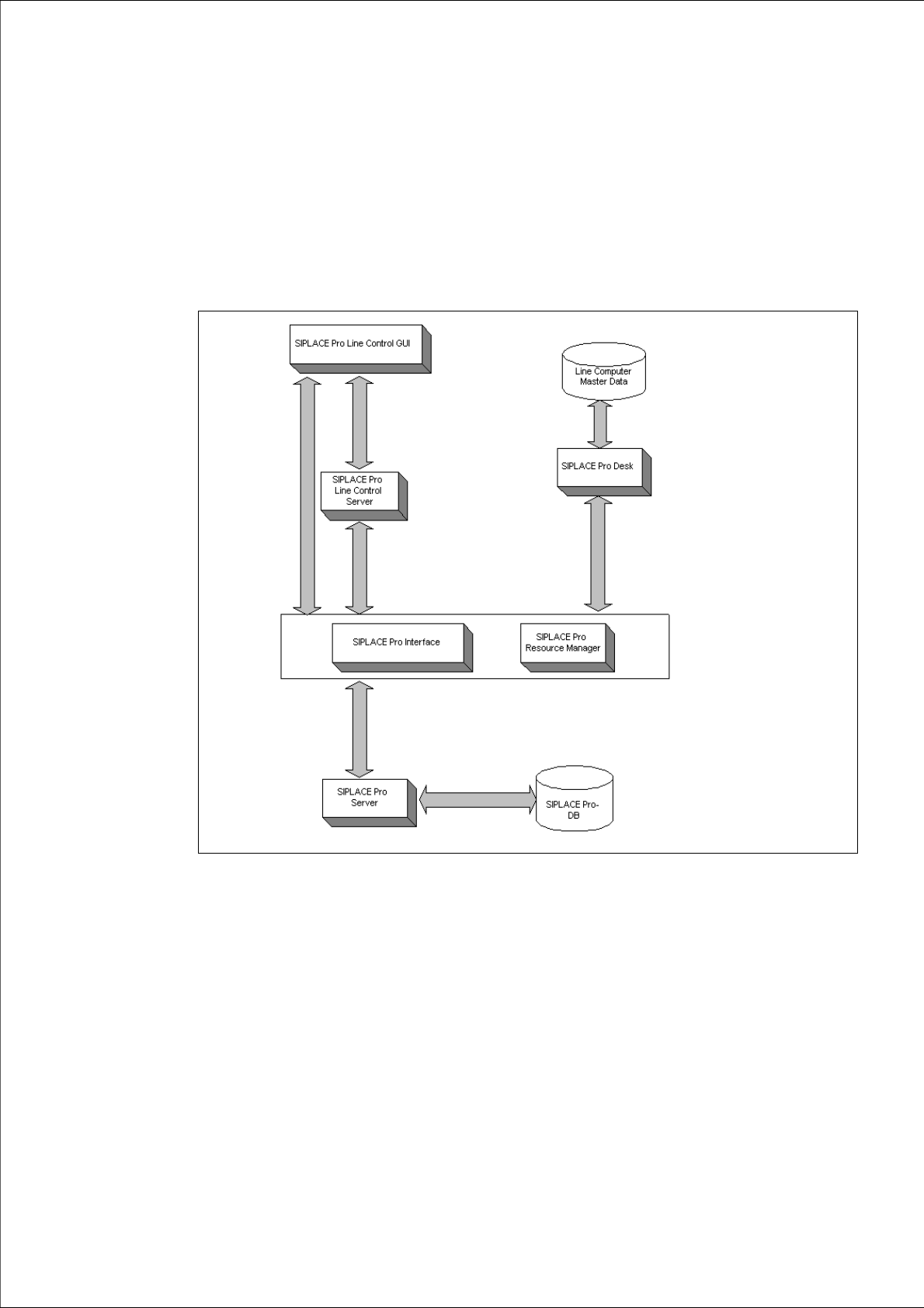
A complete installation of SIPLACE Pro consists of the following components. 2
Fig. 2 - 1 Overview of SIPLACE Pro system components
Æ Please read the documents "Configurations for SIPLACE Pro" and "Navigation Guide for
Installation". You will find the documents on the Installation CD for SIPLACE Pro (Folder
"Documentation").