00194574-01.pdf - 第19页
Installation manual SIPLACE Pro 4 Installati on of SIPLACE Pro and possible Setup Types Version 3.0 Edition 03/2005 US 19 The "Choose Destination Location" dialog box prompts you to enter the nam e of the folde…
4 Installation of SIPLACE Pro and possible Setup Types Installation manual SIPLACE Pro
Edition 03/2005 US Version 3.0
18
Step 4
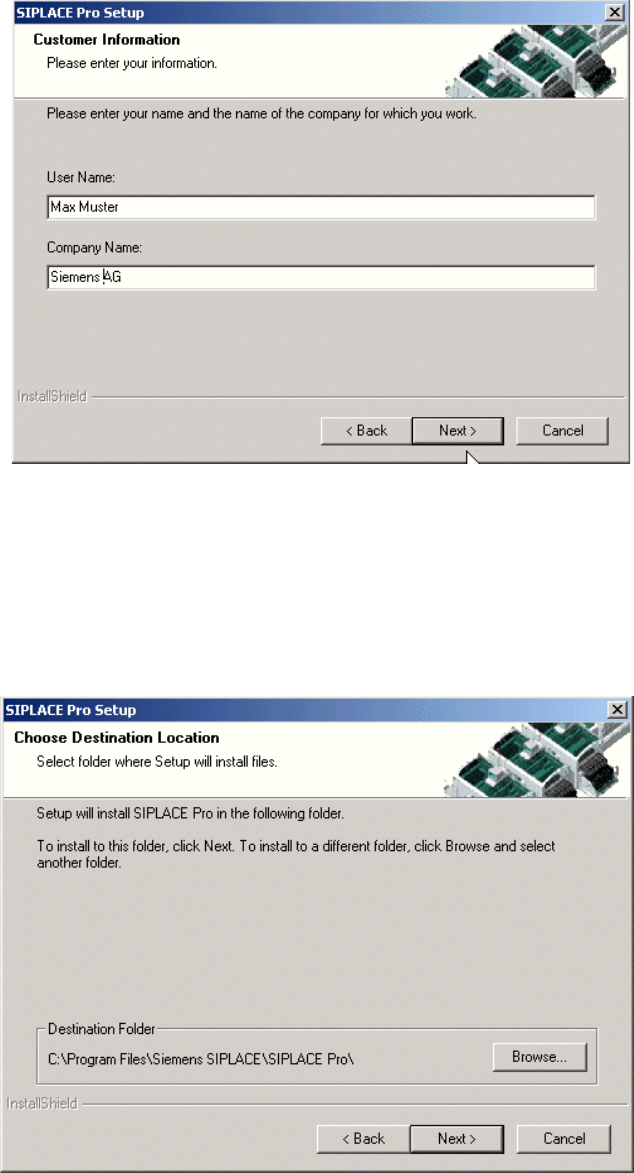
Fig. 4 - 4 "Customer Information" dialog box
Æ Enter your User Name and Company Name in the "Customer Information" dialog box.
Æ Both boxes must be filled in before the installation process can be continued.
Æ Click Next.
Step 5
4
Fig. 4 - 5 "Choose Destination Location" dialog box
Installation manual SIPLACE Pro 4 Installation of SIPLACE Pro and possible Setup Types
Version 3.0 Edition 03/2005 US
19
The "Choose Destination Location" dialog box prompts you to enter the name of the folder in
which SIPLACE Pro should be installed. The system suggests a default destination folder for you.
However, you can click the Browse button to open a dialog box in which you can enter or select
the path you want to use. If the folder you specify does not exist, it is created after having accepted
a confirmation dialog. 4
Æ Click Next.
Step 6
The Setup Type dialog box displays the SIPLACE Pro components you can choose for installa-
tion. 4
4
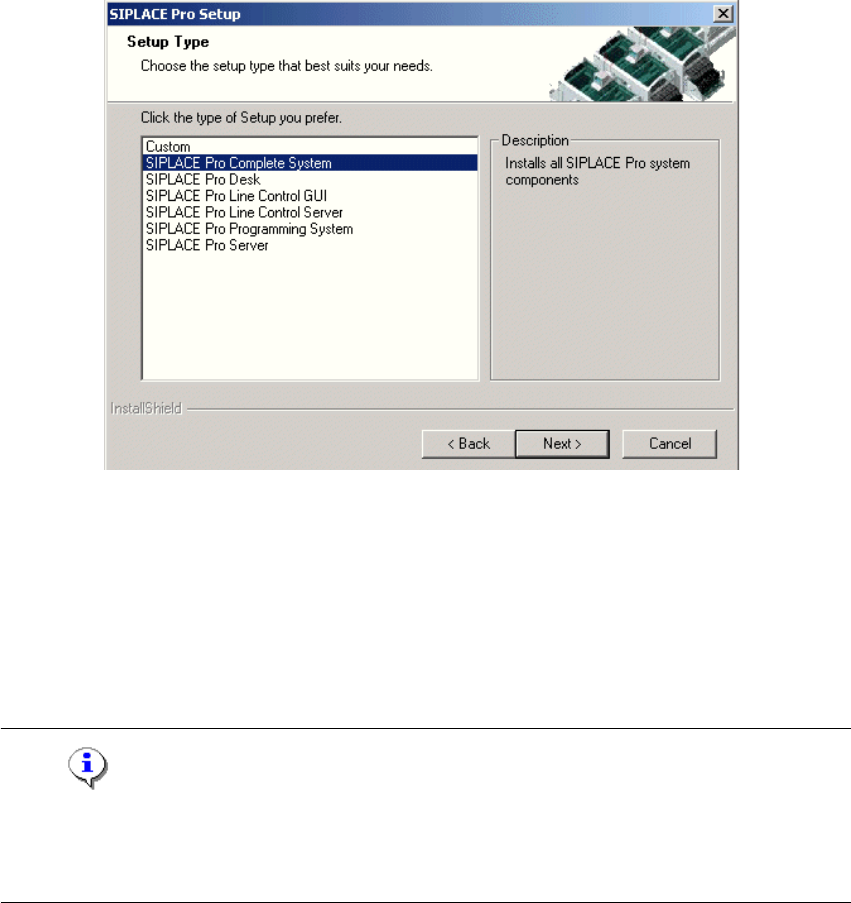
Fig. 4 - 6 "Setup Type" dialog box
In the "Setup Type" dialog box, 4
Æ select the setup type you want to install.
Æ Click Next.
A short description of the setup type in question appears in the Description box when you select
a type. 4
Note
After choosing a setup type which includes a database installation, the setup program immediately
checks if SQL server or MSDE (Microsoft Data Desktop Engine) and the proper Service Pack and
Security Patch are installed on the computer. 4
4 Installation of SIPLACE Pro and possible Setup Types Installation manual SIPLACE Pro
Edition 03/2005 US Version 3.0
20
4.2 Individual setup types and next steps
4.2.1 Setup Type – Custom
This setup type allows the experienced user to select any possible combination of SIPLACE Pro
components. However, you should use one of the specified setup types if you are installing stan-
dard components, since this means the necessary components are always installed and you do
not have to pay attention to the details. 4
Step 1
Æ Run through the steps in ”Starting installation – first steps” from page 15.
Æ Select the Custom setup type
Æ Click Next.