User Manual SIPLACE Linear Dipping Unit 2 X.pdf - 第65页
4 Operation 4.6 Testing new flux types User Manual SIPLACE Linear Dipping Unit 2 X 05/2020 65 4.6 Testing new flux types NOTICE Target group: setup operator The procedure described is a task that occurs irregularly and s…
4 Operation
4.5 Checking the layer thickness
64 User Manual SIPLACE Linear Dipping Unit 2 X 05/2020
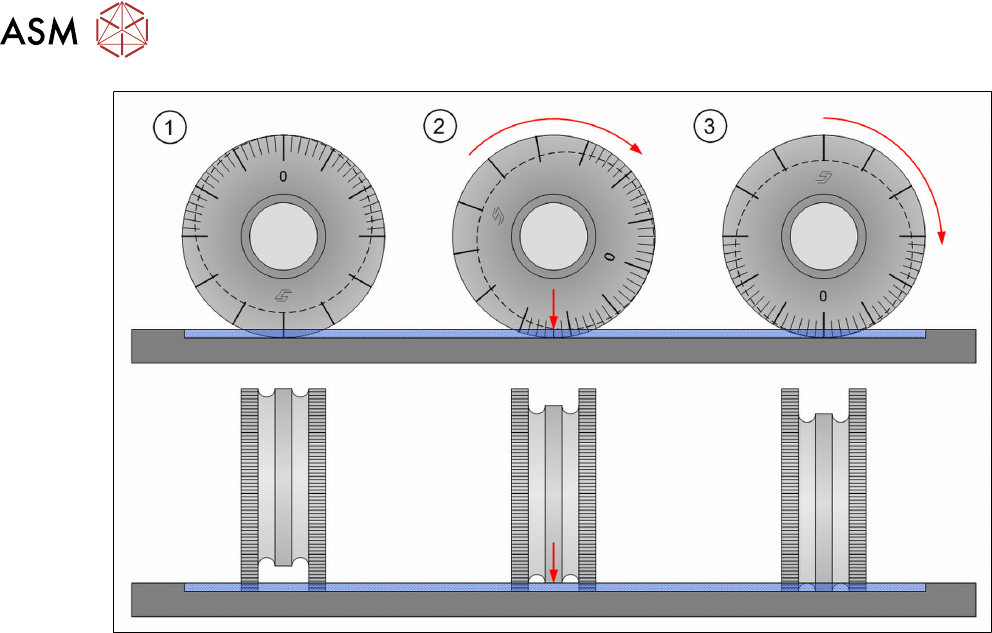
Performing the measurement
Measurement 1
► Hold the measuring device with your thumb and forefinger on its handle.
► (1) Place the measuring device with the point which is opposite the zero value of the scale
onto the flux surface and press down to the base of the cavity.
► (2) Apply slight pressure and roll the measuring device in one direction to the zero value (3).
► Take the measuring device vertically up and out of the flux.
► Determine on the middle roller the point (2) where the flux starts to coat the middle roller.
► Read the value on the scale at this point.
Measurement 2
► Repeat the measurement by rolling the measuring device in the opposite direction as far as
the zero value.
► Read the value shown on the scale.
► Calculate the mean value of both measuring results.
4 Operation
4.6 Testing new flux types
User Manual SIPLACE Linear Dipping Unit 2 X 05/2020 65
4.6 Testing new flux types
NOTICE
Target group: setup operator
The procedure described is a task that occurs irregularly and should only be carried out by
a trained operator with special knowledge (setup operator).
If you use a new flux, then proceed as follows during the test phase:
► Calculate the relevant cavity for the product.
► Place the corresponding dipping plate in the LDU.
► Fill in the flux.
► Set the application speed.
► Increase or decrease the application speed in steps.
► While doing this, observe the flux surface.
► Reduce the application speed again, if waves, dips or irregularities are formed on the surface.
► Select a long dwell time. This can be reduced later to achieve higher cycle times.
► Select a slow start for the upwards movement of the placement head after dipping. This en-
sures that the component is not lost in the flux.
4.7 Performing a self-test
NOTICE
Target group: setup operator
The procedure described is a task that occurs irregularly and should only be carried out by
a trained operator with special knowledge (setup operator).
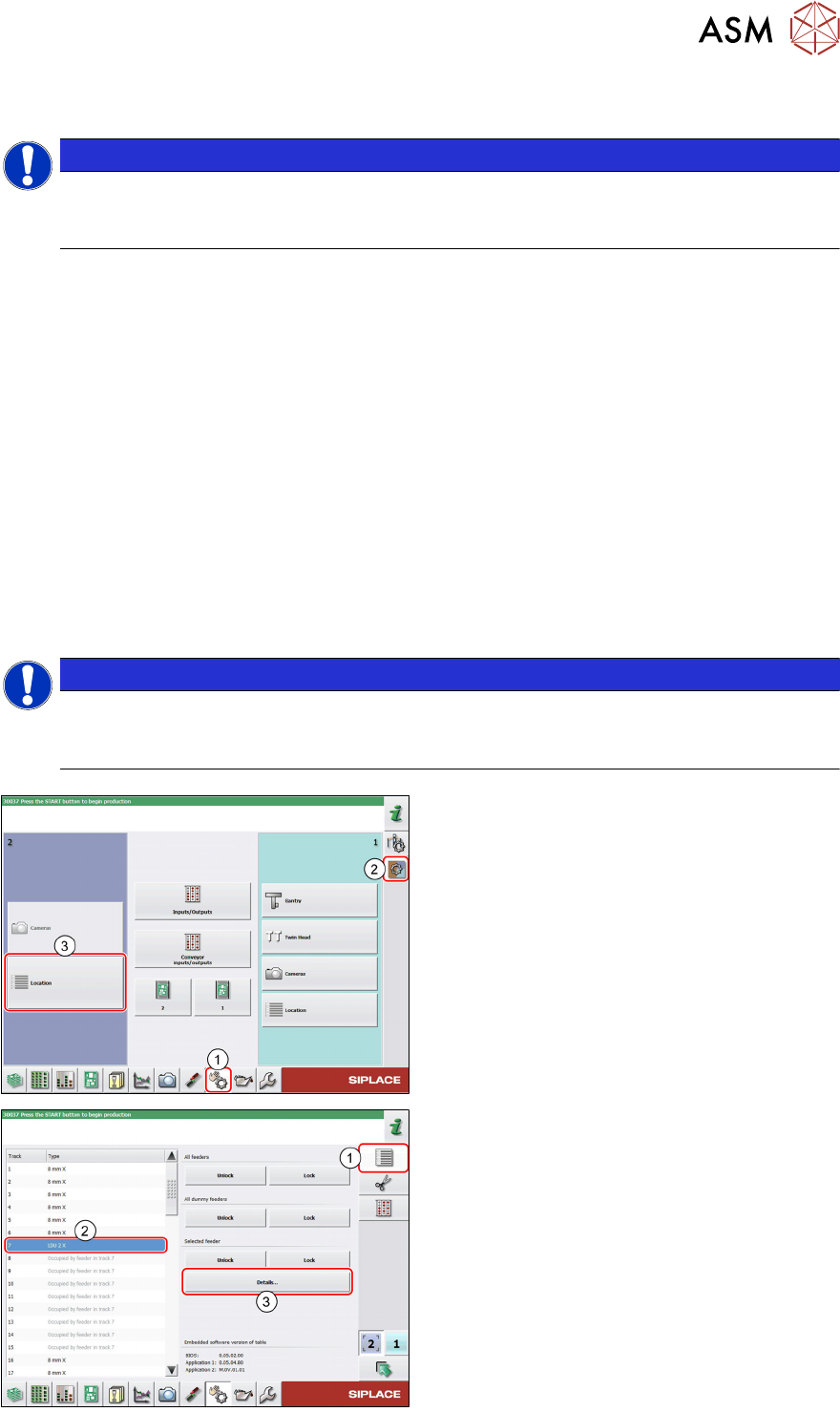
► In the station software, select the Single
functions view(1) and then the Subsys-
tems area (2).
► Select the Location (3) on which the LDU
is set up.
► Select the Feeder area (1).
► Select the LDU in the list of set up feeders
(2)
.
► Click on the Details…button (3).
4 Operation
4.8 Operating the control unit via user interface
66 User Manual SIPLACE Linear Dipping Unit 2 X 05/2020
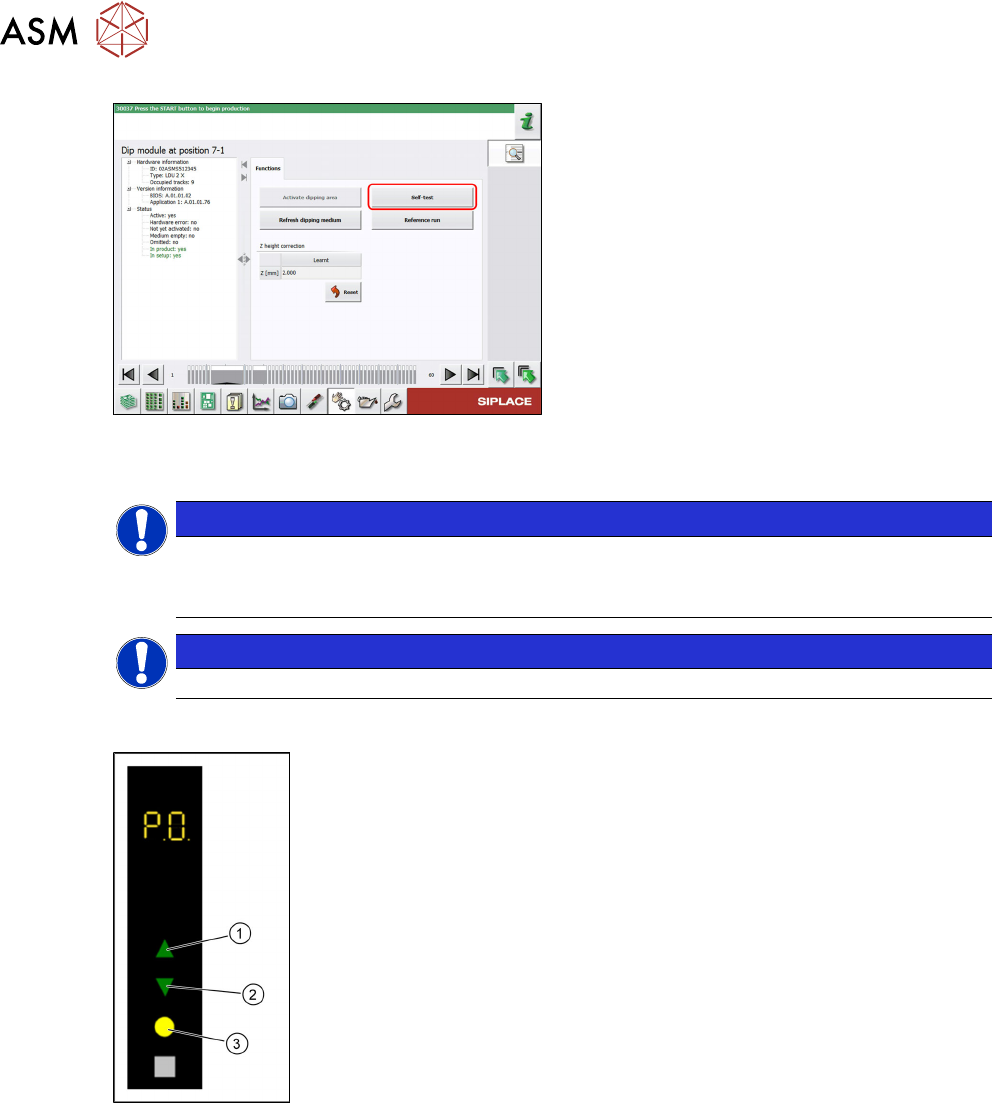
► Click on the Self-test button.
The LDU performs a self-test.
4.8 Operating the control unit via user interface
NOTICE
Target group: setup operator
The procedure described is a task that occurs irregularly and should only be carried out by
a trained operator with special knowledge (setup operator).
NOTICE
Operating the control unit via GUI can be done by any trained operator.
Logging off
► Use the Up(1) or Down key(2) to select the operating mode P0.
► Press the Select key(3).
The LDU will be logged off and unlocked from the placement machine.
► Remove the LDU from the changeover table.