00193796-08.pdf - 第48页
Installation Manual Station Software Version 505.04 48 of 156 4.3.2 Hard disk partitioning Partitioning required for the hard disk: C: partition 50 MByte, active boot partition D: partition 450 MByte, SIPLACE Software Th…
Installation Manual, Station Software Version 505.04 Edition 07/2006
47 of 156
4.3.1.13 Setup page "PC Health Status"
In the "Selection options" column, the setting for fail-safe default is indicated in italics and the setting
for optimized default is underlined
.
Menu item Note Selection options
Throttling
Temperature
This setting specifies the internal chip temperature at
which the processor automatically begins thermal
throttling.
90°C/194°F;
100°C/212°F
110°C/110.00°C
All other menu items indicate internal voltages and cannot be changed.
4.3.1.14 Setup page “Frequency/Voltage Control”
In the "Selection options" column, the setting for fail-safe default is indicated in italics and the setting
for optimized default is underlined
.
Menu item Note Selection options
Auto Detect
DIMM/PCI Clk
If this function is Enabled, only CPCI and DIMM slots
which are also occupied are clocked.
Enabled
Disabled
Spread Spectrum
If this function is Enabled, the average frequency of the
clock cycles generated in the clock synthesizer is
modulated within tight boundaries. This widens the noise
spectrum but lowers the amplitude.
Enabled
Disabled
Installation Manual Station Software Version 505.04
48 of 156
4.3.2 Hard disk partitioning
Partitioning required for the hard disk:
C: partition 50 MByte, active boot partition
D: partition 450 MByte, SIPLACE Software
The total size of both partitions must not exceed 504 Mbyte.
The DOS program fdisk is used for partitioning.
It can be called via the command line after booting with a DOS system floppy or will start
automatically when the operating system is installed if the hard disk was not set up correctly.
Installation Manual, Station Software Version 505.04 Edition 07/2006
49 of 156
4.3.3 Installing the machine controller operating system
4.3.3.1 Creating the installation floppies
The two floppies required for the operating system of the machine controller can be created on any
PC which is running Windows XP and which has a CD drive, for example, the station computer.
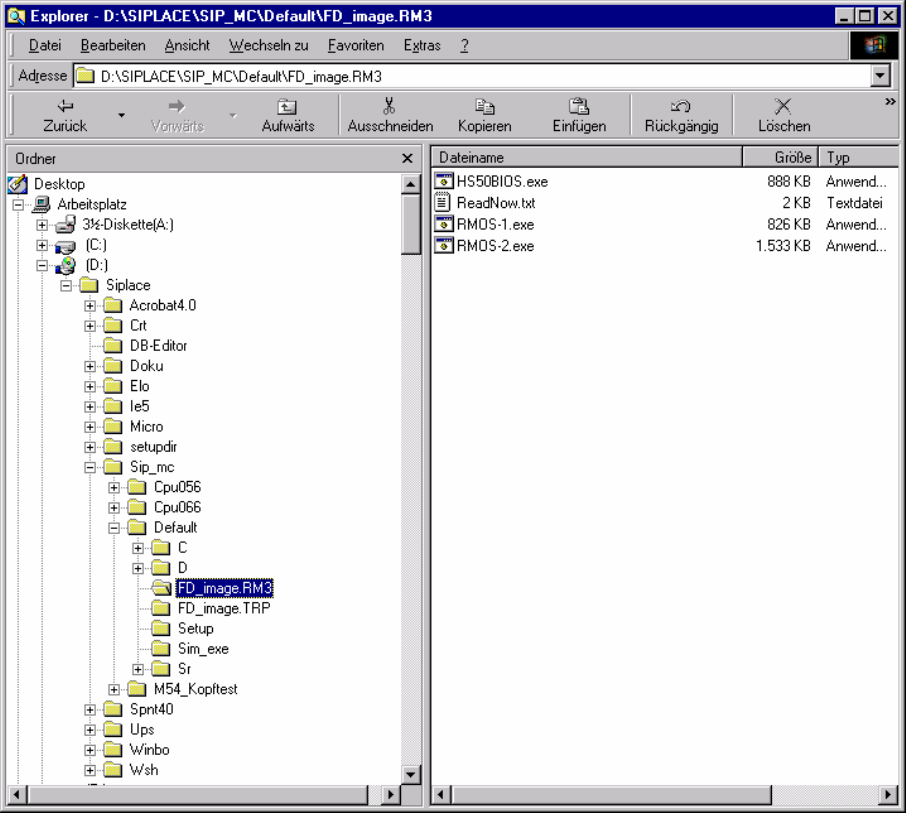
An image in the form of a self-extracting EXE file is stored in the folder
\SIPLACE\Sip_mc\Default\FD_IMAGE.RM3 for both of the installation floppies. The numbers at the
end of the file name (Rmos-1.exe, Rmos-2.exe) correspond to the number of the floppy. The
floppies can be created in any order.
→ Insert a formatted floppy (3.5", 1.44MB) into drive A.