00193796-08.pdf - 第70页
Installation Manual Station Software Version 505.04 70 of 156 4.4.1.14 Setup page "IMC Miscellaneous" ┌─────────────────┤ IMC Miscellaneous ├────────────────┐ │ │ │ ┌─ Keyboard ───────────────────────────────┐ …
Installation Manual, Station Software Version 505.04 Edition 07/2006
69 of 156
4.4.1.13 Setup page "COM Redirection"
┌─────────┤ COM Redirection ├───────────┐
│ │
│ ┌─Status───────────────────┐ ╔══════╗ │
│ │ ( ) disabled │ ║ OK ║ │
│ │ ( ) enabled │ ╚══════╝ │
│ │ (*) enabled (ANSI/VT100) │ ┌──────┐ │
│ └──────────────────────────┘ │Cancel│ │
│ ┌─Baudrate─────────────────┐ └──────┘ │
│ │ ( ) 9600 Bd │ │
│ │ (*) 19200 Bd │ │
│ │ ( ) 38400 Bd │ │
│ └──────────────────────────┘ │
│ ┌─Mode──────────────────────────────┐ │
│ │ (*) Autoredirection │ │
│ │ ( ) Redirect on Request only │ │
│ └───────────────────────────────────┘ │
│ Press [F1] key for help │
└───────────────────────────────────────┘
ANSI/VT100 must be selected in the "Status" field, as this makes it possible to operate the system
without a keyboard without errors. If this is not done, the BIOS reports a "Keyboard Error" on
booting.

Installation Manual Station Software Version 505.04
70 of 156
4.4.1.14 Setup page "IMC Miscellaneous"
┌─────────────────┤ IMC Miscellaneous ├────────────────┐
│ │
│ ┌─Keyboard───────────────────────────────┐ ╔══════╗ │
│ │[ ] Disable CTRL-C/CTRL-BREAK │ ║ OK ║ │
│ │[√] Force Cold boot on CTRL-ALT-DEL │ ╚══════╝ │
│ └────────────────────────────────────────┘ ┌──────┐ │
│ ┌─BIOS-E-Segment─────────────────────────┐ │Cancel│ │
│ │[√] Disable BIOS E-Segment at boot │ └──────┘ │
│ └────────────────────────────────────────┘ │
│ │
│ Press [F1] key for help │
└──────────────────────────────────────────────────────┘
Keyboard
Disable CTRL-C/
CTRL-BREAK
When this option is selected, the keystrokes <CTRL-C> and <CTRL-
Break> are trapped by the BIOS and not passed on to the operating
system.
Force Cold boot
on
CTRL-ALT-DEL
When this option is activated, pressing CTRL-ALT-DEL causes a
hardware reset rather than a warmstart.
BIOS-E-Segment
Disable BIOS
E-Segment at
boot
If this option is activated, the E-segment of the BIOS will be deactivated
prior to booting. Any access in this area will be passed on to the PCI bus
and thus to the ISA or SMP16 bus.
(interface to the axis cards)
4.4.2 Hard disk partitioning
Partitioning required for the hard disk:
C: partition 50 MByte, active boot partition
D: partition 450 MByte, SIPLACE Software
The total size of both partitions must not exceed 504 Mbyte.
The DOS program fdisk is used for partitioning.
It can be called via the command line after booting with a DOS system floppy or will start automatically
when the operating system is installed if the hard disk was not set up correctly.
Installation Manual, Station Software Version 505.04 Edition 07/2006
71 of 156
4.4.3 Installing the operating system
4.4.3.1 Creating the installation floppies
The two floppies required for the operating system of the machine controller can be created on any
PC which is running Windows XP and which has a CD drive, for example, the station computer.
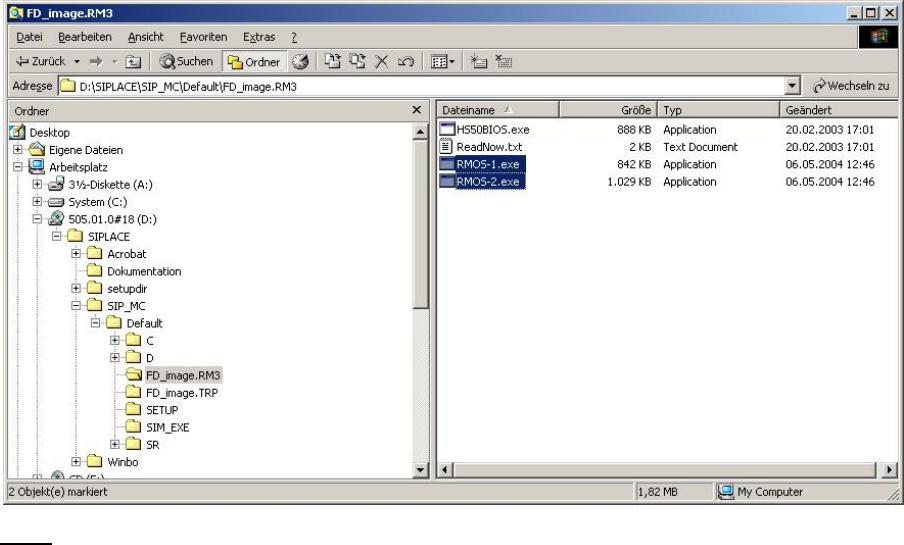
An image in the form of a self-extracting EXE file is stored in the folder
\SIPLACE\SIP_MC\HS50\FD_IMAGE.RM3 for both of the installation floppies. The numbers at the
end of the file name (Rmos-1.exe, Rmos-2.exe) correspond to the number of the floppy. The
floppies can be created in any order.
Insert a formatted floppy (3.5", 1.44MB) in drive A and access it briefly in the Explorer. Start the
relevant executable (it can also be started from the Explorer by double-clicking on the file). Then
simply follow the instructions in the program. Insert the disk / the program may ask whether disk
should be deleted / data is written to the disk (the bar shows the progress).
When the window disappears, the floppy is finished (before removing the floppy, you must wait until
the 'active' light on the disk drive has gone out).
Notes
− The system looks for a floppy in drive 'A': The floppy must therefore already be in the drive at the start
(this setting cannot be changed).