00195346-0302_SM_WPC4_EN.pdf - 第32页
Replacing Spare Parts Control Unit and Power Supply Unit Control Unit 32 Ser vice Manual SIPLACE WPC4 3.5.1.2 Replacing the Powe r Supply Board [03047225-xx] Spare part WPC power supply board [03 047225-02] Removal/ins…
Replacing Spare Parts
Control Unit Control Unit and Power Supply Unit
Service Manual SIPLACE WPC4
31
3.5.1 Control Unit
3.5.1.1 Instructions for Working with Control Units
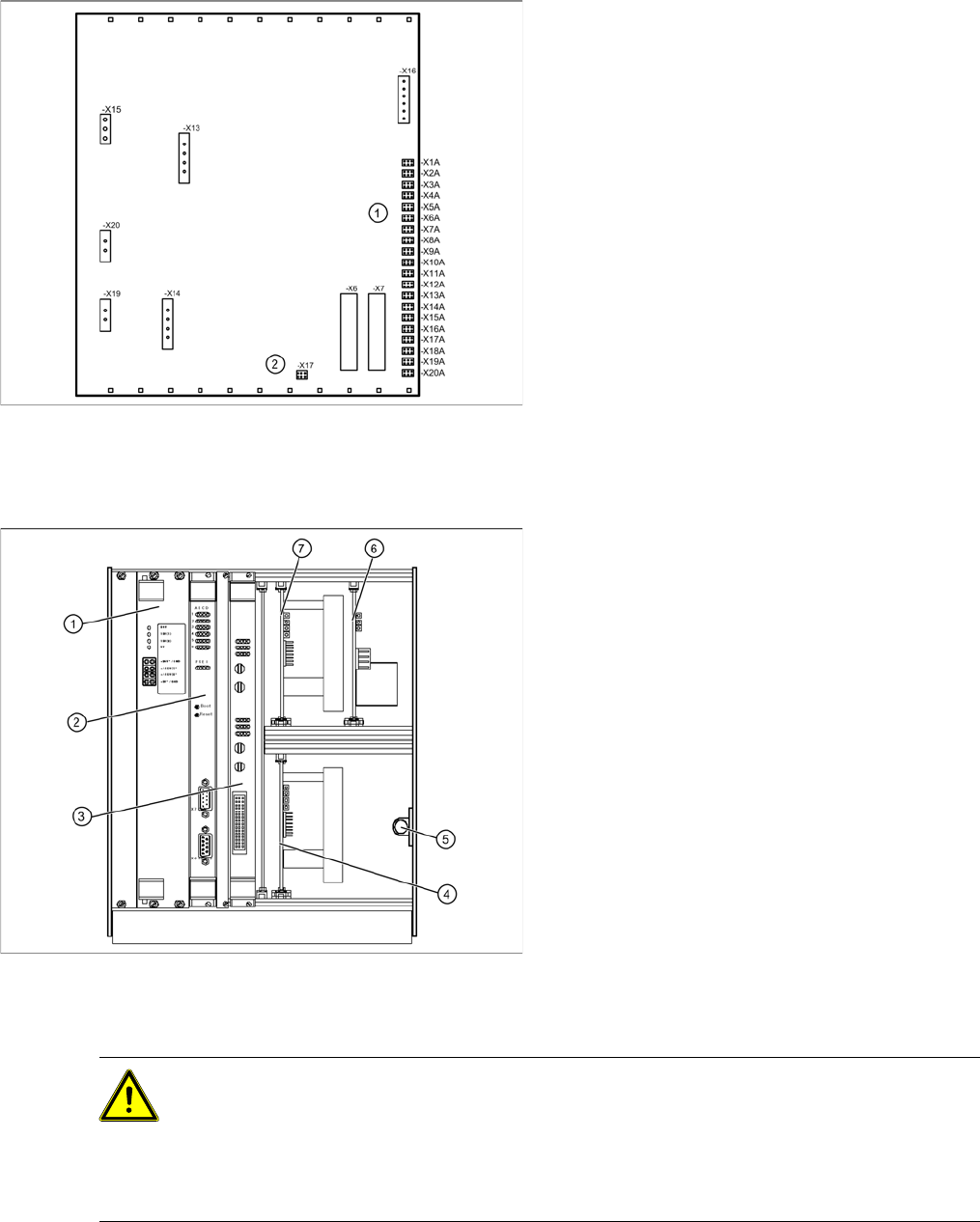
View of back - details
1. Connections for limit switches, sensors and
light barriers
2. Fan connection
X For connection details and complete circuit
diagrams, please refer to the following
documentation:
SIPLACE D1 detailed circuit diagrams
[00194841-xx] German
SIPLACE D1 detailed circuit diagrams
[00194841-xx] English
Overview
1. Supply board
2. Controller board
3. Axis controller board KSP A364 analog
4. Servo amplifier for lifting axis (10A)
5. Braking resistor for lifting axis
6. Ballast circuit
7. Servo amplifier for feed axis (3A)
CAUTION: Observe the ESD regulations!
When handling control unit assemblies, observe the ESD regulations for your own safety and
the safety of the machine:
X When removing or installing individual assemblies, always wear the ESD wristband, to
prevent damage to the electronics system.
X Also observe the ESD regulations specified SIPLACE D1/D2 machine operating manuals.

Replacing Spare Parts
Control Unit and Power Supply Unit Control Unit
32 Service Manual SIPLACE WPC4
3.5.1.2 Replacing the Power Supply Board [03047225-xx]
Spare part
WPC power supply board [03047225-02]
Removal/installation
X Wear the ESD wristband.
X Loosen the 4 screws fastening the front plate of the power supply board.
X Carefully pull the power supply board (see Section (3.5.1 Control Unit
J
31) ) out of the control unit.
X Carefully insert the new power supply board.
X Make sure that the power supply board engages properly.
X Tighten the 4 screws fastening the front plate of the power supply board.
Settings
There are no settings required.
NOTE: Check the power supply board voltages.
The green LEDs on the power supply board only show whether voltage is present or not
(function monitoring). They do not show whether this voltage is correct.
X Use a digital multimeter to measure the voltages at the respective pins on the front plate of
the power supply board.

Replacing Spare Parts
Control Unit Control Unit and Power Supply Unit
Service Manual SIPLACE WPC4
33
3.5.1.3 Replacing the Controller Board [03047223-xx]
Spare part
WPC controller board [03047223-02]
Removal/installation
X Make a backup copy of the machine data, if this is still possible
(*.MA
). See Section (4.3.2 Saving
the Machine Data
J
68) .
X Wear the ESD wristband.
X Unplug the CAN bus cable from the front of the controller board.
X Loosen the 2 screws fastening the front plate of the controller board.
X Carefully pull the controller board (see Section (3.5.1 Control Unit
J
31) ) out of the control unit.
X Carefully insert the new controller board.
X Make sure that the controller board engages properly.
X Tighten the 4 screws fastening the front plate of the controller board.
X Plug the CAN bus cable back into the front of the controller board.
Settings
X Perform a firmware download (BIOS and application) for the controller board.
To do this, open the SITEST main view and select the function=>
Download
=> tab
WPC
. For
further information, refer to the SITEST manual for placement machines.
X Restore the
*.MA data
for which you made a backup copy. See Section (4.3.3 Restoring Machine
Data
J
69) .
3.5.1.4 Replacing the Axis Controller Board [03041865-xx]
Spare part
Axis KSP A364 analog [03041865-05]
Removal/installation
X Wear the ESD wristband.
X Loosen the 2 screws fastening the front plate of the axis controller board.
X Carefully pull the axis controller board (see Section (3.5.1 Control Unit
J
31) ) out of the control unit.
X Carefully insert the new axis controller board.
X Make sure that the axis controller board engages properly.
X Tighten the 2 screws fastening the front plate of the axis controller board.
Settings
X Perform a firmware download for the axis controller board.
To do this, open the SITEST main view and select the function=>
Download
=> tab
WPC
. For
further information, refer to the SITEST manual.
NOTE: Backup battery
A backup battery is located on the controller board.
X Replace this battery if you are shown the error message "17802 WPC: Voltage of back-up
battery is too low“.
NOTE: Calibration
If you are able to restore a current MA file, you do not need to recalibrate the WPC4.
If you are unable to restore a current MA file, you will need to recalibrate the WPC4.