00195346-0302_SM_WPC4_EN.pdf - 第64页
Calibration and Settings Lifting Axis Calibrating the Re ferenc e Sensor, Lifting Axis 64 Ser vice Manual SIPLACE WPC4 4.1.1.1 T roubleshooting for "T each Zero Point Correction" 4.1.2 Calibrating the Reference…
Calibration and Settings
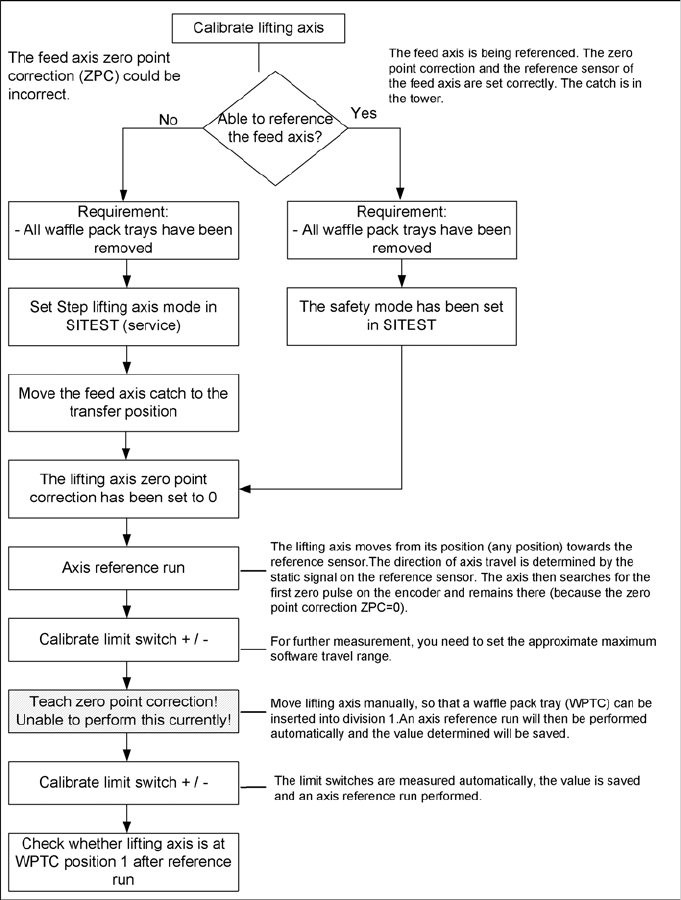
Procedure - Calibrating the Lifting Axis Lifting Axis
Service Manual SIPLACE WPC4
63
4 Calibration and Settings
4.1 Lifting Axis
4.1.1 Procedure - Calibrating the Lifting Axis
Calibration and Settings
Lifting Axis Calibrating the Reference Sensor, Lifting Axis
64 Service Manual SIPLACE WPC4
4.1.1.1 Troubleshooting for "Teach Zero Point Correction"
4.1.2 Calibrating the Reference Sensor, Lifting Axis
See the service manual (3.6.9 Replacing the Reference Sensor, Lifting Axis [03047278-xx]
J
57) .
Description - solution
When teaching the zero point correction, move the
lifting axis manually, so that a waffle pack tray
carrier can be inserted. The feed axis needs to be
in the transfer position for this.
This does not function with the current station
software 603.
When using split catches, you need to dismantle
the catch extension, in order to move the lifting
axis.
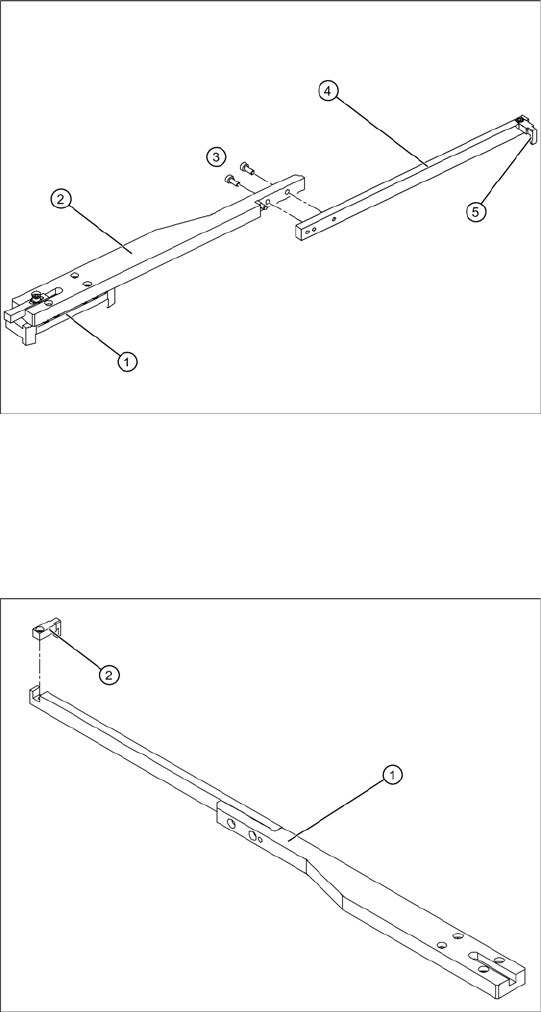
Dismantling the catch extension on split
drivers
1. Guide trolley
2. Catch clamping unit
3. 2 fastening screws
4. Catch extension
5. Catch
Dismantling the catch lug
In another version of the WPC4, the catch is not
split.
X If a calibration run is required for this WPC4,
you will need to dismantle the lug (2) on the
catch (1).
Calibration and Settings
Teaching the Zero Point Correction Lifting Axis
Service Manual SIPLACE WPC4
65
4.1.3 Teaching the Zero Point Correction
X Place a waffle pack tray (WPTC) on the sliding rail of the feed axis.
X Push the WPTC into tray position 1 of the tower. The waffle pack tray must move evenly into the
tower on the sliding rails and must not jam anywhere.
X Make sure that the WPTC can be moved over the slanted ends of the sliding rails, without jamming.
X Correct the position of the tower with the help of the SITEST function
Teach zero point
.
X To do this, open the SITEST main view and select the function=>
SITEST Settings
.
X In the input area Axis, select the radio button
Lifting axis
.
X In the input area
Travel range
select the button
Teach zero point
.
X Follow the instructions as you are guided through this menu and teach the position of the tower with
the help of the arrow keys.
4.1.4 Calibrating the Top Lifting Axis Limit Switch
See the service manual (3.6.10 Replacing the Top Lifting Axis Limit Switch [03047279-xx]
J
59) .
4.1.5 Calibrating the Bottom Lifting Axis Limit Switch
See the service manual (3.6.11 Replacing the Bottom Lifting Axis Limit Switch [03047280-01-xx]
J
60) .
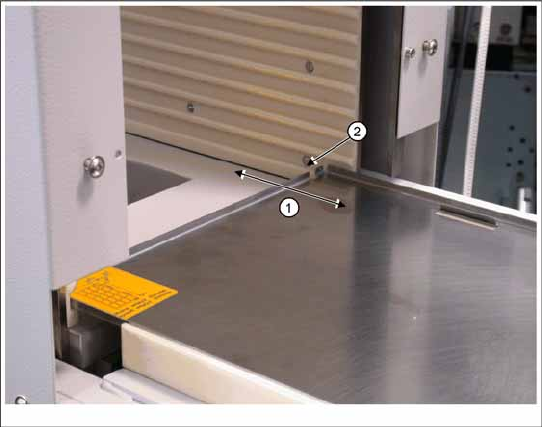
1. Waffle pack tray carrier
2. Tray position 1 in tower
It must be possible to move the waffle pack tray
into the tower magazine (tray position 1) via the
feed axis, without the waffle pack tray jamming or
getting caught anywhere.