00195346-0302_SM_WPC4_EN.pdf - 第80页
SITEST for WPC4 SITEST Functions Version Info 80 Ser vice Manual SIPLACE WPC4 5.6.2 V ersion Info This s hows inf ormation about the subsystems, w ith th eir cor responding ver sions. This data can be saved for further u…
SITEST for WPC4
Approach SITEST Functions
Service Manual SIPLACE WPC4
79
5.6.1.1 Calibrate
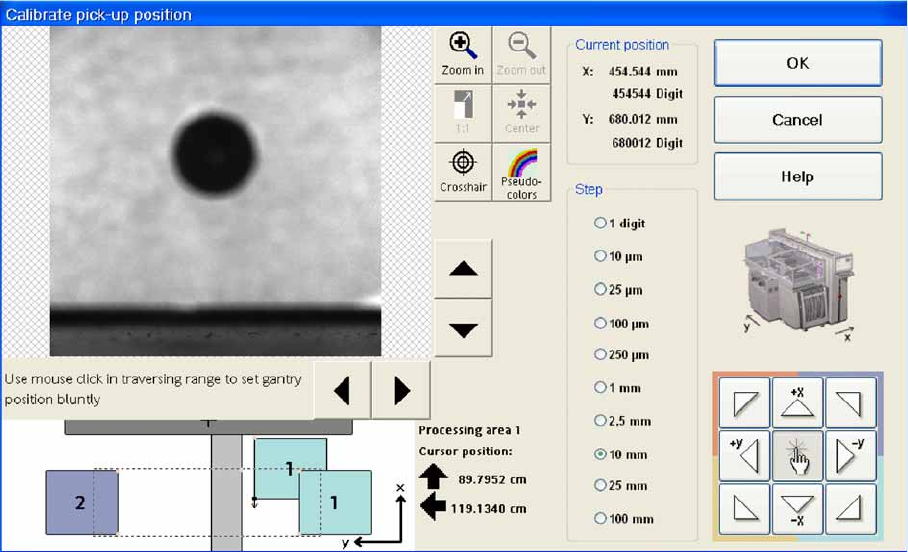
The fiducial position currently saved is approached and the fiducial is shown on the screen. The fiducial
position can be recalibrated in this menu. Move the fiducial into the center of the screen and click on OK.
Selected buttons from the camera Help menu:
The digital camera image can be reduced or increased in size - up to the display of individual pixels.
1. To the top right of the video image, you will find the camera Help menu with the following buttons:
Zoom in: Increases the size of the fiducial image stepwise, starting from the center.
The position originally approached is kept.
Zoom out: Reduces the size stepwise.
1:1: Restores the fiducial image to its original size in the center of the screen.
Center: Returns the fiducial image section to the center of the screen.
Crosshair: Fades in camera crosshairs so that the position and size can be assessed.
Pseudo colors: Can be selected if you want to evaluate the contrast of features.
The arrow buttons to the right and below the camera image can be used to move the section of the
camera image.
SITEST for WPC4
SITEST Functions Version Info
80 Service Manual SIPLACE WPC4
5.6.2 Version Info
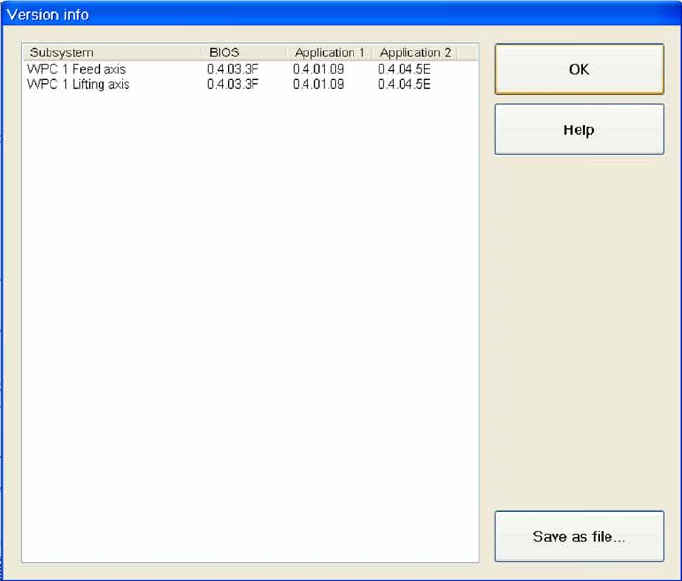
This shows information about the subsystems, with their corresponding versions. This data can be saved
for further use as an XML file, in a folder of your choice.
Subsystem: Shows a partial system or subsystem in the WPC4, in which data is saved.
BIOS: (Basic Input Output System) Shows the basic program which each subsystem needs to work.
Application 1 / Application 2: Shows the application program for a subsystem. This contains the
individual parameters for the application.
Save as file...: Opens a dialog box in which you can select the folder where the version information
is to be saved as an XML file. You can specify a file name of your choice.
OK : Closes the dialog box.
SITEST for WPC4
Changing WPTCs SITEST Functions
Service Manual SIPLACE WPC4
81
5.6.3 Changing WPTCs
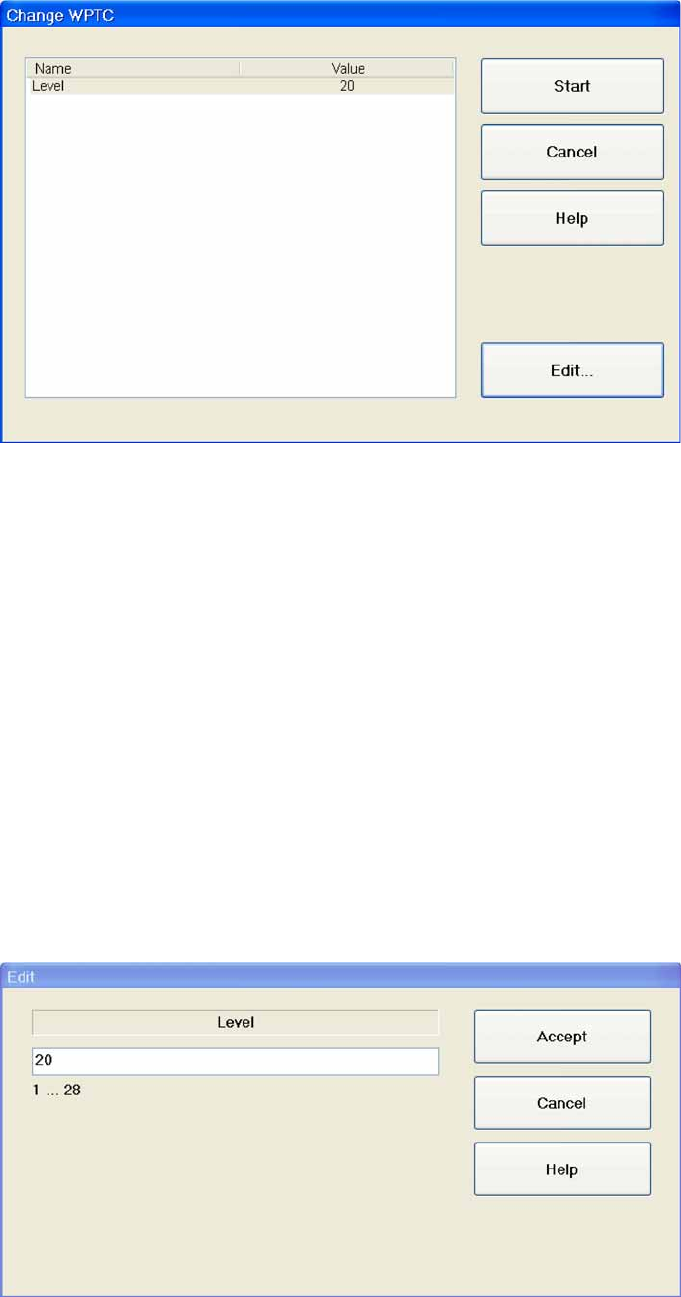
Name: The name is always "Level".
Value: Shows the number of the level for which a WPTC is to be made available.
Start: The lifting axis moves the selected level to the feed axis position and the waffle pack tray
carrier to be changed will be moved to the staging position.The waffle pack tray carrier which was
made available previously (if applicable) will be moved back into the tower.
Cancel: Closes the dialog box without saving any changes made.
Edit...: Opens a dialog box in which the relevant value can be entered for the level. The waffle pack
tray carrier for this level will then be made available.
Change WPTC…
X Select the level containing the waffle pack tray carrier (WPTC) which you want to change.
X Select
Start
.
A menu will be shown with the WPTC changeover time.
Edit
X Mark the
Level
X field and select
Edit...
.
X Enter the required value in the input field. Make sure the value entered is within the permissible limits.
X Select
Accept
to confirm your entry or
Cancel
to reject the entry.