5TROUBLESHOOTING_.pdf - 第115页
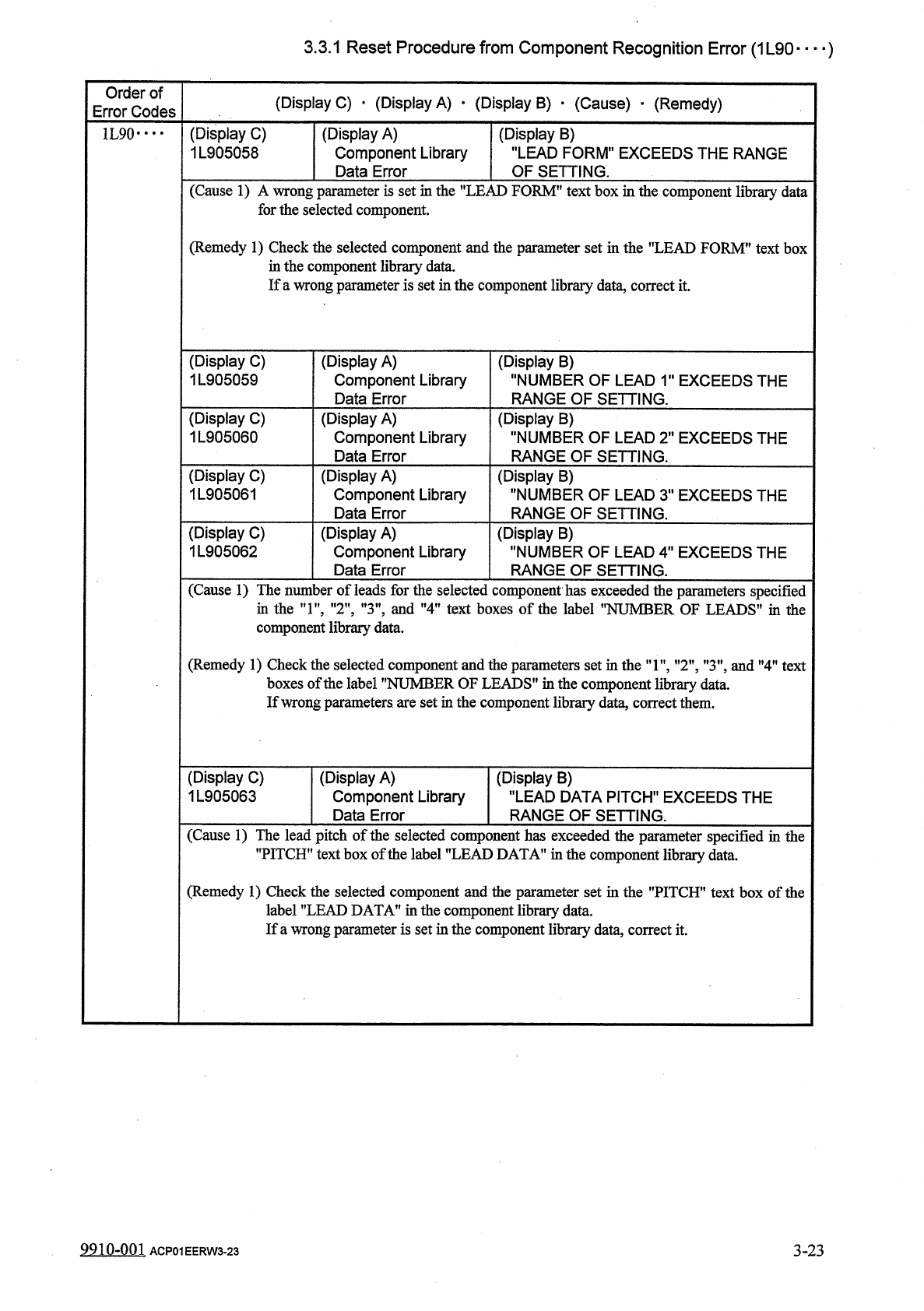
3.3 . 1 Reset Procedure from Component Recognition Error ( 1 L 90 — ) Order of Error Codes ( Display C ) • ( Display A ) • ( Display B ) • ( Cause ) - ( Remedy ) ( Display C ) 1 L 905064 ( Display A ) Component Library D…
3.3
.
1
Reset
Procedure
from
Component
Recognition
Error
(
1
L
90
—
)
Order
of
Error
Codes
(
Display
C
)
•
(
Display
A
)
•
(
Display
B
)
•
(
Cause
)
•
(
Remedy
)
(
Display
C
)
1
L
905058
1
L
90
•
•
•
•
(
Display
A
)
Component
Library
Data
Error
(
Display
B
)
"
LEAD
FORM
"
EXCEEDS
THE
RANGE
OF
SETTING
.
(
Cause
1
)
A
wrong
parameter
is
set
in
the
"
LEAD
FORM
"
text
box
in
the
component
library
data
for
the
selected
component
.
(
Remedy
1
)
Check
the
selected
component
and
the
parameter
set
in
the
"
LEAD
FORM
"
text
box
in
the
component
libraiy
data
.
If
a
wrong
parameter
is
set
in
the
component
library
data
,
correct
it
.
(
Display
C
)
1
L
905059
(
Display
A
)
Component
Library
Data
Error
(
Display
B
)
"
NUMBER
OF
LEAD
1
"
EXCEEDS
THE
RANGE
OF
SETTING
.
(
Display
C
)
1
L
905060
(
Display
A
)
Component
Library
Data
Error
(
Display
B
)
"
NUMBER
OF
LEAD
2
"
EXCEEDS
THE
RANGE
OF
SETTING
.
(
Display
C
)
1
L
905061
(
Display
A
)
Component
Library
Data
Error
(
Display
B
)
"
NUMBER
OF
LEAD
3
"
EXCEEDS
THE
RANGE
OF
SETTING
.
(
Display
C
)
1
L
905062
(
Display
A
)
Component
Library
Data
Error
(
Display
B
)
"
NUMBER
OF
LEAD
4
"
EXCEEDS
THE
RANGE
OF
SETTING
.
(
Cause
1
)
The
number
of
leads
for
the
selected
component
has
ex
in
the
,
T
,
,
”
2
"
,
"
3
"
,
and
"
4
"
text
boxes
of
the
label
component
library
data
.
icceeded
•
'
NUMB
the
parameters
specified
ER
OF
LEADS
1
'
in
the
(
Remedy
1
)
Check
the
selected
boxes
of
the
label
'
If
wrong
parameters
are
set
in
the
component
library
data
,
correct
them
.
nent
and
the
parameters
set
ER
OF
LEADS
"
in
the
co
:
;
tintheT
,
”
2
”
,
"
3
"
,
and
"
4
"
text
mponent
library
data
.
i
compor
"
NUMB
:
(
Display
C
)
1
L
905063
(
Display
A
)
Component
Library
Data
Error
(
Display
B
)
"
LEAD
DATA
PITCH
"
EXCEEDS
THE
RANGE
OF
SETTING
.
(
Cause
1
)
The
lead
pitch
of
the
selected
component
has
exceeded
the
parameter
specified
in
the
"
PITCH
"
text
box
of
the
label
"
LEAD
DATA
"
in
the
component
library
data
.
(
Remedy
1
)
Check
the
selected
component
and
the
1
"
LEAD
DATA
"
in
the
component
ter
set
in
the
"
PITCH
"
text
box
of
the
data
.
wrong
parameter
is
set
in
the
component
library
data
,
correct
it
.
labe
If
a
’
9910
-
001
ACP
01
EERW
3
-
23
3
-
23
3.3
.
1
Reset
Procedure
from
Component
Recognition
Error
(
1
L
90
—
)
Order
of
Error
Codes
(
Display
C
)
•
(
Display
A
)
•
(
Display
B
)
•
(
Cause
)
-
(
Remedy
)
(
Display
C
)
1
L
905064
(
Display
A
)
Component
Library
Data
Error
(
Display
B
)
"
LEAD
DATA
WIDTH
"
EXCEEDS
THE
RANGE
OF
SETTING
.
1
L
90
••••
(
Cause
1
)
The
lead
widths
of
the
selected
component
have
exceeded
the
parameters
specified
in
the
"
WIDTH
"
text
boxes
of
the
label
"
LEAD
DATA
"
in
the
component
library
data
.
(
Remedy
1
)
Check
the
selected
component
and
the
parameters
set
in
the
"
WIDTH
"
text
boxes
of
the
label
’’
LEAD
DATA
"
in
the
component
library
data
.
If
wrong
parameters
are
set
in
the
component
library
data
,
correct
them
.
(
Display
C
)
1
L
905065
(
Display
A
)
Component
Library
Error
(
Display
B
)
"
LEAD
DATA
LENGTH
"
EXCEEDS
THE
RANGE
OF
SETTING
.
Data
ngths
(
Cause
1
)
The
lead
le
:
of
the
selected
the
"
LENGTH
"
textboxes
of
the
onent
have
exceeded
the
parameters
specified
in
"
LEAD
DATA
"
in
the
component
library
data
.
comp
label
(
Remedy
1
)
Check
the
selected
component
and
the
parameter
specified
in
the
"
LENGTH
"
text
boxes
of
the
label
"
LEAD
DATA
"
in
the
component
library
If
wrong
parameters
are
set
in
the
component
library
data
,
y
data
,
correct
them
.
9910
-
001
3
-
24
ACP
01
EERW
3
-
24
3.3
.
1
Reset
Procedure
from
Component
Recognition
Error
(
1
L
90
)
Order
of
Error
Codes
(
Display
C
)
•
(
Display
A
)
•
(
Display
B
)
_
(
Cause
)
•
(
Remedy
)
(
Display
C
)
1
L
905066
(
Display
A
)
Component
Library
Data
Error
(
Display
B
)
"
MOLD
TYPE
"
EXCEEDS
THE
RANGE
OF
SETTING
.
1
L
90
•
…
(
Cause
1
)
A
wrong
parameter
is
set
in
the
"
MOLD
TYPE
"
text
box
in
the
component
library
data
for
the
selected
component
.
(
Remedy
1
)
Check
the
selected
component
and
the
parameter
specified
in
the
"
MOLD
TYPE
"
text
box
in
the
component
library
data
.
If
a
wrong
parameter
is
set
in
the
component
library
data
,
correct
it
.
(
Display
C
)
1
L
905067
(
Display
A
)
Component
Library
Data
Error
(
Display
B
)
"
MOLD
SIZE
#
1
MARGIN
A
"
EXCEEDS
THE
RANGE
OF
SETTING
.
(
Display
C
)
1
L
905068
(
Display
A
)
Component
Library
Data
Error
(
Display
B
)
"
MOLD
SIZE
#
1
MARGIN
B
"
EXCEEDS
THE
RANGE
OF
SETTING
.
(
Display
C
)
1
L
905069
(
Display
A
)
Component
Library
Data
Error
(
Display
B
)
"
MOLD
SIZE
#
2
MARGIN
C
"
EXCEEDS
THE
RANGE
OF
SETTING
.
(
Display
C
)
1
L
905070
(
Display
A
)
Component
Library
Data
Error
(
Display
B
)
"
MOLD
SIZE
#
2
MARGIN
D
"
EXCEEDS
THE
RANGE
OF
SETTING
.
(
Display
C
)
1
L
905071
(
Display
A
)
Component
Library
Data
Error
(
Display
B
)
"
MOLD
SIZE
#
3
MARGIN
E
"
EXCEEDS
THE
RANGE
OF
SETTING
.
(
Display
C
)
1
L
905072
(
Display
A
)
Component
Library
Data
Error
(
Display
B
)
"
MOLD
SIZE
#
3
MARGIN
FM
EXCEEDS
THE
RANGE
OF
SETTING
.
(
Display
C
)
1
L
905073
(
Display
A
)
Component
Library
Data
Error
(
Display
B
)
"
MOLD
SIZE
#
4
MARGIN
G
"
EXCEEDS
THE
RANGE
OF
SETTING
.
(
Display
C
)
1
L
905074
(
Display
A
)
Component
Library
Data
Error
(
Display
B
)
"
MOLD
SIZE
#
4
MARGIN
H
"
EXCEEDS
THE
RANGE
OF
SETTING
.
(
Cause
1
)
The
mold
side
margins
of
the
selected
component
have
exceeded
the
parameters
set
in
each
text
box
of
the
labels
"
MOLD
SIDE
#
1
MARGIN
"
,
"
MOLD
SIDE
#
2
MARGIN
'
"
MOLD
SIDE
#
3
MARGIN
'
and
"
MOLD
SIDE
#
4
MARGIN
"
in
the
component
libraiy
data
.
(
Remedy
1
)
Check
the
selected
component
and
the
parameters
set
in
each
text
box
of
the
labels
”
MOLD
SIDE
#
1
MARGIN
'
"
MOLD
SIDE
#
2
MARGIN
'
"
MOLD
SIDE
#
3
MARGIN
'
and
"
MOLD
SIDE
#
4
MARGIN
”
in
the
component
library
data
.
If
wrong
parameters
are
set
in
the
component
library
data
,
correct
them
.
9910
-
00
]
3
-
25
ACP
01
EERW
3
-
25