5TROUBLESHOOTING_.pdf - 第120页
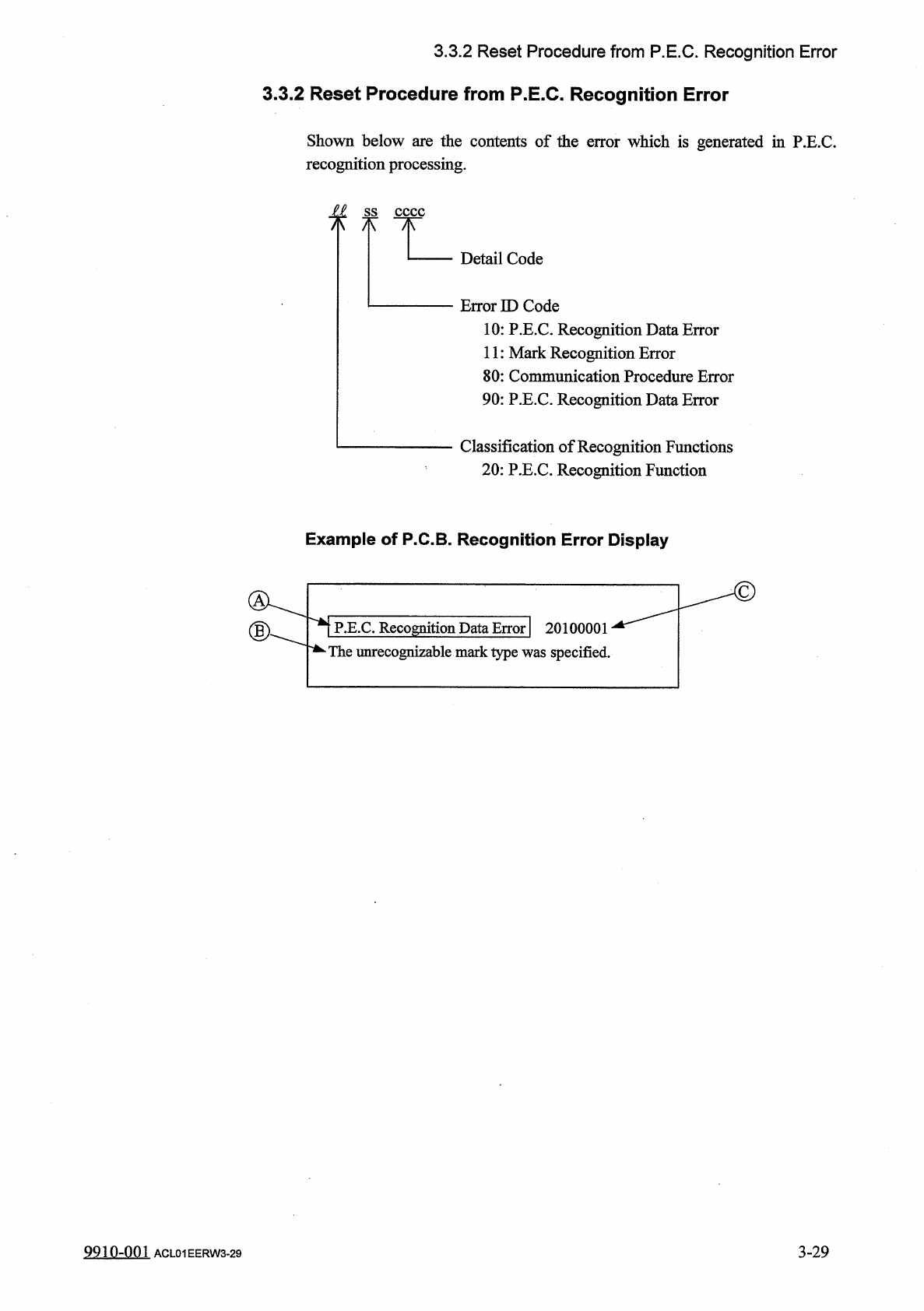
3.3 . 2 Reset Procedure from P . E . C . Recognition Error 3.3 . 2 Reset Procedure from P . E . C . Recognition Error Shown below are the contents of the error which is generated in P . E . C . recognition processing . f…
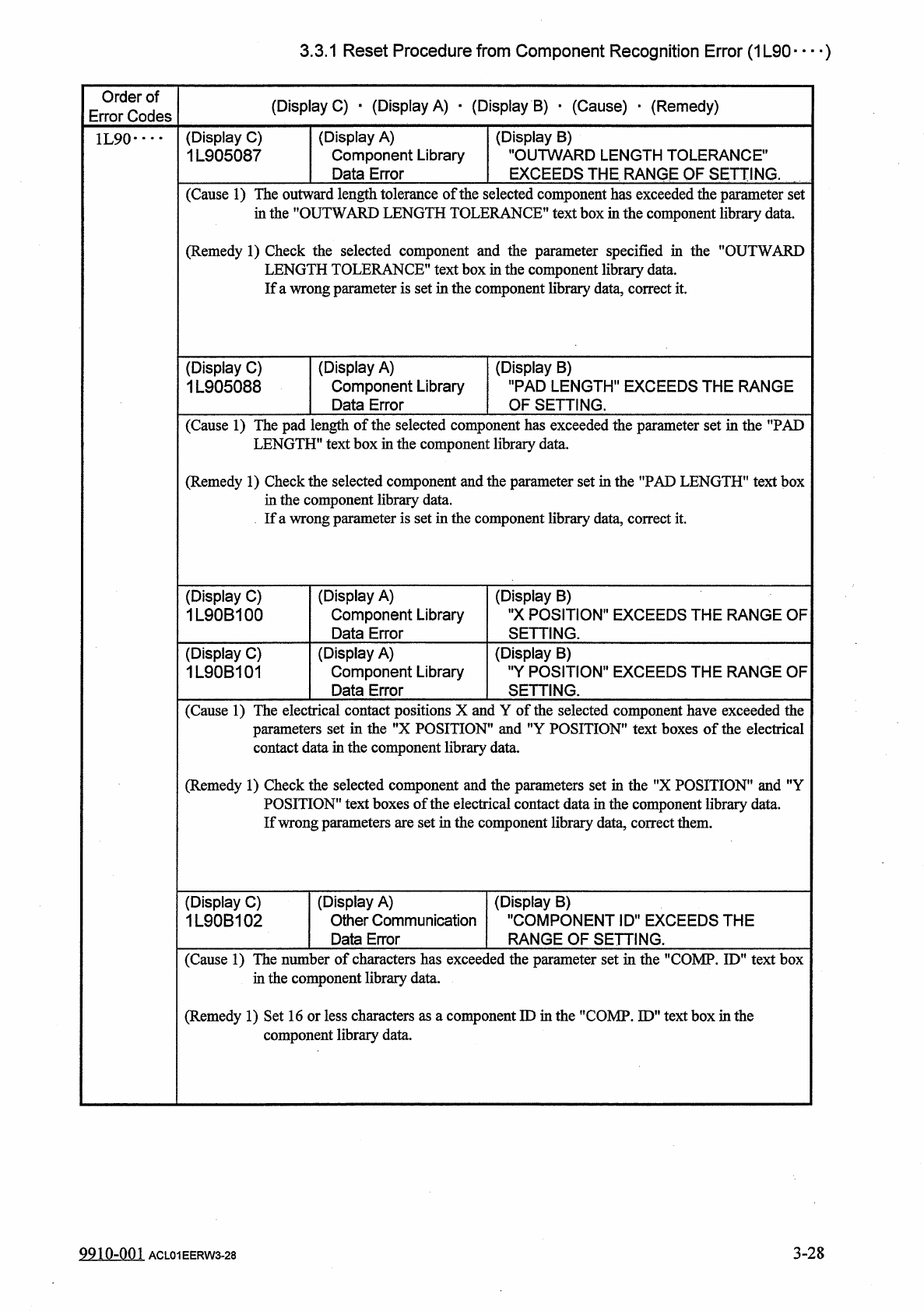
3.3
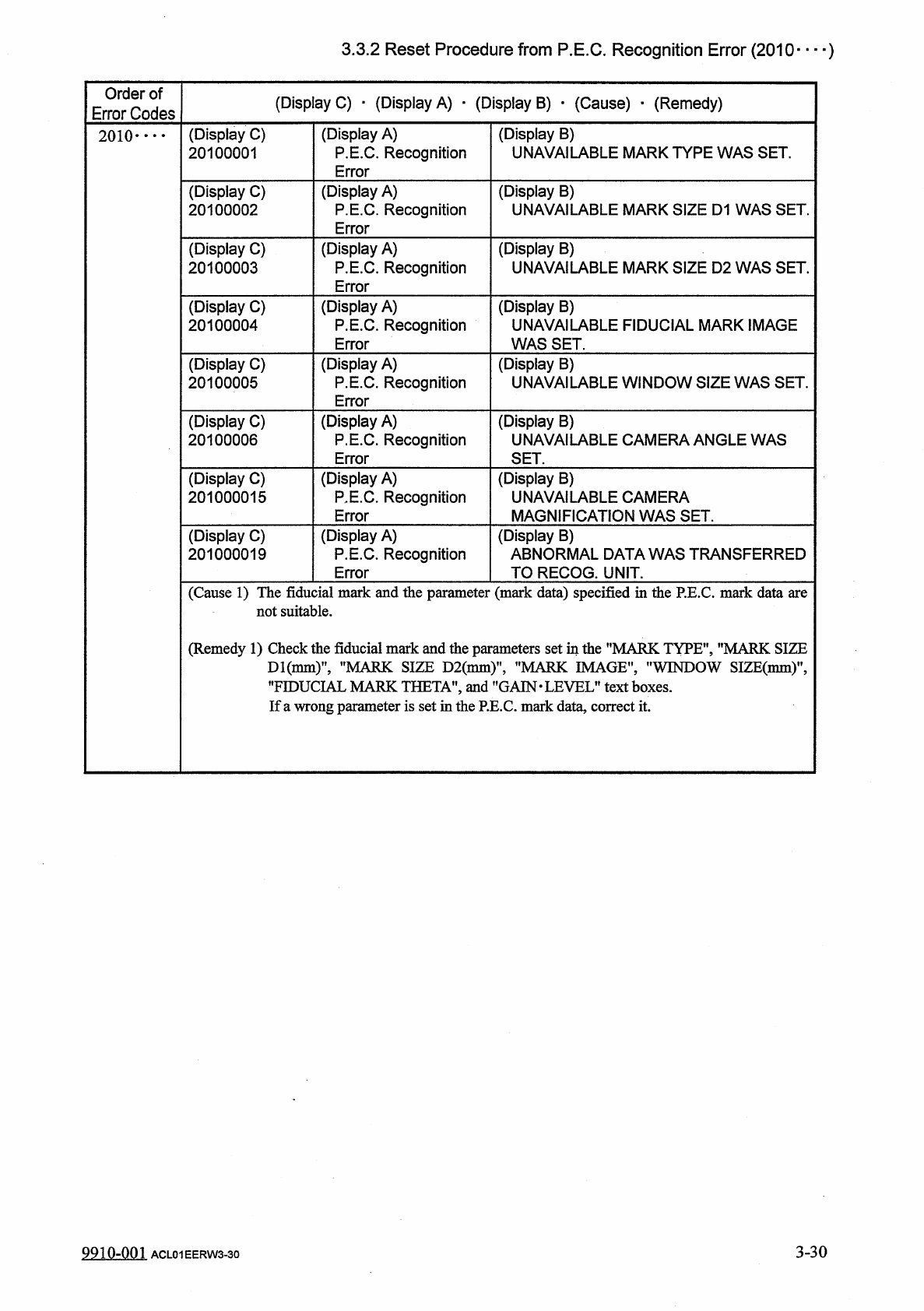
.
1
Reset
Procedure
from
Component
Recognition
Error
(
1
L
90
—
)
Order
of
Error
Codes
(
Display
C
)
•
(
Display
A
)
•
(
Display
B
)
■
(
Cause
)
•
(
Remedy
)
(
Display
C
)
1
L
905087
(
Display
A
)
Component
Library
Data
Error
(
Display
B
)
"
OUTWARD
LENGTH
TOLERANCE
"
EXCEEDS
THE
RANGE
OF
SETTING
.
1
L
90
•
…
(
Cause
1
)
The
outward
length
tolerance
of
the
in
the
"
OUTWARD
LENGTH
TOL
:
selected
component
has
exceeded
the
parameter
set
ERANCE
”
text
box
in
the
component
library
data
.
(
Remedy
1
)
Check
the
selected
component
and
the
parameter
specified
in
the
"
OUTWARD
LENGTH
TOLERANCE
"
text
box
in
the
component
library
data
.
If
a
wrong
parameter
is
set
in
the
component
library
data
,
correct
it
.
(
Display
C
)
1
L
905088
(
Display
A
)
Component
Library
Data
Error
(
Display
B
)
"
PAD
LENGTH
"
EXCEEDS
THE
RANGE
OF
SETTING
.
(
Cause
1
)
The
pad
length
of
the
selected
component
has
exceeded
the
parameter
set
in
the
"
PAD
LENGTH
"
text
box
in
the
component
libraiy
data
.
(
Remedy
1
)
Check
the
selected
component
and
the
parameter
set
in
the
"
PAD
LENGTH
1
'
text
box
in
the
component
library
data
.
If
a
wrong
parameter
is
set
in
the
component
library
data
,
correct
it
.
(
Display
C
)
1
L
90
B
100
(
Display
A
)
Component
Library
Data
Error
(
Display
"
X
POSITION
"
EXCEEDS
THE
RANGE
OF
SETTING
.
B
)
(
Display
C
)
1
L
90
B
101
(
Display
A
)
Component
Library
Data
Error
(
Display
B
)
"
Y
POSITION
"
EXCEEDS
THE
RANGE
OF
SETTI
r
of
the
ING
.
(
Cause
1
)
The
electrical
contact
positions
X
and
Y
set
in
the
"
X
POSITION
"
and
"
Y
POSITION
"
text
boxes
of
the
electrical
in
the
component
library
data
.
selected
component
have
exceeded
the
parameters
i
contact
data
(
Remedy
1
)
Check
the
selected
component
and
the
parameters
set
in
the
f
,
X
POSITION
"
and
"
Y
POSITION
”
text
boxes
of
the
electrical
contact
data
in
the
component
library
data
.
If
wrong
parameters
are
set
in
the
component
library
data
,
correct
them
.
(
Display
A
)
Other
Communication
Data
Error
(
Display
C
)
1
L
90
B
102
(
Display
B
)
"
COMPONENT
ID
"
EXCEEDS
THE
RANGE
OF
SETTING
.
(
Cause
1
)
The
number
of
characters
has
exceeded
the
parameter
set
in
the
"
COMP
.
ID
"
text
box
in
the
component
library
data
.
(
Remedy
1
)
Set
16
or
less
characters
as
a
component
ID
in
the
"
COMP
.
ID
"
text
box
in
the
component
libraiy
data
.
3
-
28
9910
-
001
ACL
01
EERW
3
-
28
3.3
.
2
Reset
Procedure
from
P
.
E
.
C
.
Recognition
Error
3.3
.
2
Reset
Procedure
from
P
.
E
.
C
.
Recognition
Error
Shown
below
are
the
contents
of
the
error
which
is
generated
in
P
.
E
.
C
.
recognition
processing
.
f
f
Detail
Code
Error
ID
Code
10
:
P
.
E
.
C
.
Recognition
Data
Error
11
:
Mark
Recognition
Error
80
:
Communication
Procedure
Error
90
:
P
.
E
.
C
.
Recognition
Data
Error
Classification
of
Recognition
Functions
20
:
P
.
E
.
C
.
Recognition
Function
Example
of
P
.
C
.
B
.
Recognition
Error
Display
P
.
E
.
C
.
Recognition
Data
Error
|
20100001
*
The
unrecognizable
mark
type
was
specified
.
3
-
29
9910
-
001
ACL
01
EERW
3
-
29
3.3
.
2
Reset
Procedure
from
P
.
E
.
C
.
Recognition
Error
(
2010
—
)
Order
of
Error
Codes
(
Display
C
)
•
(
Display
A
)
■
(
Display
B
)
•
(
Cause
)
•
(
Remedy
)
(
Display
A
)
P
.
E
.
C
.
Recognition
Error
(
Display
B
)
UNAVAILABLE
MARK
TYPE
WAS
SET
.
(
Display
C
)
20100001
2010
-
•
•
•
(
Display
C
)
20100002
(
Display
A
)
P
.
E
.
C
.
Recognition
Error
(
Display
B
)
UNAVAILABLE
MARK
SIZE
D
1
WAS
SET
.
(
Display
C
)
20100003
(
Display
A
)
P
.
E
.
C
.
Recognition
Error
(
Display
B
)
UNAVAILABLE
MARK
SIZE
D
2
WAS
SET
.
(
Display
C
)
20100004
(
Display
A
)
P
.
E
.
C
.
Recognition
Error
(
Display
B
)
UNAVAILABLE
FIDUCIAL
MARK
IMAGE
WAS
SET
.
(
Display
A
)
P
.
E
.
C
.
Recognition
Error
(
Display
B
)
UNAVAILABLE
WINDOW
SIZE
WAS
SET
.
(
Display
C
)
20100005
(
Display
C
)
20100006
(
Display
A
)
P
.
E
.
C
.
Recognition
Error
(
Display
B
)
UNAVAILABLE
CAMERA
ANGLE
WAS
SET
.
(
Display
C
)
201000015
(
Display
A
)
P
,
E
.
C
.
Recognition
Error
(
Display
B
)
UNAVAILABLE
CAMERA
MAGNIFICATION
WAS
SET
.
(
Display
C
)
201000019
(
Display
A
)
P
.
E
.
C
.
Recognition
Error
(
Display
B
)
ABNORMAL
DATA
WAS
TRANSFERRED
TO
RECOG
.
UNIT
.
(
Cause
1
)
The
fiducial
mark
and
the
parameter
(
mark
data
)
specified
in
the
P
.
E
.
C
.
mark
data
are
not
suitable
.
(
Remedy
1
)
Check
the
fiducial
mark
and
the
parameters
set
in
the
"
MARK
TYPE
"
,
"
MARK
SIZE
Dl
(
nmi
)
,
,
,
"
MARK
SIZE
D
2
(
mm
)
"
,
"
MARK
IMAGE
"
,
"
WINDOW
SIZE
(
mm
)
"
,
”
FIDUCIAL
MARK
THETA
'
and
"
GAIN
.
LEVEL
"
text
boxes
.
If
a
wrong
parameter
is
set
in
the
P
.
E
.
C
.
mark
data
,
correct
it
.
3
-
30
9910
-
001
ACL
01
EERW
3
-
30