5TROUBLESHOOTING_.pdf - 第126页
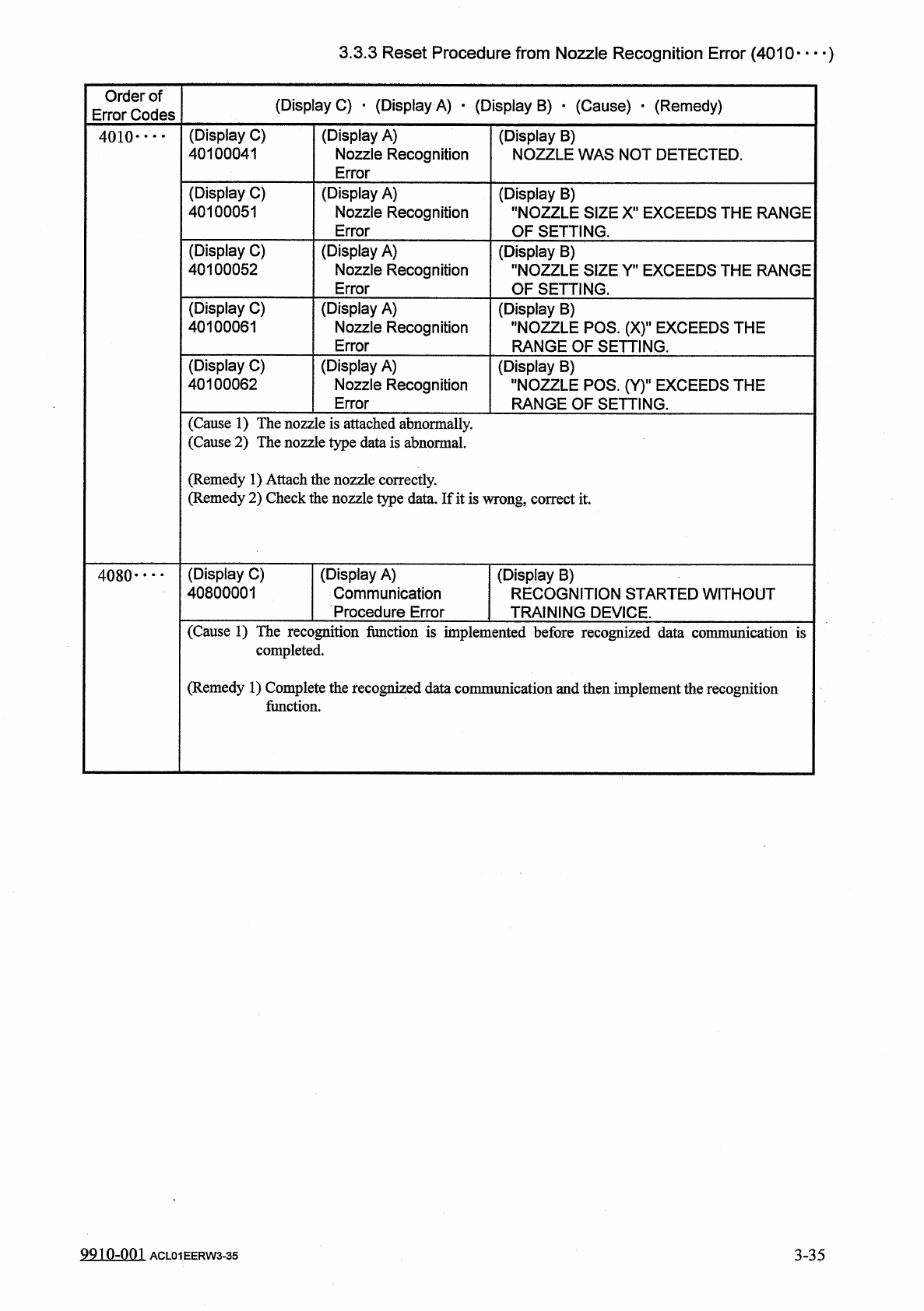
3.3 . 3 Reset Procedure from Nozzle Recognition Error ( 4010 " " ) Order of Error Codes ( Display C ) ■ ( Display A ) • ( Display B ) • ( Cause ) • ( Remedy ) ( Display C ) 40100041 ( Display A ) Nozzle Recogni…
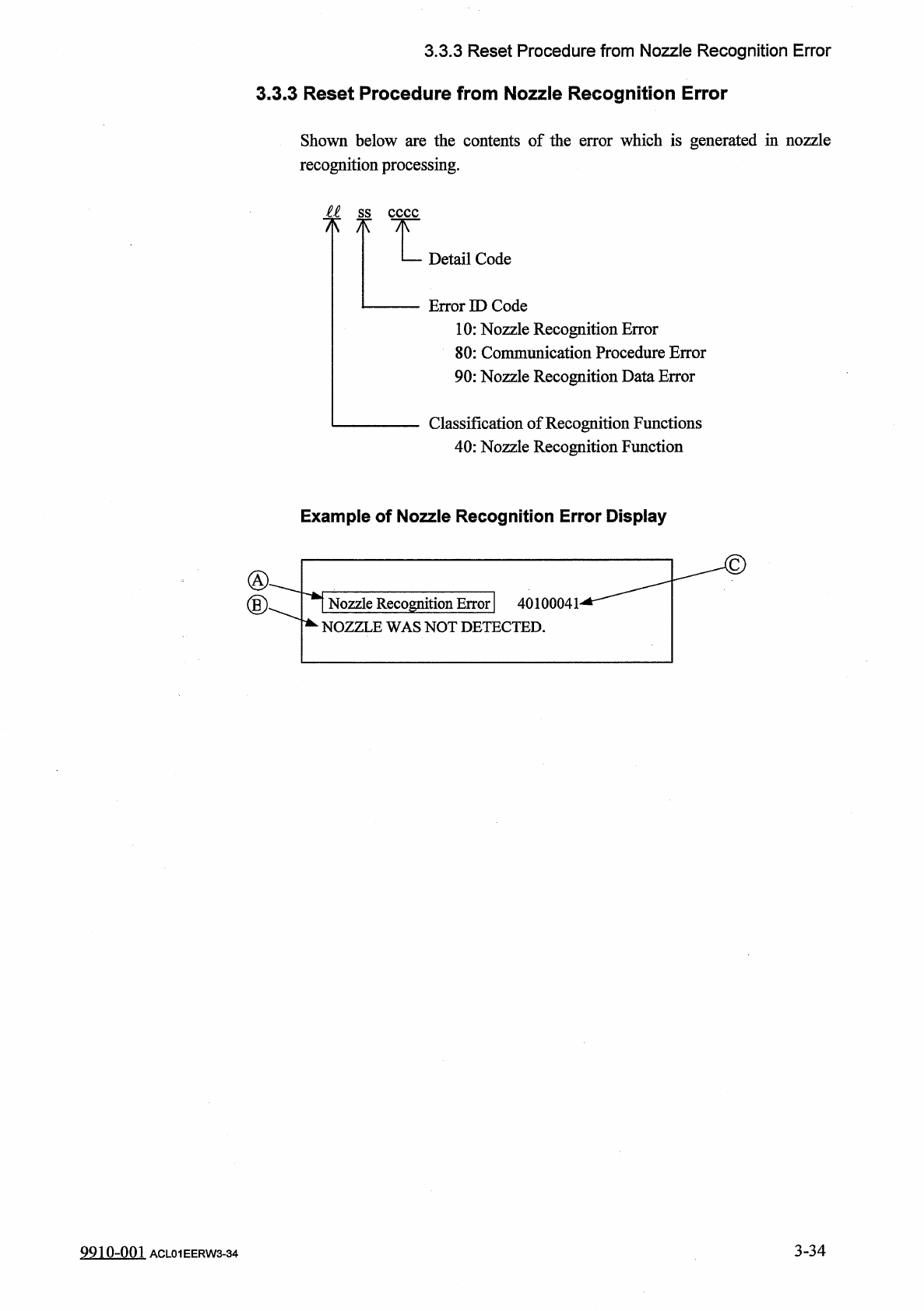
3.3
.
3
Reset
Procedure
from
Nozzle
Recognition
Error
3.3
.
3
Reset
Procedure
from
Nozzle
Recognition
Error
Shown
below
are
the
contents
of
the
error
which
is
generated
in
nozzle
recognition
processing
.
M
ss
7
*
Detail
Code
Error
ID
Code
10
:
Nozzle
Recognition
Error
80
:
Communication
Procedure
Error
90
:
Nozzle
Recognition
Data
Error
Classification
of
Recognition
Functions
40
:
Nozzle
Recognition
Function
Example
of
Nozzle
Recognition
Error
Display
\
Nozzle
Recognition
Error
|
40100041
-
^
NOZZLE
WAS
NOT
DETECTED
.
3
-
34
9910
-
001
ACL
01
EERW
3
-
34
3.3
.
3
Reset
Procedure
from
Nozzle
Recognition
Error
(
4010
"
"
)
Order
of
Error
Codes
(
Display
C
)
■
(
Display
A
)
•
(
Display
B
)
•
(
Cause
)
•
(
Remedy
)
(
Display
C
)
40100041
(
Display
A
)
Nozzle
Recognition
Error
(
Display
B
)
NOZZLE
WAS
NOT
DETECTED
.
4010
"
"
(
Display
C
)
40100051
(
Display
A
)
Nozzle
Recognition
Error
(
Display
B
)
"
NOZZLE
SIZE
X
"
EXCEEDS
THE
RANGE
OF
SETTING
.
(
Display
C
)
40100052
(
Display
A
)
Nozzle
Recognition
Error
(
Display
B
)
"
NOZZLE
SIZE
Y
"
EXCEEDS
THE
RANGE
OF
SETTING
.
(
Display
C
)
40100061
(
Display
A
)
Nozzle
Recognition
Error
(
Display
B
)
"
NOZZLE
POS
.
(
X
)
"
EXCEEDS
THE
RANGE
OF
SETTING
.
(
Display
C
)
40100062
(
Display
A
)
Nozzle
Recognition
Error
(
Display
B
)
"
NOZZLE
POS
.
(
Y
)
H
EXCEEDS
THE
RANGE
OF
SETTING
.
(
Cause
1
)
The
nozzle
is
attached
abnormally
.
(
Cause
2
)
The
nozzle
type
data
is
abnormal
.
(
Remedy
1
)
Attach
the
nozzle
correctly
.
(
Remedy
2
)
Check
the
nozzle
type
data
.
If
it
is
wrong
,
correct
it
.
(
Display
C
)
40800001
(
Display
A
)
Communication
Procedure
Error
(
Display
B
)
RECOGNITION
STARTED
WITHOUT
TRAINING
DEVICE
.
4080
-
*
- -
(
Cause
1
)
The
recognition
function
is
implemented
before
recognized
data
commimication
is
completed
.
(
Remedy
1
)
Complete
the
recognized
data
communication
and
then
implement
the
recognition
function
.
991
Q
-
QQ
1
3
-
35
ACL
01
EERW
3
-
35
3.3
.
3
Reset
Procedure
from
Nozzle
Recognition
Error
(
4090
—
)
Order
of
Error
Codes
(
Display
C
)
•
(
Display
A
)
■
(
Display
B
)
•
(
Cause
)
•
(
Remedy
)
(
Display
C
)
40900001
(
Display
A
)
Nozzle
Recognition
Data
Error
(
Display
B
)
"
NOZZLE
OFFSET
"
EXCEEDS
THE
RANGE
OF
SETTING
.
4090
•
…
(
Display
C
)
40900002
(
Display
A
)
Nozzle
Recognition
Data
Error
(
Display
B
)
"
NOZZLE
SHAPE
CODE
(
A
)
"
EXCEEDS
THE
RANGE
OF
SETTING
.
(
Display
C
)
40900003
(
Display
A
)
Nozzle
Recognition
Data
Error
(
Display
B
)
"
NOZZLE
OUTER
THE
RANGE
OF
S
SIZE
(
B
)
1
ETTING
.
EXCEEDS
(
Display
C
)
40900004
(
Display
A
)
Nozzle
Recognition
Data
Error
(
Display
B
)
"
NOZZLE
INNER
SIZE
(
C
)
"
EXCEEDS
THE
RANGE
OF
SETTING
.
(
Display
C
)
40900005
(
Display
A
)
Nozzle
Recognition
Data
Error
(
Display
B
)
"
FIDUCIAL
MARK
IMAGE
(
D
)
"
EXCEEDS
THE
RANGE
OF
SETTING
.
(
Display
C
)
40900006
(
Display
A
)
Nozzle
Recognition
Data
Error
(
Display
B
)
"
LIGHTING
MODE
(
E
)
"
EXCEEDS
THE
RANGE
OF
SETTING
.
(
Display
C
)
40900007
(
Display
A
)
Nozzle
Recognition
Data
Error
(
Display
B
)
"
NOZZLE
V
-
CUTW
THE
RANGE
OF
SI
tfIDTH
(
F
)
"
EXCEEDS
ETTING
.
(
Display
C
)
40900008
(
Display
A
)
Nozzle
Recognition
Data
Error
(
Display
B
)
"
CAMERA
MAGNIFICATION
(
G
)
"
EXCEEDS
THE
RANGE
OF
SETTING
.
(
Display
C
)
40900009
(
Display
A
)
Nozzle
Recognition
Data
Error
(
Display
B
)
"
RESERVED
(
H
)
"
EXCEEDS
THE
RANGE
OF
SETTING
.
(
Cause
1
)
The
jig
nozzle
is
attached
abnormally
.
Or
,
the
jig
nozzle
is
not
adjusted
correctly
.
(
Cause
2
)
The
nozzle
type
data
exceeds
the
range
of
setting
.
(
Remedy
1
)
Attach
the
jig
nozzle
correctly
.
Use
the
jig
nozzle
and
perform
the
adjustment
correctly
.
(
Remedy
2
)
Set
the
nozzle
type
data
correctly
.
9910
-
001
ACL
01
EERW
3
-
36
3
-
36