5TROUBLESHOOTING_.pdf - 第119页
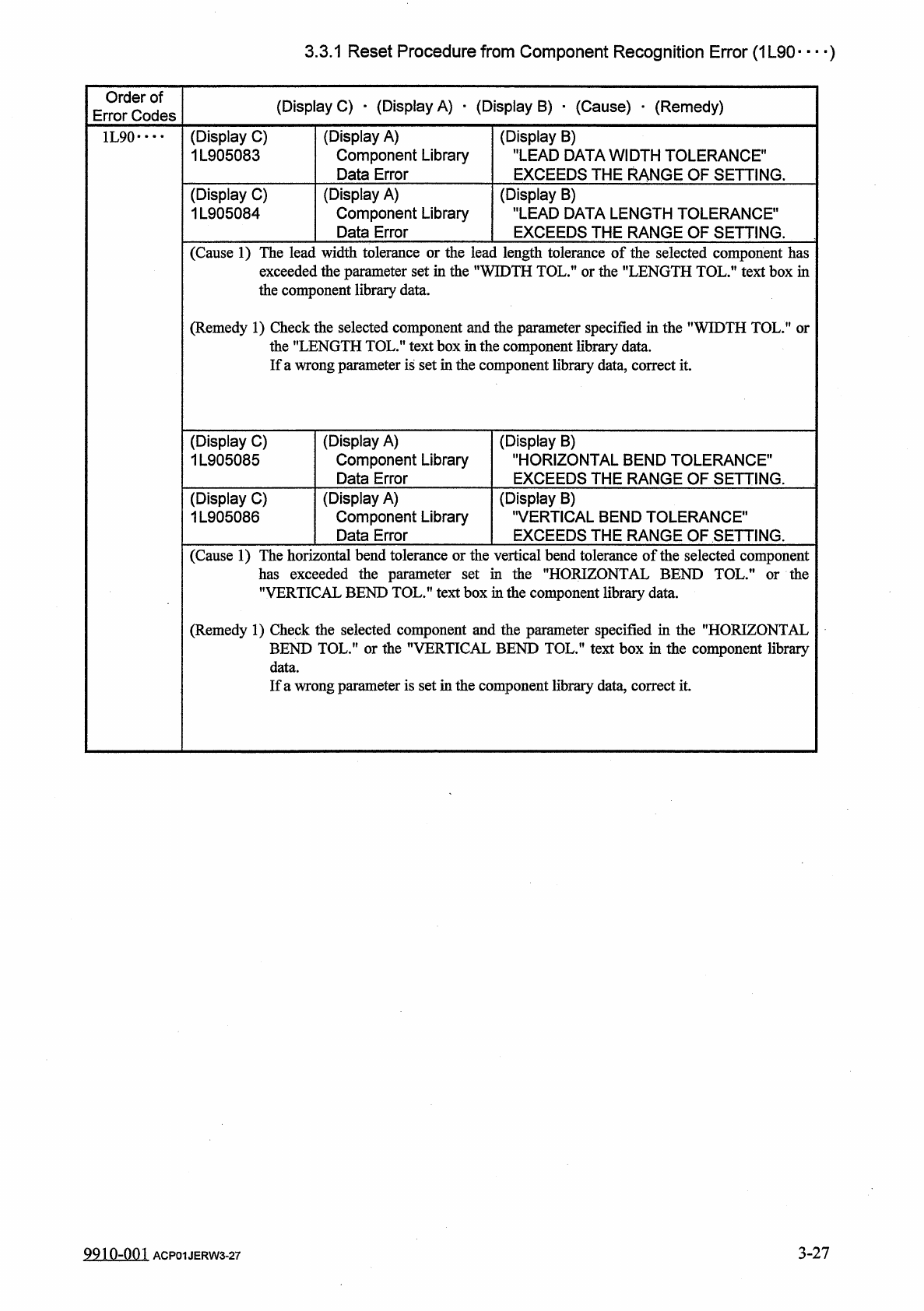
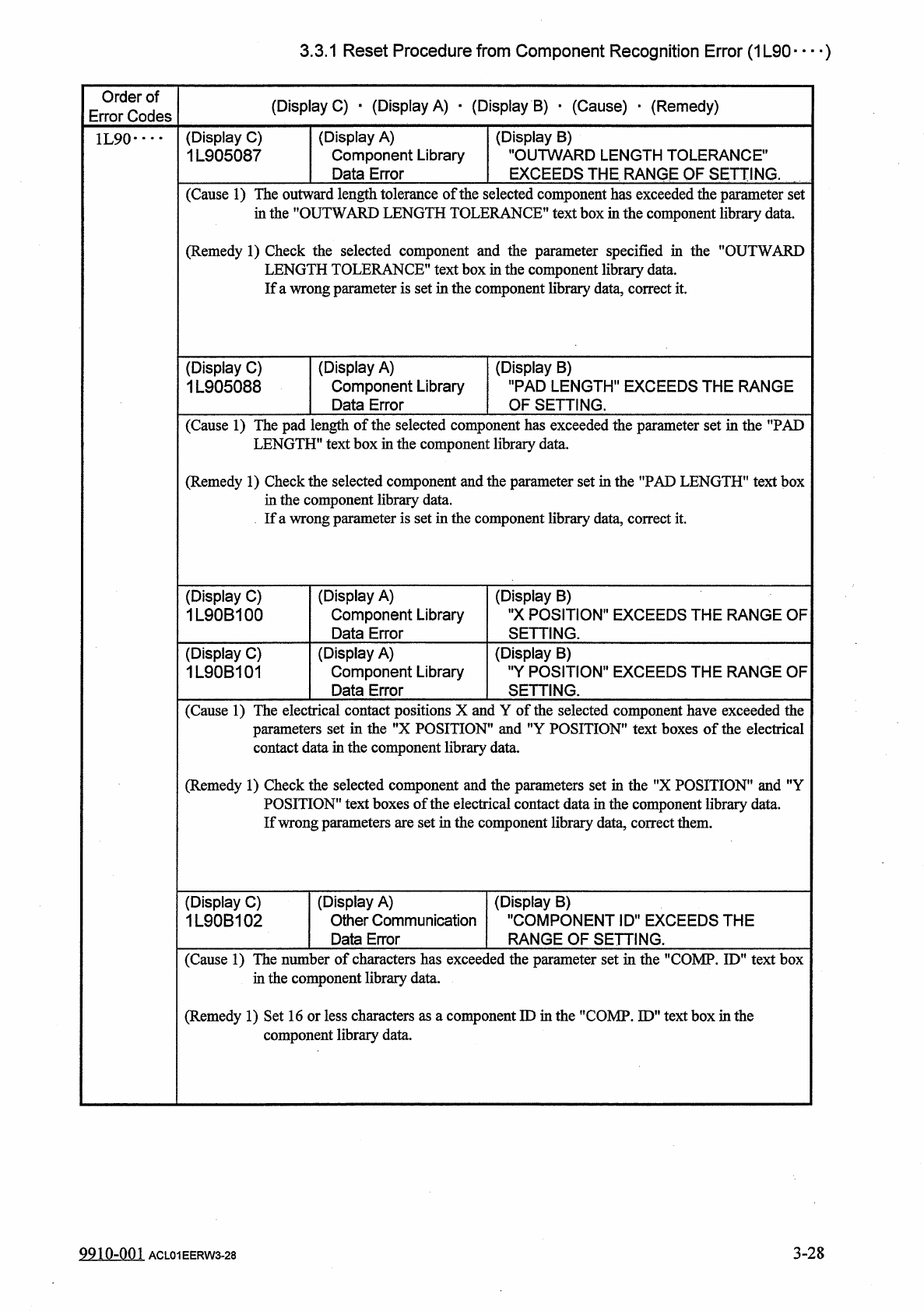
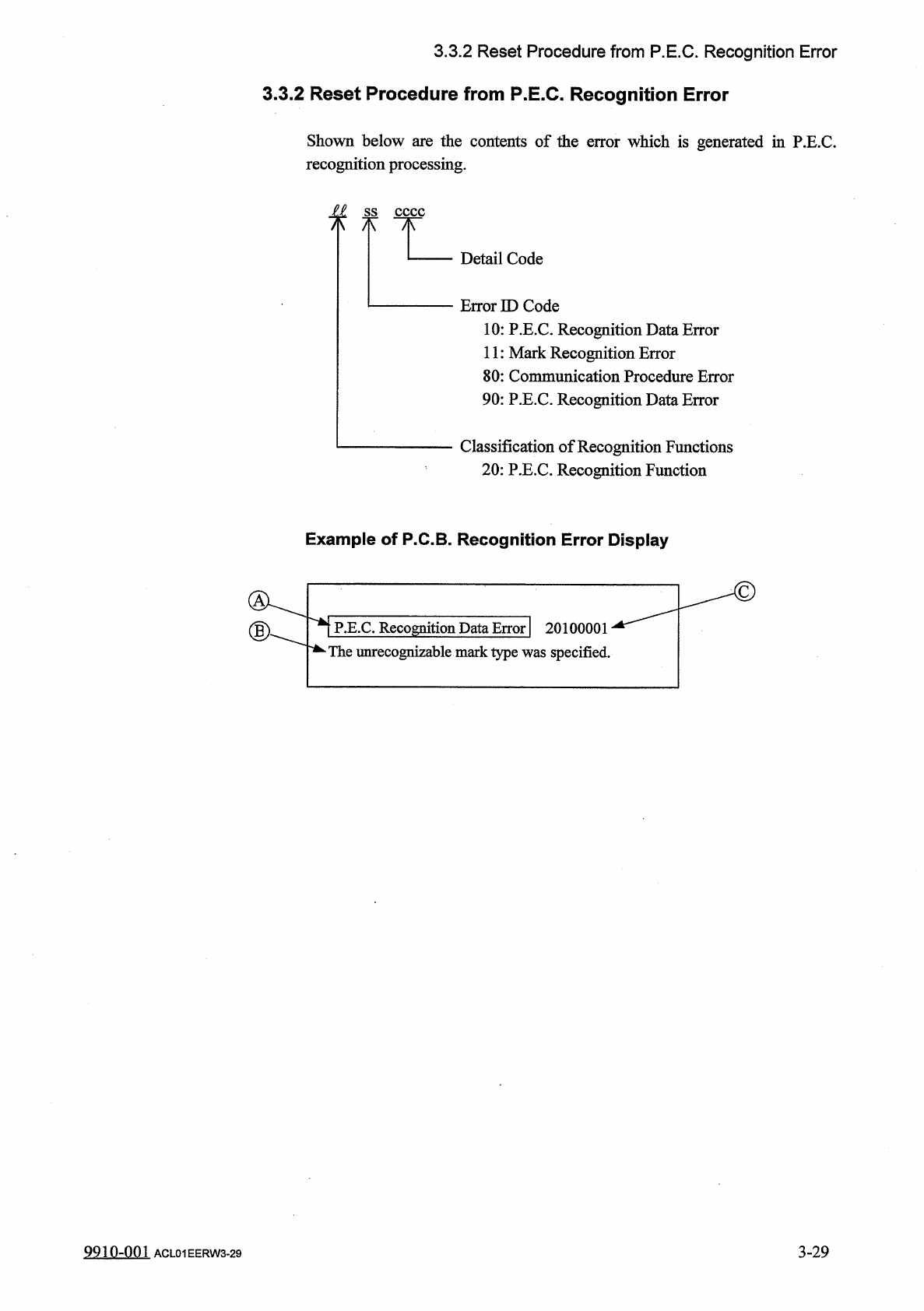
3.3 . 1 Reset Procedure from Component Recognition Error ( 1 L 90 — ) Order of Error Codes ( Display C ) • ( Display A ) • ( Display B ) ■ ( Cause ) • ( Remedy ) ( Display C ) 1 L 905087 ( Display A ) Component Library D…
3.3
.
1
Reset
Procedure
from
Component
Recognition
Error
(
1
L
90
)
Order
of
Error
Codes
(
Display
C
)
•
(
Display
A
)
■
(
Display
B
)
■
(
Cause
)
_
(
Remedy
)
(
Display
C
)
1
L
905083
(
Display
A
)
Component
Library
Data
Error
(
Display
B
)
"
LEAD
DATA
WIDTH
TOLERANCE
"
EXCEEDS
THE
RANGE
OF
SETTING
.
1
L
90
•
•••
(
Display
C
)
1
L
905084
(
Display
A
)
Component
Library
Data
Error
(
Display
B
)
"
LEAD
DATA
LENGTH
TOLERANCE
"
EXCEEDS
THE
RANGE
OF
SETTING
.
(
Cause
1
)
The
lead
width
tolerance
or
the
lead
length
tolerance
of
the
selected
component
has
exceeded
the
parameter
set
in
the
"
WIDTH
TOL
.
”
or
the
"
LENGTH
TOL
.
”
text
box
in
the
component
library
data
.
(
Remedy
1
)
Check
the
selected
component
and
the
parameter
specified
in
the
"
WIDTH
TOL
.
'
the
"
LENGTH
TOL
.
"
text
box
in
the
component
library
data
.
If
a
wrong
parameter
is
set
in
the
component
library
data
,
correct
it
.
or
(
Display
C
)
1
L
905085
(
Display
A
)
Component
Library
Data
Error
(
Display
B
)
"
HORIZONTAL
BEND
TOLERANCE
"
EXCEEDS
THE
RANGE
OF
SETTING
.
(
Display
C
)
1
L
905086
(
Display
A
)
Component
Library
Data
Error
(
Display
B
)
"
VERTICAL
BEND
TOLERANCE
"
EXCEEDS
THE
RANGE
OF
SETTING
.
(
Cause
1
)
The
horizontal
bend
tolerance
or
the
vertical
bend
tolerance
of
the
selected
component
has
exceeded
the
parameter
set
in
the
"
HORIZONTAL
BEND
TOL
.
"
or
the
"
VERTICAL
BEND
TOL
.
”
text
box
in
the
component
library
data
.
(
Remedy
1
)
Check
the
selected
component
and
the
parameter
specified
in
the
"
HORIZONTAL
BEND
TOL
.
"
or
the
"
VERTICAL
BEND
TOL
.
"
text
box
in
the
component
library
data
.
If
a
wrong
parameter
is
set
in
the
component
library
data
,
correct
it
.
3
-
27
9910
-
001
ACP
01
JERW
3
-
27
3.3
.
1
Reset
Procedure
from
Component
Recognition
Error
(
1
L
90
—
)
Order
of
Error
Codes
(
Display
C
)
•
(
Display
A
)
•
(
Display
B
)
■
(
Cause
)
•
(
Remedy
)
(
Display
C
)
1
L
905087
(
Display
A
)
Component
Library
Data
Error
(
Display
B
)
"
OUTWARD
LENGTH
TOLERANCE
"
EXCEEDS
THE
RANGE
OF
SETTING
.
1
L
90
•
…
(
Cause
1
)
The
outward
length
tolerance
of
the
in
the
"
OUTWARD
LENGTH
TOL
:
selected
component
has
exceeded
the
parameter
set
ERANCE
”
text
box
in
the
component
library
data
.
(
Remedy
1
)
Check
the
selected
component
and
the
parameter
specified
in
the
"
OUTWARD
LENGTH
TOLERANCE
"
text
box
in
the
component
library
data
.
If
a
wrong
parameter
is
set
in
the
component
library
data
,
correct
it
.
(
Display
C
)
1
L
905088
(
Display
A
)
Component
Library
Data
Error
(
Display
B
)
"
PAD
LENGTH
"
EXCEEDS
THE
RANGE
OF
SETTING
.
(
Cause
1
)
The
pad
length
of
the
selected
component
has
exceeded
the
parameter
set
in
the
"
PAD
LENGTH
"
text
box
in
the
component
libraiy
data
.
(
Remedy
1
)
Check
the
selected
component
and
the
parameter
set
in
the
"
PAD
LENGTH
1
'
text
box
in
the
component
library
data
.
If
a
wrong
parameter
is
set
in
the
component
library
data
,
correct
it
.
(
Display
C
)
1
L
90
B
100
(
Display
A
)
Component
Library
Data
Error
(
Display
"
X
POSITION
"
EXCEEDS
THE
RANGE
OF
SETTING
.
B
)
(
Display
C
)
1
L
90
B
101
(
Display
A
)
Component
Library
Data
Error
(
Display
B
)
"
Y
POSITION
"
EXCEEDS
THE
RANGE
OF
SETTI
r
of
the
ING
.
(
Cause
1
)
The
electrical
contact
positions
X
and
Y
set
in
the
"
X
POSITION
"
and
"
Y
POSITION
"
text
boxes
of
the
electrical
in
the
component
library
data
.
selected
component
have
exceeded
the
parameters
i
contact
data
(
Remedy
1
)
Check
the
selected
component
and
the
parameters
set
in
the
f
,
X
POSITION
"
and
"
Y
POSITION
”
text
boxes
of
the
electrical
contact
data
in
the
component
library
data
.
If
wrong
parameters
are
set
in
the
component
library
data
,
correct
them
.
(
Display
A
)
Other
Communication
Data
Error
(
Display
C
)
1
L
90
B
102
(
Display
B
)
"
COMPONENT
ID
"
EXCEEDS
THE
RANGE
OF
SETTING
.
(
Cause
1
)
The
number
of
characters
has
exceeded
the
parameter
set
in
the
"
COMP
.
ID
"
text
box
in
the
component
library
data
.
(
Remedy
1
)
Set
16
or
less
characters
as
a
component
ID
in
the
"
COMP
.
ID
"
text
box
in
the
component
libraiy
data
.
3
-
28
9910
-
001
ACL
01
EERW
3
-
28
3.3
.
2
Reset
Procedure
from
P
.
E
.
C
.
Recognition
Error
3.3
.
2
Reset
Procedure
from
P
.
E
.
C
.
Recognition
Error
Shown
below
are
the
contents
of
the
error
which
is
generated
in
P
.
E
.
C
.
recognition
processing
.
f
f
Detail
Code
Error
ID
Code
10
:
P
.
E
.
C
.
Recognition
Data
Error
11
:
Mark
Recognition
Error
80
:
Communication
Procedure
Error
90
:
P
.
E
.
C
.
Recognition
Data
Error
Classification
of
Recognition
Functions
20
:
P
.
E
.
C
.
Recognition
Function
Example
of
P
.
C
.
B
.
Recognition
Error
Display
P
.
E
.
C
.
Recognition
Data
Error
|
20100001
*
The
unrecognizable
mark
type
was
specified
.
3
-
29
9910
-
001
ACL
01
EERW
3
-
29