5TROUBLESHOOTING_.pdf - 第144页
4.2 Troubleshooting on Pick - Up Errors 4.2 . 1.2 Machine - Based Factors When a component has no problem , check the main body of the machine . A failure can be tracked by checking if it occurs on a specific vacuum nozz…
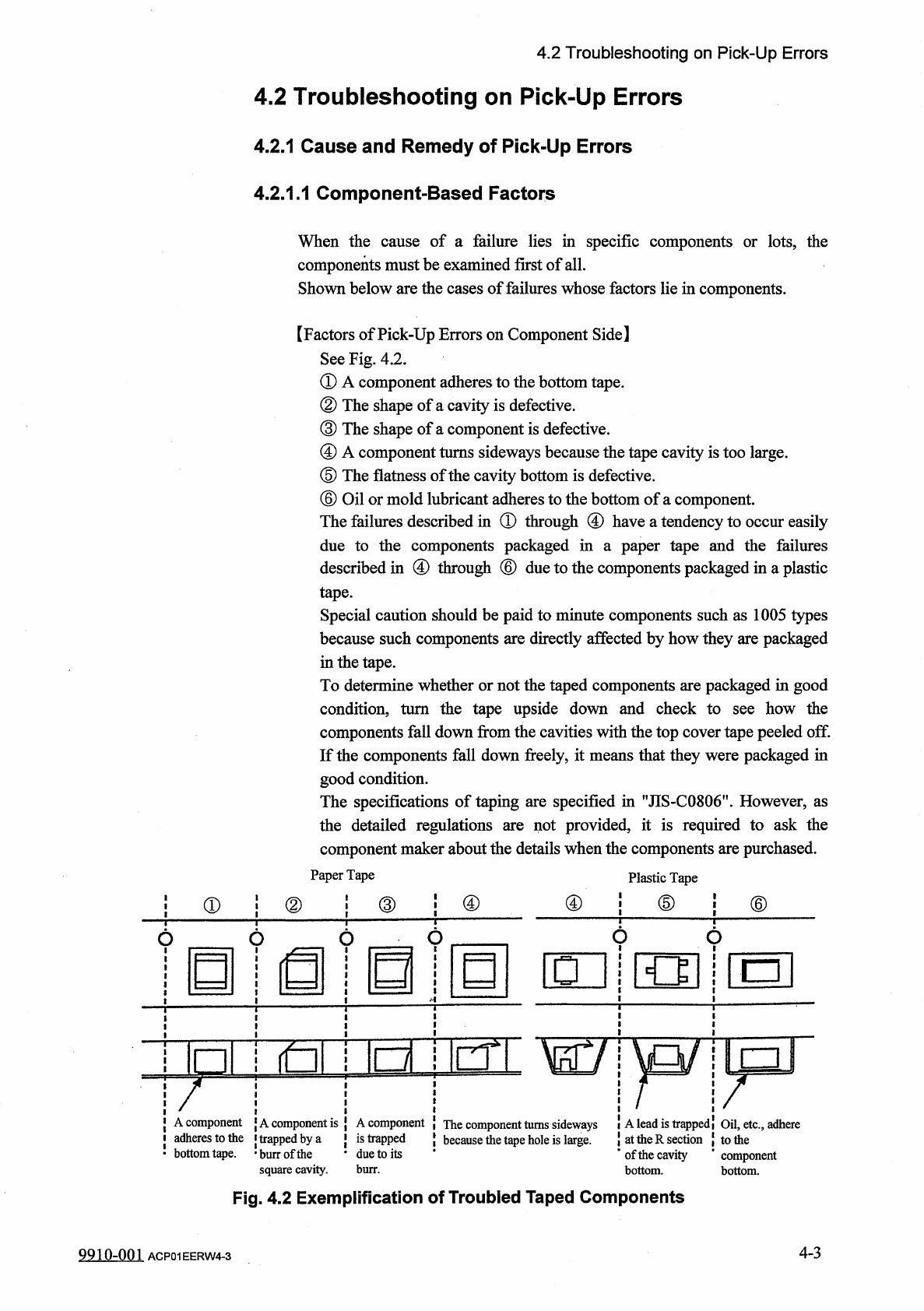
4.2
Troubleshooting
on
Pick
-
Up
Errors
4.2
Troubleshooting
on
Pick
-
Up
Errors
4.2
.
1
Cause
and
Remedy
of
Pick
-
Up
Errors
4.2
.
1.1
Component
-
Based
Factors
When
the
cause
of
a
failure
lies
in
specific
components
or
lots
,
the
components
must
be
examined
first
of
all
.
Shown
below
are
the
cases
of
failures
whose
factors
lie
in
components
.
【
Factors
of
Pick
-
Up
Errors
on
Component
Side
】
See
Fig
.
4.2
.
①
A
component
adheres
to
the
bottom
tape
.
②
The
shape
of
a
cavity
is
defective
.
③
The
shape
of
a
component
is
defective
.
④
A
component
turns
sideways
because
the
tape
cavity
is
too
large
.
⑤
The
flatness
of
the
cavity
bottom
is
defective
.
⑥
Oil
or
mold
lubricant
adheres
to
the
bottom
of
a
component
.
The
failures
described
in
①
through
④
have
a
tendency
to
occur
easily
due
to
the
components
packaged
in
a
paper
tape
and
the
failures
described
in
④
through
®
due
to
the
components
packaged
in
a
plastic
tape
.
Special
caution
should
be
paid
to
minute
components
such
as
1005
types
because
such
components
are
directly
affected
by
how
they
are
packaged
in
the
tape
.
To
determine
whether
or
not
the
taped
components
are
packaged
in
good
condition
,
turn
the
tape
upside
down
and
check
to
components
fall
down
from
the
cavities
with
the
top
cover
tape
peeled
off
.
If
the
components
fall
down
freely
,
it
means
that
they
were
packaged
in
good
condition
.
The
specifications
of
taping
are
specified
in
"
JIS
-
C
0806
"
.
However
,
as
the
detailed
regulations
component
maker
about
the
details
when
the
components
are
purchased
.
Paper
Tape
how
the
see
not
provided
,
it
is
required
to
ask
the
are
Plastic
Tape
j
®
④
④
⑤
⑥
①
②
□
nir
^
irn
A
component
j
A
component
is
J
A
component
(
The
component
turns
sideways
i
A
lead
is
trappedi
Oil
,
etc
.
,
adhere
adheres
to
the
i
trapped
by
a
bottom
鄉
e
.
•
burr
of
the
square
cavity
.
is
trapped
•
due
to
its
at
the
R
section
{
to
the
*
of
the
cavity
*
component
bottom
.
because
the
tape
hole
is
large
.
burr
.
Fig
.
4.2
Exemplification
of
Troubled
Taped
Components
4
-
3
9910
-
001
ACP
01
EERW
4
-
3
4.2
Troubleshooting
on
Pick
-
Up
Errors
4.2
.
1.2
Machine
-
Based
Factors
When
a
component
has
no
problem
,
check
the
main
body
of
the
machine
.
A
failure
can
be
tracked
by
checking
if
it
occurs
on
a
specific
vacuum
nozzle
or
feeder
slot
No
.
(
lane
)
.
(
1
)
When
a
failure
occurs
on
a
specific
vacuum
nozzle
,
check
the
following
items
concerning
the
pertinent
vacuum
nozzle
.
①
Check
if
the
nozzle
is
abnormal
.
②
Check
if
the
vacuum
line
is
abnormal
.
③
Check
if
the
vacuum
ON
/
OFF
valve
is
abnormal
.
When
a
factory
is
dusty
or
a
lot
of
components
packaged
in
paper
tapes
are
used
,
the
vacuum
nozzles
and
their
filters
get
dirty
easily
.
Therefore
,
it
becomes
important
to
clean
the
periodically
.
Refer
to
”
4.2
.
2.1
Frequent
Failures
on
Specific
Vacuum
Nozzle
"
for
the
troubleshooting
.
nozzles
and
filters
vacuum
(
2
)
When
a
failure
occurs
on
a
specific
feeder
slot
No
.
(
lane
)
,
check
the
following
items
concerning
the
pertinent
feeder
slot
No
.
(
lane
)
.
①
Check
if
the
tape
feeder
is
loaded
correctly
with
components
.
②
Check
if
the
top
cover
tape
is
peeled
off
normally
.
③
Check
if
the
data
related
to
the
component
picks
is
normal
.
Refer
to
,
f
4.2
.
2.2
Frequent
Failures
on
Specific
Feeder
Slot
No
.
(
Lane
)
"
for
the
troubleshooting
.
4
-
4
9910
-
001
ACP
01
EERW
4
-
4
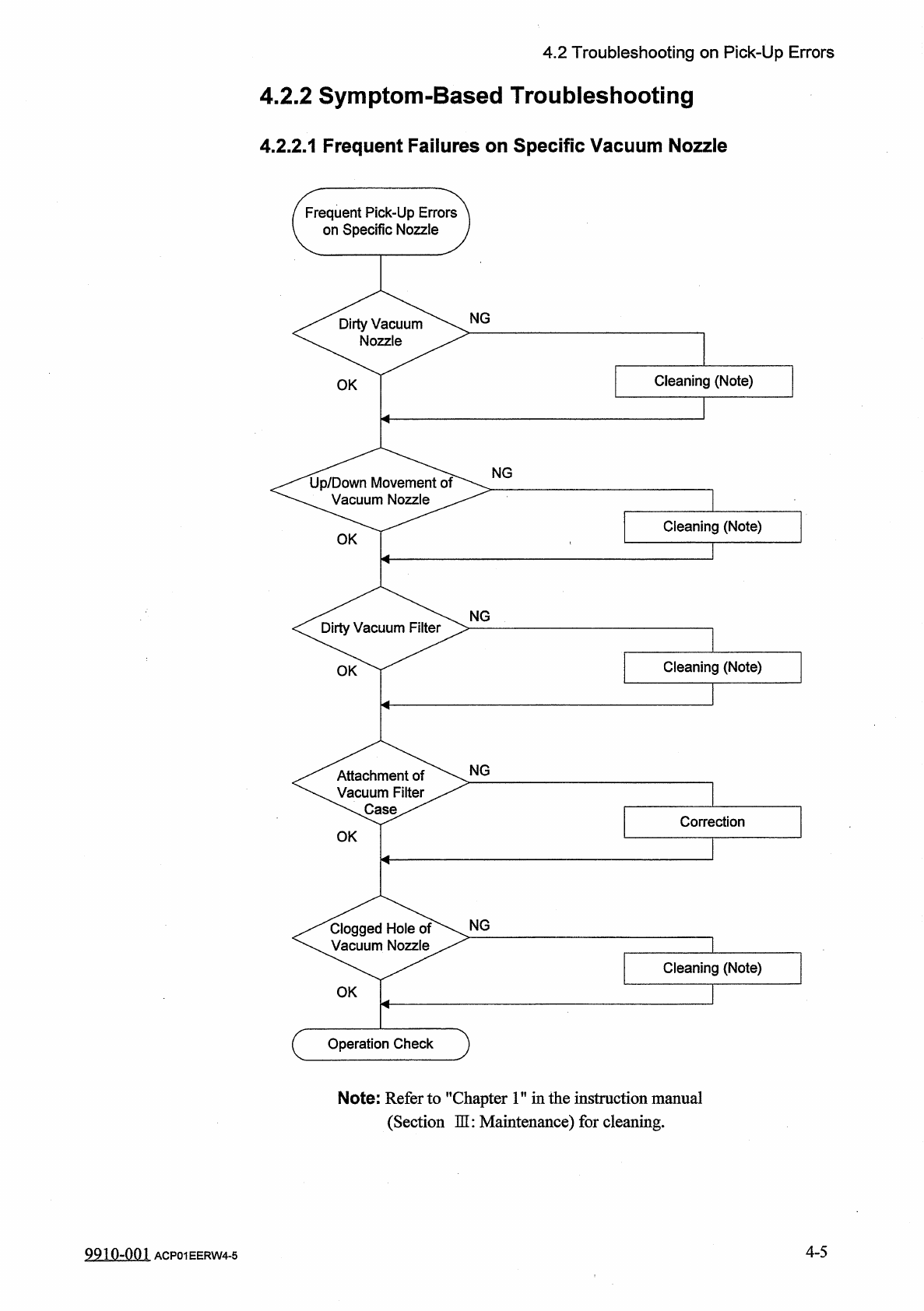
4.2
Troubleshooting
on
Pick
-
Up
Errors
4.2
.
2
Symptom
-
Based
Troubleshooting
4.2
.
2.1
Frequent
Failures
on
Specific
Vacuum
Nozzle
Frequent
Pick
-
Up
Errors
on
Specific
Nozzle
NG
Dirty
Vacuum
Nozzle
Cleaning
(
Note
)
OK
<
^
tJ
^
/
Down
Movement
Vacuum
Nozzle
NG
Cleaning
(
Note
)
OK
NG
Dirty
Vacuum
Filter
Cleaning
(
Note
)
OK
NG
Attachment
of
icuum
Filter
、
Case
Correction
OK
NG
Clogged
Hole
of
Vacuum
Nozzle
Cleaning
(
Note
)
OK
c
Operation
Check
Note
:
Refer
to
"
Chapter
1
"
in
the
instruction
manual
(
Section
HI
:
Maintenance
)
for
cleaning
.
4
-
5
9910
-
001
ACP
01
EERW
4
-
5