5TROUBLESHOOTING_.pdf - 第98页
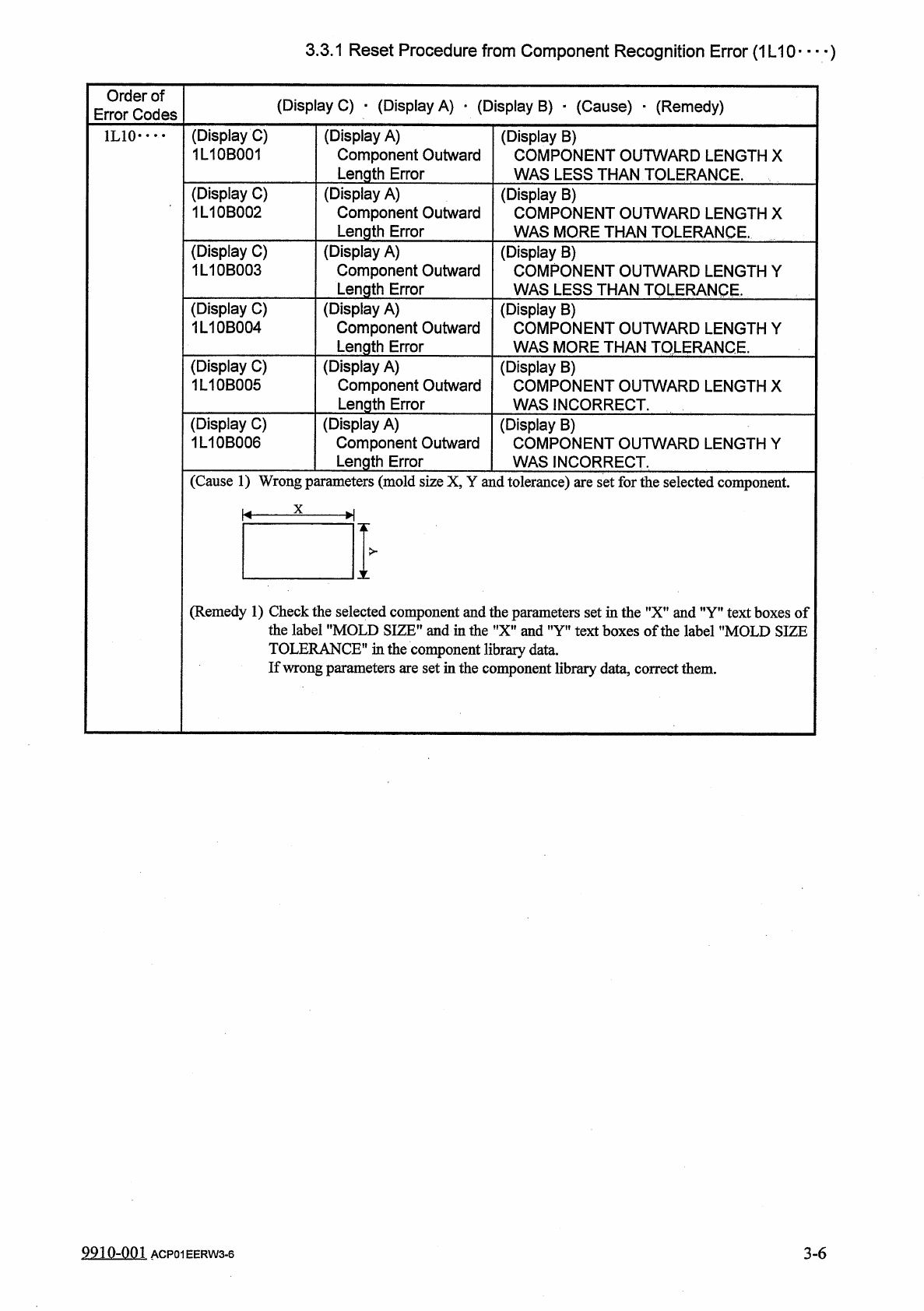
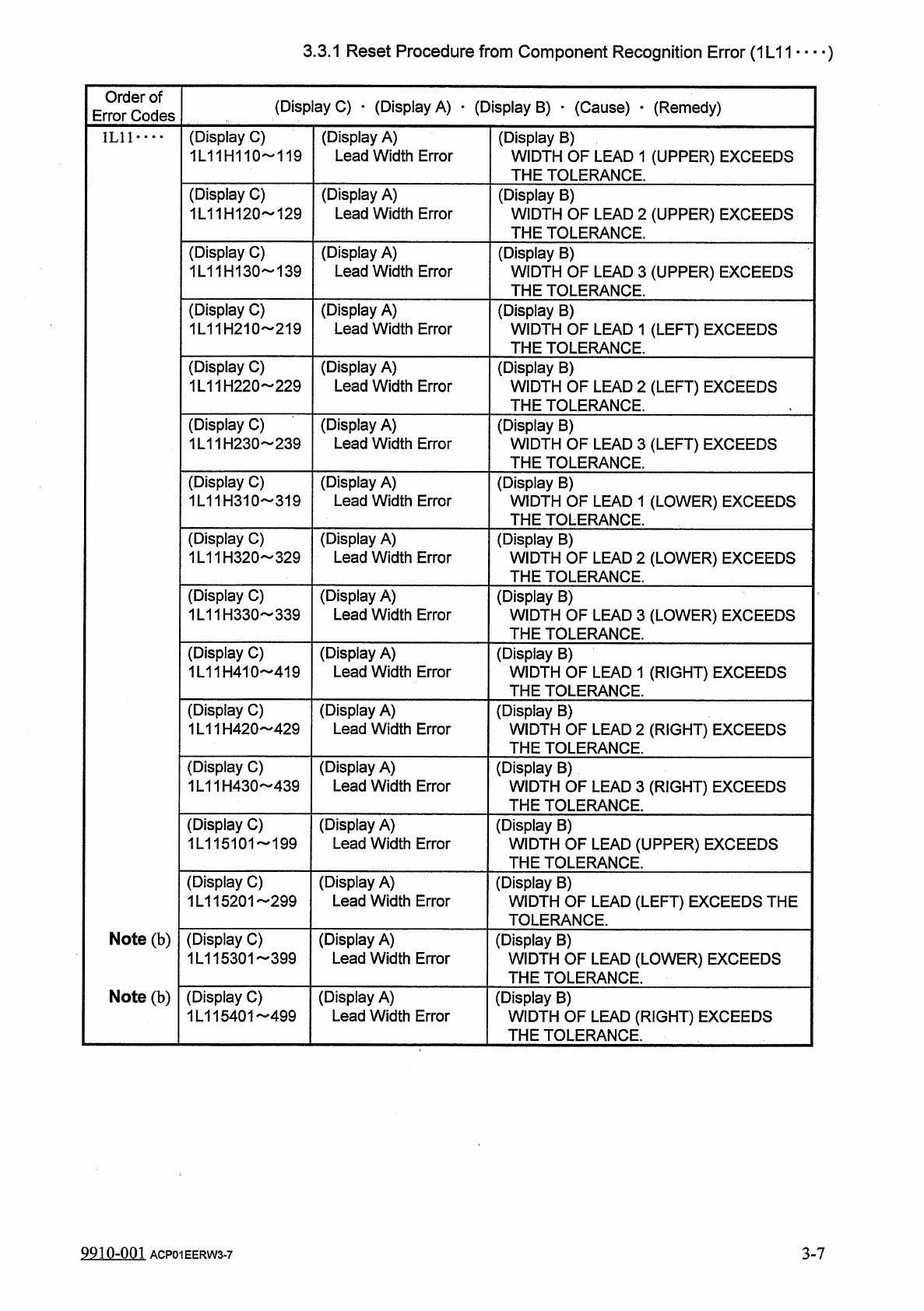
3.3 . 1 Reset Procedure from Component Recognition Error ( 1 L 11 " ■ ■ ) Order of Error Codes ( Display C ) . ( Display A ) ■ ( Display B ) ■ ( Cause ) - ( Remedy ) ( Display C ) 1 L 11 H 110 119 ( Display A ) Lead…
3.3
.
1
Reset
Procedure
from
Component
Recognition
Error
(
1
L
10
)
Order
of
Error
Codes
(
Display
C
)
•
(
Display
A
)
_
(
Display
B
)
■
(
Cause
)
■
(
Remedy
)
(
Display
C
)
1
L
10
B
001
(
Display
A
)
Component
Outward
Length
Error
(
Display
B
)
COMPONENT
OUTWARD
LENGTH
X
WAS
LESS
THAN
TOLERANCE
.
1
L
10
•
…
(
Display
C
)
1
L
10
B
002
(
Display
A
)
Component
Outward
Length
Error
(
Display
B
)
COMPONENT
OUTWARD
LENGTH
X
WAS
MORE
THAN
TOLERANCE
.
(
Display
C
)
1
L
10
B
003
(
Display
A
)
Component
Outward
Length
Error
(
Display
B
)
COMPONENT
OUTWARD
LENGTH
Y
WAS
LESS
THAN
TOLERANCE
.
(
Display
C
)
1
L
10
B
004
(
Display
A
)
Component
Outward
Length
Error
(
Display
B
)
COMPONENT
OUTWARD
LENGTH
Y
WAS
MORE
THAN
TOLERANCE
.
(
Display
C
)
1
L
10
B
005
(
Display
A
)
Component
Outward
Length
Error
(
Display
B
)
COMPONENT
OUTWARD
LENGTH
X
WAS
INCORRECT
.
(
Display
C
)
1
L
10
B
006
(
Display
A
)
Component
Outward
Length
Error
(
Display
B
)
COMPONENT
OUTWARD
LENGTH
Y
WAS
INCORRECT
.
(
Cause
1
)
Wrong
parameters
(
mold
size
X
,
Y
and
tolerance
)
are
set
for
the
selected
component
.
X
K
-
H
>
X
(
Remedy
1
)
Check
the
selected
component
and
the
parameters
set
in
the
"
X
”
and
”
Y
”
text
boxes
of
the
label
"
MOLD
SIZE
”
and
in
the
"
X
"
and
"
Y
"
text
boxes
of
the
label
"
MOLD
SIZE
TOLERANCE
"
in
the
component
library
data
.
If
wrong
parameters
are
set
in
the
component
library
data
,
correct
them
.
9910
-
001
ACP
01
EERW
3
-
6
3
-
6
3.3
.
1
Reset
Procedure
from
Component
Recognition
Error
(
1
L
11
"
■
■
)
Order
of
Error
Codes
(
Display
C
)
.
(
Display
A
)
■
(
Display
B
)
■
(
Cause
)
-
(
Remedy
)
(
Display
C
)
1
L
11
H
110
119
(
Display
A
)
Lead
Width
Error
(
Display
B
)
WIDTH
OF
LEAD
1
(
UPPER
)
EXCEEDS
THE
TOLERANCE
.
1
L
11
•
…
(
Display
C
)
1
L
11
H
120
129
(
Display
A
)
Lead
Width
Error
(
Display
B
)
WIDTH
OF
LEAD
2
(
UPPER
)
EXCEEDS
THE
TOLERANCE
.
(
Display
C
)
1
L
11
H
130
139
(
Display
A
)
Lead
Width
Error
(
Display
B
)
WIDTH
OF
LEAD
3
(
UPPER
)
EXCEEDS
THE
TOLERANCE
.
(
Display
C
)
1
L
11
H
210
219
(
Display
A
)
Lead
Width
Error
(
Display
B
)
WIDTH
OF
LEAD
1
(
LEFT
)
EXCEEDS
THE
TOLERANCE
.
(
Display
C
)
1
L
11
H
220
229
(
Display
A
)
Lead
Width
Error
(
Display
B
)
WIDTH
OF
LEAD
2
(
LEFT
)
EXCEEDS
THE
TOLERANCE
.
(
Display
C
)
1
L
11
H
230
239
(
Display
A
)
Lead
Width
Error
(
Display
B
)
WIDTH
OF
LEAD
3
(
LEFT
)
EXCEEDS
THE
TOLERANCE
.
(
Display
C
)
1
L
11
H
310
319
(
Display
A
)
Lead
Width
Error
(
Display
B
)
WIDTH
OF
LEAD
1
(
LOWER
)
EXCEEDS
THE
TOLERANCE
.
(
Display
C
)
1
L
11
H
320
329
(
Display
A
)
Lead
Width
Error
(
Display
B
)
WIDTH
OF
LEAD
2
(
LOWER
)
EXCEEDS
THE
TOLERANCE
.
(
Display
C
)
1
L
11
H
330
339
(
Display
A
)
Lead
Width
Error
(
Display
B
)
WIDTH
OF
LEAD
3
(
LOWER
)
EXCEEDS
THE
TOLERANCE
.
(
Display
C
)
1
L
11
H
410
419
(
Display
A
)
Lead
Width
Error
(
Display
B
)
WIDTH
OF
LEAD
1
(
RIGHT
)
EXCEEDS
THE
TOLERANCE
.
(
Display
C
)
1
L
11
H
420
429
(
Display
A
)
Lead
Width
Error
(
Display
B
)
WIDTH
OF
LEAD
2
(
RIGHT
)
EXCEEDS
THE
TOLERANCE
.
(
Display
C
)
1
L
11
H
430
439
(
Display
A
)
Lead
Width
Error
(
Display
B
)
WIDTH
OF
LEAD
3
(
RIGHT
)
EXCEEDS
THE
TOLERANCE
.
(
Display
C
)
1
L
115101
199
(
Display
A
)
Lead
Width
Error
(
Display
B
)
WIDTH
OF
LEAD
(
UPPER
)
EXCEEDS
THE
TOLERANCE
.
(
Display
C
)
1
L
115201
-
299
(
Display
A
)
Lead
Width
Error
(
Display
B
)
WIDTH
OF
LEAD
(
LEFT
)
EXCEEDS
THE
TOLERANCE
.
Note
(
b
)
(
Display
C
)
1
L
115301
399
(
Display
A
)
Lead
Width
Error
(
Display
B
)
WIDTH
OF
LEAD
(
LOWER
)
EXCEEDS
THE
TOLERANCE
.
Note
(
b
)
(
Display
C
)
1
L
115401
499
(
Display
A
)
Lead
Width
Error
(
Display
B
)
WIDTH
OF
LEAD
(
RIGHT
)
EXCEEDS
THE
TOLERANCE
.
9910
-
001
3
-
7
ACP
01
EERW
3
-
7
3.3
.
1
Reset
Procedure
from
Component
Recognition
Error
(
1
L
11
—
)
Order
of
Error
Codes
(
Display
C
)
•
(
Display
A
)
•
(
Display
B
)
•
(
Cause
)
•
(
Remedy
)
Notes
:
(
a
)
When
the
front
-
lighting
system
is
used
to
recognize
square
and
deform
components
,
the
word
"
LEAD
”
is
changed
to
"
ELECTRICAL
CONTACT
"
.
(
b
)
The
last
two
digits
of
the
error
code
represents
the
lead
No
.
1
L
11
•
•
•
•
(
Cause
1
)
The
lead
width
of
the
selected
component
exceeds
its
tolerance
.
Lead
Width
(
Remedy
1
)
Check
the
selected
component
and
the
parameters
set
in
the
"
WIDTH
"
text
boxes
of
the
label
"
LEAD
DATA
”
in
the
component
library
data
.
If
wrong
parameters
are
set
in
the
component
library
data
,
correct
them
.
3
-
8
9910
-
001
ACP
01
EERW
3
-
8