5TROUBLESHOOTING_.pdf - 第76页
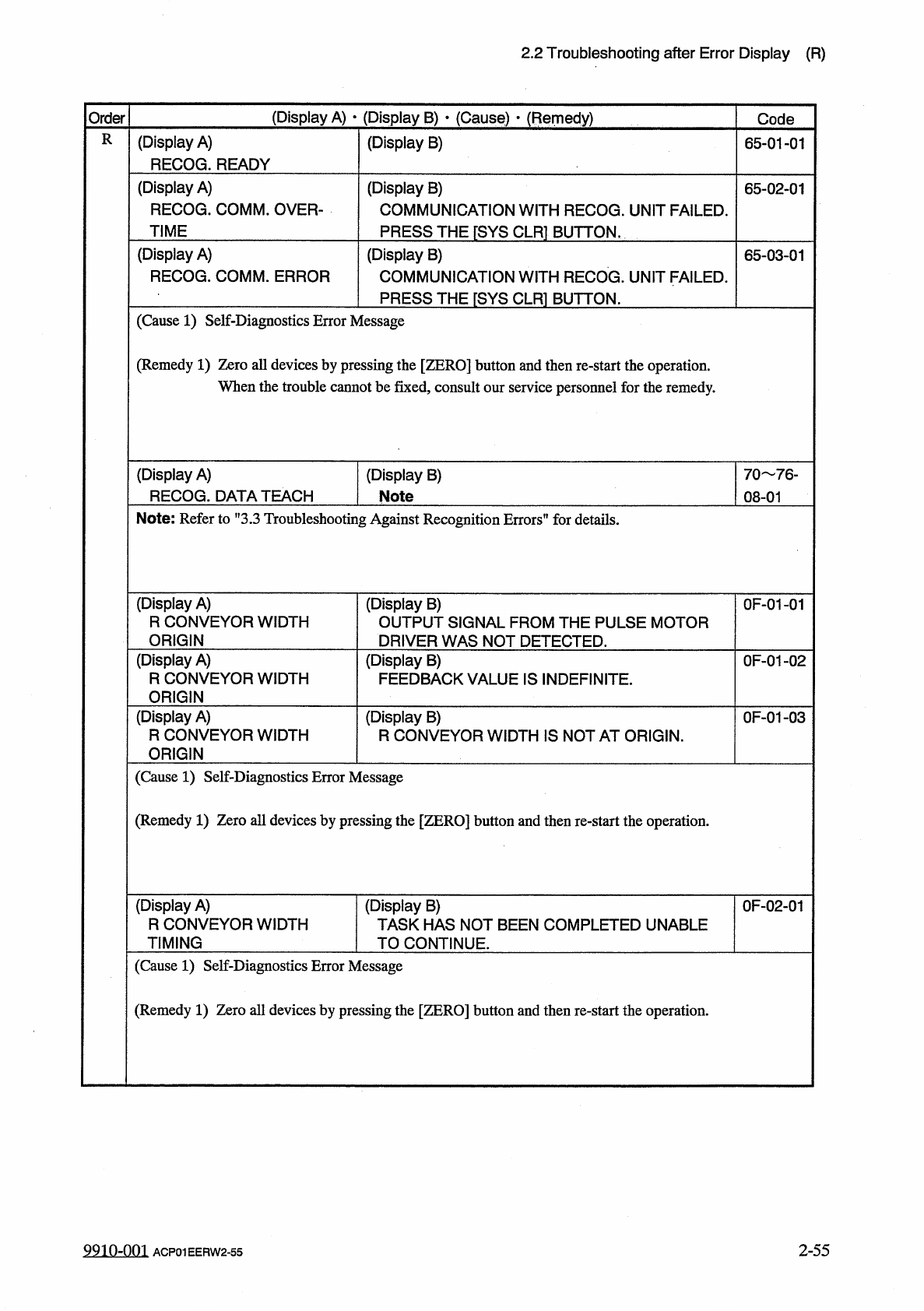
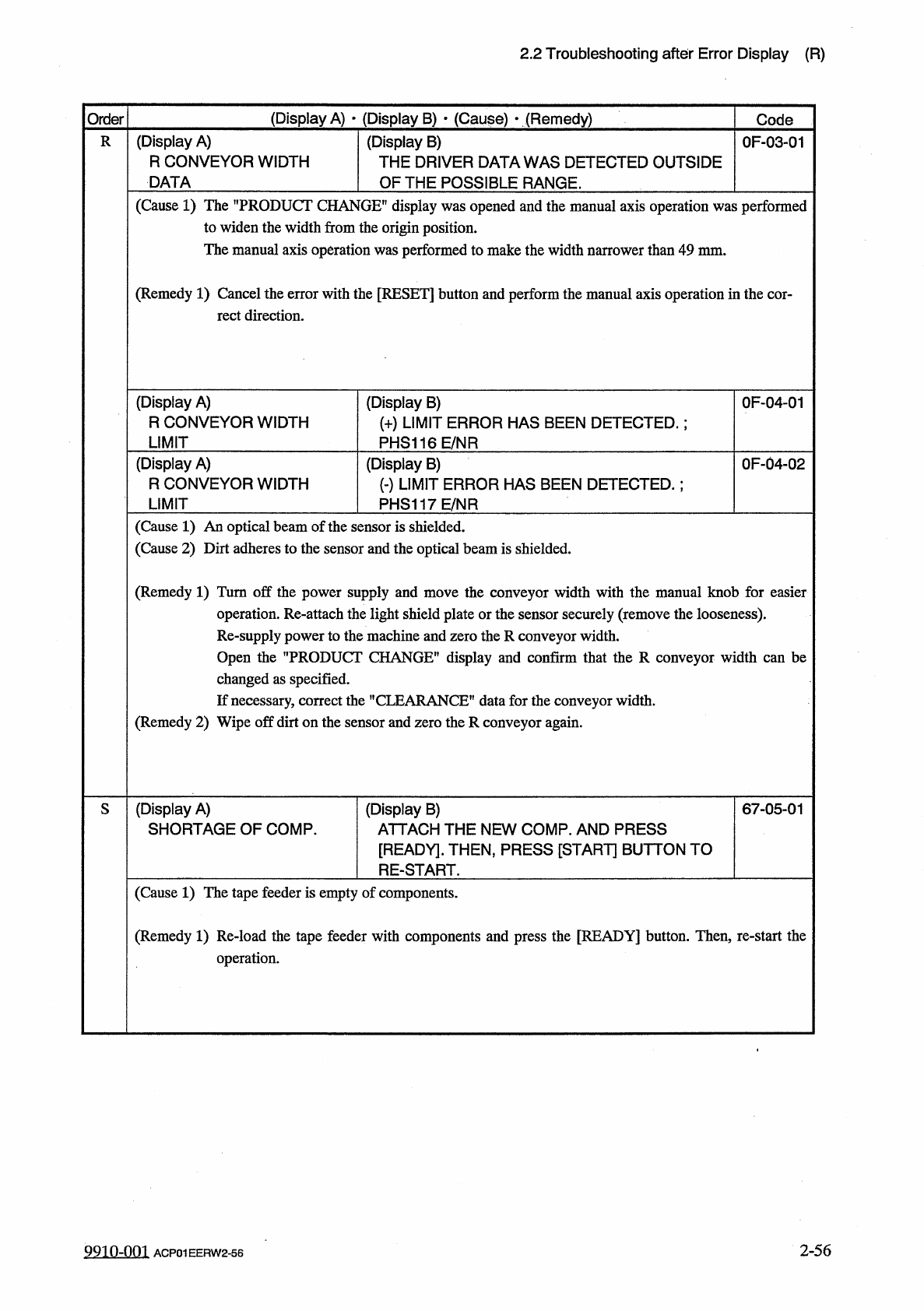
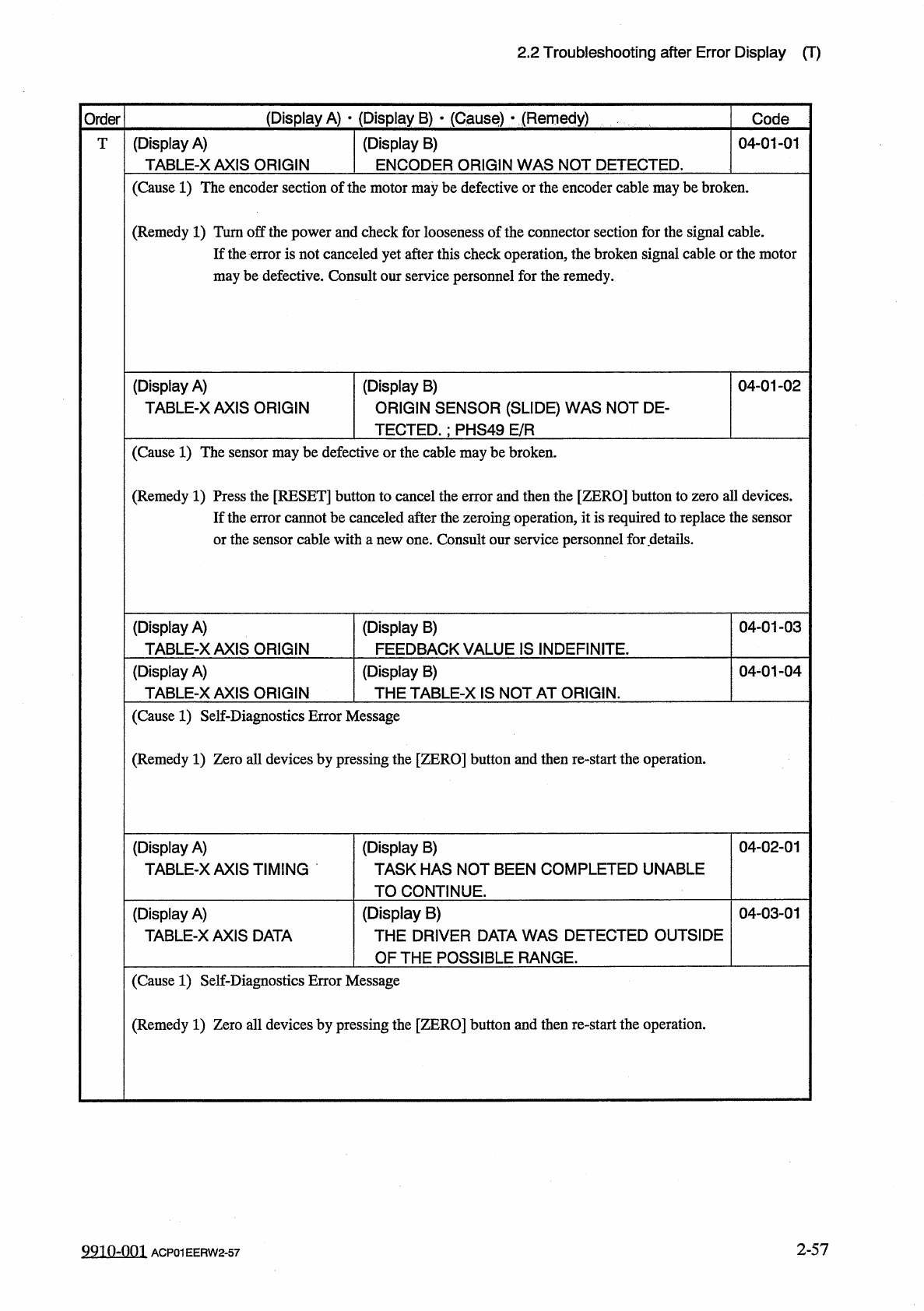
2.2 Troubleshooting after Error Display ( R ) ( Display A ) • ( Display B ) • ( Cause ) > ( Remedy ) Order Code ( Display A ) R CONVEYOR WIDTH DATA ( Display B ) THE DRIVER DATA WAS DETECTED OUTSIDE OF THE POSSIBLE RA…
2.2
Troubleshooting
after
Error
Display
(
R
)
(
Display
A
)
•
(
Display
B
)
»
(
Cause
)
•
(
Remedy
)
Order
Code
R
(
Display
A
)
RECOG
.
READY
(
Display
B
)
65
-
01
-
01
(
Display
A
)
RECOG
.
COMM
.
OVER
-
TIME
(
Display
B
)
COMMUNICATION
WITH
RECOG
.
UNIT
FAILED
.
PRESS
THE
[
SYS
CLR
1
BUTTON
,
65
-
02
-
01
(
Display
A
)
RECOG
.
COMM
.
ERROR
(
Display
B
)
COMMUNICATION
WITH
RECOG
.
UNIT
FAILED
.
PRESS
THE
「
SYS
CLR
1
BUTTON
.
65
-
03
-
01
(
Cause
1
)
Self
-
Diagnostics
Error
Message
(
Remedy
1
)
Zero
all
devices
by
pressing
the
[
ZERO
]
button
and
then
re
-
start
the
operation
.
When
the
trouble
cannot
be
fixed
,
consult
our
service
personnel
for
the
remedy
.
(
Display
A
)
RECOG
.
DATA
TEACH
(
Display
B
)
Note
70
76
-
08
-
01
Note
:
Refer
to
”
3.3
Troubleshooting
Against
Recognition
Errors
”
for
details
.
(
Display
A
)
R
CONVEYOR
WIDTH
ORIGIN
(
Display
B
)
OUTPUT
SIGNAL
FROM
THE
PULSE
MOTOR
DRIVER
WAS
NOT
DETECTED
.
0
F
-
01
-
01
(
Display
A
)
R
CONVEYOR
WIDTH
ORIGIN
(
Display
B
)
FEEDBACK
VALUE
IS
INDEFINITE
.
0
F
-
01
-
02
(
Display
A
)
R
CONVEYOR
WIDTH
ORIGIN
(
Display
B
)
R
CONVEYOR
WIDTH
IS
NOT
AT
ORIGIN
.
0
F
-
01
-
03
(
Cause
1
)
Self
-
Diagnostics
Error
Message
(
Remedy
1
)
Zero
all
devices
by
pressing
the
[
ZERO
]
button
and
then
re
-
start
the
operation
.
(
Display
A
)
R
CONVEYOR
WIDTH
TIMING
(
Display
B
)
TASK
HAS
NOT
BEEN
COMPLETED
UNABLE
TO
CONTINUE
.
0
F
-
02
-
01
(
Cause
1
)
Self
-
Diagnostics
Error
Message
(
Remedy
1
)
Zero
all
devices
by
pressing
the
[
ZERO
]
button
and
then
re
-
start
the
operation
.
9910
-
001
2
-
55
ACP
01
EERW
2
-
55
2.2
Troubleshooting
after
Error
Display
(
R
)
(
Display
A
)
•
(
Display
B
)
•
(
Cause
)
>
(
Remedy
)
Order
Code
(
Display
A
)
R
CONVEYOR
WIDTH
DATA
(
Display
B
)
THE
DRIVER
DATA
WAS
DETECTED
OUTSIDE
OF
THE
POSSIBLE
RANGE
.
R
0
F
-
03
-
01
(
Cause
1
)
The
"
PRODUCT
CHANGE
"
display
was
opened
and
the
manual
axis
operation
was
performed
to
widen
the
width
from
the
origin
position
.
The
manual
axis
operation
was
performed
to
make
the
width
narrower
than
49
mm
.
(
Remedy
1
)
Cancel
the
error
with
the
[
RESET
]
button
and
perform
the
manual
axis
operation
in
the
cor
-
rect
direction
.
(
Display
A
)
R
CONVEYOR
WIDTH
LIMIT
(
Display
B
)
(
+
)
LIMIT
ERROR
HAS
BEEN
DETECTED
.
;
PHS
116
E
/
NR
0
F
-
04
-
01
(
Display
A
)
R
CONVEYOR
WIDTH
LIMIT
OF
-
04
-
02
(
Display
B
)
(
-
)
LIMIT
ERROR
HAS
BEEN
DETECTED
.
;
PHS
117
E
/
NR
(
Cause
1
)
An
optical
beam
of
the
sensor
is
shielded
.
(
Cause
2
)
Dirt
adheres
to
the
sensor
and
the
optical
beam
is
shielded
.
(
Remedy
1
)
Turn
off
the
power
supply
and
move
the
conveyor
width
with
the
manual
knob
for
easier
operation
.
Re
-
attach
the
light
shield
plate
or
the
sensor
securely
(
remove
the
looseness
)
.
Re
-
supply
power
to
the
machine
and
zero
the
R
conveyor
width
.
Open
the
"
PRODUCT
CHANGE
"
display
and
confirm
that
the
R
conveyor
width
can
be
changed
as
specified
.
If
necessary
,
correct
the
"
CLEARANCE
”
data
for
the
conveyor
width
.
(
Remedy
2
)
Wipe
off
dirt
on
the
sensor
and
zero
the
R
conveyor
again
.
(
Display
A
)
SHORTAGE
OF
COMP
.
S
(
Display
B
)
ATTACH
THE
NEW
COMP
.
AND
PRESS
[
READY
]
.
THEN
,
PRESS
[
START
]
BUTTON
TO
RE
-
START
.
67
-
05
-
01
(
Cause
1
)
The
tape
feeder
is
empty
of
components
.
(
Remedy
1
)
Re
-
load
the
tape
feeder
with
components
and
press
the
[
READY
]
button
.
Then
,
re
-
start
the
operation
.
2
-
56
9910
-
001
ACP
01
EERW
2
-
56
2.2
Troubleshooting
after
Error
Display
(
T
)
(
Display
A
)
•
(
Display
B
)
>
(
Cause
)
•
(
Remedy
)
Order
Code
(
Display
A
)
TABLE
-
XAX
1
S
ORIGIN
(
Display
B
)
ENCODER
ORIGIN
WAS
NOT
DETECTED
.
04
-
01
-
01
T
(
Cause
1
)
The
encoder
section
of
the
motor
may
be
defective
or
the
encoder
cable
may
be
broken
.
(
Remedy
1
)
Turn
off
the
power
and
check
for
looseness
of
the
connector
section
for
the
signal
cable
.
If
the
error
is
not
canceled
yet
after
this
check
operation
,
the
broken
signal
cable
or
the
motor
may
be
defective
.
Consult
our
service
personnel
for
the
remedy
.
(
Display
A
)
TABLE
-
XAXIS
ORIGIN
(
Display
B
)
ORIGIN
SENSOR
(
SLIDE
)
WAS
NOT
DE
-
TECTED
.
;
PHS
49
E
/
R
04
-
01
-
02
(
Cause
1
)
The
sensor
may
be
defective
or
the
cable
may
be
broken
.
(
Remedy
1
)
Press
the
[
RESET
]
button
to
cancel
the
error
and
then
the
[
ZERO
]
button
to
zero
all
devices
.
If
the
error
cannot
be
canceled
after
the
zeroing
operation
,
it
is
required
to
replace
the
sensor
or
the
sensor
cable
with
a
new
one
.
Consult
our
service
personnel
for
details
.
(
Display
A
)
TABLE
-
XAXIS
ORIGIN
(
Display
B
)
FEEDBACK
VALUE
IS
INDEFINITE
.
04
-
01
-
03
(
Display
A
)
TABLE
-
XAXIS
ORIGIN
(
Display
B
)
THE
TABLE
-
X
IS
NOT
AT
ORIGIN
.
04
-
01
-
04
(
Cause
1
)
Self
-
Diagnostics
Error
Message
(
Remedy
1
)
Zero
all
devices
by
pressing
the
[
ZERO
]
button
and
then
re
-
start
the
operation
.
04
-
02
-
01
(
Display
A
)
TABLE
-
XAXIS
TIMING
(
Display
B
)
TASK
HAS
NOT
BEEN
COMPLETED
UNABLE
TO
CONTINUE
.
:
(
Display
B
)
THE
DRIVER
DATA
WAS
DETECTED
OUTSIDE
OF
THE
POSSIBLE
RANGE
.
04
-
03
-
01
(
Display
A
)
TABLE
-
X
AXIS
DATA
(
Cause
1
)
Self
-
Diagnostics
Error
Message
(
Remedy
1
)
Zero
all
devices
by
pressing
the
[
ZERO
]
button
and
then
re
-
start
the
operation
.
2
-
57
9910
-
001
ACP
01
EERW
2
-
57