5TROUBLESHOOTING_.pdf - 第24页
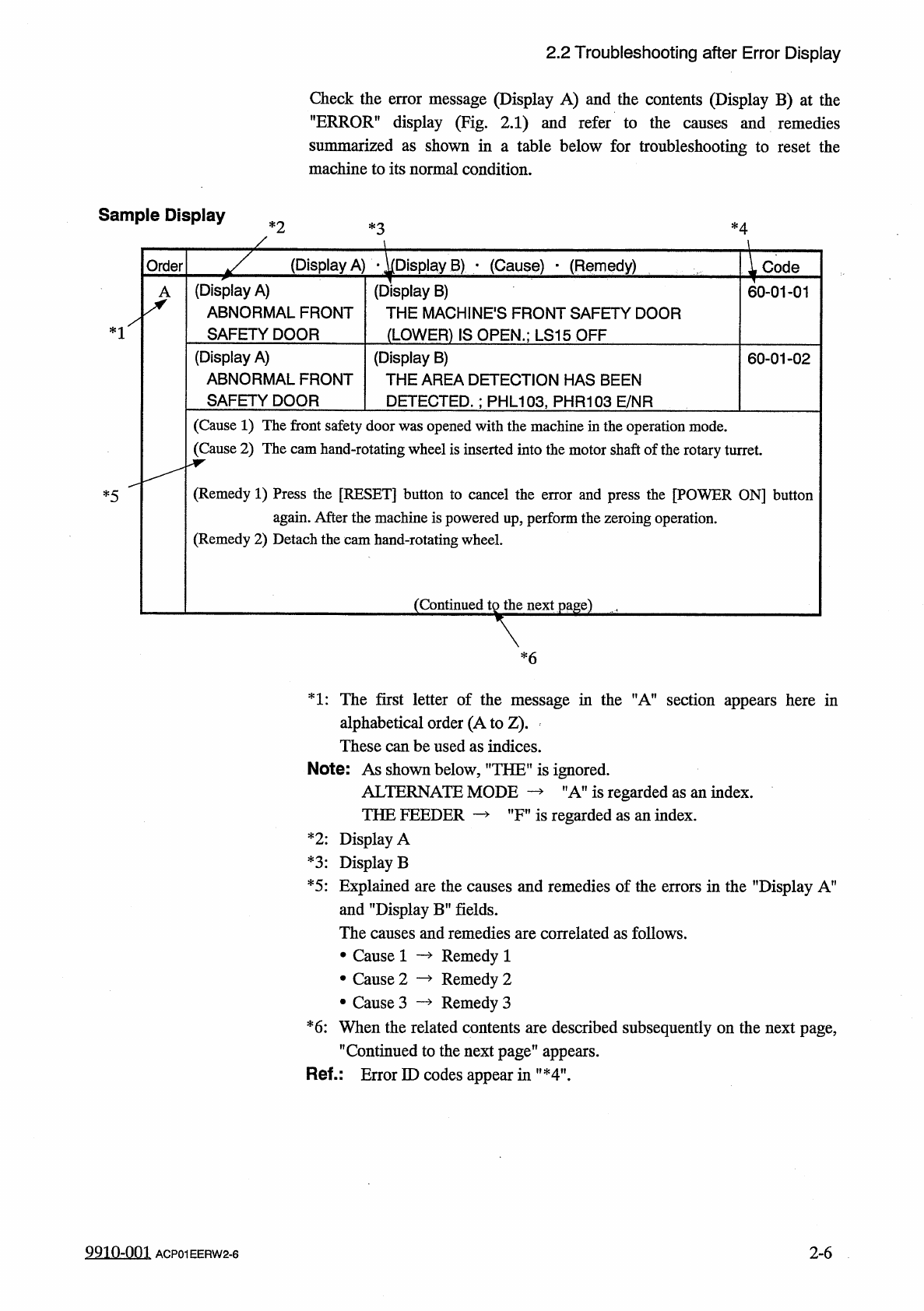
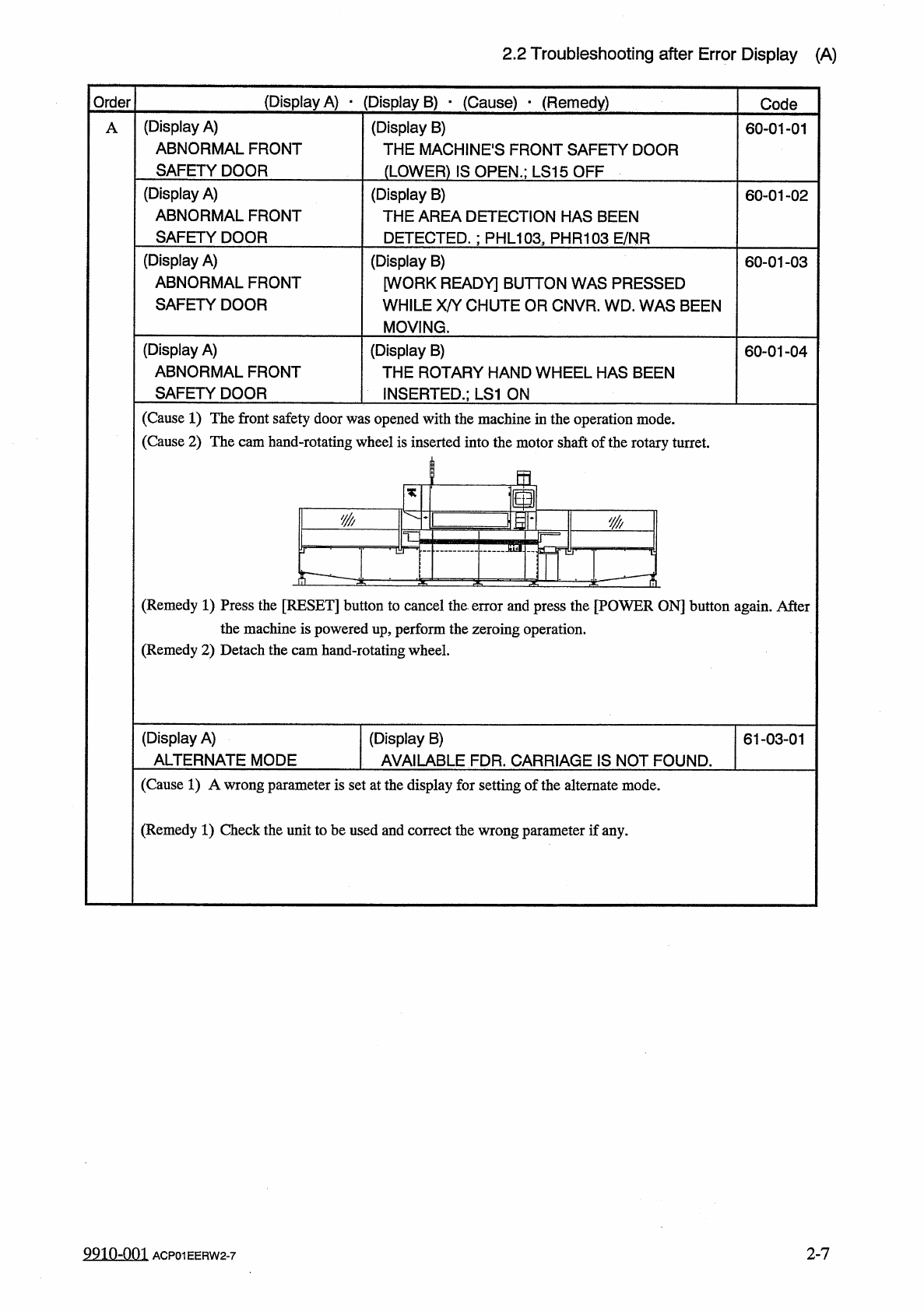
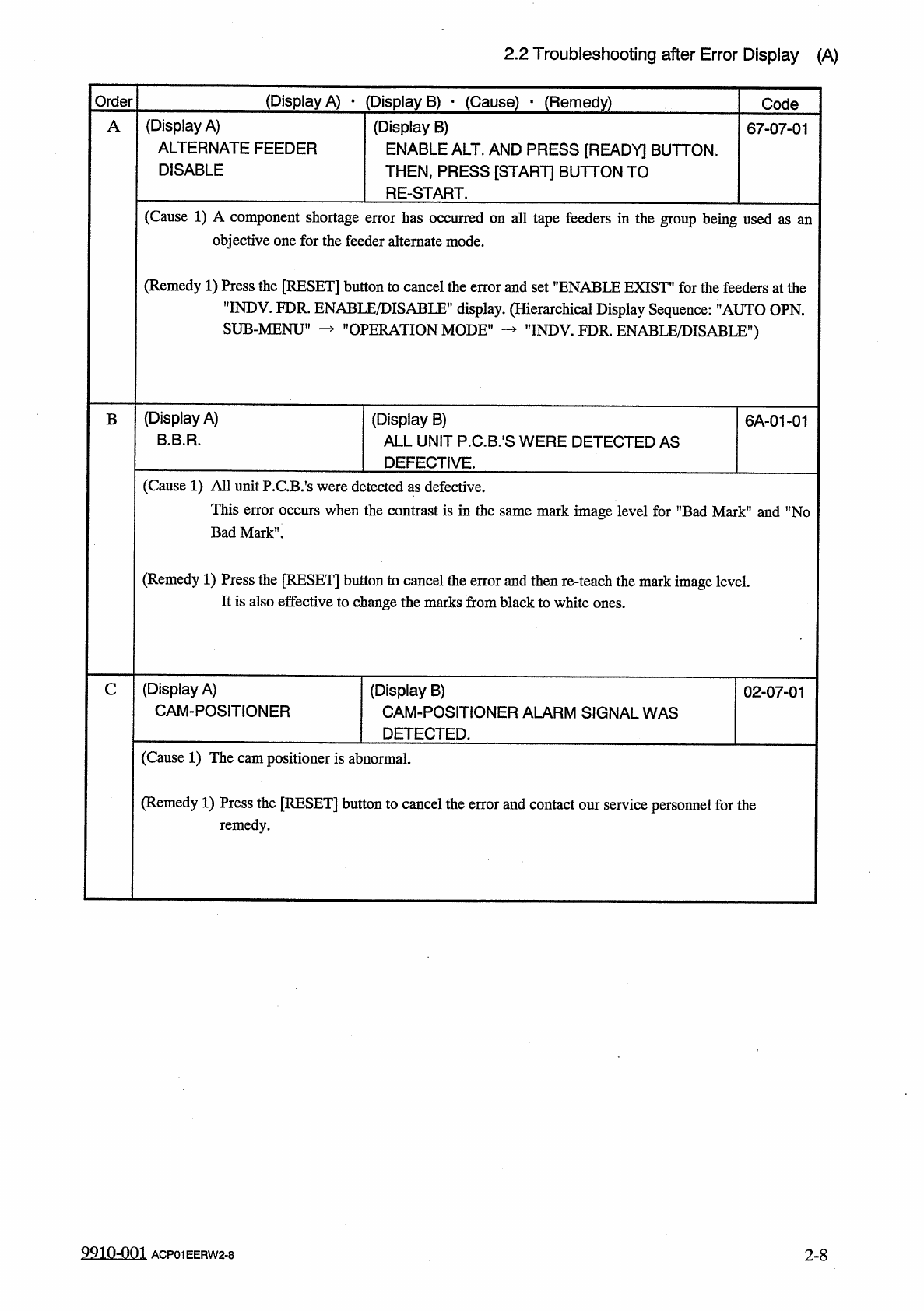
2.2 Troubleshooting after Error Display ( A ) ( Display A ) • ( Display B ) • ( Cause ) • ( Remedy ) Order Code ( Display A ) ABNORMAL FRONT SAFETY DOOR ( Display B ) THE MACHINES FRONT SAFETY DOOR ( LOWER ) IS OPEN . ; …
2.2
Troubleshooting
after
Error
Display
Check
the
error
message
(
Display
A
)
and
the
contents
(
Display
B
)
at
the
"
ERROR
”
display
(
Fig
.
2.1
)
and
refer
to
the
causes
and
remedies
summarized
as
shown
in
a
table
below
for
troubleshooting
to
reset
the
machine
to
its
normal
condition
.
Sample
Display
*
2
*
4
*
3
(
Display
A
)
•
^
Display
B
)
■
(
Cause
)
-
(
Remedy
)
Order
Code
(
Display
A
)
ABNORMAL
FRONT
SAFETY
DOOR
(
Display
B
)
THE
MACHINES
FRONT
SAFETY
DOOR
(
LOWER
)
IS
OPEN
.
;
LS
15
OFF
60
-
01
-
01
*
1
(
Display
A
)
ABNORMAL
FRONT
SAFETY
DOOR
(
Display
B
)
THE
AREA
DETECTION
HAS
BEEN
DETECTED
.
:
PHL
103
,
PHR
103
E
/
NR
60
-
01
-
02
(
Cause
1
)
The
front
safety
door
was
opened
with
the
machine
in
the
operation
mode
.
(
Cause
2
)
The
cam
hand
-
rotating
wheel
is
inserted
into
the
motor
shaft
of
the
rotary
turret
.
(
Remedy
1
)
Press
the
[
RESET
]
button
to
cancel
the
error
and
press
the
[
POWER
ON
]
button
again
.
After
the
machine
is
powered
up
,
perform
the
zeroing
operation
.
(
Remedy
2
)
Detach
the
cam
hand
-
rotating
wheel
.
*
5
(
Continued
tg
the
next
page
)
,
*
6
1
:
The
first
letter
of
the
message
in
the
"
A
”
section
appears
here
in
alphabetical
order
(
A
to
Z
)
.
These
can
be
used
as
indices
.
Note
:
As
shown
below
,
”
THEU
is
ignored
.
ALTERNATE
MODE
THE
FEEDER
—
"
A
”
is
regarded
as
an
index
.
"
Fn
is
regarded
as
an
index
.
*
2
:
Display
A
*
3
:
Display
B
*
5
:
Explained
are
the
causes
and
remedies
of
the
errors
in
the
"
Display
A
”
and
"
Display
B
”
fields
.
The
causes
and
remedies
are
correlated
as
follows
.
Remedy
1
Remedy
2
Remedy
3
*
6
:
When
the
related
contents
are
described
subsequently
on
the
next
page
,
,
f
Continued
to
the
next
page
"
appears
.
Ref
-
:
Error
ID
codes
appear
in
"
*
4
"
.
•
Cause
1
•
Cause
2
•
Cause
3
99
in
-
nm
2
-
6
ACP
01
EERW
2
-
6
2.2
Troubleshooting
after
Error
Display
(
A
)
(
Display
A
)
•
(
Display
B
)
•
(
Cause
)
•
(
Remedy
)
Order
Code
(
Display
A
)
ABNORMAL
FRONT
SAFETY
DOOR
(
Display
B
)
THE
MACHINES
FRONT
SAFETY
DOOR
(
LOWER
)
IS
OPEN
.
;
LS
15
OFF
A
60
-
01
-
01
(
Display
A
)
ABNORMAL
FRONT
SAFETY
DOOR
(
Display
B
)
THE
AREA
DETECTION
HAS
BEEN
DETECTED
.
:
PHL
103
,
PHR
103
E
/
NR
60
-
01
-
02
(
Display
A
)
ABNORMAL
FRONT
SAFETY
DOOR
(
Display
B
)
[
WORK
READY
]
BUTTON
WAS
PRESSED
WHILE
X
/
Y
CHUTE
OR
CNVR
.
WD
.
WAS
BEEN
MOVING
.
60
-
01
-
03
(
Display
A
)
ABNORMAL
FRONT
SAFETY
DOOR
(
Display
B
)
THE
ROTARY
HAND
WHEEL
HAS
BEEN
INSERTED
.
;
LS
1
ON
60
-
01
-
04
(
Cause
1
)
The
front
safety
door
was
opened
with
the
machine
in
the
operation
mode
.
(
Cause
2
)
The
cam
hand
-
rotating
wheel
is
inserted
into
the
motor
shaft
of
the
rotary
turret
.
m
皇
10
里
y
^
-
(
Remedy
1
)
Press
the
[
RESET
]
button
to
cancel
the
error
and
press
the
[
POWER
ON
]
button
again
.
After
the
machine
is
powered
up
,
perform
the
zeroing
operation
.
(
Remedy
2
)
Detach
the
cam
hand
-
rotating
wheel
.
(
Display
A
)
ALTERNATE
MODE
(
Display
B
)
AVAILABLE
FDR
.
CARRIAGE
IS
NOT
FOUND
.
61
-
03
-
01
(
Cause
1
)
A
wrong
parameter
is
set
at
the
display
for
setting
of
the
alternate
mode
.
(
Remedy
1
)
Check
the
unit
to
be
used
and
correct
the
wrong
parameter
if
any
.
9910
-
001
ACP
01
EERW
2
-
7
2
-
7
2.2
Troubleshooting
after
Error
Display
(
A
)
(
Display
A
)
•
(
Display
B
)
•
(
Cause
)
-
(
Remedy
)
Order
Code
(
Display
A
)
ALTERNATE
FEEDER
DISABLE
(
Display
B
)
ENABLE
ALT
.
AND
PRESS
[
READY
]
BUTTON
.
THEN
,
PRESS
[
START
]
BUTTON
TO
RE
-
START
.
A
67
-
07
-
01
(
Cause
1
)
A
component
shortage
error
has
occurred
on
all
tape
feeders
in
the
group
being
used
objective
one
for
the
feeder
alternate
mode
.
as
an
(
Remedy
1
)
Press
the
[
RESET
]
button
to
cancel
the
error
and
set
”
ENABLE
EXIST
"
for
the
feeders
at
the
"
INDV
.
FDR
.
ENABLE
/
DISABLE
”
display
.
(
Hierarchical
Display
Sequence
:
'
’
AUTO
OPN
.
SUB
-
MENU
1
’
OPERATION
MODE
"
rINDV
.
FDR
.
ENABLE
/
DISABLE
”
)
(
Display
A
)
B
.
B
.
R
.
(
Display
B
)
ALL
UNIT
P
.
C
.
B
/
S
WERE
DETECTED
AS
DEFECTIVE
.
6
A
-
01
-
01
B
(
Cause
1
)
All
unit
P
.
CB
/
s
were
detected
as
defective
.
This
error
occurs
when
the
contrast
is
in
the
same
mark
image
level
for
"
Bad
Mark
”
and
"
No
Bad
Mark
”
.
(
Remedy
1
)
Press
the
[
RESET
]
button
to
cancel
the
error
and
then
re
-
teach
the
mark
image
level
.
It
is
also
effective
to
change
the
marks
from
black
to
white
ones
.
(
Display
A
)
CAM
-
POSITIONER
C
(
Display
B
)
CAM
-
POSITIONER
ALARM
SIGNAL
WAS
DETECTED
.
02
-
07
-
01
(
Cause
1
)
The
cam
positioner
is
abnormal
.
(
Remedy
1
)
Press
the
[
RESET
]
button
to
cancel
the
error
and
contact
our
service
personnel
for
the
remedy
.
9910
-
001
2
-
8
ACP
01
EERW
2
-
8