5TROUBLESHOOTING_.pdf - 第129页
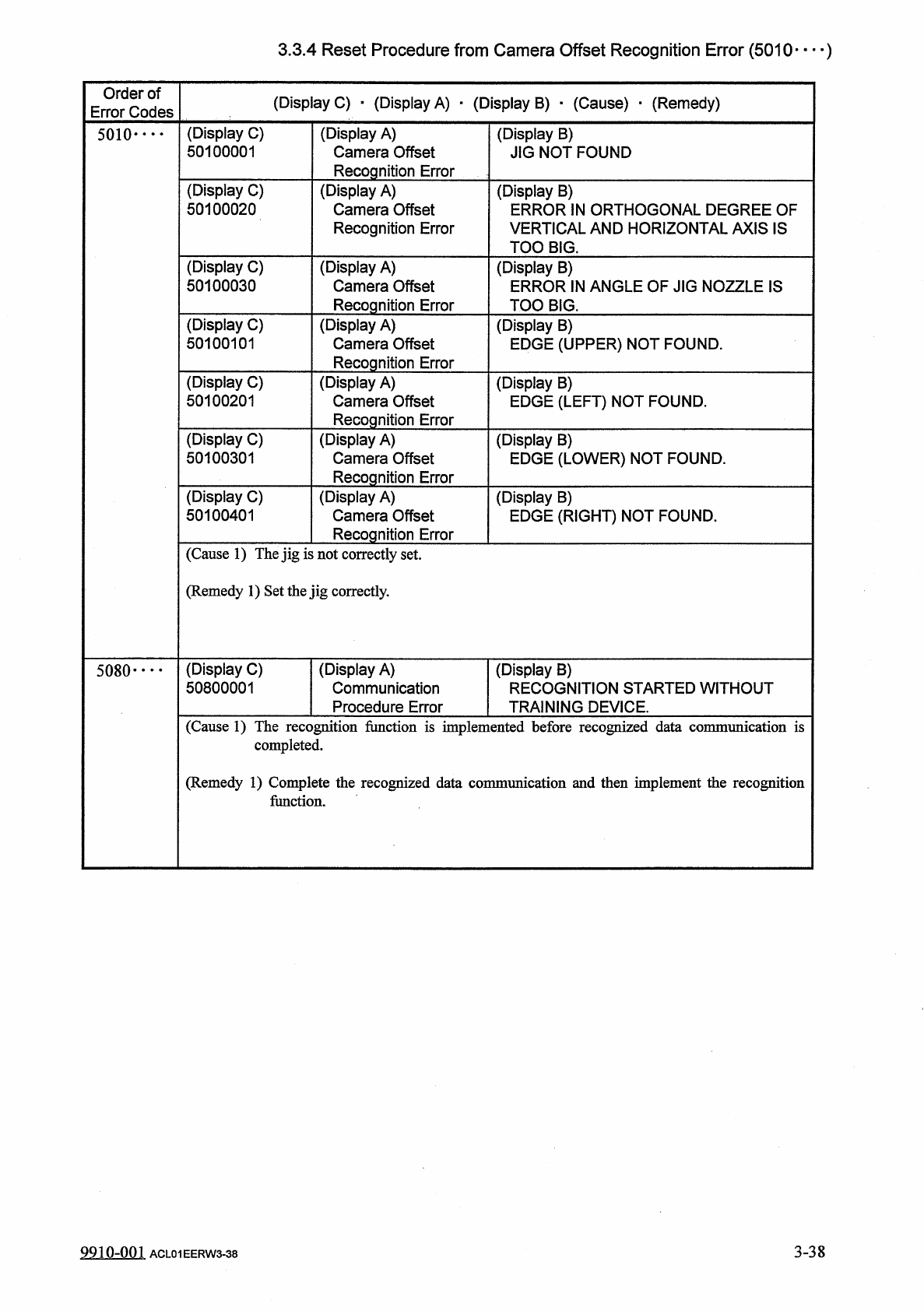
3.3 . 4 Reset Procedure from Camera Offset Recognition Error ( 5010 — ) Order of Error Codes ( Display C ) - ( Display A ) - ( Display B ) • ( Cause ) • ( Remedy ) ( Display C ) 50100001 ( Display A ) Camera Offset Recog…
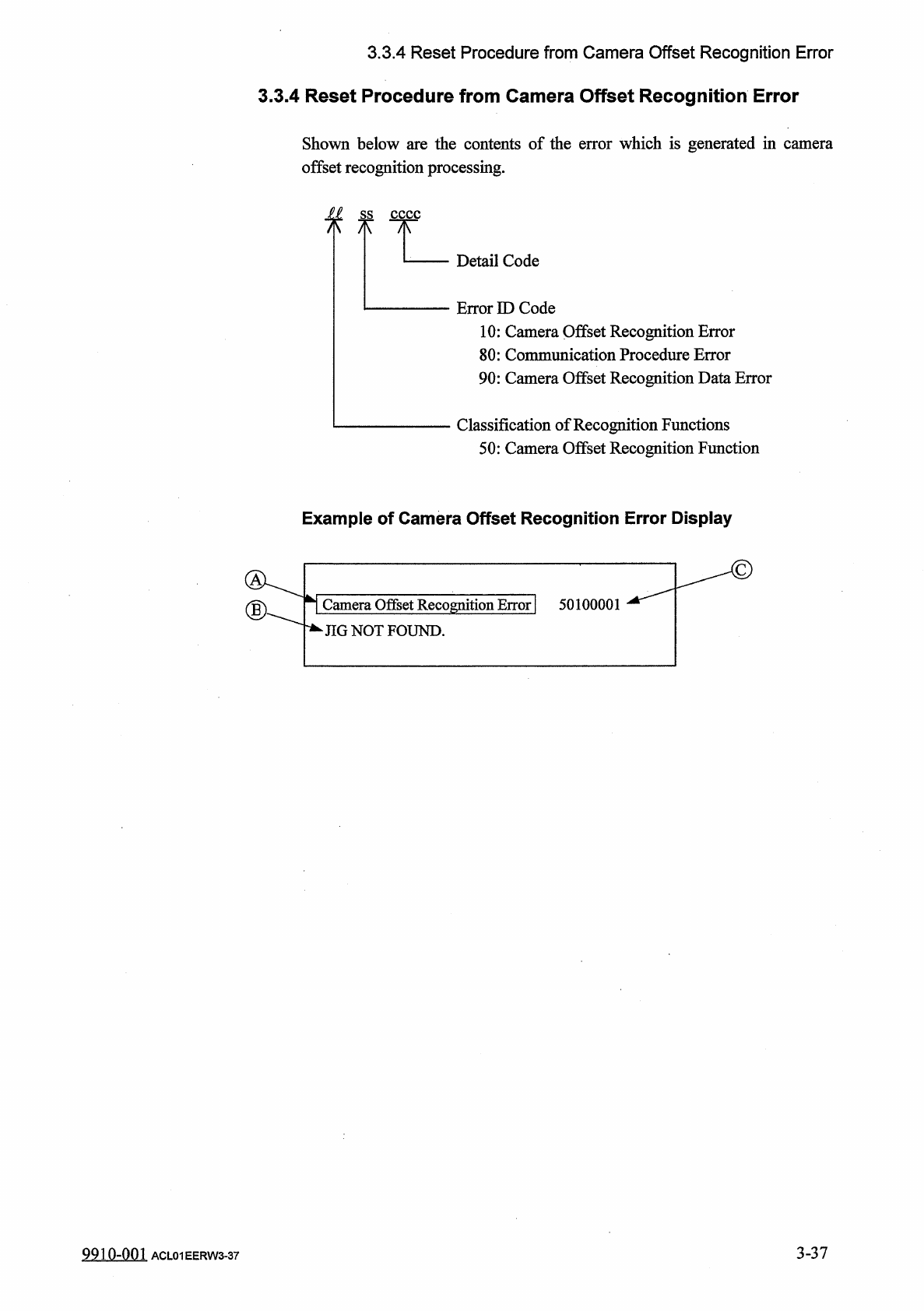
3.3
.
4
Reset
Procedure
from
Camera
Offset
Recognition
Error
3.3
.
4
Reset
Procedure
from
Camera
Offset
Recognition
Error
Shown
below
are
the
contents
of
the
error
which
is
generated
in
camera
offset
recognition
processing
.
jl
Detail
Code
Error
ED
Code
10
:
Camera
Offset
Recognition
Error
80
:
Communication
Procedure
Error
90
:
Camera
Offset
Recognition
Data
Error
Classification
of
Recognition
Functions
50
:
Camera
Offset
Recognition
Function
Example
of
Camera
Offset
Recognition
Error
Display
Camera
Offset
Recognition
Eiror
]
50100001
■
JIG
NOT
FOUND
.
3
-
37
9910
-
001
ACL
01
EERW
3
-
37
3.3
.
4
Reset
Procedure
from
Camera
Offset
Recognition
Error
(
5010
—
)
Order
of
Error
Codes
(
Display
C
)
-
(
Display
A
)
-
(
Display
B
)
•
(
Cause
)
•
(
Remedy
)
(
Display
C
)
50100001
(
Display
A
)
Camera
Offset
Recognition
Error
(
Display
B
)
JIG
NOT
FOUND
5010
•
…
(
Display
C
)
50100020
(
Display
A
)
Camera
Offset
Recognition
Error
(
Display
B
)
ERROR
IN
ORTHOGONAL
DEGREE
OF
VERTICAL
AND
HORIZONTAL
AXIS
IS
TOO
BIG
.
(
Display
C
)
50100030
(
Display
A
)
Camera
Offset
Recognition
Error
(
Display
B
)
ERROR
IN
ANGLE
OF
JIG
NOZZLE
IS
TOO
BIG
.
(
Display
C
)
50100101
(
Display
A
)
Camera
Offset
Recognition
Error
(
Display
B
)
EDGE
(
UPPER
)
NOT
FOUND
.
(
Display
C
)
50100201
(
Display
A
)
Camera
Offset
Recognition
Error
(
Display
A
)
Camera
Offset
(
Display
B
)
EDGE
(
LEFT
)
NOT
FOUND
.
(
Display
C
)
50100301
(
Display
B
)
EDGE
(
LOWER
)
NOT
FOUND
.
Recognition
Error
(
Display
C
)
50100401
(
Display
A
)
Camera
Offset
(
Display
B
)
EDGE
(
RIGHT
)
NOT
FOUND
.
Recognition
Error
(
Cause
1
)
The
jig
is
not
correctly
set
.
(
Remedy
1
)
Set
the
jig
correctly
.
(
Display
C
)
50800001
(
Display
A
)
Communication
Procedure
Error
(
Display
B
)
RECOGNITION
STARTED
WITHOUT
TRAINING
DEVICE
.
5080
•
…
(
Cause
1
)
The
recognition
function
is
implemented
before
recognized
data
communication
is
completed
.
(
Remedy
1
)
Complete
the
recognized
data
communication
and
then
implement
the
recognition
function
.
3
-
38
9910
-
001
ACL
01
EERW
3
-
38
3.3
.
4
Reset
Procedure
from
Camera
Offset
Recognition
Error
(
5090
)
Order
of
Error
Codes
(
Display
C
)
■
(
Display
A
)
■
(
Display
B
)
•
(
Cause
)
_
(
Remedy
)
(
Display
C
)
50900001
(
Display
A
)
Camera
Offset
Recognition
Data
Error
(
Display
B
)
"
JIG
SIZE
X
"
EXCEEDS
THE
RANGE
OF
SETTING
.
5090
•
…
(
Display
C
)
50900002
(
Display
A
)
Camera
Offset
Recognition
Data
Error
(
Display
B
)
"
JIG
SIZE
Y
"
EXCEEDS
THE
RANGE
OF
SETTING
.
(
Display
C
)
50900003
(
Display
A
)
Camera
Offset
Recognition
Data
Error
(
Display
B
)
"
JIG
WIRE
WIDTH
"
EXCEEDS
THE
RANGE
OF
SETTING
.
(
Display
C
)
50900004
(
Display
A
)
Camera
Offset
Recognition
Data
Error
(
Display
B
)
nJIG
EXTERNAL
SHAPE
"
EXCEEDS
THE
RANGE
OF
SETTING
.
(
Cause
1
)
The
X
/
Y
data
of
the
jig
P
.
C
.
B
.
exceeds
the
range
of
setting
.
(
Remedy
1
)
Correct
the
X
/
Y
data
.
9910
-
001
ACL
01
EERW
3
-
39
3
-
39