00194932-20 User Manual CAN Test Box-Error Frame Diagnostic unit_en.pdf - 第31页
1 - 31 Edition 10/2 018 SIPLACE CAN Bus 31 Independent of the machine type, each mach ine has one CAN Bus fo r each placement area. This CAN Bus can be disconnect at a adequate point and the CAN switch will be connect in…
1 - 30
SIPLACE CAN Bus Edition 10/2018
30
3.2 Function description
With the Siplace CAN Test Box we are able to recognize Error Frames on the machine CAN Bus.
The Error Frame will be shown on the display of the CAN Test Box. All subsystems of the machine
could send Error Frames, so it is helpful to know from which subsystem the Error frame comes.
With the Error Frame Diagnostic unit it is possible to determine the direction of the Error Frames.
The CAN Switch will be split into two independent working CAN Bus networks.
The CAN commands will received on one side of the CAN Switch and forwarded to the other side.
The direction of communication is irrelevant. As long as the received CAN commands are not phy-
sically corrupted an green LED on each side of the CAN switch is activated. If one or more Error
Frames (depend of the dip-switch settings) are received, a red LED, left or right of the CAN switch
will show the direction of the incoming Error frames.
Note:
The transfer of CAN commands inside the CAN switch have a delay time of 150µs. When the CAN
Switch receive and transfer CAN commands from both sides, a delay time over 150µs may occur.
The result could be waiting times and reduction of the placement rate.
So therefore, please use the Service tool only for troubleshoting and remove the CAN Switch from
the machine CAN Bus after troubleshoting.
Exception for the second WPC on the SIPLACE SX2 machine and X- Series S machine only. On
the X-Series S machine we reduce the lenght of the CAN Bus cable with the CAN Switch to avoid
Error Frames, so the conveyor control unit and stationary cameras in PA 1 are disconnected from
the machine CAN Bus).
Principle: 3
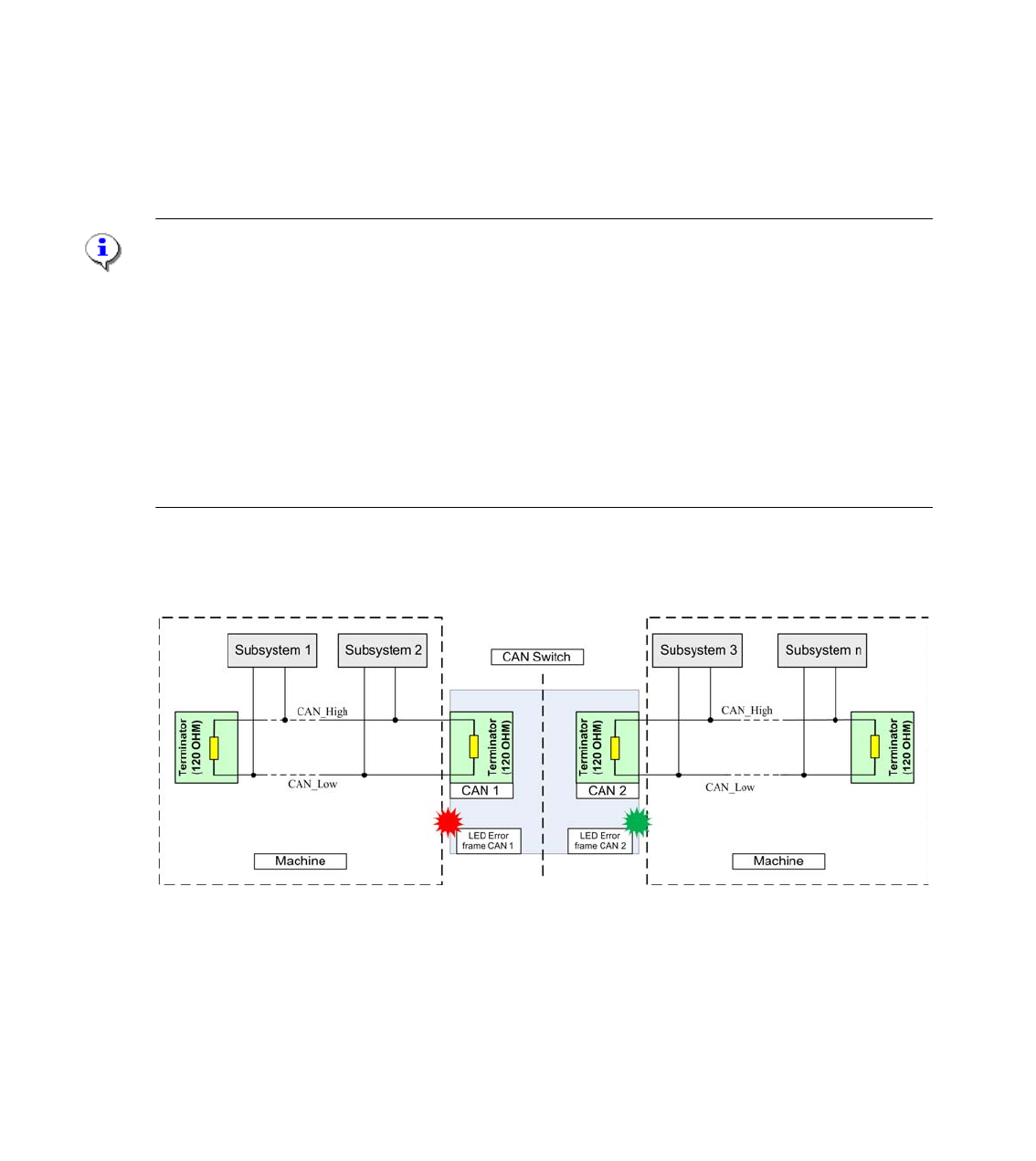
Fig. 3.2 - 1 Function prinziple CAN Switch
1 - 31
Edition 10/2018 SIPLACE CAN Bus
31
Independent of the machine type, each machine has one CAN Bus for each placement area.
This CAN Bus can be disconnect at a adequate point and the CAN switch will be connect in se-
ries. Therefore two independet CAN Bus systems are established. The structur of the CAN Bus
are described in chapter 4 as flow chart and circuit diagram.
If one or more Error frames are received the LED will be red (see red dot in the picture above).
The result is, that the Error Frames comes from the subsystem 1 or 2.
The next step could be to install the CAN Switch between subsysteme 1 and 2. Additionally you
have to check the CAN Bus-cable, whether there is no short cut or other bad connection.To elimi-
nate defect CAN Bus cable you can use CAN test cable.
Note:
The new eSW (GATWAY_0011000A.bhx) on the CAN Switch is necessary to work with the SX
machine and two WPC‘s. With this eSW the initialize procedure of the CAN Switch has a delay
time of 10sec. So therefore you have to wait 10seconds after switch ON the CAN switch before
you start with your Servicework.
3.2.1 Adapter cable CAN switch
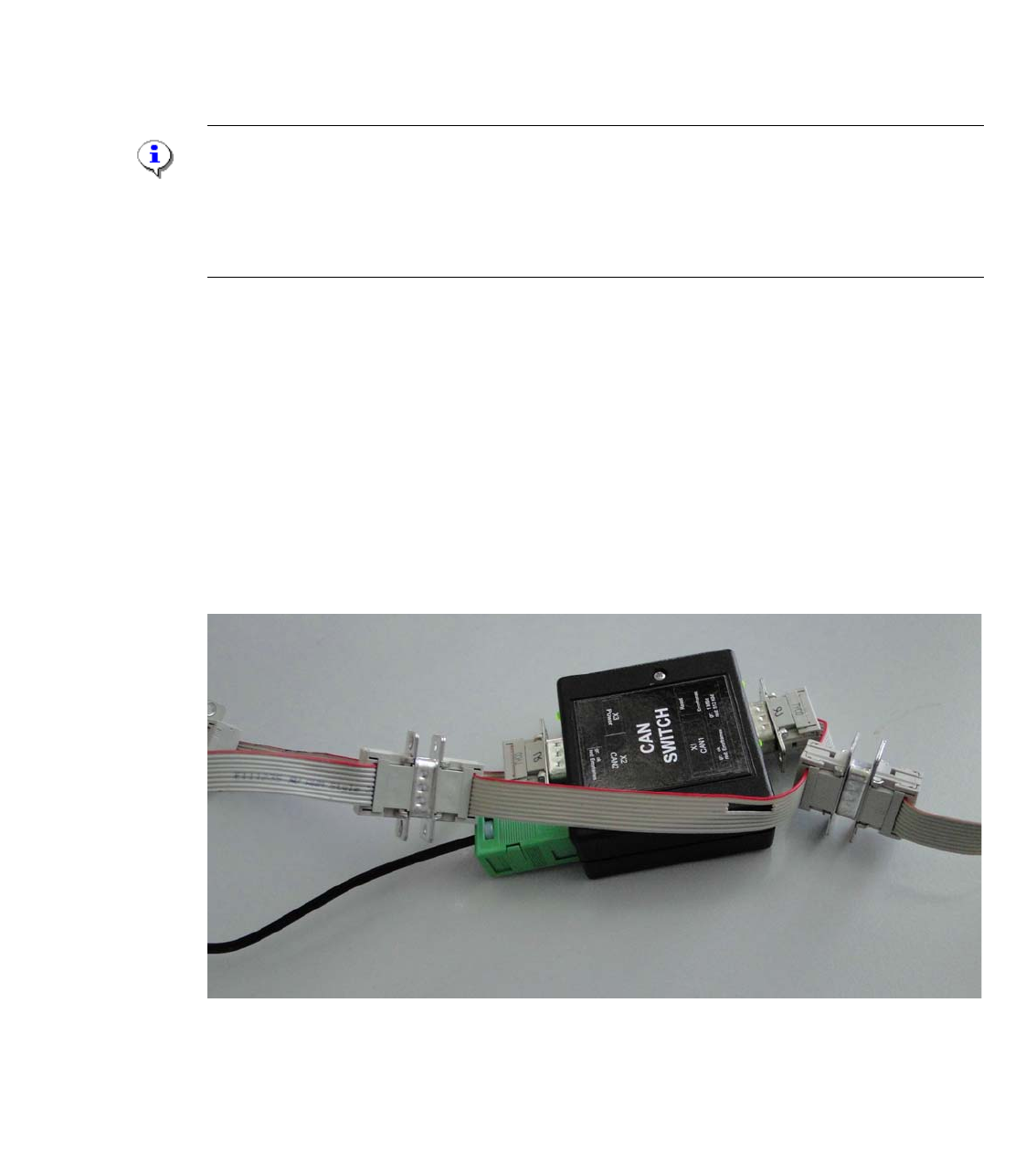
For older machine like the HS50,60, D4, HF and partly for X-series machines the adaptercable is
necessary to transfer the additional signals Power fail, CAN Reset and the 1-wire Bus, which are
integrated in the CAN Bus cable. When we cut the machine CAN Bus into two parts with the CAN
switch box the connection of this signals will be destroyed. Because the CAN switch box transfer
CAN_H and CAN_L signals only.
The adapter cable have to connected for this machine between CAN 1 and CAN 2 of the CAN
switch box. (see picture)
Fig. 3.2 - 2 Adapter cable for the CAN Switch Box
1 - 32
SIPLACE CAN Bus Edition 10/2018
32
3.3 Description and settings
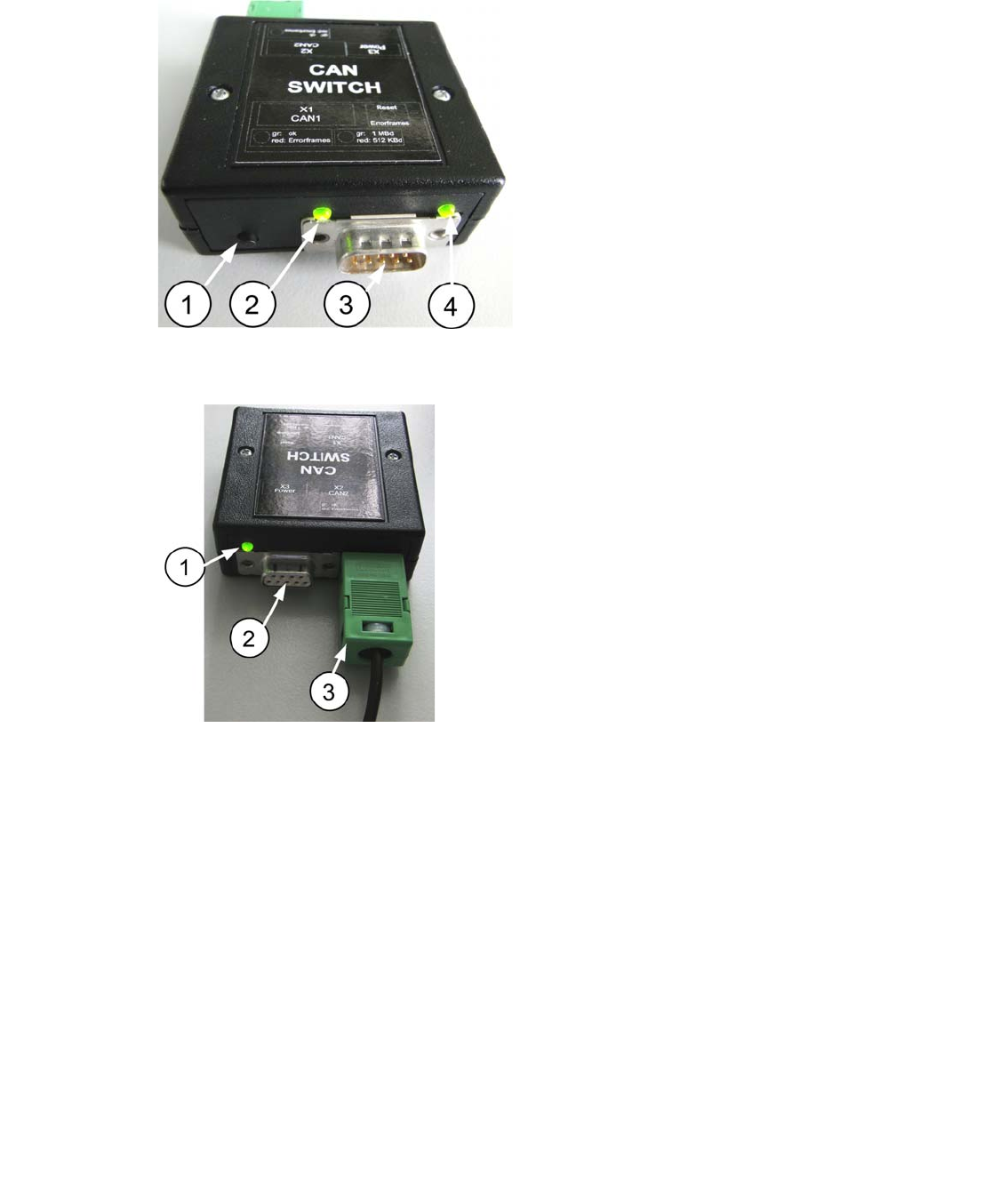
Fig. 3.3 - 1 Description CAN 1
Fig. 3.3 - 2 Description CAN 2
1. RESET - button, to reset the red LED on
both side CAN 1 and CAN 2 of the CAN
switch
2. LED GREEN Baud rate 500kBit/1MBit
depend on the DIP-Switch setting S1.2
3. Connector CAN Bus cable CAN 1
4. LED Green/Red for CAN 1
Data transfer OK - Green
Error Frames received - Red
1. LED Green/Red for CAN 2
Data transfer OK - Green
Error Frames received - Red
2. Connector CAN Bus cable CAN 2
3. Connector power supply 24V DC