TM3355.CheckNozzleBuffingFunctionSpecifications.pdf - 第14页
Y AMAHA M otor Co. Ltd ., IM Company SMT Software Engineering Grou p MDOC-SOFT50 052 14 /27 Executive Condition Execute ti ming None Not execute. Po w e r ON Immed iately af ter the fi rst retur n-to-or igin afte r…
YAMAHA Motor Co. Ltd.,
IM Company
SMT Software Engineering Group
MDOC-SOFT50052
13/27
5. Schedule specification
The nozzle buffing check function can be executed by schedule specification with V3.28STD
R1.000 or later.
Executing a nozzle buffing check periodically by schedule specification, you can avoid missing
the work and maintain the nozzles efficiently.
5.1. Setting method
Set [Setting] - [Specification Information] - [Schedule Specification] to execute a nozzle buffing
check by schedule specification.
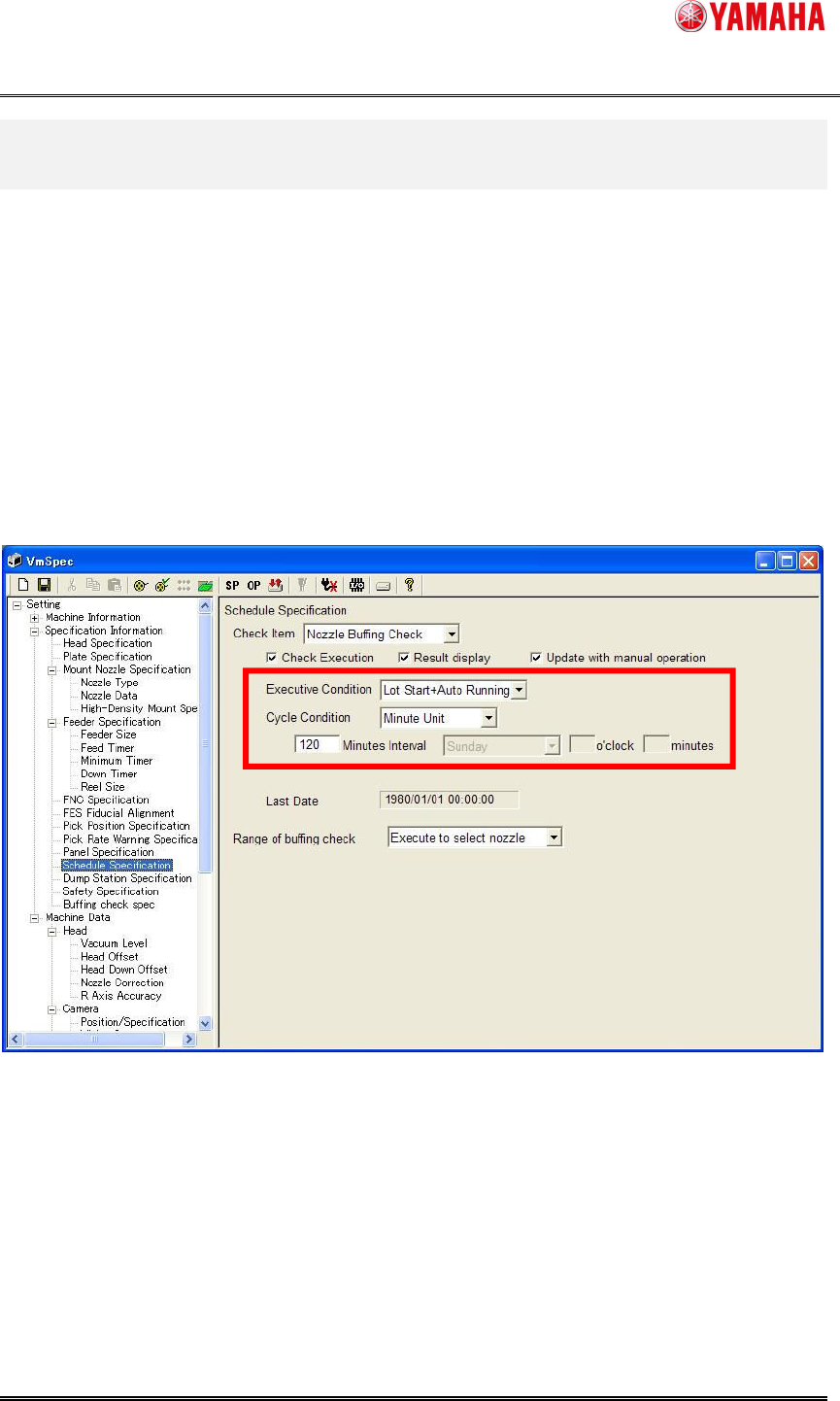
Fig. 5.1 Schedule Specification setting
(1) Select [Nozzle Buffing Check] from the [Check Item] combo-box.
(2) Check the [Check Execution] check box.
(3) Select [Executive Condition] and [Cycle Condition].
(1)
(2)
(3)
(4)
YAMAHA Motor Co. Ltd.,
IM Company
SMT Software Engineering Group
MDOC-SOFT50052
14/27
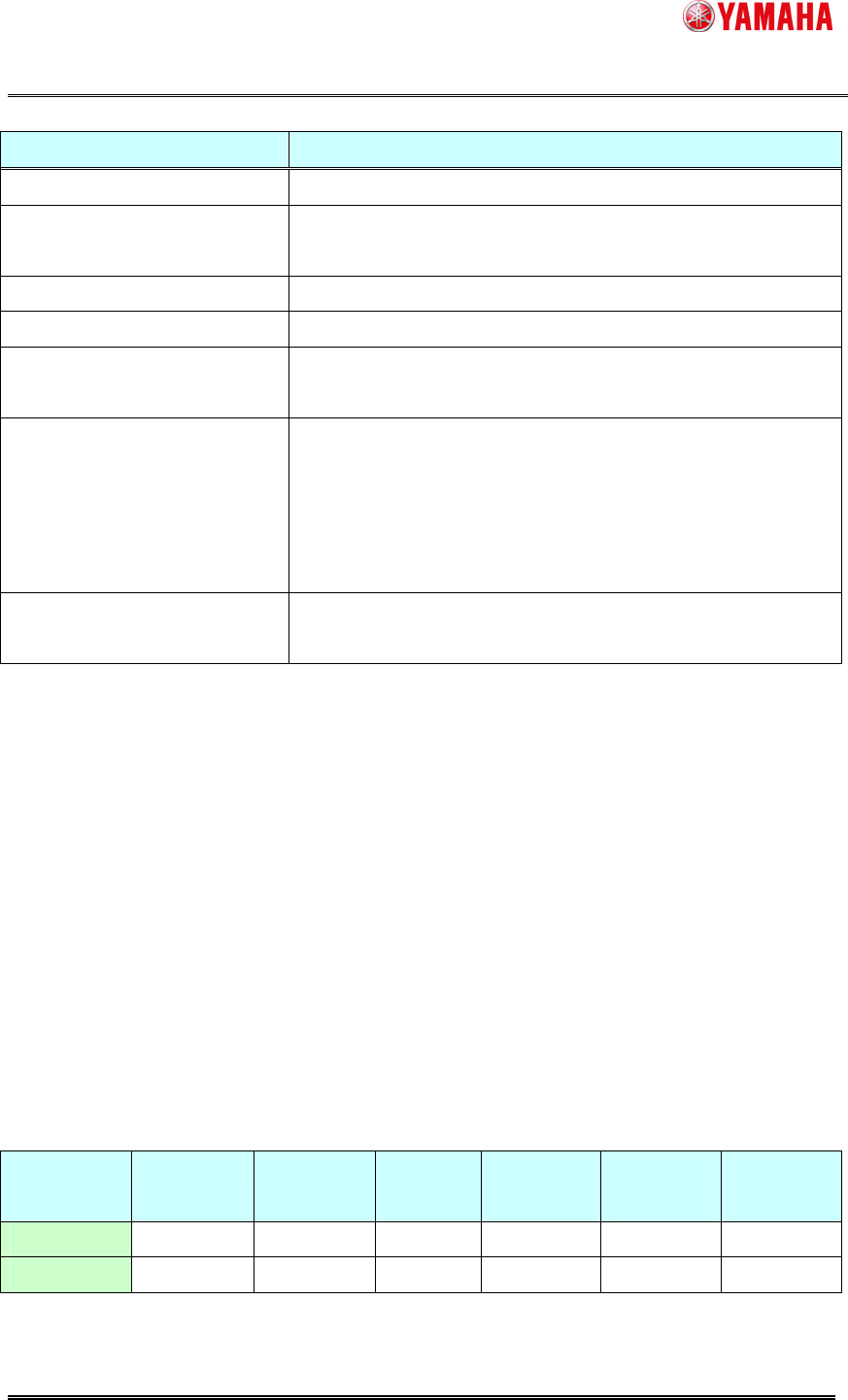
Executive Condition Execute timing
None Not execute.
Power ON
Immediatelyafterthe first return-to-originafterthe
powerONofmachine.
Power OFF
Immediatelyafterclickingthe[PowerOFF]button.
Reset
Afterthecompletionofreset.
Start Run
Immediately after pushing the [START] button on the
operationpanel.
Lot Start + Auto Running
-Atthetimeofthefirstauto-runningstartafterthe
powerON.
-Whenaboardischanged.
-Whenaboardiscarriedoutpassingthetimeof[Cycle
Condition].
Only During Auto Running
Whenaboardiscarriedoutpassingthetimeof[Cycle
Condition].
For [Cycle Condition], select any of [Minute Unit], [Every Day], or [Every Week] .
When you select [Every Day] or [Every Week], you need to set a cycle time.
(4) Select a range of nozzle buffing check execute.
[Execute all]
This can be selected only for a machine with an effective nozzle station.
Executes a buffing check for nozzles with “AutoNzlChg” selected on [VmSpec] - [Machine
Data] - [Head] – [Head Offset] - [Head Type]
[Select nozzle]
This can be selected for a machine with/without an effective nozzle station.
When a nozzle station is not effective, select this item.
Executes a buffing check for all nozzles used for loaded board data.
Executionproprietyofexecutivecondition
Power ON Power OFF Reset Start Run
Lot Start +
Auto Running
Only Auto
Running
Executeall O O O O O O
Selectnozzle
X X X O(*) O O
(*) Executed only with board data loaded.

YAMAHA Motor Co. Ltd.,
IM Company
SMT Software Engineering Group
MDOC-SOFT50052
15/27
5.2. Result of Checking
An execution result can be checked after a nozzle buffing check by schedule specification as well
as after [Unit] - [Head] - [Buffing Check] executed.
Please refer to "4.2. Result of Checking" for details of the execution result of nozzle buffing
check.
When the nozzle buffing check by schedule specification doesn’t detect any abnormality, no
message is displayed.
With [Setting] - [Specification Information] - [Schedule Specification] - [Executive Condition] set to
“Lot Start + Auto Running” or “Only Auto Running”, when an abnormal nozzle buffing is detected
during auto-running, the machine stops and you can maintain the nozzle.
Auto-running is continued if any abnormality is not detected.
5.3. When an abnormal nozzle is detected
When an abnormal nozzle is detected by schedule specification nozzle buffing check, please
check the nozzle again with [Unit] - [Head] - [Buffing Check].
If there is actually no problem, you can start auto-running.
If there is a problem, maintain or exchange the nozzle.