TM3355.CheckNozzleBuffingFunctionSpecifications.pdf - 第9页
Y AMAHA M otor Co. Ltd ., IM Company SMT Software Engineering Grou p MDOC-SOFT50 052 9/27 Click the [E RROR CL E AR] button o n the err or m essage, and the [B uffing check result] dialog is d isplayed. (See Fig. 4. 2.3)…
YAMAHA Motor Co. Ltd.,
IM Company
SMT Software Engineering Group
MDOC-SOFT50052
8/27
4.2. Result of Checking
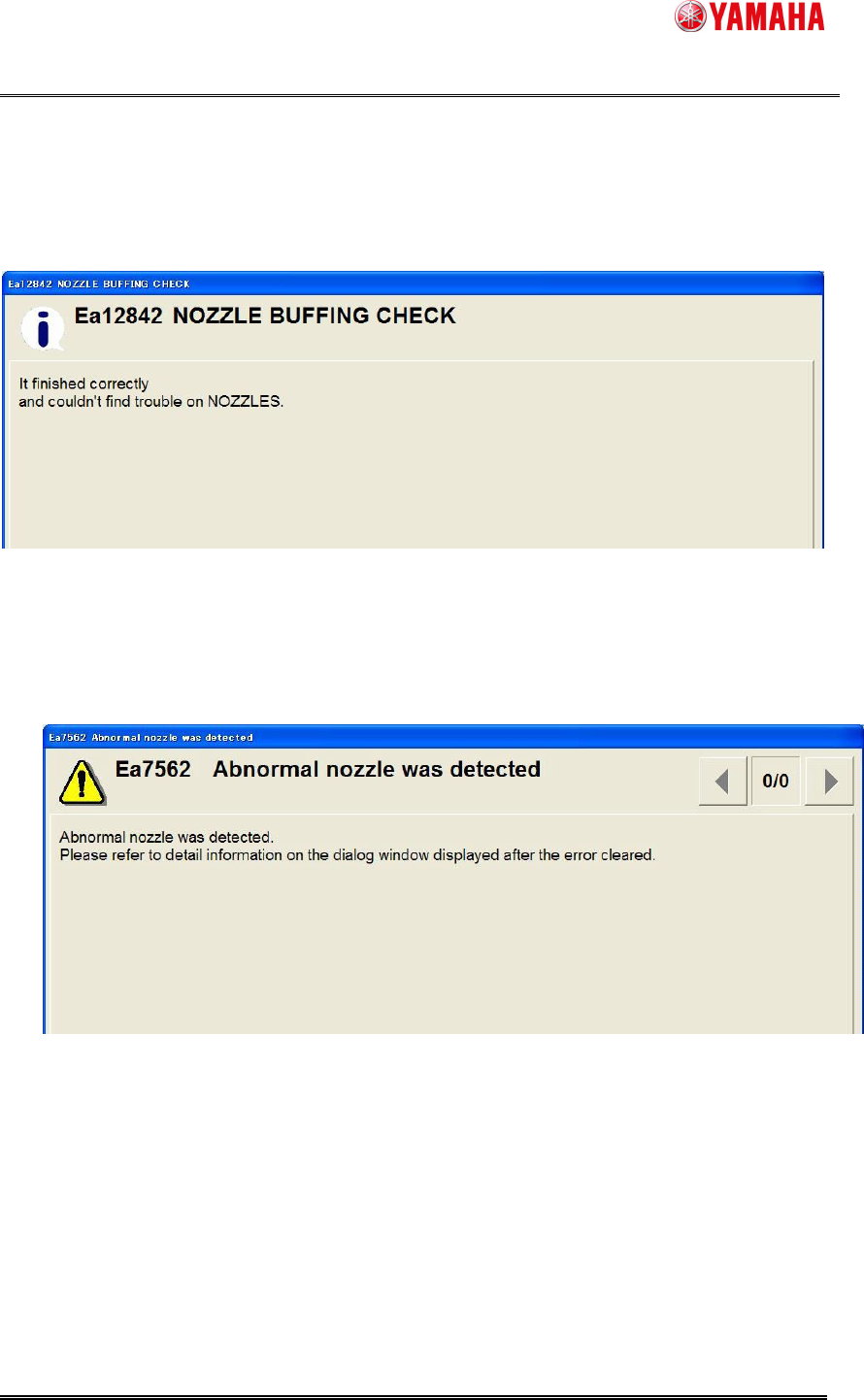
No abnormity found
If no abnormity is found, the following message is displayed. (See Fig. 4.2.1)
This means all checked nozzles have no problem.
Fig. 4.2.1 Nozzle buffing check finished correctly
Abnormity found
If an abnormality is found, the following message is displayed. (See Fig. 4.2.2)
Fig. 4.2.2 Abnormal nozzle was detected
YAMAHA Motor Co. Ltd.,
IM Company
SMT Software Engineering Group
MDOC-SOFT50052
9/27
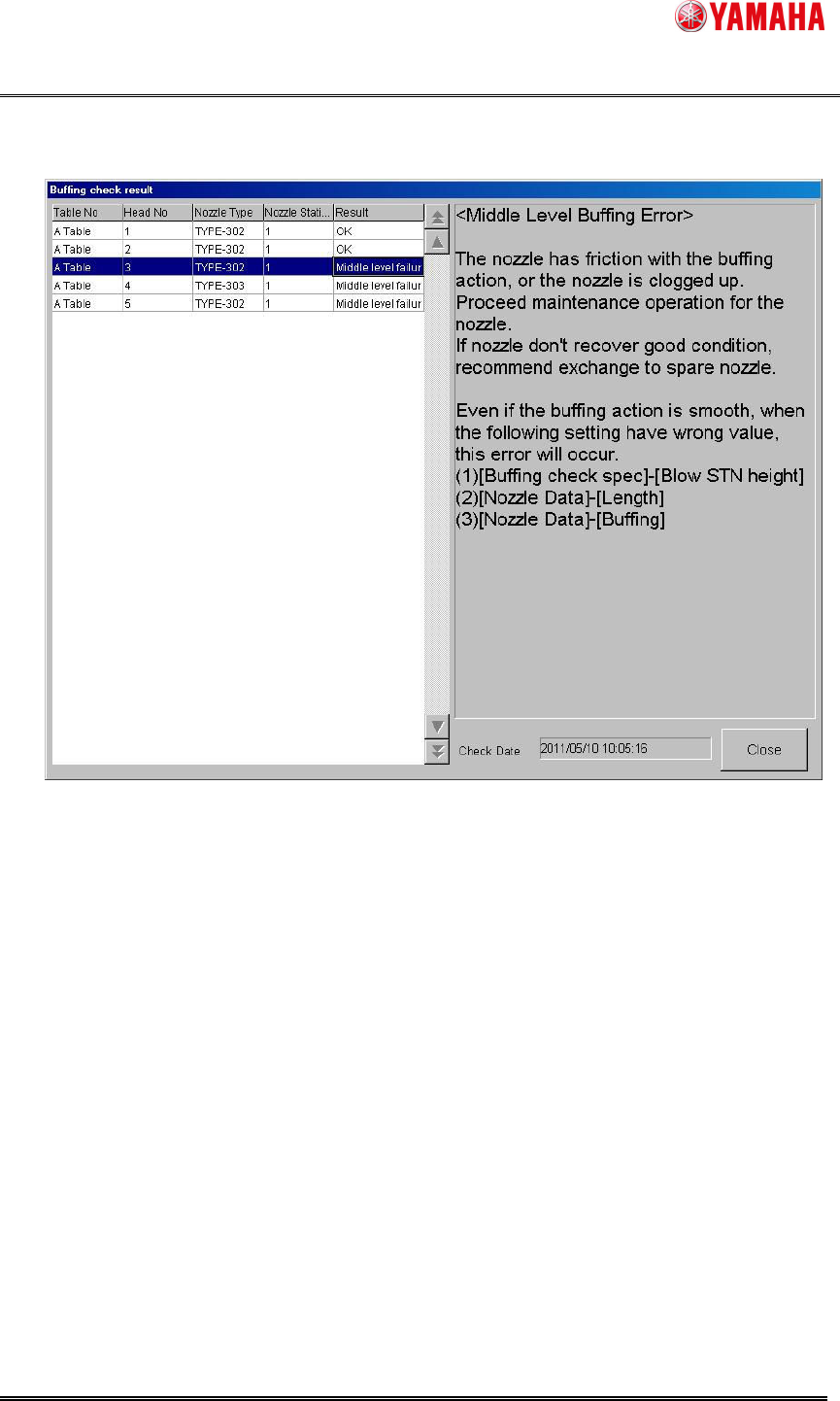
Click the [ERROR CLEAR] button on the error message, and the [Buffing check result]
dialog is displayed. (See Fig. 4.2.3)
Fig. 4.2.3 Buffing check result dialog
On this dialog, you can see the result of nozzle buffing check.
Moreover, since the Nozzle Station shutter is open while displaying this dialog, you can see
the abnormal nozzle condition and exchange it.
[Table No, Head No, Nozzle Type]
Table No, Head No, and Nozzle Type of all nozzles to execute nozzle buffing check
[Nozzle station No]
Nozzle Station Number corresponding to the Table No, Head No, and Nozzle Type
0 is always displayed for a manual nozzle and a stationary nozzle.
[Result]
Result of nozzle buffing check (See Table 4.2.4)
In addition, select a grid, and you can see its detail on the right area on the screen.
When the nozzle buffing check is executed for the head in which the nozzle is not set, it
becomes abnormality.
YAMAHA Motor Co. Ltd.,
IM Company
SMT Software Engineering Group
MDOC-SOFT50052
10/27
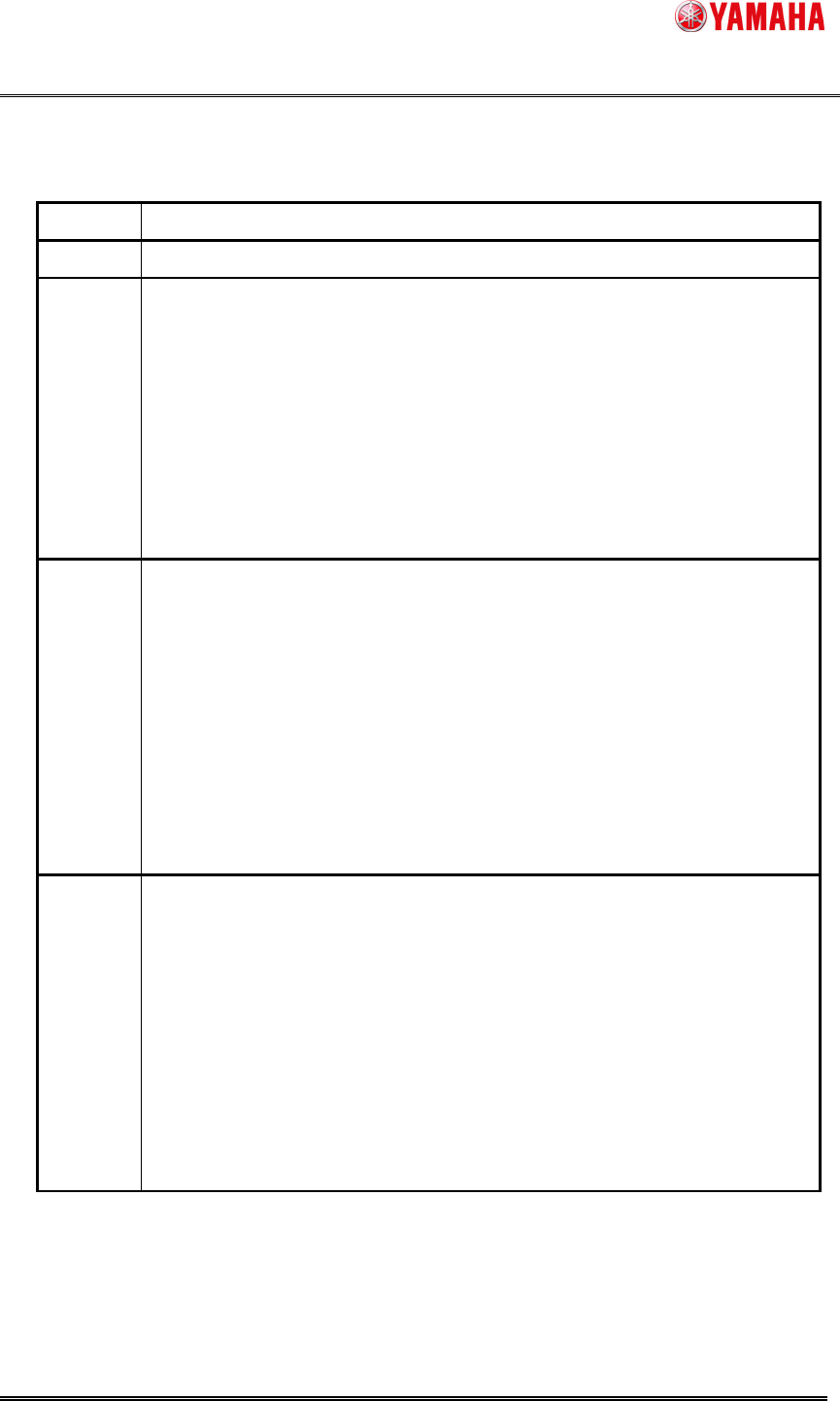
Table 4.2.4 Nozzle buffing check execution result list
Result Details
Correctly
Abnormality was not found in the nozzle buffing.
Low
Level
Buffing
Error
The nozzle has slight friction with the buffing action.
Proceed maintenance operation and confirm whether the buffing action is
smooth.
Even if the buffing action is smooth, when the following setting have wrong
value or it is a different setup from an actual nozzle, this error will occur.
(1)[Buffing check spec]-[Measurement height]
(2)[Nozzle Data]-[Length]
Middle
Level
Buffing
Error
The nozzle has friction with the buffing action, or the nozzle is clogged up.
Proceed maintenance operation for the nozzle.
If nozzle don't recover good condition, recommend exchange to spare nozzle.
Even if the buffing action is smooth, when the following setting have wrong
value or it is a different setup from an actual nozzle, this error will occur.
(1)[Buffing check spec]-[Measurement height]
(2)[Nozzle Data]-[Length]
(3)[Nozzle Data]-[Buffing]
High
Level
Buffing
Error
The nozzle has friction with the buffing action, or the nozzle is clogged up.
Proceed maintenance operation for the nozzle.
If nozzle don't recover good condition, recommend exchange to spare nozzle.
Even if the buffing action is smooth, when the following setting have wrong
value or it is a different setup from an actual nozzle, this error will occur.
(1)[Buffing check spec]-[Measurement height]
(2)[Nozzle Data]-[Length]
(3)[Nozzle Data]-[Buffing]