03229208-01-01 All Purpose Clamping (APC) Manual DE.PDFA.pdf - 第102页
3 APC-SOFTWARE EINSTELLUNG UND EMPFOHLENE EINSTELLUNGEN 3.2 SOFTWARE EINSTELLUNG PARAMETER 102 EIGENSTÄNDIGES HANDBUCH UNIVERSALKLEMMEN (APC) 12/2019 3.2.4 OTS-Vakuum-Modus Wenn ein Vakuum Werkzeug montiert ist, dann kan…
3 APC-SOFTWARE EINSTELLUNG UND EMPFOHLENE EINSTELLUNGEN
3.2 SOFTWARE EINSTELLUNG PARAMETER
EIGENSTÄNDIGES HANDBUCH UNIVERSALKLEMMEN (APC) 12/2019 101
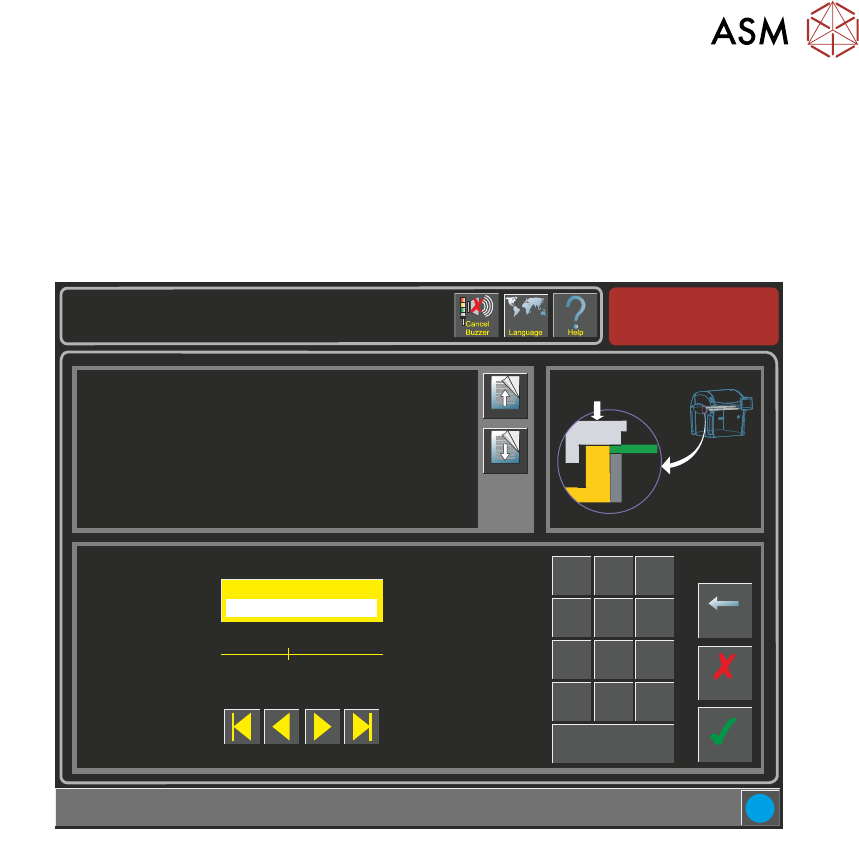
3.2.3 Klemmdruck
Die Over-The-Top-Klemme wird über das Substrat gelegt und es wird Druck ausgeübt, damit,
wenn das Substrat in die Maschine eingeführt wird und der Snugger läuft, die Oberseite des Sub-
strat gerade mit dem Snugger gehalten wird. Ein Mindestdruck von 1,5 und ein Maximaldruck von
5 Bar können eingestellt werden. 1,5 Bar Druck sind erforderlich, um das Balance Ventil zu über-
winden.
Setup \ Tooling
Page Up
Page
Down
This parameter represents the pressure applied to flatten the board before
snugging.
Accept
Cancel
Clamp Pressure ( bar )
3.0
Backspace
Min
1.5
Max
5.0
7
8 9
4
5
6
1 2
3
0
.
+/-
Apply
i
3 APC-SOFTWARE EINSTELLUNG UND EMPFOHLENE EINSTELLUNGEN
3.2 SOFTWARE EINSTELLUNG PARAMETER
102 EIGENSTÄNDIGES HANDBUCH UNIVERSALKLEMMEN (APC) 12/2019
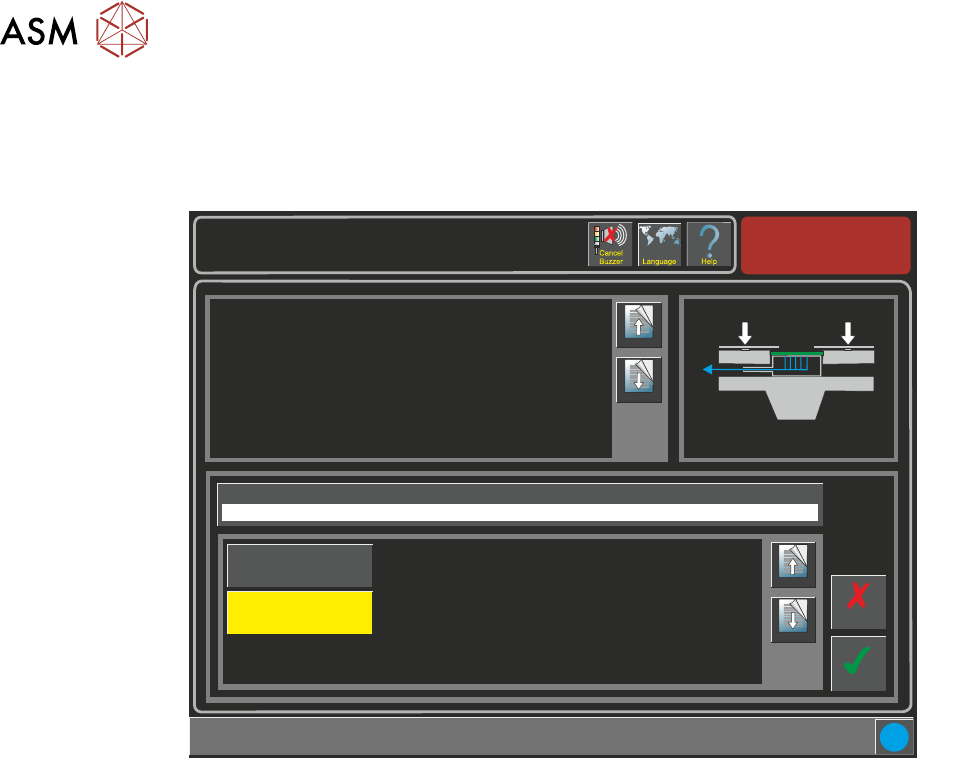
3.2.4 OTS-Vakuum-Modus
Wenn ein Vakuum Werkzeug montiert ist, dann kann das Vakuum eingestellt werden dass es akti-
viert, entweder bevor oder nachdem das Substrat festgeklemmt wird/Snug ist.
Setup \ Tooling
Page Up
Page
Down
This parameter sets determines if the vacuum is to be applied before or
after snugging and clamping the board.
If the board snuggers are applied and the board becomes dislodged it
cannot be clamped. To prevent any movement, the vacuum is applied
beforehand.
The options are:
Before
The product is held by the vacuum prior to snugging and clamping taking
place.
After
The board edges are flattened by the clamps before the vacuum is applied.
Accept
Cancel
i
OTS Vacuum Mode
Before
Page Up
Page
Down
After
Before
3 APC-SOFTWARE EINSTELLUNG UND EMPFOHLENE EINSTELLUNGEN
3.3 KALIBRATION
EIGENSTÄNDIGES HANDBUCH UNIVERSALKLEMMEN (APC) 12/2019 103
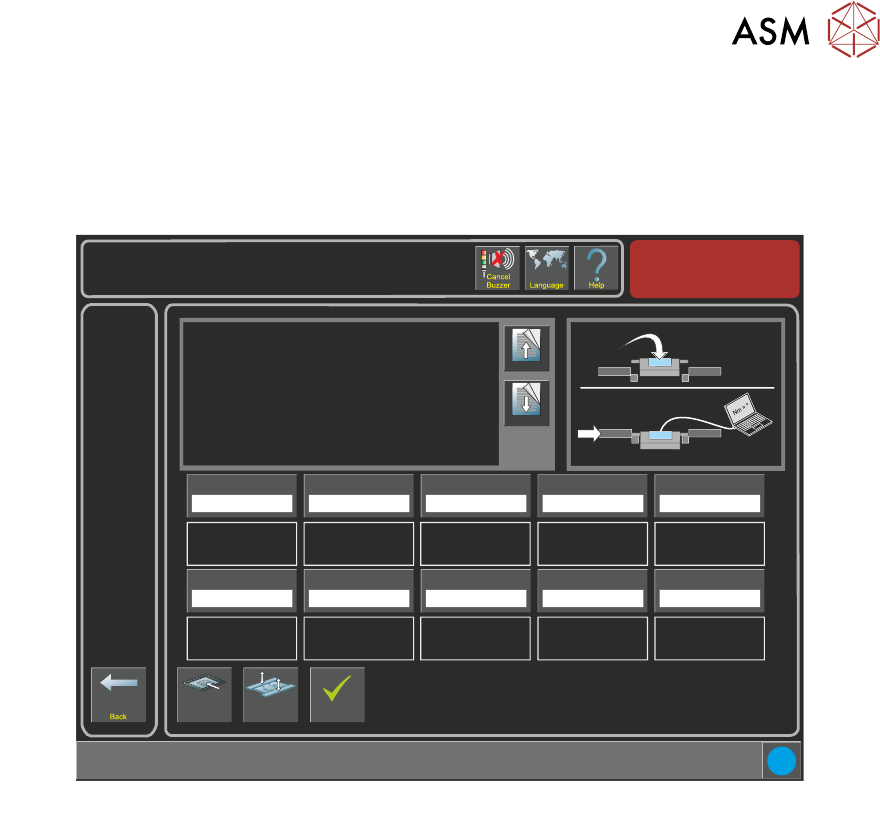
3.3 KALIBRATION
Die APC-Kalibration is ein teils Software / teils Hardware Vorgang zur Kalibration der Drehmoment-
kraft, die beim Klemmen benutzt wird. Die Kalibrationsseite befindet sich unter Wartung -> Maschi-
neneinstellung -> Grundlagen -> APC-Kalibrationsseite.
Torque Value 1
27.0%
i
Maintenance \ Machine Setup \ Basics \ APC Calibration
Page Up
Page
Down
On selecting this parameter, the rising table moves to
transport height, the transport rails are checked for boards,
and the rear rail is moved into position to allow the user to
place the test jig between the front and rear rails.
The ten read only Torque Value parameters represent the
percentage of the torque delivered. The torque applied to
the jig is measured by the sensor at its centre. Selecting
Torque On/Off applies torque to the jig, selecting Torque
On/Off again releases it.
Values are input into the ten Calibration Value parameters
Load Screen
Board
Clamps
Accept
Torque Value 2
28.0%
Torque Value 3
29.0%
Torque Value 4
30.0%
Torque Value 5
31.0%
Calibration Value 1
20.0 Newtons
Calibration Value 2
25.0 Newtons
Calibration Value 3
30.0 Newtons
Calibration Value 4
35.0 Newtons
Calibration Value 5
40.0 Newtons
Torque Value 6
32.0%
Torque Value 7
33.0%
Torque Value 8
34.0%
Torque Value 9
35.0%
Torque Value 10
36.0%
Calibration Value 6
45.0 Newtons
Calibration Value 7
50.0 Newtons
Calibration Value 8
55.0 Newtons
Calibration Value 9
60.0 Newtons
Calibration Value 10
65.0 Newtons
Nm
Benutzen Sie eine Kalibrationsvorrichtung und einen Laptop auf dem eine spezielle Software
installiert wurde, die Drehmomentkraft, welche von der Maschinen-Software gefordert wird und die
tatsächliche Kraft, die auf die Maschine ausgeübt werden können gemessen, verglichen und jus-
tiert werden, um zu gewährleisten, dass die genauen Kräfte ausgeübt werden.
HINWEIS
Siehe Snug Kraft Kalibration im Universalklemmen Kapitel in diesem Handbuch für Einzelheiten
zum Kalibrationsvorgang.