00198502-02_VD_SIPLACE_Pro_15.1_R18-1_DE_EN.pdf - 第17页
SIPLACE Pro 15.1 (R 18 - 1) / V ersion Description 05/2018 Edition 17 5 Features of SIPLACE Pro 1 5.0 If not different ly described, t he features of t he previous SIPLA CE Pro versions are contained in SIPLACE Pro 15.0 …

SIPLACE Pro 15.1 (R18-1) / Version Description 05/2018 Edition
16
The transfer of nozzle configurations is supported for the following placement heads in these
directions:
Nozzle Mapping table
– C&P20 -> C&P20 P
– C&P20 P -> C&P20 P2.
– C&P20 -> C&P20 P2 (the nozzles will be transferred twice: 1xxx -> 4xxx -> 6xxx).
Configurations of other placement heads (i.e. CPP12, Twin Head) will only be transferred if the
placement head type is the same on the target placement machine.
Restrictions
– Feeders or nozzles will be cut if the space on the target setup is insufficient.
– Custom nozzles will not be transferred.
– Transfers in the other direction, i.e. 6xxx -> 4xxx and 4xxx -> 1xxx are not possible.
– Fixed nozzle configurations of the placement head are not transferred.
4.9 CAD Data Import – Supported Formats
SIPLACE Pro supports the Gerber RS-274-X format for the CAD Data Import.
NOTICE
The compatible extension format Gerber X2 is currently not supported.
4.10 LED Pairing – Separate Package in SIPLACE Pro Installation
LED Pairing is now offered to be installed as a separate package within the SIPLACE Pro setup
wizard.
All files required by LED Pairing can be installed without installing SIPLACE Pro Desk and the Line
Control GUI. Thus the user cannot start SIPLACE Pro Desk accidentally and perform potentially
unwanted changes to the SIPLACE Pro data. Please refer to the SIPLACE Pro Installation Manual,
item no. [00198503-xx].

SIPLACE Pro 15.1 (R18-1) / Version Description 05/2018 Edition
17
5 Features of SIPLACE Pro 15.0
If not differently described, the features of the previous SIPLACE Pro versions are contained in
SIPLACE Pro 15.0. The main features of SIPLACE Pro 15.0 are listed below.
NOTICE
Detailed information on the individual functions can be found in the Online Help for
SIPLACE Pro.
5.1 New Fixed Rail Positions
Some fixed rail positions on SIPLACE TX-series placement machines do not match the
correspondent positions on other SIPLACE placement machines (SX / X / X S / DX / CA series).
For compatibility reasons, the following changes have been made in SIPLACE Pro:
– On SIPLACE TX-series placement machines, the existing fixed rail positions 268.0 and 281.0
have been renamed to 268.0 SMEMA and 281.0 SMEMA.
– On the other SIPLACE placement machines, the fixed rail positions 268.0 SMEMA and 281.0
SMEMA have been added to the existing positions 268.0 and 281.0. The new positions should
be used in mixed lines with SIPLACE TX-series placement machines.
5.2 Making Equal Cycle Times for Left and Right Lane
The procedure for borrowing performance between the placement areas has been improved. It is
now possible to achieve the same cycle time for both board sides if the top and bottom side of a
board shall be placed within one line.
Usually, this will be used if the board top and board bottom sides have a different amount of
placements. One board would be finishing clearly earlier than the other board. To compensate this
behavior this new feature will help.
For this, the two board sides have to be inserted in one recipe and each board side has to be
assigned to one side of the line respectively (left / right). Additionally, the Make equal cycle times
for left and right lane option has to be enabled in the Recipe Editor.
The optimizer will use the asynchronous placement areas to make a kind of balancing between the
two boards. In the result view, the two board sides of the recipe are displayed together. The cycle
times of the two board sides are displayed in different colors.
SIPLACE Pro 15.1 (R18-1) / Version Description 05/2018 Edition
18
5.3 "The Hermes Standard" – New Communication Protocol
"The Hermes Standard" is a new communication protocol for SMT assembly lines that can be used
alternatively to the electrical SIPLACE SMEMA interface. With this protocol, more information can
be transferred with the board down the line like unique board Ids, barcodes, conveyor speed, board
length / width / thickness. All this information can be transferred down the complete line, without
any interruption. Up to now, this was only possible within a SIPLACE SMEMA cluster. If all devices
in the line support "The Hermes Standard", whispering down the line is possible within "The
Hermes Standard" cluster as it is within the SIPLACE SMEMA cluster.
"The Hermes Standard" can be used on all placement machines supported by station software
version ≥ 711. Please refer to the station software Version Description, item no. [00198500-xx].
It is also supported that the line is divided for example into two "The Hermes Standard" clusters, if
other devices in the line do not support "The Hermes Standard".
A button has been added to the Line Editor in SIPLACE Pro Desk, to all production line editors
(e.g. Setup Editor, Recipe Editor, Job Editor) and to the graphical line view in the Line Control GUI
with which the user can hide or show generic devices in the graphical line view.
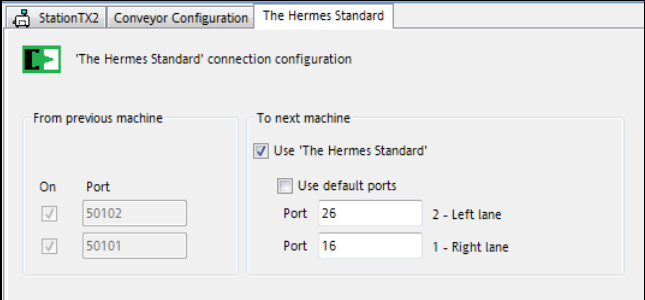
"The Hermes Standard" connection configuration has been added to the Line Editor in which the
devices are configured (printers, generic devices, process lens devices and placement stations).
Figure 5-1: "The Hermes Standard" connection configuration
The user can only configure "The Hermes Standard" device connections to the next device. The
configuration of the connection to the previous device is displayed read-only, as this configuration
is edited in the respective editor of the previous device.
The Use 'The Hermes Standard' check box specifies whether the connection shall use "The
Hermes Standard" protocol. If not enabled, the SIPLACE SMEMA protocol will be used.
In the Line Control GUI, the new line view 'The Hermes Standard' connection View can be
selected. In this view, the user can check and download "The Hermes Standard" device connection
configuration. Additionally, a report can be created and printed.
Restrictions
– No support for stations with shuttle.
– No support for devices with IPv6 addresses.