00198502-02_VD_SIPLACE_Pro_15.1_R18-1_DE_EN.pdf - 第5页
SIPLACE Pro 15.1 (R 18 - 1) / V ersion Description 05/2018 Edition 5 1 Introduction SIPLACE ® Pro 15.1 (R1 8-1) is the programming syst em for SIPLAC E placement . The placement programs for t he placement lines are p re…
SIPLACE Pro 15.1 (R18-1) / Version Description 05/2018 Edition
5
1 Introduction
SIPLACE® Pro 15.1 (R18-1) is the programming system for SIPLACE placement. The placement
programs for the placement lines are prepared, generated and optimized with SIPLACE Pro. The
Release-Tag displays in which ASM Release the current product has been released.
Example: (R18-1) –> 1. Release, 2018.
Additionally, the SIPLACE Pro programming system supports DEK printing solutions. ASM Printer
Programming extends the existing SIPLACE Pro programming system by adding functionality for
editing print process data for DEK printing systems. The SIPLACE Pro programming system allows
preparing, optimizing and downloading printing programs. The ASM Printer Programming license
can be ordered separately, item no: [00117815-xx].
1.1 System Overview
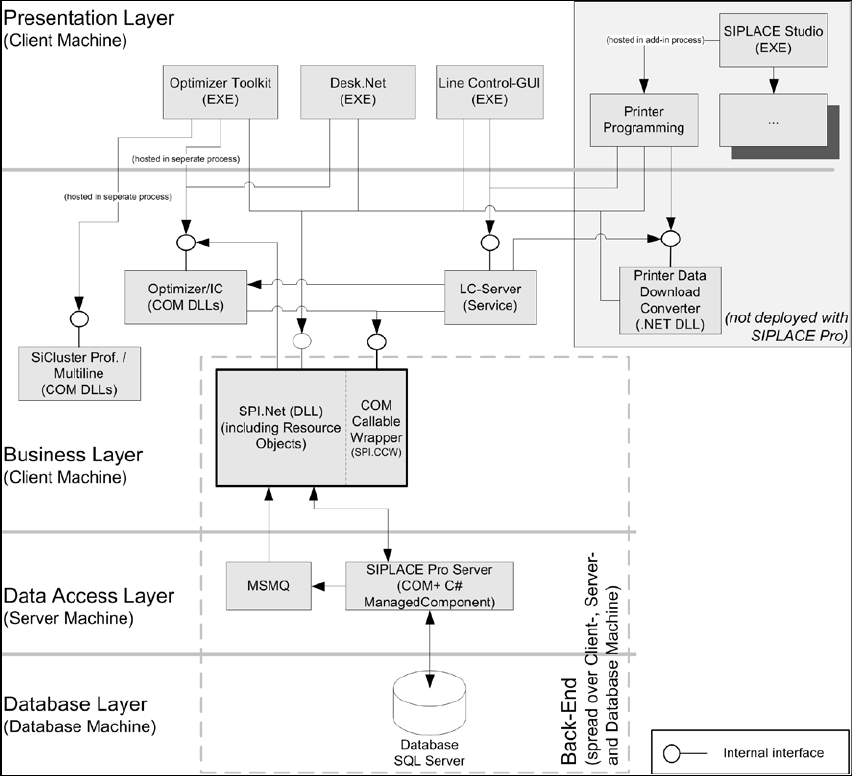
The SIPLACE Pro programming system consists of the following subsystems:
Figure 1-1: System overview
SIPLACE Pro saves all data in a database (Microsoft SQL Server). All clients, such as the Desk,
communicate via the Business Layer with the SIPLACE Pro Server.
The system installation can be distributed across several computers.

SIPLACE Pro 15.1 (R18-1) / Version Description 05/2018 Edition
6
2 Scope of Delivery
2.1 Packages
● SIPLACE Pro Basic License V15.0, item no. [00117832-xx] contains:
1 SIPLACE Pro Factory License (without connection to the SIPLACE stations)
● All software belonging to R18-1 is available on the ASM Software Collection USB Medium
R18-1, item no. [00117883-xx]. This USB stick contains all basic product packages of R18-1.
Additionally, the individual software packages (*.iso files) contain the relevant software
documents (Installation Manuals, Software Version Descriptions, User Guides etc.).
NOTICE
To Support Media:
Please use the Navigation Guide button of the Support Media Launcher to navigate
through the documentation.
The navigation guide and all related documents are available with the Support Media.