00192485-02.pdf - 第52页
52

51
switching off . . . . . . . . . . . . . . . . . . . . . . 23
Status display
. . . . . . . . . . . . . . . . . . . . . . . 14
Component barcode
. . . . . . . . . . . . . . . 16
Compressed air cut-out
. . . . . . . . . . . . . 16
Connection to the line computer
. . . . . . 16
Information and help system
. . . . . . . . . 16
Locations
. . . . . . . . . . . . . . . . . . . . . . . . 16
Machine options
. . . . . . . . . . . . . . . . . . 16
PCB barcode
. . . . . . . . . . . . . . . . . . . . . 16
PCB conveyor
. . . . . . . . . . . . . . . . . . . . 18
PCBs
. . . . . . . . . . . . . . . . . . . . . . . . . . . 16
Software options
. . . . . . . . . . . . . . . . . . 16
Transport signal interface
. . . . . . . . . . . 16
Troubleshooting
. . . . . . . . . . . . . . . . . . . 16
Step revolver head
. . . . . . . . . . . . . . . . . . . 37
Stop button
. . . . . . . . . . . . . . . . . . . . . . . . . . 6
Stop processing PCB
. . . . . . . . . . . . . . . . . 14
Switches and buttons
. . . . . . . . . . . . . . . . . . 5
Switching off
line computer
. . . . . . . . . . . . . . . . . . . . . 22
SIPLACE line
. . . . . . . . . . . . . . . . . . . . . 22
stations
. . . . . . . . . . . . . . . . . . . . . . . . . 23
Switching on stations . . . . . . . . . . . . . . . . . 21
T
Table functions
. . . . . . . . . . . . . . . . . . . . . . 29
Title bar
. . . . . . . . . . . . . . . . . . . . . . . . . . . 30
Toolbar with icons of submenus
. . . . . . . . .15
Touchscreen
. . . . . . . . . . . . . . . . . . . . . . . .12
Tower
. . . . . . . . . . . . . . . . . . . . . . . . . . . . .26
TR/D/T
. . . . . . . . . . . . . . . . . . . . . . . . . . 5, 30
Track
. . . . . . . . . . . . . . . . . . . . . . . . . . . . . .26
Track barcode
. . . . . . . . . . . . . . . . . . . . . . .26
Track error
. . . . . . . . . . . . . . . . . . . . . . . . . .18
Track errors
. . . . . . . . . . . . . . . . . . . . . 30, 43
Track number
. . . . . . . . . . . . . . . . . . . . . . .26
Trackball
. . . . . . . . . . . . . . . . . . . . . . . . . . .12
Transport error
. . . . . . . . . . . . . . . . . . . . . .18
Transport errors
. . . . . . . . . . . . . . . . . . 30, 44
Troubleshooting
. . . . . . . . . . . . . . . . . . . . . .43
U
Uncoupling the CO changeover table
. . . . .47
Update sensors
. . . . . . . . . . . . . . . . . . . . . .40
User interface
. . . . . . . . . . . . . . . . . . . . . . .13
User level
’Operator’
. . . . . . . . . . . . . . . . . . . . . . . .24
V
Vacuum on/off
. . . . . . . . . . . . . . . . . . . . . . .35
W
Warning boxes
. . . . . . . . . . . . . . . . . . . . . .19
White fault indicator lamp
. . . . . . . . . . . . . . .7

52
53
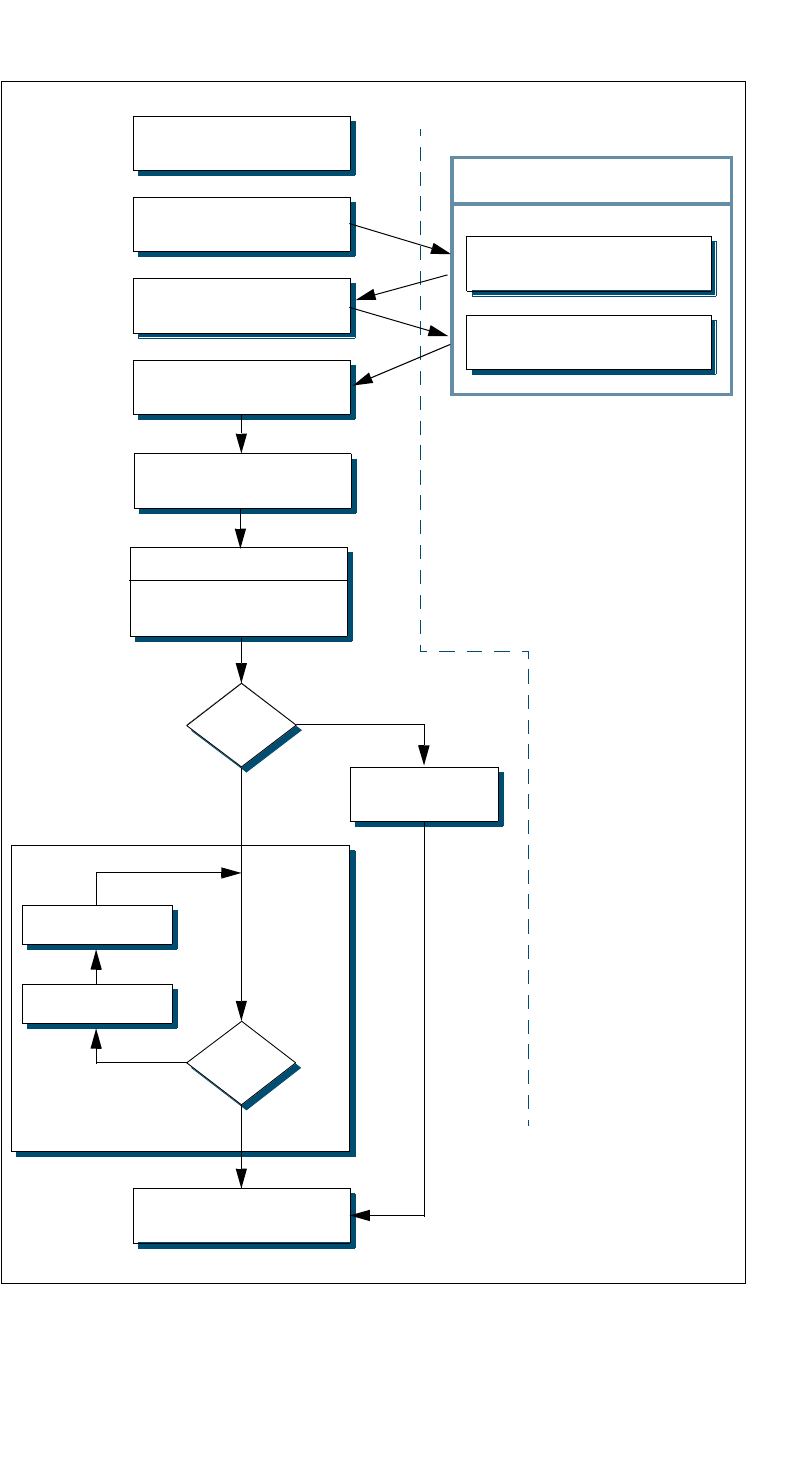
Flowchart "Switching ON the SIPLACE Line"
Test set-up
Reset tracks
No
Line computer tasks
Load cluster data
Make settings on the machine
Set-up generator appears
Check the set-up
(insert feeder modules)
Switch on
Nozzle check
Change nozzle
configuration, if necessary
Wait for PCB
Introduce PCB
Track
errors
Ye s
Abort
processing PCB
Ye s
PCB onto output conveyor
No
Station computer
Bold :
Italic :
To be carried out
by the operator
Carried out or
signaled by the
station
Confirm the
set-up generator
Fiducials
OK?