00197696-02_IM_SIPLACE_Pro_12.1_EN.pdf - 第31页
4 Installation of SIPLACE Pro and possible Setup Types Installation Manual Edition 04/2015 SIPLACE Pro 12.1 29 4.3 Individual setup types and next step s 4.3.1 Setup T ype – Custom This setup type allo ws the experienced…
Installation Manual 4 Installation of SIPLACE Pro and possible Setup Types
SIPLACE Pro 12.1 Edition 04/2015
28
Step 7
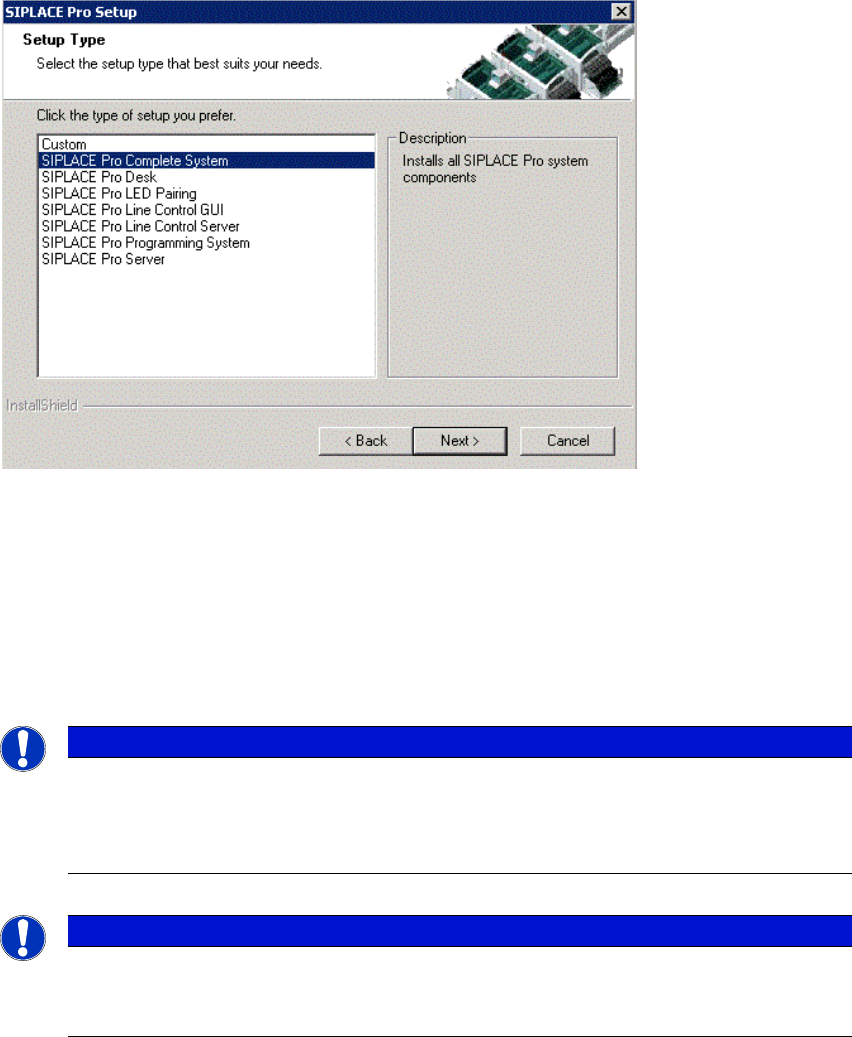
The Setup Type dialog box displays the SIPLACE Pro components you can choose for installa-
tion.
4
Fig. 4.2 - 11 "Setup Type" dialog box
In the "Setup Type" dialog box,
Select the setup type you want to install.
Click Next.
A short description of the setup type in question appears in the Description box when you select
a type.
4
Note
After choosing a setup type which includes a database installation, the setup program im-
mediately checks if SQL server and the proper Service Pack are installed on the comput-
er.
Note
If a database already exists, setup performs an Integrity Check. If the Integrity Check
fails, you might need to cancel Setup. More information in Chapter 6.
4 Installation of SIPLACE Pro and possible Setup Types Installation Manual
Edition 04/2015 SIPLACE Pro 12.1
29
4.3 Individual setup types and next steps
4.3.1 Setup Type – Custom
This setup type allows the experienced user to select any possible combination of SIPLACE Pro
components. However, you should use one of the other specified setup types if you are installing
standard components, since this means the necessary components are always installed and you
do not have to pay attention to the details.
Step 1
Run through the steps in “Starting installation – first steps” on page 21.
Select the Custom setup type
Click Next.
Step 2
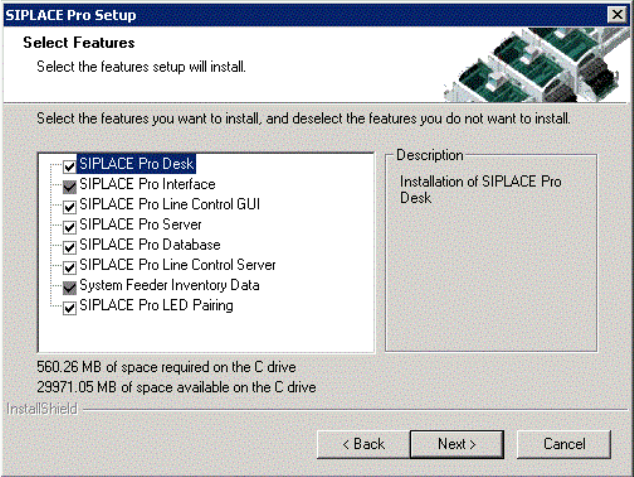
In the "Setup Features" dialog box, select the features you want to install.
4
Fig. 4.3 - 1 "Select Features" dialog box
– The disk space required by all selected components is shown. The size information for
SIPLACE Pro Database is misleading, since it only takes into account the size of the SQL
scripts copied by InstallShield and installed for these components. The size of the database
itself should also be considered. The initial value is defined in a later dialog when creating a
new database. The database size is dynamic anyway - it will grow as required during use of
SIPLACE Pro.
Installation Manual 4 Installation of SIPLACE Pro and possible Setup Types
SIPLACE Pro 12.1 Edition 04/2015
30
Select the features you want to install.
4
4
Click Next.
4
Note
You need to install SIPLACE Pro Interface as minimum requirement for external applica-
tions.
Note
After choosing the feature "SIPLACE Pro Database" and clicking Next, setup immediate-
ly checks if SQL server is installed on the computer.
Note
From this point onwards, the dialog boxes displayed depend on which features have
been selected (either implicit via the other Setup Type selection or explicit in the Custom
Setup Type). The sequence varies according to which features and options have been
selected, so there are many possible combinations. It is not feasible to describe all the
combinations for Custom installation here. However, you will see the individual dialog
boxes occuring in the course of the following setup types.