00197696-02_IM_SIPLACE_Pro_12.1_EN.pdf - 第70页
Installation Manual 7 Troubleshooting SIPLACE Pro 12.1 Edition 04/2015 68 7.1.8 Error - 16xx... Error description: Message with unspecific error me ssage "Error -16xx ..." is displayed during se tup. Cause: SIP…
7 Troubleshooting Installation Manual
Edition 04/2015 SIPLACE Pro 12.1
67
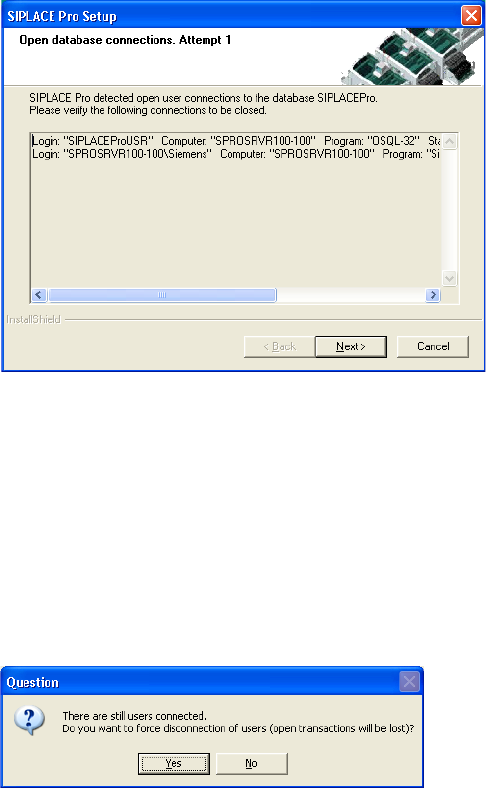
7.1.7 Users connected to the database SIPLACEPro
During upgrade, if users are connected to the database SIPLACEPro, a message similar to the
following will be displayed:
7
Fig. 7.1 - 6 Open Database Connections
In this case, you have to examine the list of connections, identify and close the appropriate appli-
cation(s) manually. Loginname, computername and program name will be displayed to help iden-
tification of the application(s) which need to be closed.
Click Next to check for remaining connections, again.
If still connections remain, SIPLACE Pro Setup will assist you. The following message will be dis-
played:
7
Fig. 7.1 - 7 Open Database Connections - Message
Click Yes if you want to force a disconnection of all open user connections automatically.
If you click No, you will start over with the connection check again.
Installation Manual 7 Troubleshooting
SIPLACE Pro 12.1 Edition 04/2015
68
7.1.8 Error - 16xx...
Error description:
Message with unspecific error message "Error -16xx ..." is displayed during setup.
Cause:
SIPLACE Pro's installation program is made up of several programs running simultaneously, and
in this case, the runtime system of the installation may detect errors, which cannot be caught or
handled by the installation program. Therefore the native error messages as provided by the
runtime system are displayed. Examples for such errors are:
– Error -1601 The Windows InstallerService could not be accessed.
– Error -1603: Fatal Error During Installation
– Error -1607: Unable to Install InstallShield Scripting Runtime
– Error -1608: Unable to create InstallDriver instance
– Error -1628: Failed to complete script based install
– Solution:
If these or other generic error messages are displayed during installation of SIPLACE Pro, please
refer to the InstallShield Customer Central (http://consumer.installshield.com/common.asp
) for in-
formation on how to handle this case.
7.1.9 Access problems of SIPLACE Pro share after client installation
Error Description:
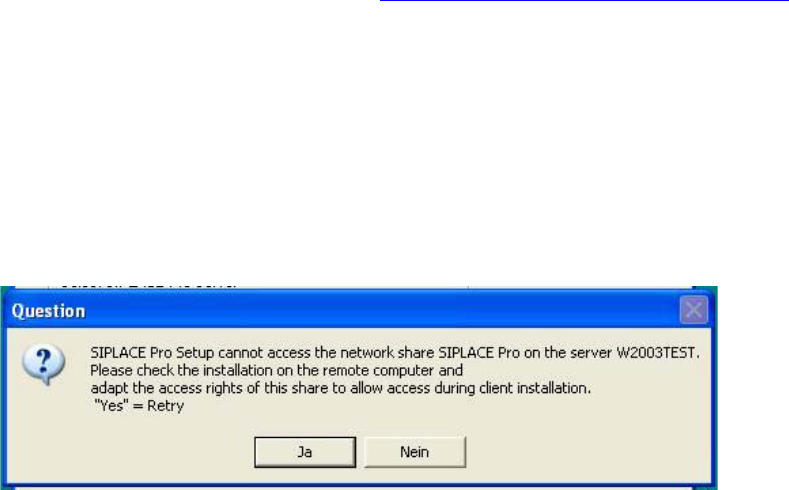
After the first client installation of SIPLACE Pro you can not access the SIPLACE Pro share ...
share on a remote server (may be true for either a SIPLACE Pro server or a Line Control Server
or a pure database server) and following error message is displayed.
7
Fig. 7.1 - 8 Error message during client installlation
Solution:
In order to solve the share problem you have to modify the access rights for this share of the
reomote computer as follows:
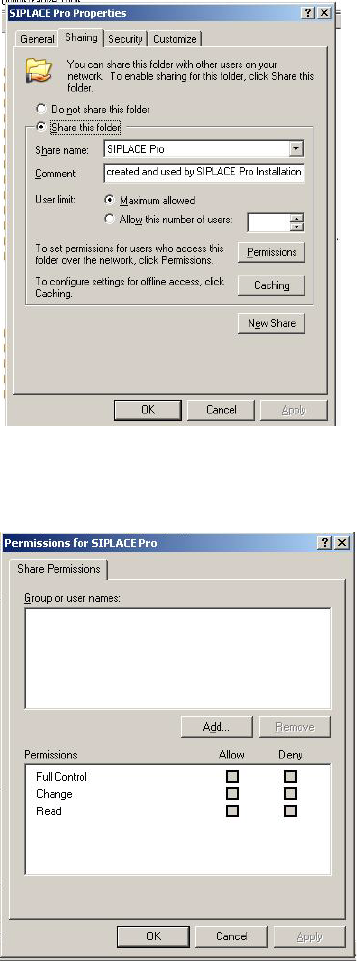
In Explorer go to Properties of the SIPLACE Pro folder.
7 Troubleshooting Installation Manual
Edition 04/2015 SIPLACE Pro 12.1
69
Click on Sharing
7
Fig. 7.1 - 9 SIPLACE Pro folder properties
Click on permissions.
7
Fig. 7.1 - 10 Permissions for SIPLACE Pro
Now you can modify permission rights by adding user groups or names and permissions as
required to access the share from client systems during installation. Please note that the
share is ONLY used during installation of SIPLACE Pro clients which implies that access to
the share is required for users which perform the client installations. If the share permissions
are configured once the share won’t need to be changed any more except for SIPLACE Pro
is deinstalled (which will remove the share) and reinstalled again.