Micron Technical Reference V9 Volume 1.pdf - 第149页
MACHINE CONTROL M36 MACHINE CONTROL ENCLOSURE Chapter Issue 12, Feb 18 Technical Reference Manual 7.5 NextMove ES Card CAUTION ANTI-ST A TIC HANDLING. ST A NDARD PRECAUTIONS MUST B E ADHERED TO WHEN HANDLING ELECTRONIC C…
MACHINE CONTROL
M36 MACHINE CONTROL ENCLOSURE
7.4 Technical Reference Manual Chapter Issue 12, Feb 18
M36 MACHINE CONTROL ENCLOSURE
The M36 Machine Control Enclosure is located at the rear of the machine and
interfaces between the PC and machine motors, sensors and switches. The
PC connects to the M36 with a USB cable allowing two-way communications
between the two enclosures.
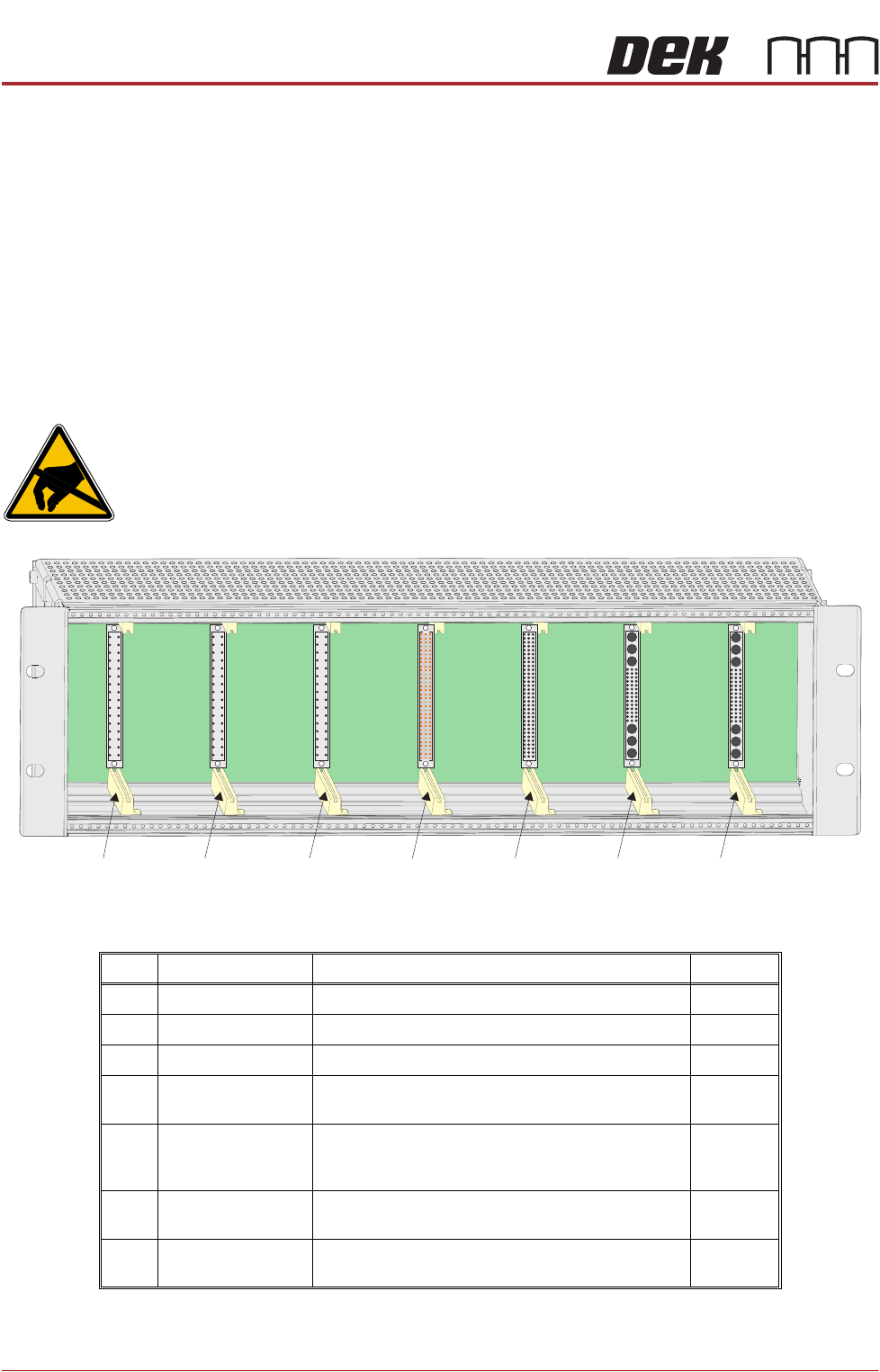
The M36 enclosure has a single backplane PCB with edge connectors mounted
on one side for plug-in cards (Slot X1 to X7) and plugs and sockets on the other
side, protruding through the rear panel, for connection to the machine looms.
The front panel has a cut-out slot to allow connection of the USB and CAN Bus
cables to the NextMove ES card in Slot X5.
M36 Card Locations
CAUTION
ANTI-STATIC HANDLING. STANDARD PRECAUTIONS MUST BE ADHERED TO
WHEN HANDLING ELECTRONIC CARDS AND CONFIGURING AND INSERTING
INTO THE ENCLOSURES.
Slot Card Function Step/Axis
X1 Dual Stepper X Forward and X Rear Actuators Step 0,1
X2 Dual Stepper Front and Rear Squeegees Step 3,4
X3 Dual Stepper Y Actuator and Moving Rail Step 2,5
X4 NextMove Interface Opto-isolates 20 inputs and 8 outputs from the Nex-
tMove ES card
X5 NextMove ES
(I/O Node1)
Motion control card providing 6 stepper and 2 servo
axes with real time I/O. Also acts as a CAN master
interfacing between the USB and CAN buses
X6 EF Servo Drive Camera X Linear Servo Motor
(linear drive machines only)
Axis 0
X7 EF Servo Drive Camera Y Linear Servo Motor
(linear drive machines only)
Axis 1
Slot X1 Slot X2 Slot X3 Slot X4 Slot X5 Slot X6 Slot X7
View on Front (front panel removed)
MACHINE CONTROL
M36 MACHINE CONTROL ENCLOSURE
Chapter Issue 12, Feb 18 Technical Reference Manual 7.5
NextMove ES Card
CAUTION
ANTI-STATIC HANDLING. STANDARD PRECAUTIONS MUST BE ADHERED TO
WHEN HANDLING ELECTRONIC CARDS AND CONFIGURING AND INSERTING
INTO THE ENCLOSURES.
The NextMove ES can control six stepper motor axes via stepper drive cards
and provides 4 analogue outputs, 2 analogue inputs, 20 digital inputs (interfaced
through the NextMove Interface card) and 8 digital outputs (interfaced through
the NextMove Interface card). Two of the analogue outputs are used as demand
outputs to control linear motors for camera X and Camera Y (linear drive
machines only). The card also incorporates a CAN encoder/decoder which
connects to I/O Node boards and Servo/Stepper Nodes using a CAN Bus
network. The CAN Bus network allows for future expansion of the system
without the need for further NextMove cards.
NextMove ES
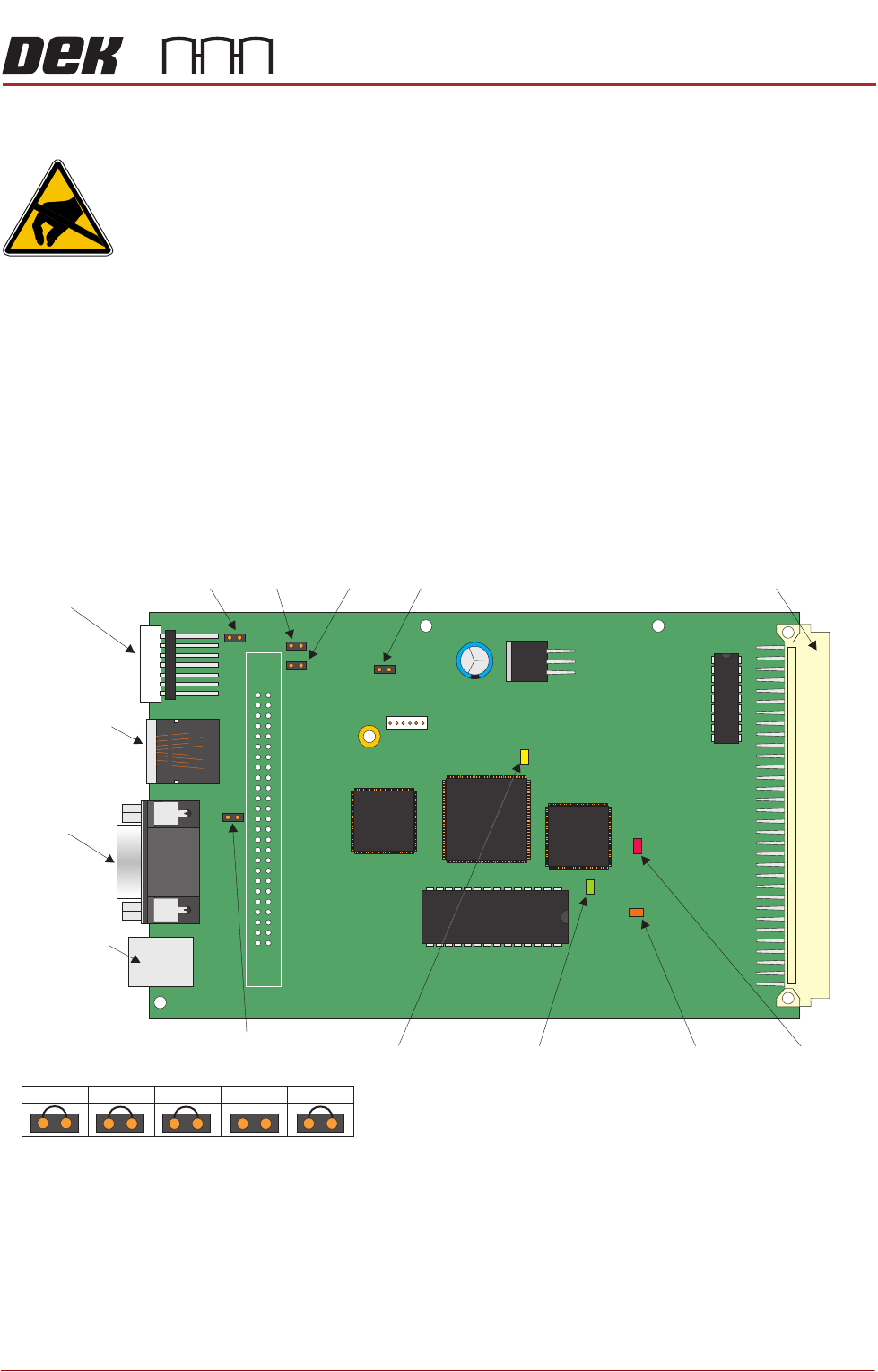
Jumper Settings
The NextMove ES jumper settings are shown below:
Figure 7-2 NextMove ES Card
LED Indications The 7 segment LED display on the edge of the NextMove ES card indicates the
Node number (1) during normal operation. During initialisation, the display
indicates a dash (-) followed by a period (.).
JP1
JP2
JP3 JP4 JP57 Segment
LED Display
CAN Bus
Connector
M36SK35
Not Used
USB
Connector
M36SK28
96 Pin Edge Connector
JP3
JP2
JP1
JP4
JP5
D3
D4
D16
D20
MACHINE CONTROL
M36 MACHINE CONTROL ENCLOSURE
7.6 Technical Reference Manual Chapter Issue 12, Feb 18
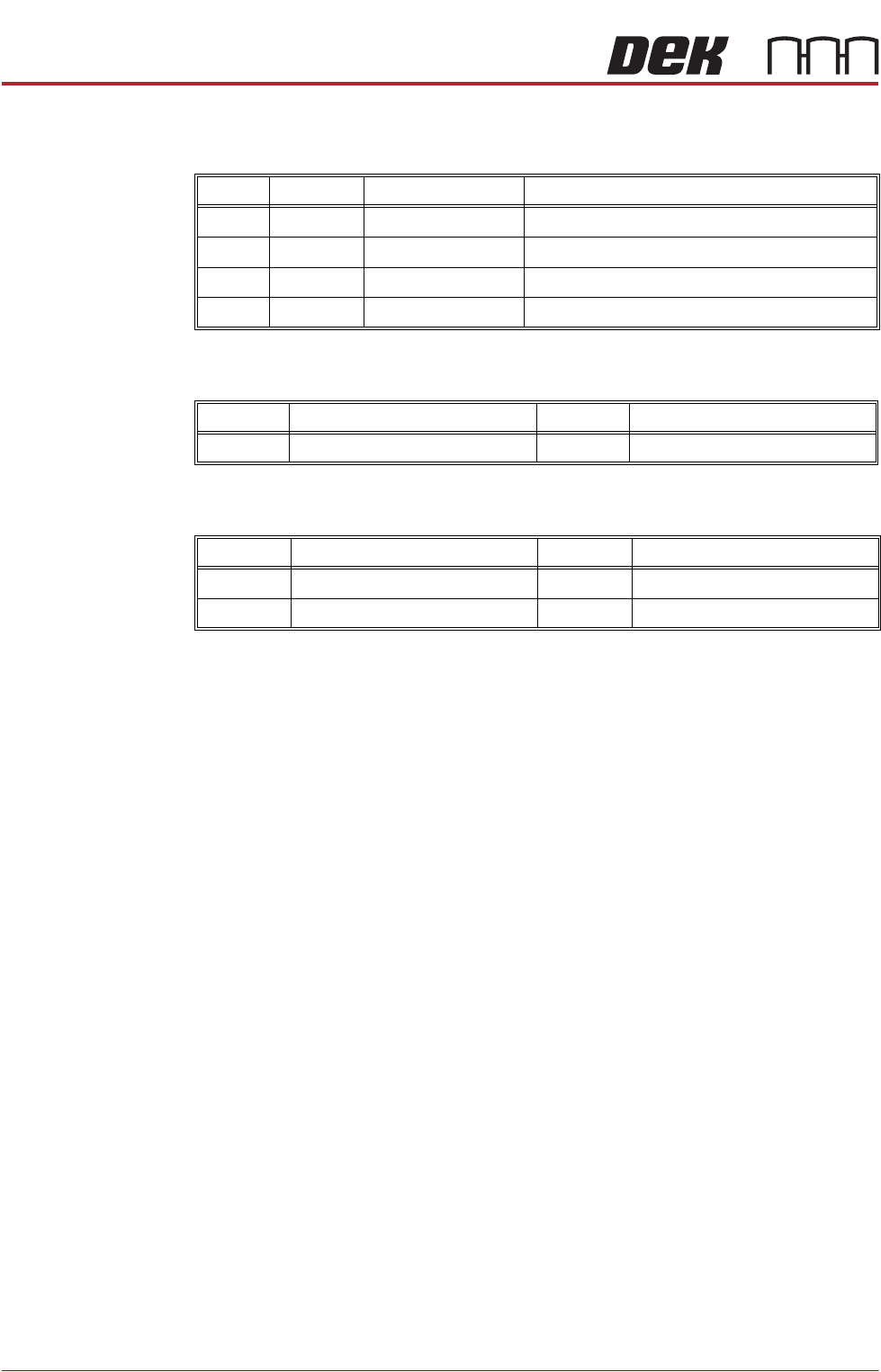
There are four surface mount LEDs on the board which are detailed in the table
below, NextMove ES Card figure refers:
Inputs The table below details the 2 analogue inputs:
Outputs The table below details the 4 analogue outputs:
LED Colour Normal Operation Purpose
D3 Yellow Off Indicates that the FPGA is being initialised
D4 Red Off Indicates that the card is in hardware reset
D16 Green Flashing Flashes at 0.5Hz to indicate firmware heartbeat
D20 Orange On Toggles on with reception of comms packet
Input Function Input Function
AIN0 USC Solvent Level AIN1 Spare
Output Function Output Function
AOUT0 Camera X (linear drive only) AOUT2 Spare
AOUT1 Camera Y (linear drive only) AOUT3 Temperature Output to TCM