00198235-01_VD_710.0_R16-2_DE_EN.pdf - 第12页
Station S oftware 71 0.0 (R16 - 2) / Version Descript ion 12/2016 Edition 12 4.5 O dd Shape Compone nts – O SC Packag e Opti on Com patible mode: Not s upported The st ation software suppor ts a bundle of new feature s f…
Station Software 710.0 (R16-2) / Version Description 12/2016 Edition
11
Single functions are only available if the shuttle extension is not in automatic mode.
The Service tool has been extended by a Shuttle configuration button. The operator can
configure speed parameters, eSW parameters and single drives in the subsequent configuration
dialogs.
The Single calibration dialog has been extended by one button per shuttle extension.
The shuttle lane width has to be calibrated.
The alignment of the fixed conveyor rails of all lanes adjacent to the shuttle has to be calibrated.
When a lane is selected, the shuttle aligns itself to the chosen lane. The operator can then move
the shuttle in small or big steps to align the fixed rail and save the setting.
Restrictions:
– Barcode mode and station-wise download are not supported.
Detailed information on the shuttle extension can be found in the Shuttle Extension Assembly
Instructions and User Manual, item no. [00198271-xx].
4.3 Precision Value
The desired precision value for the component shape has to be specified in SIPLACE Pro. If an
accuracy < 20µm has been specified, the Micron 15u3Sigma – Machine Connection license is
required at the station.
4.4 Alternative Component Shapes
Compatible mode: Not supported
As of this station software version, alternative component shapes are supported. With this feature,
multiple component shapes can be assigned to one component. An own placement offset can be
assigned to each alternative component shape. An own feeder with pickup offsets (X and Y) and
pickup angle can be assigned to each alternative component shape.
Alternative component shapes have to be specified in SIPLACE Pro.
The alternative component shapes process largely independently recognizes which component
shape description is to be used for the measurement. For each component, the SIPLACE Pro user
can select which method is to be used to select the used alternative component shape. Three
selection methods are available:
– Setup Center
The operator verifies the used component shape at the station. For this, ASM Setup Center
transmits additional attributes (e.g. the manufacturer component name) from the barcode label
of the packaging unit reel to the station. This attribute is used to select the appropriate
component shape.
– Station
SIPLACE Vision measures the component at the station and recognizes the used component
shape.
– Operator
The operator at the station determines, selects and confirms the used component shape on the
station software GUI.
Detailed information can be found in the Alternative Component Shapes User Manual,
item no. [00198270-xx].
Station Software 710.0 (R16-2) / Version Description 12/2016 Edition
12
4.5 Odd Shape Components – OSC Package Option
Compatible mode: Not supported
The station software supports a bundle of new features for odd shape components (OSC) as of
station software 710.0. These features have been collected into the OSC Package option. This
option has to be enabled in SIPLACE Pro for the station(s) concerned. The option requires the
Vision OSC Package - Machine Connection floating license. The license must be available at
download if any of the supported features shall be used.
Following features are supported by the OSC Package option:
● Vision OSC measuring options:
– User-defined "Odd shape component"
– Stereo measurement for pins
– Special position evaluation – "Alignment" attribute
● Increased placement force of Twin VHF placement head to 100 N
● Improved placement of snap-in components
– Specification of Z-threshold
● Support to find best acceleration
The single features are presented below.
4.5.1 Vision OSC Measuring Options
The following measuring options are available in SIPLACE Vision if the corresponding license is
installed and the OSC Package option enabled.
User-defined Odd shape component
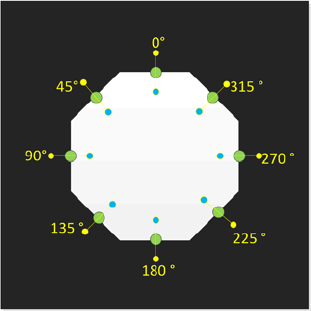
The new Pattern Feature lead type allows the user to describe arbitrary abstract patterns on a
component. These patterns can only be created and taught in the Component Shape wizard of
SIPLACE Vision.
Example
Figure 4-2: Pattern Feature
Station Software 710.0 (R16-2) / Version Description 12/2016 Edition
13
Stereo Measurements for pins
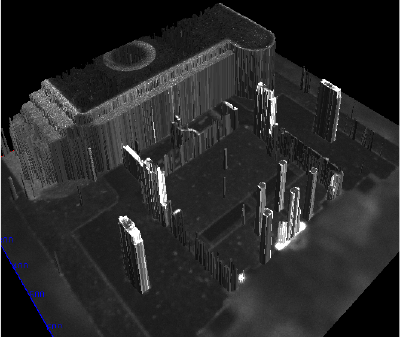
This option can be enabled if a multiple measurement is required for an OSC component. For each
measurement, two images are taken offset to each other in X-direction. Through stereo matching, a
height image will then be computed from these two images (i.e. the distance to the camera can be
computed for each pixel in the images).
Example
Figure 4-3: 3D display of the stereo measurement height image
If stereo measurement is enabled or the Edit parameter button has been pressed, a dialog box
opens in which illumination and traversing path can be set.
The option can only be enabled for stationary cameras of the types 25 and 33 (and thus for Twin
and CPP placement heads only) with the following restrictions:
Camera type 25: minimum feature size = 75 µ
Camera type 33: minimum feature size = 200 µ
The measurement of THT components (Through Hole Technology) with 2 or 3 pins is handled as a
special case. If a component contains 2 or 3 connectors of the types THT round pin or THT
square pin and no other feature groups are available, an automatic measuring process will be
performed during the stereo measurement.
Special Position Evaluation
For OSC components it is often difficult to find the X-/Y-position and determine the rotation of a
component by using the same feature. Therefore, a new function has been introduced that allows
using one feature for the X-/Y-alignment and another one for the rotational alignment.
The new Alignment attribute is displayed as parameter of the respective feature group on the GUI.
The attribute is only visible in SIPLACE Vision.