00198235-01_VD_710.0_R16-2_DE_EN.pdf - 第18页
Station S oftware 71 0.0 (R16 - 2) / Version Descript ion 12/2016 Edition 18 After pres sing the Start but ton the Execution page w ill be opene d . Figure 4-8 : Teach acceleration values – E xecution The exec ution step…
Station Software 710.0 (R16-2) / Version Description 12/2016 Edition
17
4.5.4 Support to Find Best Acceleration
A new teaching function supports finding the highest acceleration or speed values for a component
shape. For this, the dialog for teaching component shapes has been enhanced by the new Teach
acceleration values menu entry under Actions as of the Machine service activity level. By
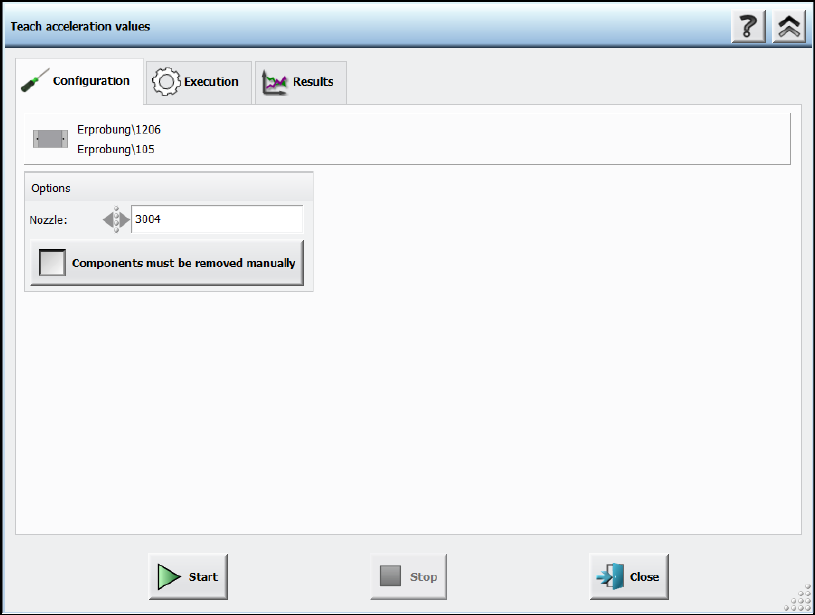
triggering this action, a Configuration page is displayed.
Figure 4-7: Teach acceleration values – Configuration
Following decisions have to be made:
– Nozzle to be used
If the user wants to perform the teaching with another nozzle, the nozzle can be selected from
a list. Only available nozzles will be displayed.
– Option for disabling the rejection of components
The default value is to reject the components automatically. But if the Components must be
removed manually option is set, the operator will be prompted to remove the component
manually from the placement head as soon as the check fails. The option is only available for
placement heads for which this is possible. Once set, the value is saved for the next run.
Station Software 710.0 (R16-2) / Version Description 12/2016 Edition
18
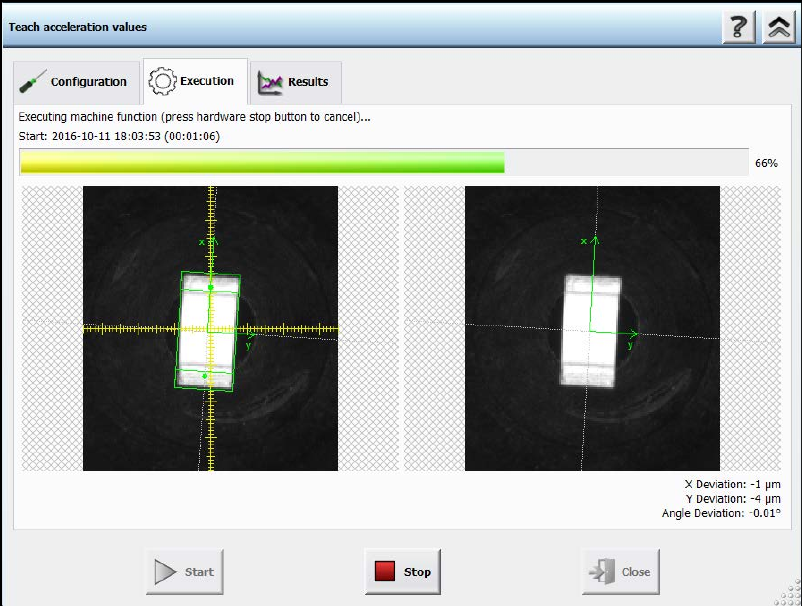
After pressing the Start button the Execution page will be opened.
Figure 4-8: Teach acceleration values – Execution
The execution steps are displayed together with the reference Vision image and the last Vision
image done by the camera. Additionally, the current acceleration values of the axes and the
measured deviations are displayed. If the operator has to remove a component from the placement
head manually or if the component is lost, a hint will be displayed and the operator must confirm
the action to continue.
If an error occurs during execution, the error causes are displayed on the last page in an error list.
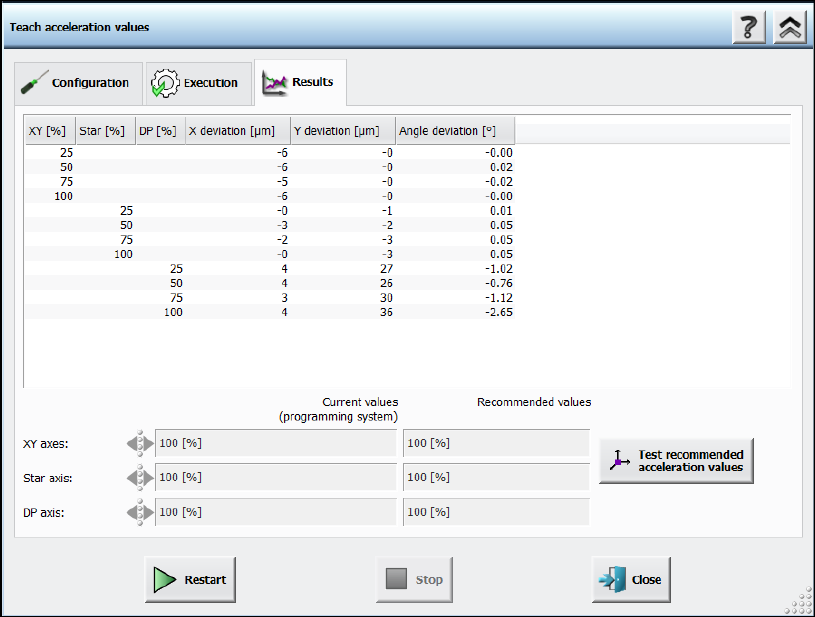
Otherwise, the results are presented in a table with all the measured values of the deviations and
the recommended accelerations values.
Station Software 710.0 (R16-2) / Version Description 12/2016 Edition
19
Figure 4-9: Teach acceleration values – Results
The recommended values can be compared with the values of the programming system. Different
values are highlighted. Usually, the recommended values will be tested after measurement. For
this, the Test recommended acceleration values button is offered. If pressed, the teach dialog
will be closed and the test dialog opened.
If the acceleration value of an axis is not relevant for the measurement, an empty cell will be
displayed. The displayed axes depend on the used placement head. A line displaying the value of
the vacuum system will be displayed if a vacuum pump is used in the machine. Thus the operator
can check that the acceleration values were determined while having a value similar to the one
during production.
The upload to SIPLACE Pro is not available until the recommended values have been tested.