252301 Issue 2.0.pdf - 第40页
GEM Manual for DEK Printers Capabilities I ssue 2.0 June 9th, 2011 page 40 of 156 Scenarios: Operator creates / change s equipment process program: Comm ents Host Equipment Comm ents P PCHANGENAME / PPCHANGESTAT US are u…

GEM Manual for DEK Printers Capabilities
Issue 2.0 June 9th, 2011 page 39 of 156
5.6 Process Program Management
This capability provides the host with the ability to control process program (product)
distribution between DEK printers. This is achieved using the following functionality.
Each printer has a process program create / edit capability. When the operator creates a new
process program or modifies an existing one, a collection event report is generated (if enabled
by host). The host uses the event reports (3.2.1) to set up the techniques to link the machine
variables, pp_old_file_name and pp_change_status to the process program change event.
The host can upload and download, new / changed programs from and to printers. The host can
also delete and rename programs resident on a printer. It can also request a directory of
programs resident on a printer. Finally, the Equipment can upload and download new / changed
programs from and to the Host. See Appendix B for Operator procedures.
Using these functions, the host can maintain a master program library and force consistency
across multiple printers.
The DEK printer supports only unformatted process programs. Modification of the process
program is not permitted while the machine is running.
Start Modification >>>
The printer stores a single process program in a number of separate data files (e.g. pr1, isd,
pxf). When the printer transfers a process program to the host, the individual files are
combined into a single block of data. When the host transfers a process program back to the
printer, the printer splits the data back into the individual files. The internal contents of the
process program data and the combining/splitting of the files is transparent to the host. This
data can be saved to persistent storage on the host, however this data should never be manually
copied (e.g. via a network or memory stick) to the printer. DEK recommends that any product
data stored on the host should be written to a file with a .PRC extension (C = compound) to
mark it as different from the individual product files. The details of the individual files are
beyond the scope of this document.
For backward compatibility, product files already held on the host can still be received and
understood by the printer. If there is a requirement to only transfer the individual PR1 file and
not the other supporting files, then equipment constant CompoundProductFiles (ECID 46) will
allow this feature to be overridden.
<<< End Modification
Note: Full process program management is only permitted when the machine is in the READY
machine state and in the ON-LINE:REMOTE control state. In the READY machine state and
ON-LINE:LOCAL control state, Host initiated process program management is limited to
Directory Request only.
Note: The printer normally allows limited adjustment of the process parameters, locally by the
operator or via the remote command “ADJUST_PARAMETER”. This can be altered by setting
the Equipment Constant “process_adjustments” to disable operator, remote or both.
GEM Manual for DEK Printers Capabilities
Issue 2.0 June 9th, 2011 page 40 of 156
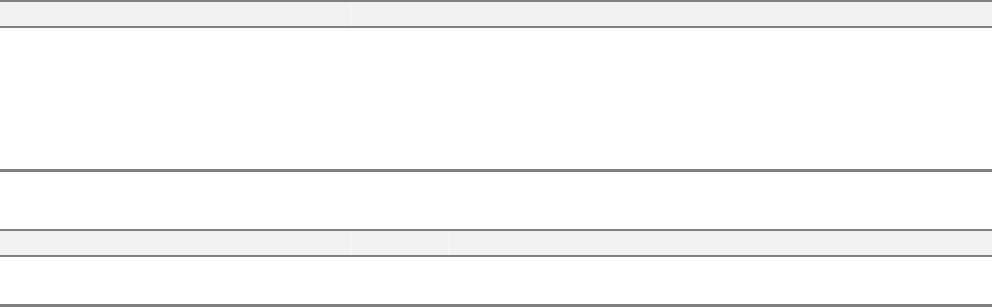
Scenarios:
Operator creates / changes equipment process program:
Comments Host Equipment Comments
PPCHANGENAME / PPCHANGESTATUS are
updated.
<-- S6F11
[IF] CEID for process program change is enabled
[THEN] Send event report.
Event report acknowledged. S6F12 -->
Host-initiated process program upload:
Comments Host Equipment Comments
Process program request S7F5 -->
<-- S7F6 Process program data.
GEM Manual for DEK Printers Capabilities
Issue 2.0 June 9th, 2011 page 41 of 156
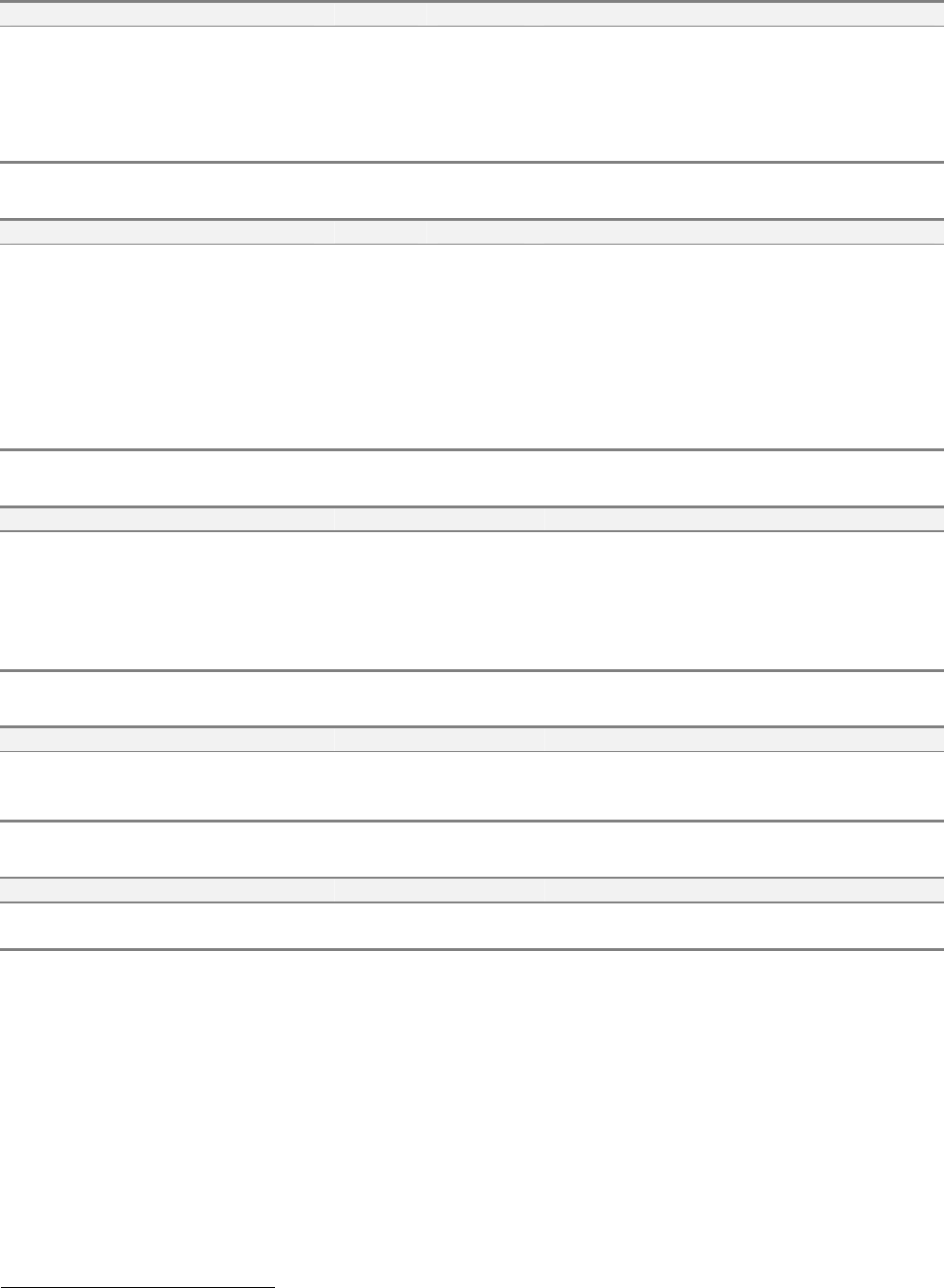
Equipment-initiated process program upload:
Comments Host Equipment Comments
<-- S7F1
[IF] Process program is multi-block [THEN] PP
Load Inquire
PP Load Grant S7F2 -->
[END_IF]
<-- S7F3 PP Send
PP Acknowledge S7F4 -->
Host-initiated process program download:
Comments Host Equipment Comments
[IF] PP is Multi-block PP Load Inquire S7F1 -->
<-- S7F2 PP Load Grant
[END_IF]
PP Send S7F3 -->
<-- S7F4 PP Acknowledge.
<-- S6F11
[IF] PP Validation = bad [AND] Bad Download
CEID
2
enabled [THEN] send Bad Download
event.
Event Acknowledge. S6F12 --> [END_IF]
Equipment-initiated process program download:
Comments Host Equipment Comments
<-- S7F5 PP Request
PP Data S7F6 -->
<-- S6F11
[IF] PP Validation = bad [AND] Bad Download
CEID
3
enabled [THEN] send Bad Download
event.
Event Acknowledge. S6F12 --> [END_IF]
Host-initiated process program delete:
Comments Host Equipment Comments
Delete PP send S7F17 -->
<-- S7F18 Delete PP Acknowledge. Process program
removed from non-volatile storage.
Process program directory request:
Comments Host Equipment Comments
Current EPPD Request. S7F19 -->
<-- S7F20 Current EPPD Data
2
See section 7-4.
3
See section 7-4.