252301 Issue 2.0.pdf - 第49页
GEM Manual for DEK Printers Capabilities I ssue 2.0 June 9th, 2011 page 49 of 156 5.12 Spooling I n the event that a co mmunication failure occur s the DEK printer is capable of spooling message s into non-volatile stora…
GEM Manual for DEK Printers Capabilities
Issue 2.0 June 9th, 2011 page 48 of 156
To illustrate, an example is given, assuming that UPPERDB = LOWERDB = 100. The list shows
consecutive readings of the variable and the resultant zone:
99 Lower Zone (Initial reading)
101 Upper Zone (Zone transition)
100 Lower Zone (Zone transition)
100 Lower Zone
99 Lower Zone
100 Upper Zone (Zone transition)
Transition from one zone into another generates a collection event, as might be reported via S6F11.
The host has the option of receiving notification by enabling event reporting for the event. For each
variable that has monitoring capability, one CEID is reserved to indicate zone transitions for that
variable. To aid in the determination of the nature of a transition event, three DVVAL's have been
defined: LimitVariable, EventLimit and TransitionType.
Scenarios:
Host defines limit attributes:
Comments Host Equipment Comments
[IF] S2, F45 is Multi-block
[THEN] Send Multi-block inquire
S2F39 -->
<-- S2F40 Multi-block grant.
[END IF]
Host defines new variable limit
attributes
S2F45 -->
<-- S2F46 Equipment acknowledges Host request.
Host queries equipment for current limits:
Comments Host Equipment Comments
Host queries Equipment for current
variable limit attribute definitions
S2F47 -->
<-- S2F48 Equipment returns report containing requested
variable limit attribute values.
Examples of applying limits monitoring for different applications are shown in SEMI E30-95
Appendix 7.

GEM Manual for DEK Printers Capabilities
Issue 2.0 June 9th, 2011 page 49 of 156
5.12 Spooling
In the event that a communication failure occurs the DEK printer is capable of spooling messages into
non-volatile storage. These messages can be recovered for transmission when the communications link
is restored.
5.12.1 Definitions
MaxSpoolTransmit: An equipment constant containing the maximum number of messages that the
equipment will transmit from the spool in response to an S6F23 "Transmit Spooled Messages" request.
If MaxSpoolTransmit is set to zero, no limit is placed on the messages sent from the spool. Multi-block
inquire/grant messages are not counted in this total.
OverWriteSpool: An equipment constant used to indicate to the equipment whether to overwrite data
in the spool area or to discard further messages whenever the spool area limits are exceeded.
Send Queue: Refers to the queue into which equipment generated SECS messages are placed in
preparation for transmission to the host.
Spool: The spool is an area of non-volatile storage in which the equipment stores certain messages that
cannot be delivered to the host (when the equipment is in the NOT COMMUNICATING substate of
COMMUNICATIONS ENABLED).
SpoolCountActual: A status variable used to keep a count of the messages actually stored in the
equipment's spool area. Multi-block inquire/grant messages are not spooled and not included in this
count.
SpoolCountTotal: A status variable used to keep a count of the total number of primary messages
directed to the spool, regardless of whether placed or currently retained in the spool. Multi-block
inquire/grant messages are not spooled and not included in this count.
SpoolFullTime: A status variable containing the timestamp when the spool last became full. If the
spool was not filled during the last spooling period, this will contain a time value prior to the current
SpoolStartTime.
SpoolStartTime: A status variable containing the timestamp from when spooling was last activated.
GEM Manual for DEK Printers Capabilities
Issue 2.0 June 9th, 2011 page 50 of 156
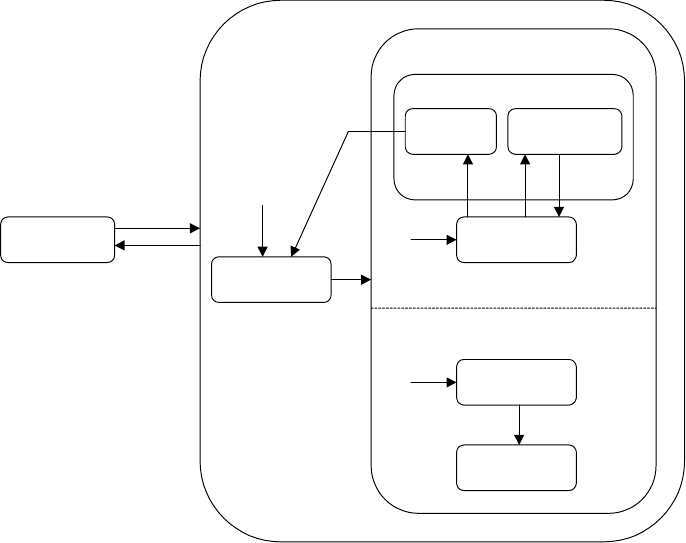
5.12.2 Spooling State Model
There are two major states of spooling: SPOOL INACTIVE and SPOOL ACTIVE. SPOOL ACTIVE
has two components: SPOOL UNLOAD and SPOOL LOAD. These are each broken into substates.
The POWER OFF and POWER ON parent states are common to all equipment subsystems. They are
shown here to illustrate the retention of spooling context during a power down situation.
NOTE: Disabling SECS communications does not affect the current spooling state since no messages
are generated until communications are subsequently enabled. Spooling is effectively frozen in this
case.
POWER OFF - The printer has lost power for any reason.
POWER ON - The printer is powered up.
SPOOL INACTIVE - This is the normal operating mode. No spooling occurs. The spool area is
empty. Primary SECS-II messages are transmitted normally.
SPOOL ACTIVE - All primary SECS-II messages ready for sending and for which spooling is
enabled (see S2F43) are directed to the spool area. All other primary messages, except Stream 1, are
discarded. The printer will attempt to send any secondary messages that are generated and discard these
messages should the attempt to send fail.
State Diagram:
SPOOL OUTPUT
PURGE
SPOOL
TRANSMIT
SPOOL
NO SPOOL
OUTPUT
SPOOL
NOT FULL
SPOOL
FULL
SPOOL
INACTIVE
POWER
OFF
POWER ON
SPOOL UNLOAD
SPOOL LOAD
7
8
3
1
2
4
5
6
SPOOL ACTIVE
Once communications are established, the host must initiate the spool unload sequence to restore full
functionality. Since the printer will deliver secondary messages, the host may inquire for information
or send commands as needed.