00192328-01.pdf - 第75页
SIPLACE S-25 HM 2 Retrofitt. Instruct. RV6-DLM1 Head & Nozzle Chang. RV6 Standa rd (Optionen) 02/01 Issue 2.5 SITEST: Adjust Configuration, Entry Zero Point Compens. Values RV6 Head 73 Å Cl ick on " RV6 S tandar…
2 Retrofitt. Instruct. RV6-DLM1 Head & Nozzle Chang. RV6 Standard (Optionen) SIPLACE S-25 HM
2.5 SITEST: Adjust Configuration, Entry Zero Point Compens. Values RV6 Head 02/01 Issue
72
&RQILJXUDWLRQ1R]]OH&KDQJHU596WDQGDUG
Å Change to the SITEST program.
Å The main view will appear.
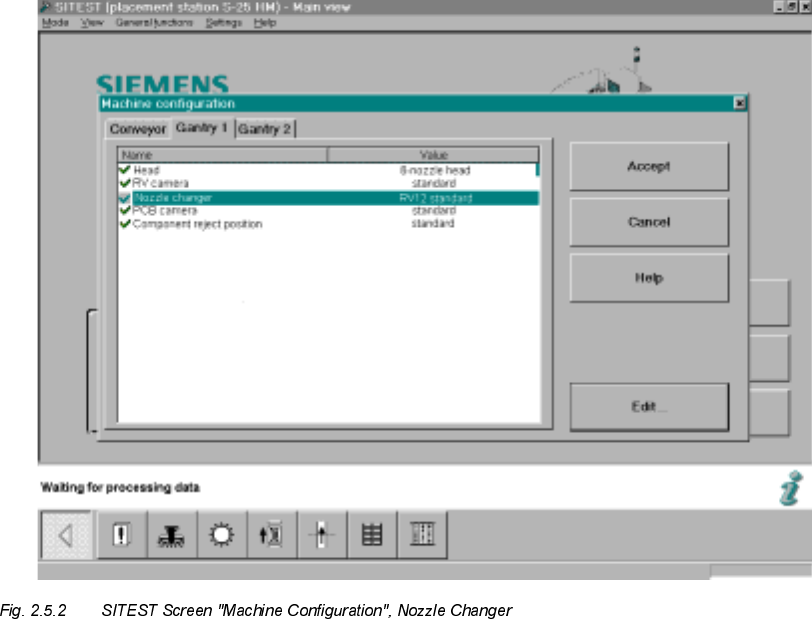
Å Starting from the main view, select -> Settings -> Machine configuration -> "Gantry 1" or "Gan-
try 2", depending on which location the nozzle changer RV6 was installed at.
The following screen will appear:
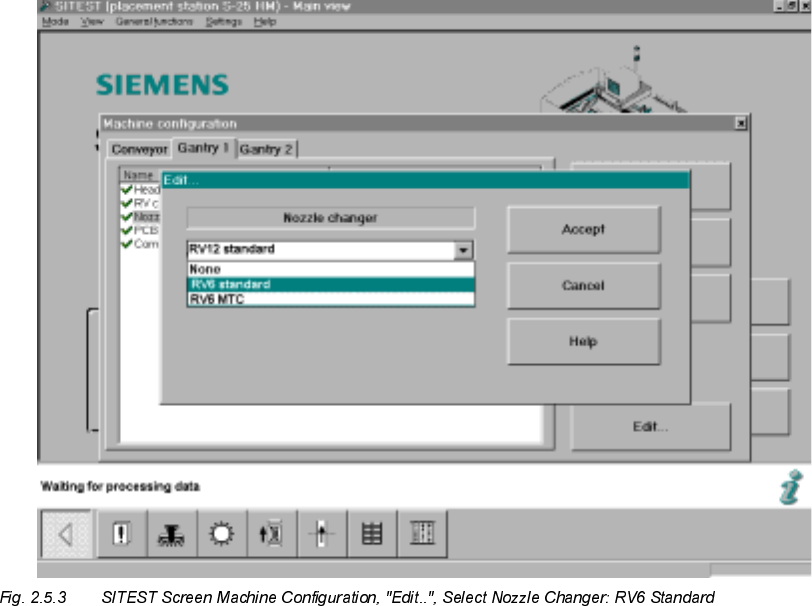
Å Click on "Nozzle changer" -> "Edit.." (button).
The following screen will appear:
SIPLACE S-25 HM 2 Retrofitt. Instruct. RV6-DLM1 Head & Nozzle Chang. RV6 Standard (Optionen)
02/01 Issue 2.5 SITEST: Adjust Configuration, Entry Zero Point Compens. Values RV6 Head
73
Å Click on "RV6 Standard" (long nozzle changer for the RV6 head) -> Select "Accept" (button).
Take note of:
If a RV6-DLM1 head AND an MTC was retrofitted, select the nozzle changer "RV6 MTC" ->
"Accept" (button) -> again "Accept".
After the overall reference run, the nozzle changer MTC is configured and measured in accor-
dance with the Retrofitting Instructions for MTC, Item no. see: Section 2.3.6.
Å Calibrate the nozzle changer after the dynamics adjustment and the calibration of the heads,
i.e., after taking the steps below (see: Section 2.8).
&RQFOXGLQJ$FFHSWDQFHRIWKH&RQILJXUDWLRQ
Å After completely adjusting the machine configuration:
Exit the menu "Machine Configuration" by pressing "Accept" (button).
The main view will be displayed and the messsage will appear:
7KHPDFKLQHFRQILJXUDWLRQKDVFKDQJHG
6KXWGRZQ!5HVWDUWPDFKLQH!&OLFNRQ2.EXWWRQ
Å Boot up the machine and change back to the SITEST program.
2 Retrofitt. Instruct. RV6-DLM1 Head & Nozzle Chang. RV6 Standard (Optionen) SIPLACE S-25 HM
2.5 SITEST: Adjust Configuration, Entry Zero Point Compens. Values RV6 Head 02/01 Issue
74
(QWU\=HUR3RLQW&RPSHQVDWLRQ9DOXHVRIWKH1HZ3ODFHPHQW+HDG
Å $)7(5WKHUHVWDUWWUDQVIHUWKH]HURSRLQWFRPSHQVDWLRQYDOXHVRQWKHODEHORIWKHSODFH
PHQWKHDGMXVWLQVWDOOHGYLVLEOHLQDVVHPEOHGFRQGLWLRQ
Å For the entry, select the menu +HDGH[FKDQJHin the SITEST main view or select:
-> ICON "Axis functions of the revolver head" -> Activate the relevant axis (z-, star, dp) by
clicking on the radio button -> Click on "Positions" (button).
Å Select "Zero point compensation" -> Edit -> Transfer the value from the label -> Click on
"Accept" (button)
Å Carry out the transfer of the remaining zero point compensations from the label in the same
manner.
Å 1RZFDUU\RXWWKHRYHUDOOUHIHUHQFHUXQEXWWRQ