00192231-09_VD_SSW 407.05_de en.pdf - 第21页
Software Version Description, Station Software Version 407.05 07/2008 Edition 5.5.2.3 Support for the track status on the SMV screen Tracks which have been verified positively during co mponent verification are indicated…

Software Version Description, Station Software Version 407.05 07/2008 Edition
New functions:
- "Alle ablegen" (Return all):
All the nozzles on the head are returned to the relevant magazine. If this is not possible because the
nozzle changer configuration has been changed, the nozzles are discarded into the reject bin.
- "Alle wegwerfen" (Discard all):
All nozzles are discarded into the reject bin.
5.5.2 Revised traceability "Trace +"
A range of improvements with respect to ease of use have been introduced since Traceability 407.03.
5.5.2.1 Requirements
SMV software 6.6.34 or later
(For installation instructions and documentation, see
SMV CD-ROM V6.6.34\win\library\HTMLHelp)
5.5.2.2 "Scan xx" function
To provide additional help for operators, an additional "Scan xx" specification should appear on the station
monitor under certain circumstances: The "xx" refers to the track number on the barcode track scale to be
scanned during component verification.
The "Scan xx" specification appears:
• On all track error messages, e.g.
Track error: 3404 Track empty PLCC44 Loc.:3, 7-2 Seg:0
(Scan 9) #E:1
In this example, the operator must scan track 9 on the barcode track scale during refilling.
This feature is only active if component verification is active.
• In an additional new "Scan" column
The "Scan xx" specification also appears in two further places:
- in the track error lists
- in the component level indicator
20 of 104
Software Version Description, Station Software Version 407.05 07/2008 Edition
5.5.2.3 Support for the track status on the SMV screen
Tracks which have been verified positively during component verification are indicated by a green "9" on the
SMV screen. Previously, this icon was also displayed if the corresponding track has been deactivated as a
result of a detected splice. In future, tracks which are verified positively but deactivated on the station will be
indicated by "(9)".
5.5.2.4 Batch status function in the GUI
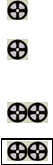
The component level indicator has a new column "Status" to display the data recording status of the track
with respect to Traceability.
Only tracks subject to component verification are supported.
Contents of the "Status" column:
<empty> means: no batch data available
means: 1 verified batch
X means: 1 verified batch, track deactivated because follow-on batch is missing (e.g. after
detected splice)
means: 2 verified batches
means: 2 verified batches, transitional area, both batches are logged
The content of the batch data, i.e. the recorded barcodes are not shown.
5.5.2.5 Sort sequence the component level indicator
Clicking on the "Location" column now sorts as follows:
- Sort by location
- within the location by track number
- then by division number
If the component level indicator is opened again, the sort sequence selected previously is still active. (This
does not apply after a reboot).
21 of 104

Software Version Description, Station Software Version 407.05 07/2008 Edition
5.5.2.6 Entering component level
Changing the component level is only possible on the "Operator" access level. This does not apply to any of
the other entries (e.g. threshold).
Specifying the remaining length of the tape behind the feeder
It is difficult to estimate the filling level of a partially used reel. The system therefore now provides help for
doing this. The operator specifies the remaining length of the tape behind the rear edge of the feeder.
The system first calculates the overall remaining tape length including the length of the feeder. On the basis
of the feeder pitch (which must be entered in the programming system) the system calculates the number of
components remaining.
Remaining component level = (length of feeder + remaining length behind feeder) / pitch
The length of the feeder can be assumed to be 50 cm.
Next to the screen area "Supply", there is another screen area "Remaining length", which includes this entry
field.
An entry in one of the fields "Supply" or "Remaining length" always causes the value in the other field to be
adjusted.
If the component level correction function is called by clicking the "Edit" button in the component level
indicator, the input focus is on the "Enter remaining length" field. The value previously entered in the field is
also selected, so that the operator can correct the value using only the keyboard without needing the mouse.
Note:
The
threshold value "Remaining length" is also calculated as of the rear edge of the feeder as of this version.
If a remaining length x is entered, the system uses a remaining length of x + 50 cm. This harmonizes the
specification with the new option for entering the component levels.
5.5.2.7 Initialization using the menu command "New table"
The function "New table" ("Set") should always reset the data maintenance for the corresponding track. All
data scanned in previously and all saved commands (splice detected) are deleted. The record reported with
"New table" is entered in the first batch. This option allows the operator to proceed in a defined manner from
"unclear" statuses. In the case of "repair operations" (continuation from a situation which is unclear for the
operator), the operator is responsible for recording the correct status:
22 of 104