00195327-03_EN_DE_Install_eWinXP_MC.pdf - 第12页
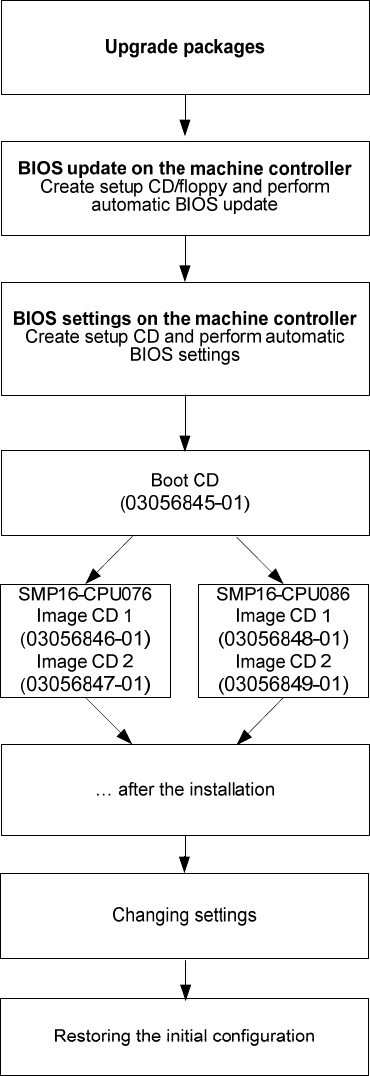
Installation Manual, Windows XP Embedded operating syst em for the machine controller Issue 04/2007 5 Inst allation for the SMP16-CPU076 and SMP16-CPU086 5.1 Overview CPU 076 with X4 machine: upgrade package (item nu mbe…

Installation Manual, Windows XP Embedded operating system for the machine controller Issue 04/2007
11 of 28
4.2.2 SIPLACE D series machine controller hardware
Name
SIMATIC Microbox 420
CPU / clock frequency
Pentium III / 933 MHz
RAM
256 MB
Hard disk
40 GB
External DVD drive
Yes
Serial interfaces
1
USB interfaces
and external USB hub
Yes
Network
2x 100 MBit
Table 4-4: Machine controller hardware (SIPLACE D series)
Installation Manual, Windows XP Embedded operating system for the machine controller Issue 04/2007
5 Installation for the SMP16-CPU076 and SMP16-CPU086
5.1 Overview
CPU 076 with X4 machine: upgrade package (item number:
03029123S03) for upgrade to CPU 086 is required
CPU 076 with X2/X3 machine: upgrade package (item number:
03051831) for memory expansion is required
See the section
5.2.
See the section
5.3.
Installing the operation system Windows XP embedded see the
section
5.4.
See the section
7.
See the section
8.
See the section
9.
12 of 28

Installation Manual, Windows XP Embedded operating system for the machine controller Issue 04/2007
5.2 Automatic BIOS update on the machine controller
Note:
You have update the BIOS update for the machine controller, when
- upgrading a SIPLACE X2, X3 or X4 machine from software version 601.0x
- operating system is installed on the machine controller for the first time
→ Disconnect the keyboard from the station computer and connect it to the machine controller.
→ Switch the video multiplexer from the station computer to the machine controller.
5.2.1 Creating a setup CD/floppy
CPU076
→ Insert the CD for Version 604.01 of the software into the drive of a computer.
→ Insert a formatted floppy (3.5", 1.44MB) into the floppy drive.
→ In the Windows Explorer, open the "BIOS-Images" folder on the CD.
→ Double-click the self-extracting EXE file "CPU076_BIOS_Update.exe".
→ Follow the instructions on screen.
→ Once the floppy has been written, remove the floppy and the CD from the drives.
CPU086
→ Insert the CD for Version 604.01 of the software into the drive of a computer.
→ Insert an empty CD-R in the drive.
→ In the Windows Explorer, open the "BIOS-Images" folder on the CD.
→ Open the image file "CPU086_BIOS_Update.iso" using the installed CD writing program.
→ Follow the instructions on screen.
→ Once the CD has been written, remove the CDs from the drives
5.2.2 Making the BIOS update on the machine controller
Note:
Before you start work, ensure that the CD-ROM/floppy is set as the first boot device in the
BIOS to allow the computer to be booted from CD.
→ Insert the CD/floppy you have created in the drive on the machine controller and boot from the
CD/floppy by switching the machine on.
The BIOS update is now performed automatically.
→ After the operation has been completed, remove the CD from the drive and carry out a warm start of
the MC computer by pressing <Ctrl><Alt><Del>.
13 of 28