00195327-03_EN_DE_Install_eWinXP_MC.pdf - 第25页
Installation Manual, Windows XP Embedded operating syst em for the machine controller Issue 04/2007 → Click the Settings tab. → Set the "Screen resolution" slider to "10 24 by 768 pixels". → Confirm t…
Installation Manual, Windows XP Embedded operating system for the machine controller Issue 04/2007
8 Changing settings
It is now necessary to check the display settings and change them if necessary.
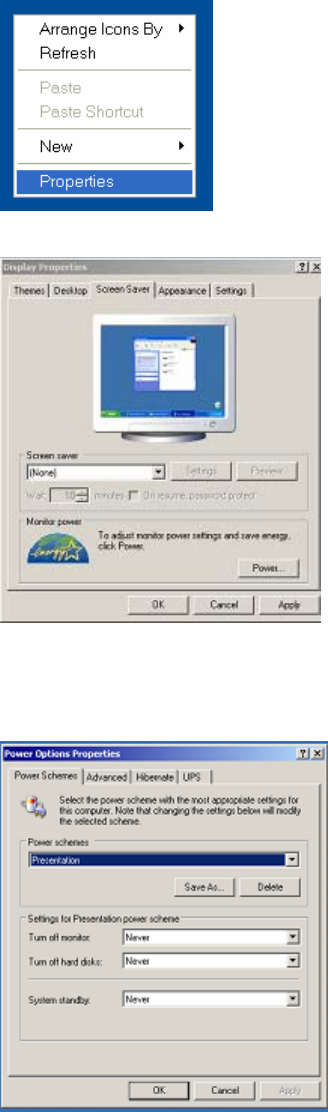
→ Right-click on a free area of the desktop and select Properties from the context menu.
→ Click the Screen Saver tab.
→ Select (None) from the list of screen savers.
→ Confirm the settings by clicking OK.
→ Click the Power… button.
→ Set all the options to Never under the "Settings for Presentation power scheme".
→ Confirm the settings by clicking OK.
24 of 28
Installation Manual, Windows XP Embedded operating system for the machine controller Issue 04/2007
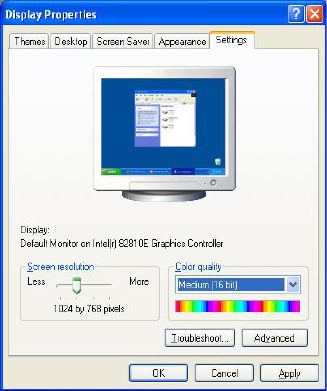
→ Click the Settings tab.
→ Set the "Screen resolution" slider to "1024 by 768 pixels".
→ Confirm the settings by clicking OK.
9 Restoring the initial configuration
→ Reconnect the keyboard to the station computer.
→ Switch the video multiplexer back to the station computer.
→ For SIMATIC Box PC 627 and SIMATIC Microbox 420:
Disconnect the USB cable for the DVD drive from the MC computer.
25 of 28
Installation Manual, Windows XP Embedded operating system for the machine controller Issue 04/2007
26 of 28