00197787-02_SI_SIPLACE_HeadVerification_EN.pdf - 第21页
3 Head verification principles 3.3 Head verification software Software Manual SIPLACE Head Verification 03/2018 21 3.3.5 Test details During the head verification you can investigate on the test details achieved. Fig.22…
3 Head verification principles
3.3 Head verification software
20 Software Manual SIPLACE Head Verification 03/2018
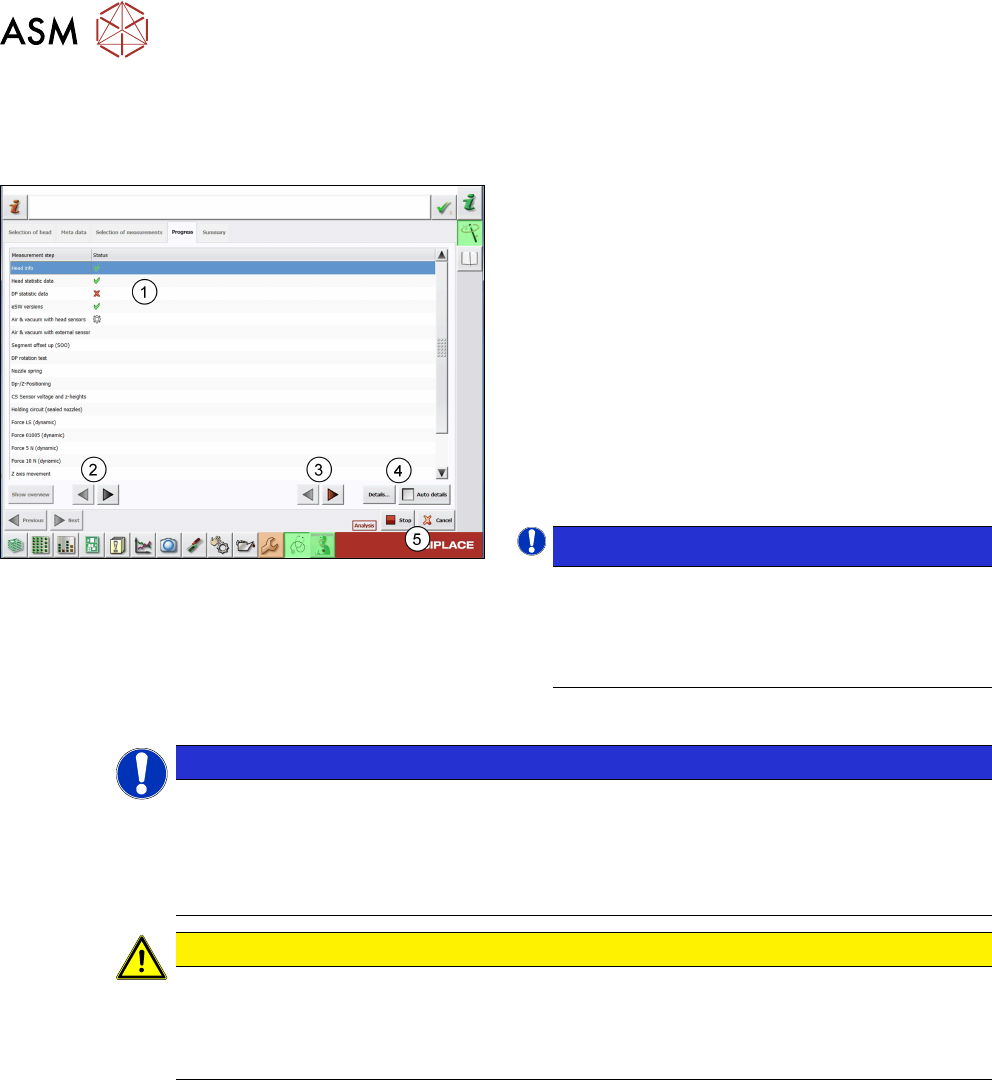
3.3.4 Measurement progress
After starting the head verification process, the software runs all measurements consecutively. The
process is only interrupted whenever a user interaction is required or if an error occurs.
Fig.21: Measurement progress
The Status column(1) shows the verification status:
●
Gear = measurement in progress.
●
Green tick = measurement successful
●
Red cross = measurement failed
► Click the arrow buttons(2) to navigate through in-
dividual measurements.
► Click the red arrow buttons(3) to navigate
through the failed measurements. The buttons
are deactivated if no error occurred.
► For more information, double-click a measuring
step(1), or select a step and click the Details…
button(4).
NOTICE!
If the arrow keys are to be used, it is recommen-
ded to switch off the Auto detailsfunction. Oth-
erwise, the detailed information screen opens for
the currently running test whenever new data is
available.
.
► Stop / Cancel buttons(5)
NOTICE
Stop aborts the current measurement
Clicking the Stop button interrupts the current measurement and unlocks the door. You can
only restart the measurement from the beginning, not from the point where it was interrup-
ted.
► To restart the measurement, close the door and click Continue.
CAUTION
Cancel aborts the whole verification
Clicking the Cancel button aborts the whole test and looses all previous settings. The veri-
fication process then needs to be started from the beginning.
► Only click Cancel if you are sure to discard all results.
3 Head verification principles
3.3 Head verification software
Software Manual SIPLACE Head Verification 03/2018 21
3.3.5 Test details
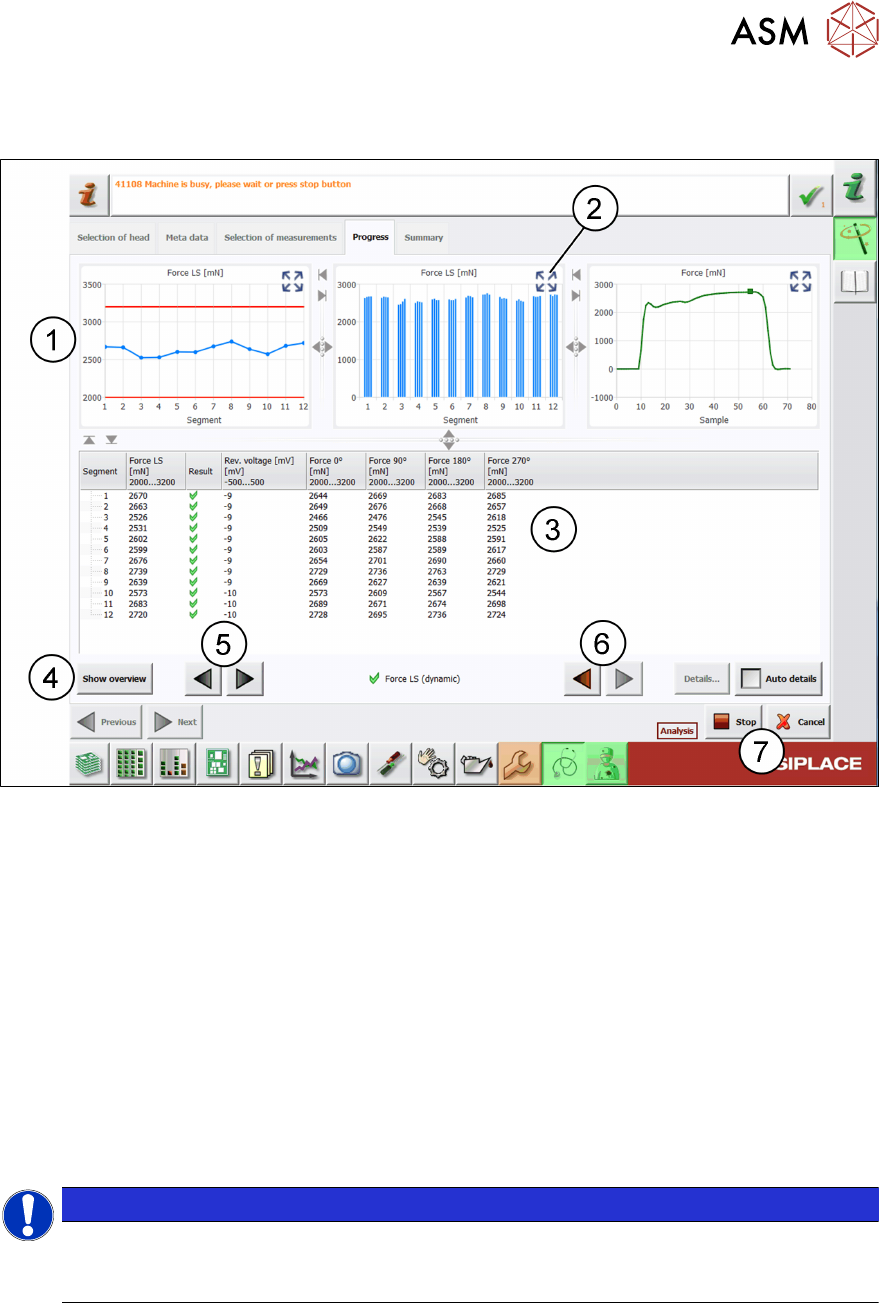
During the head verification you can investigate on the test details achieved.
Fig.22: Force LS (dynamic) test – Details view
1 Different graphs showing the measurement details for each segment:
●
The red lines indicate the limits shown in the header of the table below the graph.
●
The values for each segment are indicated by blue or green dots and lines.
2 Button to expand the graph for a more detailed view.
3 Table showing the measured segments, the defined limits, the individual data and the
achieved results.
4 Show overview button to return to the Progress view.
5 Arrow buttons to navigate through individual measurements.
6 Red arrow buttons to navigate through failed measurements.
7 Stop/Cancel buttons
NOTICE
Live image display
For measurements using the camera, a live image is displayed in the right corner of the
Progress tab.
3 Head verification principles
3.3 Head verification software
22 Software Manual SIPLACE Head Verification 03/2018
3.3.6 End of measurement – Summary
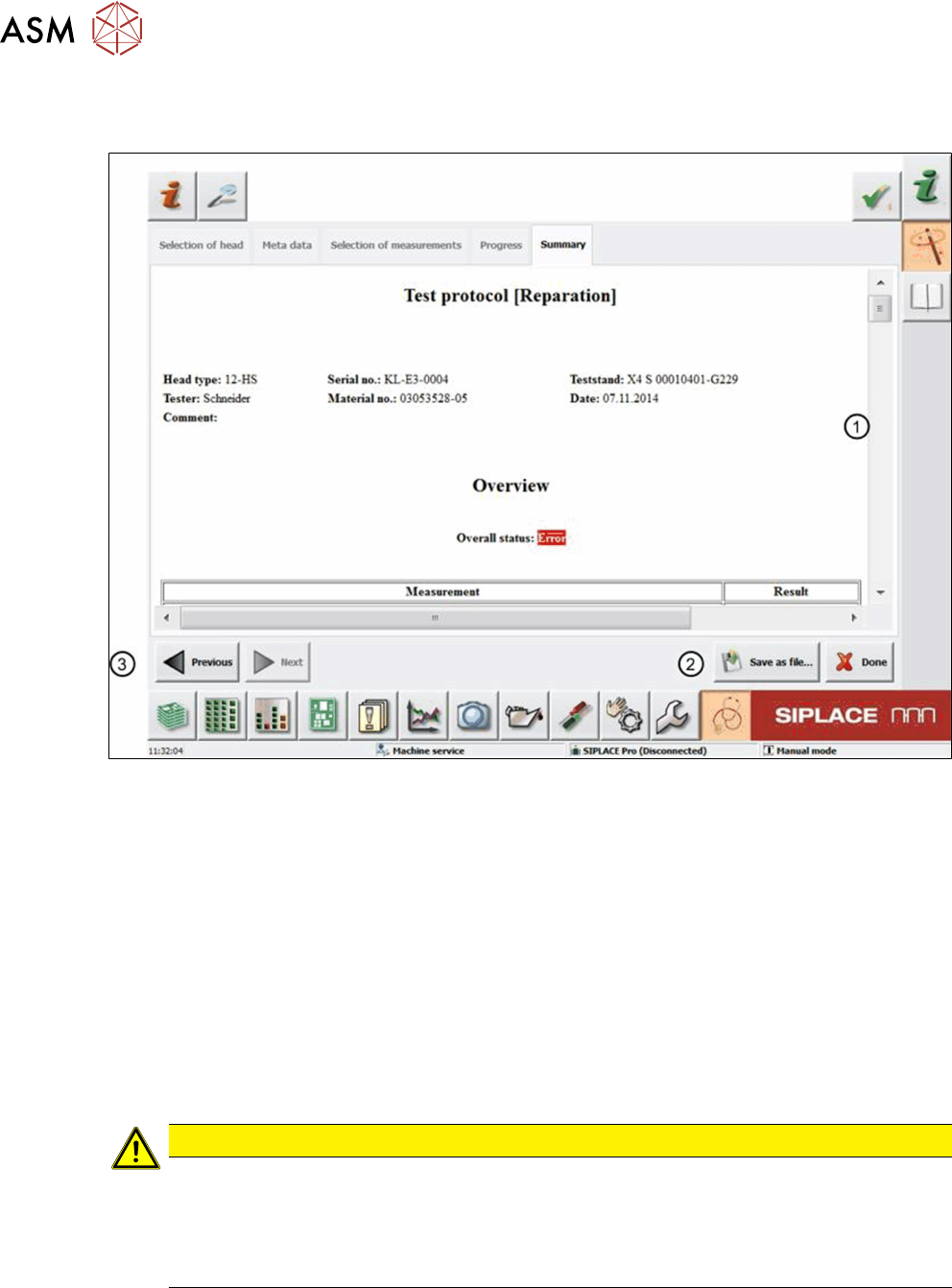
When all measurements are finished, the system automatically opens the protocolview(1).
Fig.23: Summary tab
1 Protocol overview
2 Save as file button
3 Previous button
If the Overall status shows an ‘Error’, one or more tests failed or could not be finished.
Following the Overall status, an overview of all measurements is displayed indicating if a meas-
urement was successful or failed, or if the test was skipped. Following that, test details for each
measurement are shown.
The protocol is automatically saved to a PDF file in D:\Protocols to a specified folder correspond-
ing to the verified head. Nevertheless, you can still save the protocol to a favored target folder:
► To close the current head verification, click the Done button.
CAUTION
Head verification process data removed
If you click the Done button, the current head verification will be closed and all temporary
data will be deleted. In this case, the result is only available in the PDF that is automatically
saved to D:\Protocols.
► Only click Done when you are sure to close the current head verification.