00197787-02_SI_SIPLACE_HeadVerification_EN.pdf - 第48页
6 Description of the test results 6.8 DP rotation test 48 Software Manual SIPLACE Head Verification 03/2018 6.8 DP rotation test 6.8.1 Measurement principle The DP rotation measurement is used to verify the DP position. …
6 Description of the test results
6.7 DP positioning time
Software Manual SIPLACE Head Verification 03/2018 47
6.7 DP positioning time
6.7.1 Measurement principle
The DP positioning time is used to verify the encoder disk and read head of the TH D-Axis.
The test is split up in two sections:
●
Firstly, the D-axis is positioned forwards and backwards by 90° steps 40 times. For each step,
the time is measured it takes the axis to reach the position.
●
Secondly, the sequence is repeated using 90° steps.
6.7.2 Measurement result
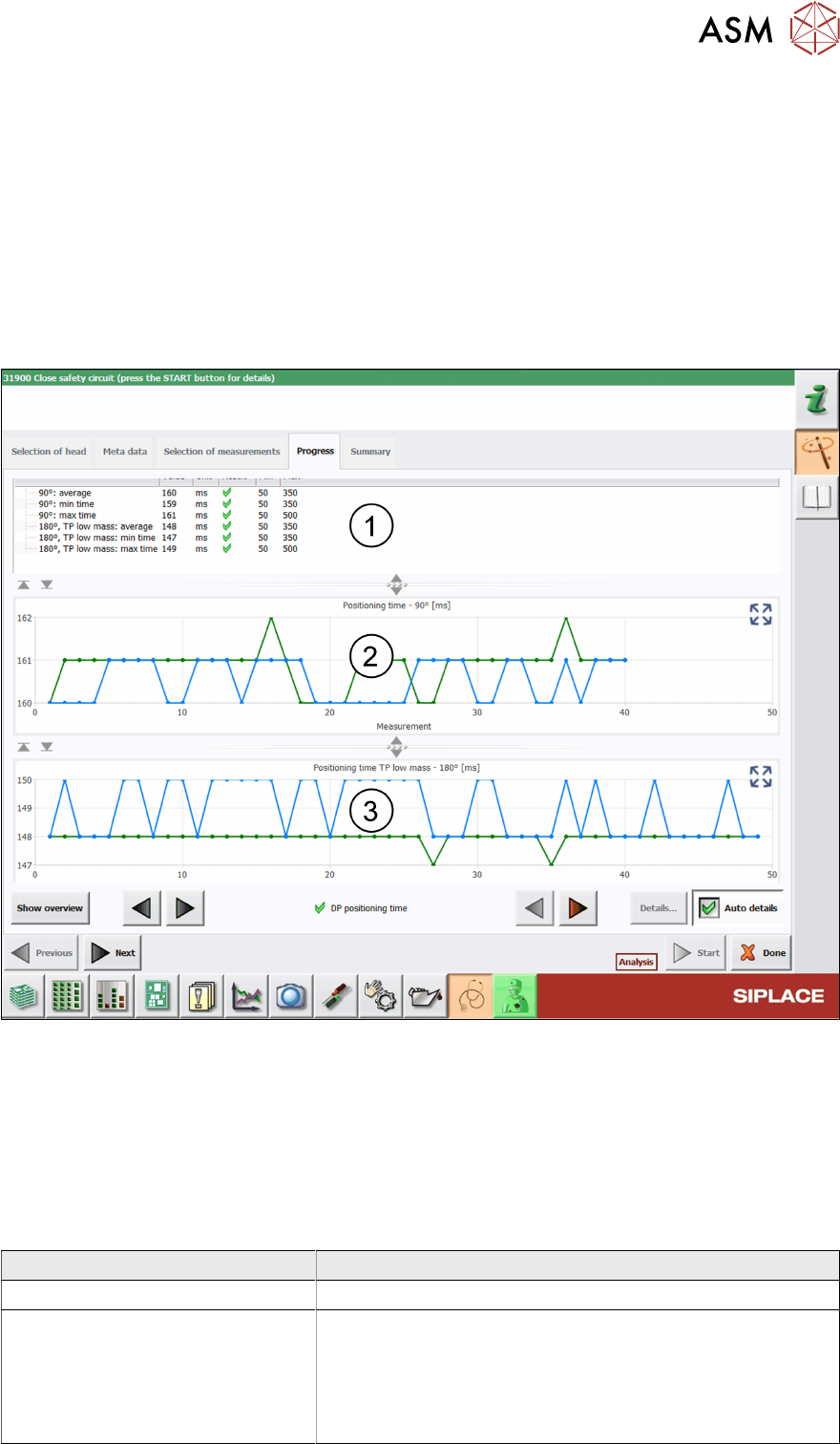
Fig.39: Result view - DP positioning time
1 Minimum, maximum and average time determined when stepping the axis by 90° / 180°.
2 Graph showing the DP positioning by 90° steps.
3 Graph showing the DP positioning by 180° steps.
6.7.3 Interpretation of the results obtained
‘DP positioning time’ error
Cause Solution
Encoder disk or read polluted ► Clean the encoder disk / read head (Q1/2018).
Encoder disk or read defective ► Replace the ‘Trick a. feather unit/P+P module
(Q1/2018)’.
► Replace the P&P module.
► Send the P&P module to ASM for customer specific re-
pair.
6 Description of the test results
6.8 DP rotation test
48 Software Manual SIPLACE Head Verification 03/2018
6.8 DP rotation test
6.8.1 Measurement principle
The DP rotation measurement is used to verify the DP position.
During the measurement, the calibration tool is picked up, moved to the component camera and
positioned at 4°(4000 digits). The component camera then captures a live image of the calibration
tool and checks if the position is within the allowed limits.
6.8.2 Measurement result
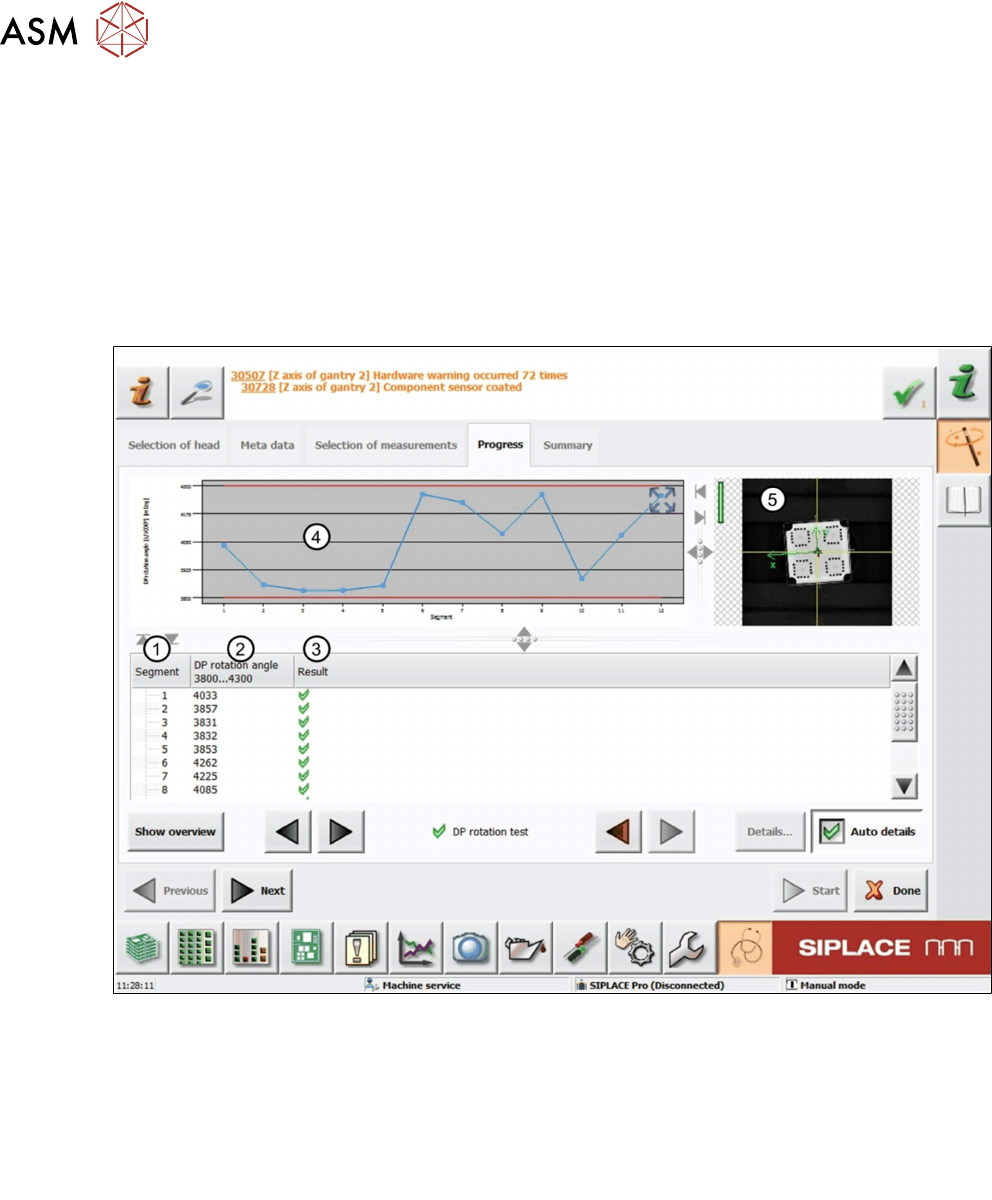
Fig.40: Result view – DP rotation test
1 Measured Segment
2 DP rotation angle of the calibration tool determined by the component camera.
3 Result view indicating if the values are within (green tick) or outside (red cross) the limits.
4 Graph showing the measured DP rotation angle for each segment.
5 Live image of the calibration tool.

6 Description of the test results
6.8 DP rotation test
Software Manual SIPLACE Head Verification 03/2018 49
6.8.3 Interpretation of the results obtained
‘DP rotation angle’ error for all segments
Cause Solution
Possible contamination of component camera ► Clean the lens or replace the component
camera.
‘DP rotation angle’ error for individual segments
Cause Solution
DP does not rotate reliably ► Replace the segment (DP).
Calibration component rotates on nozzle ► Check if the nozzle is dirty and clean it if
necessary.
► Check the nozzle seat.
► Check the vacuum supply.