3MAINTENANCE__O.pdf - 第111页
3.5 Offset Teaching Set the [ OPERATION / SET UP ] switch to the “ SET UP ” side before performing the above - related maintenance work ( including jig attachment ) . Only the person in charge of maintenance work should …
3.5
Offset
Teaching
3.5
Offset
Teaching
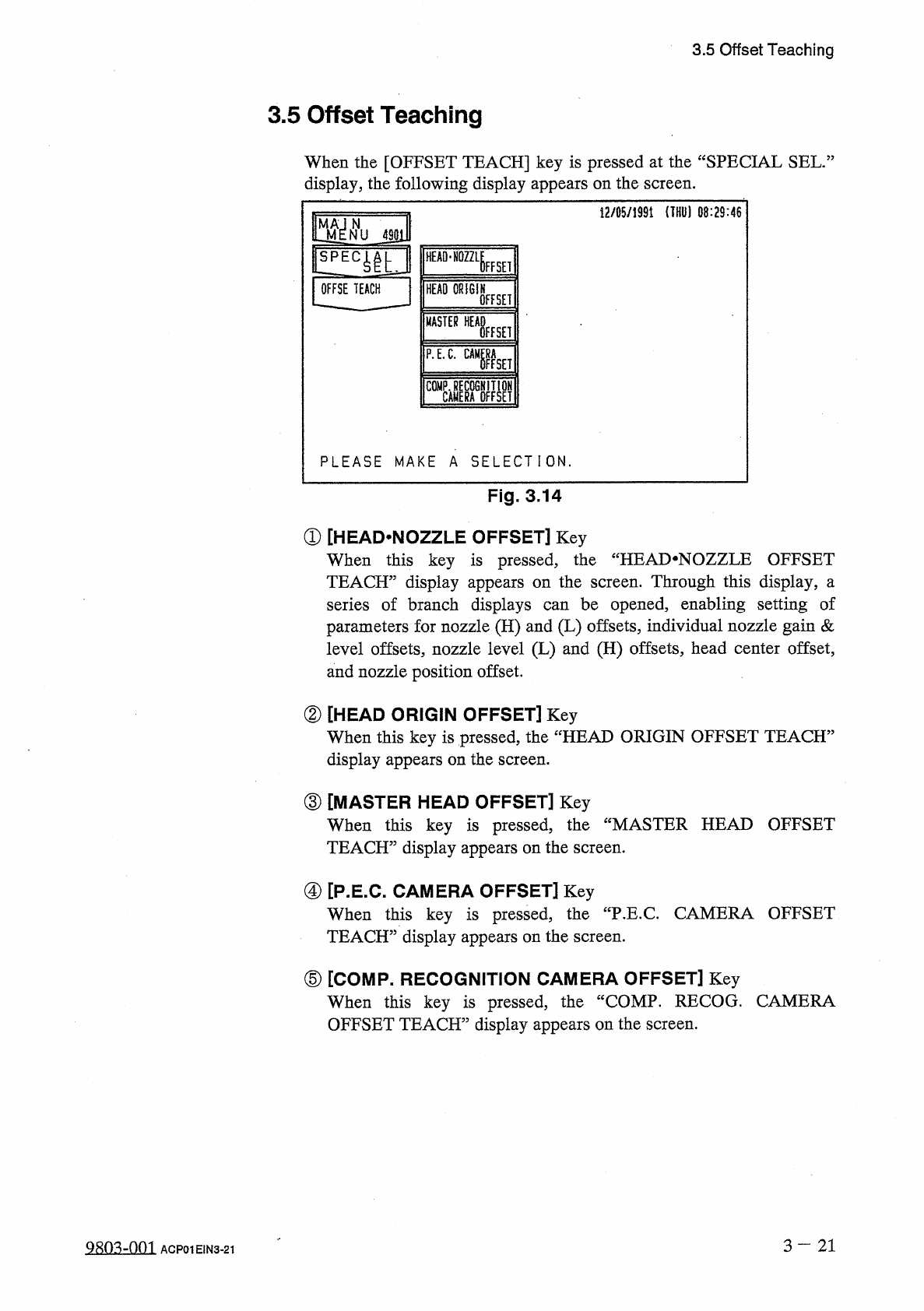
When
the
[
OFFSET
TEACH
]
key
is
pressed
at
the
“
SPECIAL
SEL
.
:
display
,
the
following
display
appears
on
the
screen
.
12
/
05
/
1991
(
THU
)
08
:
29
:
46
m
N
NU
4901
HEAD
-
NOZZLE
FFSEI
OFFSE
TEACH
HEAD
ORIGIN
OFFSET
MASTER
WHisEH
P
.
E
.
C
.
gaga
PLEASE
MAKE
A
SELECTION
.
Fig
.
3.14
①
[
HEAD
.
NOZZLE
OFFSET
]
Key
When
this
key
is
pressed
,
the
“
HEAI
>
NOZZLE
OFFSET
TEACH
”
display
appears
on
the
screen
.
Through
this
display
,
a
series
of
branch
displays
parameters
for
nozzle
(
H
)
and
(
L
)
offsets
,
individual
nozzle
gain
&
level
offsets
,
nozzle
level
(
L
)
and
(
H
)
offsets
,
head
center
offset
,
and
nozzle
position
offset
.
be
opened
,
enabling
setting
of
can
②
[
HEAD
ORIGIN
OFFSET
]
Key
When
this
key
is
pressed
,
the
“
HEAD
ORIGIN
OFFSET
TEACH
5
display
appears
on
the
screen
.
③
[
MASTER
HEAD
OFFSET
]
Key
When
this
key
is
pressed
,
TEACH
”
display
appears
on
the
screen
.
the
“
MASTER
HEAD
OFFSET
④
[
P
.
E
.
C
.
CAMERA
OFFSET
]
Key
When
this
key
is
pressed
,
TEACH
”
display
appears
on
the
screen
.
the
"
P
.
E
.
C
.
CAMERA
OFFSET
⑤
[
COMP
.
RECOGNITION
CAMERA
OFFSET
]
Key
When
this
key
is
pressed
,
the
“
COMP
.
RECOG
.
CAMERA
OFFSET
TEACH
”
display
appears
on
the
screen
.
3
—
21
Q
8
ft
3
-
nm
ACP
01
EIN
3
-
21
3.5
Offset
Teaching
Set
the
[
OPERATION
/
SET
UP
]
switch
to
the
“
SET
UP
”
side
before
performing
the
above
-
related
maintenance
work
(
including
jig
attachment
)
.
Only
the
person
in
charge
of
maintenance
work
should
perform
teaching
operations
.
Teaching
operations
cannot
be
performed
with
the
[
OPERATION
/
SET
UP
]
switch
set
to
the
“
SET
UP
”
side
.
A
WARNING
3
-
2 2
9803
-
001
ACP
01
EIN
3
-
22
3.5
Offset
Teaching
3.5
.
1
Head
^
Nozzle
Offset
Teaching
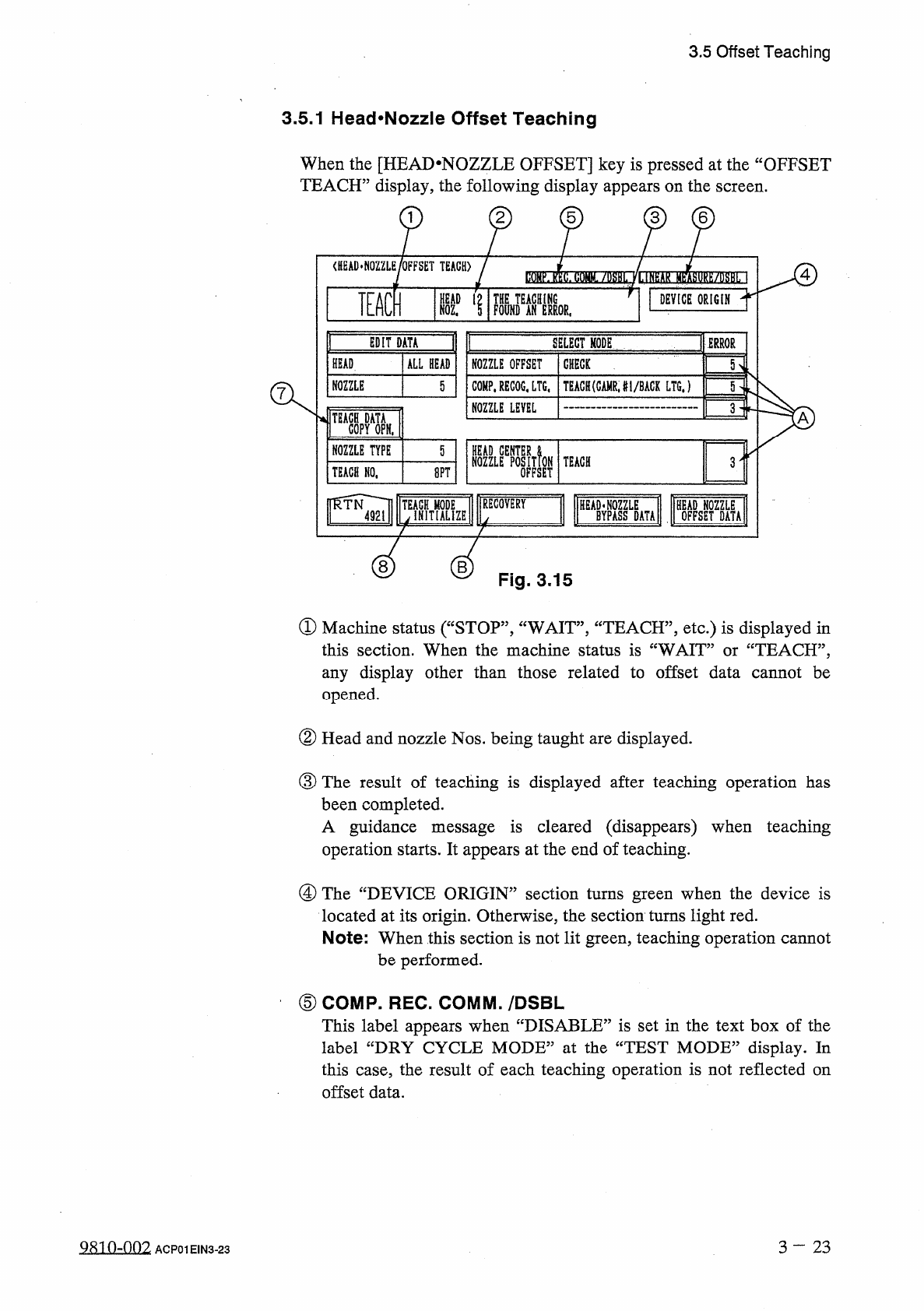
When
the
[
HEAD
-
NOZZLE
OFFSET
]
key
is
pressed
at
the
“
OFFSET
TEACH
”
display
,
the
following
display
appears
on
the
screen
.
2
5
<
HEAD
*
NOZZLE
/
OFFSET
TEACH
)
4
TEACH
S
'
1
DEVICE
ORIGIN
TERROR
EDIT
DATA
SELECT
MODE
HEAD
ALL
HEAD
ROZZLE
OFFSET
GttEGK
NOZZLE
TEACH
(
GAMRJ
1
/
BACK
LTGJ
5
COMP
.
RECOG
,
LTG
,
5
NOZZLE
LEVEL
3
A
NOZZLE
TYPE
5
NOZZLEEPOSITfoN
OFFSET
TEACH
3
TEACH
NO
,
8
PT
[
RECOVERY
«
ZE
B
Fig
.
3.15
①
Machine
status
(
“
STOP
”
,
“
WAIT
”
,
“
TEACH
”
,
etc
.
)
is
displayed
in
:
TEACH
,
,
,
this
section
.
When
the
machine
status
is
“
WAIT
any
display
other
than
those
related
to
offset
data
cannot
be
opened
.
or
②
Head
and
nozzle
Nos
.
being
taught
are
displayed
.
③
The
result
of
teaching
is
displayed
after
teaching
operation
has
been
completed
.
A
guidance
message
is
cleared
(
disappears
)
when
teaching
operation
starts
.
It
appears
at
the
end
of
teaching
.
@
The
“
DEVICE
ORIGIN
”
section
turns
green
when
the
device
is
located
at
its
origin
.
Otherwise
,
the
section
turns
light
red
.
Note
:
When
this
section
is
not
lit
green
,
teaching
operation
cannot
be
performed
.
⑤
COMP
.
REC
.
COMM
.
/
DSBL
This
label
appears
when
“
DISABLE
”
is
set
in
the
text
box
of
the
label
“
DRY
CYCLE
MODE
”
at
the
“
TEST
MODE
”
display
.
In
this
case
,
the
result
of
each
teaching
operation
is
not
reflected
on
offset
data
.
3
—
23
Q
8
in
-
002
ACP
01
EIN
3
-
23