3MAINTENANCE__O.pdf - 第114页
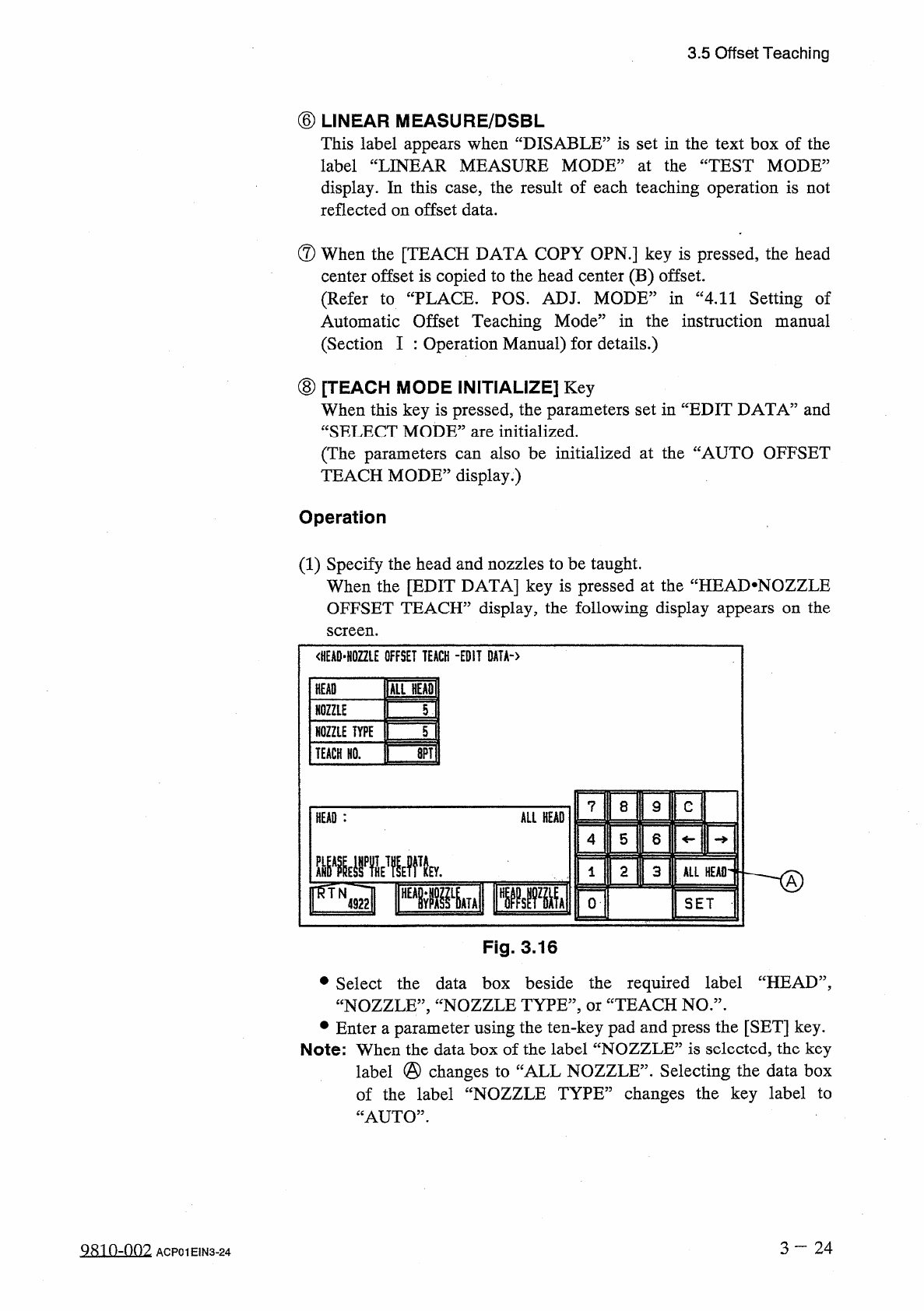
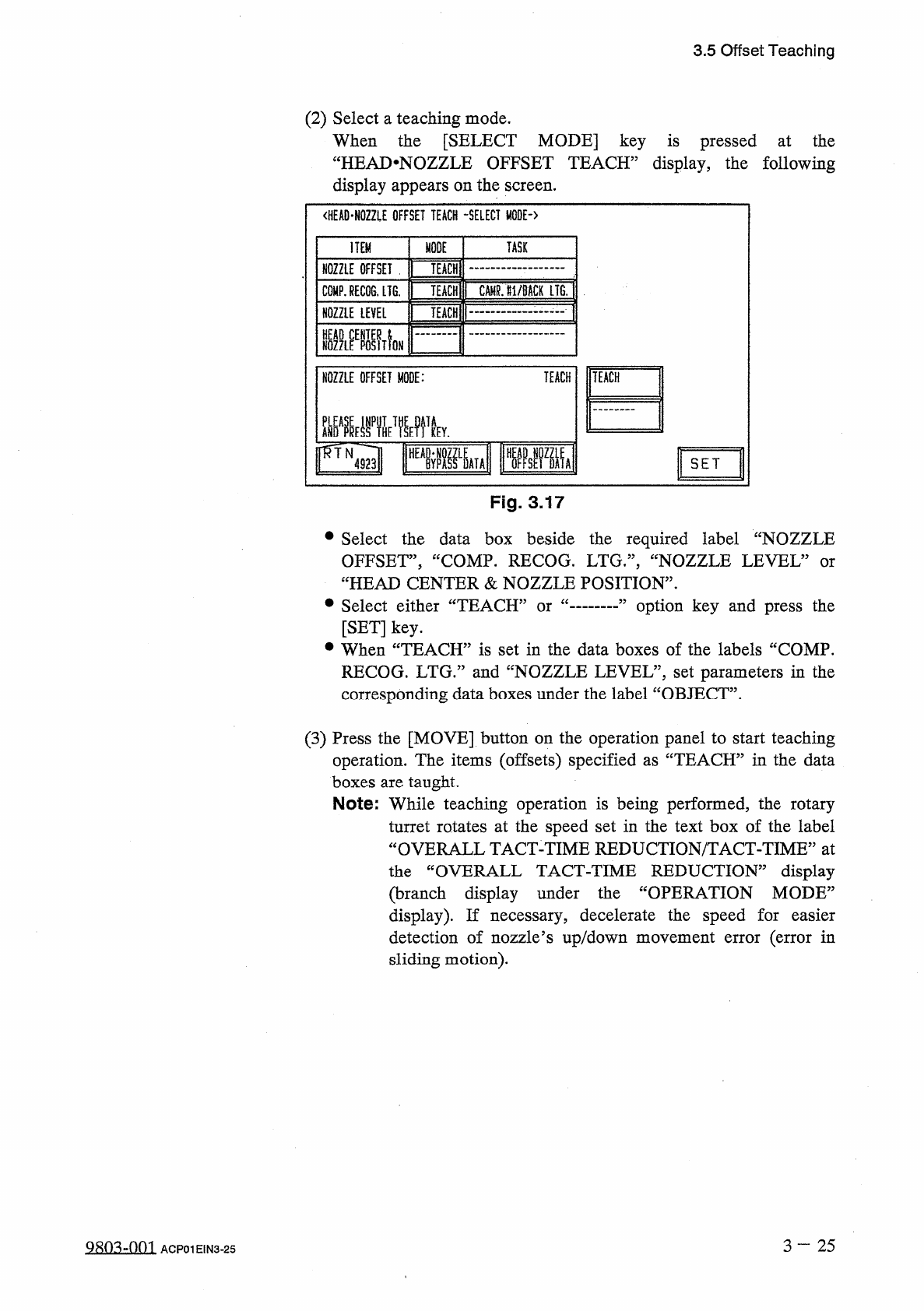
3.5 Offset Teaching ( 2 ) Select a teaching mode . When the [ SELECT MODE ] key is pressed at the “ HEAJ > NOZZLE OFFSET TEACH ” display , the following display appears on the screen . < HEAD - NOZZLE OFFSET TEACH …
3.5
Offset
Teaching
⑥
LINEAR
MEASURE
/
DSBL
This
label
appears
when
“
DISABLE
”
is
set
in
the
text
box
of
the
label
“
LINEAR
MEASURE
MODE
”
at
the
“
TEST
MODE
”
display
.
In
this
case
,
the
result
of
each
teaching
operation
is
not
reflected
on
offset
data
.
®
When
the
[
TEACH
DATA
COPY
OPN
.
]
key
is
pressed
,
the
head
center
offset
is
copied
to
the
head
center
(
B
)
offset
.
(
Refer
to
“
PLACE
.
POS
.
ADJ
.
MODE
”
in
“
4.11
Setting
of
Automatic
Offset
Teaching
Mode
”
in
the
instruction
manual
(
Section
I
:
Operation
Manual
)
for
details
.
)
⑧
[
TEACH
MODE
INITIALIZE
]
Key
When
this
key
is
pressed
,
the
parameters
set
in
“
EDIT
DATA
”
and
“
SELECT
MODE
”
are
initialized
.
(
The
parameters
can
also
be
initialized
at
the
“
AUTO
OFFSET
TEACH
MODE
”
display
.
)
Operation
(
1
)
Specify
the
head
and
nozzles
to
be
taught
.
When
the
[
EDIT
DATA
]
key
is
pressed
at
the
“
HEAD
.
NOZZLE
OFFSET
TEACH
”
display
,
the
following
display
appears
on
the
screen
.
<
HEAD
-
H
02
ZLE
OFFSET
TEACH
-
EDIT
DATA
-
〉
inn
HEAD
T
\
NOZZLE
NOZZLE
TYPE
5
画
TEACH
HO
.
7
8
9
C
ALL
HEAD
HEAD
:
4
5
6
2
3
ALL
HEAD
®
FTN
』
Risllglll
0
SET
Fig
.
3.16
•
Select
the
data
box
beside
the
required
label
“
HEAD
”
,
“
NOZZLE
”
,
“
NOZZLE
TYPE
,,
,
or
“
TEACH
NO
.
,
,
.
•
Enter
a
parameter
using
the
ten
-
key
pad
and
press
the
[
SET
]
key
.
Note
:
When
the
data
box
of
the
label
“
NOZZLE
”
is
selected
,
the
key
label
@
changes
to
of
the
label
“
NOZZLE
TYPE
”
changes
the
key
label
to
“
AUTO
”
.
Selecting
the
data
box
CALL
NOZZLE
”
.
3
~
2 4
9810
-
002
ACP
01
EIN
3
-
24
3.5
Offset
Teaching
(
2
)
Select
a
teaching
mode
.
When
the
[
SELECT
MODE
]
key
is
pressed
at
the
“
HEAJ
>
NOZZLE
OFFSET
TEACH
”
display
,
the
following
display
appears
on
the
screen
.
<
HEAD
-
NOZZLE
OFFSET
TEACH
-
SELECT
MODE
-
〉
ITEM
»
0
DE
TASK
NOZZLE
OFFSET
TEACH
CAMOi
/
MCK
LTO
C
0
MP
.
REC
06
.
LTG
.
TEACH
NOZZLE
LEVEL
TEACH
NOZZLEEPOSIT
1
QN
TEACH
NOZZLE
OFFSET
MODE
:
FTN
43
l
IFfiFUll
W
纖
SET
Fig
.
3.17
•
Select
the
data
box
beside
the
required
label
“
NOZZLE
OFFSET
,
,
,
“
COMP
.
RECOG
.
LTG
,
,
,
,
“
NOZZLE
LEVEL
5
“
HEAD
CENTER
&
NOZZLE
POSITION
,
'
•
Select
either
“
TEACff
[
SET
]
key
.
•
When
“
TEACH
”
is
set
in
the
data
boxes
of
the
labels
“
COMP
.
RECOG
.
LTG
.
”
and
“
NOZZLE
LEVEL
”
,
set
parameters
in
the
corresponding
data
boxes
under
the
label
“
OBJECT
”
.
or
option
key
and
press
the
or
(
3
)
Press
the
[
MOVE
]
button
on
the
operation
panel
to
start
teaching
operation
.
The
items
(
offsets
)
specified
as
“
TEACH
”
in
the
data
boxes
are
taught
.
Note
:
While
teaching
operation
is
being
performed
,
the
rotary
turret
rotates
at
the
speed
set
in
the
text
box
of
the
label
“
OVERALL
TACT
-
TIME
REDUCTION
/
TACT
-
TIME
”
at
the
“
OVERALL
TACT
-
TIME
REDUCTION
”
display
(
branch
display
under
the
“
OPERATION
MODE
”
display
)
.
If
necessary
,
decelerate
the
speed
for
detection
of
nozzle
’
s
up
/
down
movement
error
(
error
in
sliding
motion
)
.
easier
3
—
25
哪
:
vnoi
ACP
01
EIN
3
-
25
3.5
Offset
Teaching
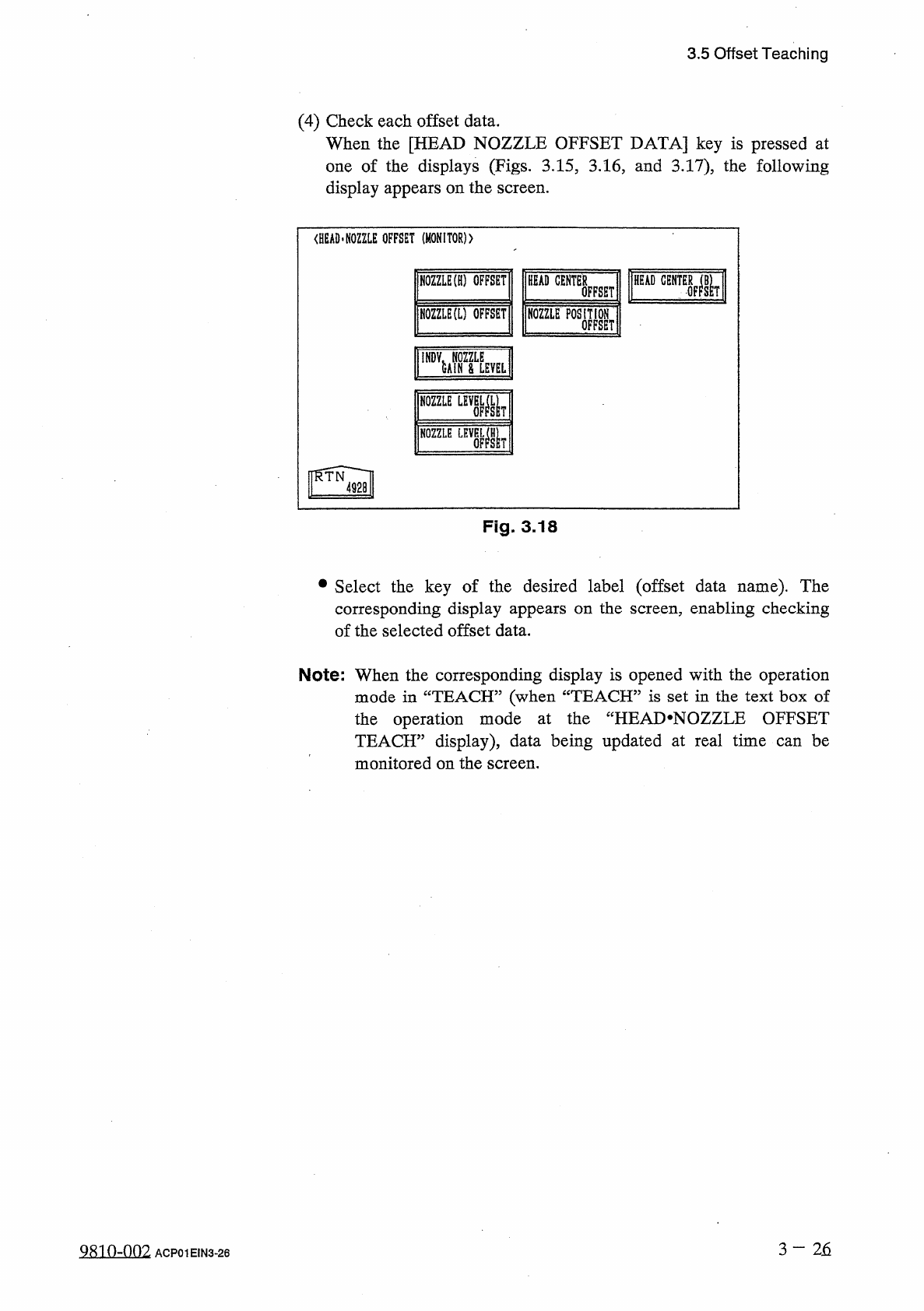
(
4
)
Check
each
offset
data
.
When
the
[
HEAD
NOZZLE
OFFSET
DATA
]
key
is
pressed
at
one
of
the
displays
(
Figs
.
3.15
,
3.16
,
and
3.17
)
,
the
following
display
appears
on
the
screen
.
<
HEAD
.
NOZZLE
OFFSET
(
MONITOR
)
)
HEAD
CENTER
NOZZLE
(
H
)
OFFSET
HEAD
OFFSET
NOZZLE
(
L
)
OFFSET
瞧
EP
0
SM
NOZZLE
LEV
關
!
了
NOZZLE
Fig
.
3.18
•
Select
the
key
of
the
desired
label
(
offset
data
name
)
.
The
corresponding
display
appears
on
the
screen
,
enabling
checking
of
the
selected
offset
data
.
Note
:
When
the
corresponding
display
is
opened
with
the
operation
mode
in
“
TEACH
”
(
when
“
TEACH
”
is
set
in
the
text
box
of
the
operation
mode
at
the
“
HEAI
>
NOZZLE
OFFSET
TEACH
”
display
)
,
data
being
updated
at
real
time
can
be
monitored
on
the
screen
.
3
—
2
石
9810
-
002
ACP
01
EIN
3
-
26