3MAINTENANCE__O.pdf - 第120页
3.5 Offset Teaching • The following explains about causes and remedies ( troubleshooting ) in order of frequency . ① Stained Nozzle Distinction : Lighting check results in “ NG ” on a specific nozzle . An NG factor may b…
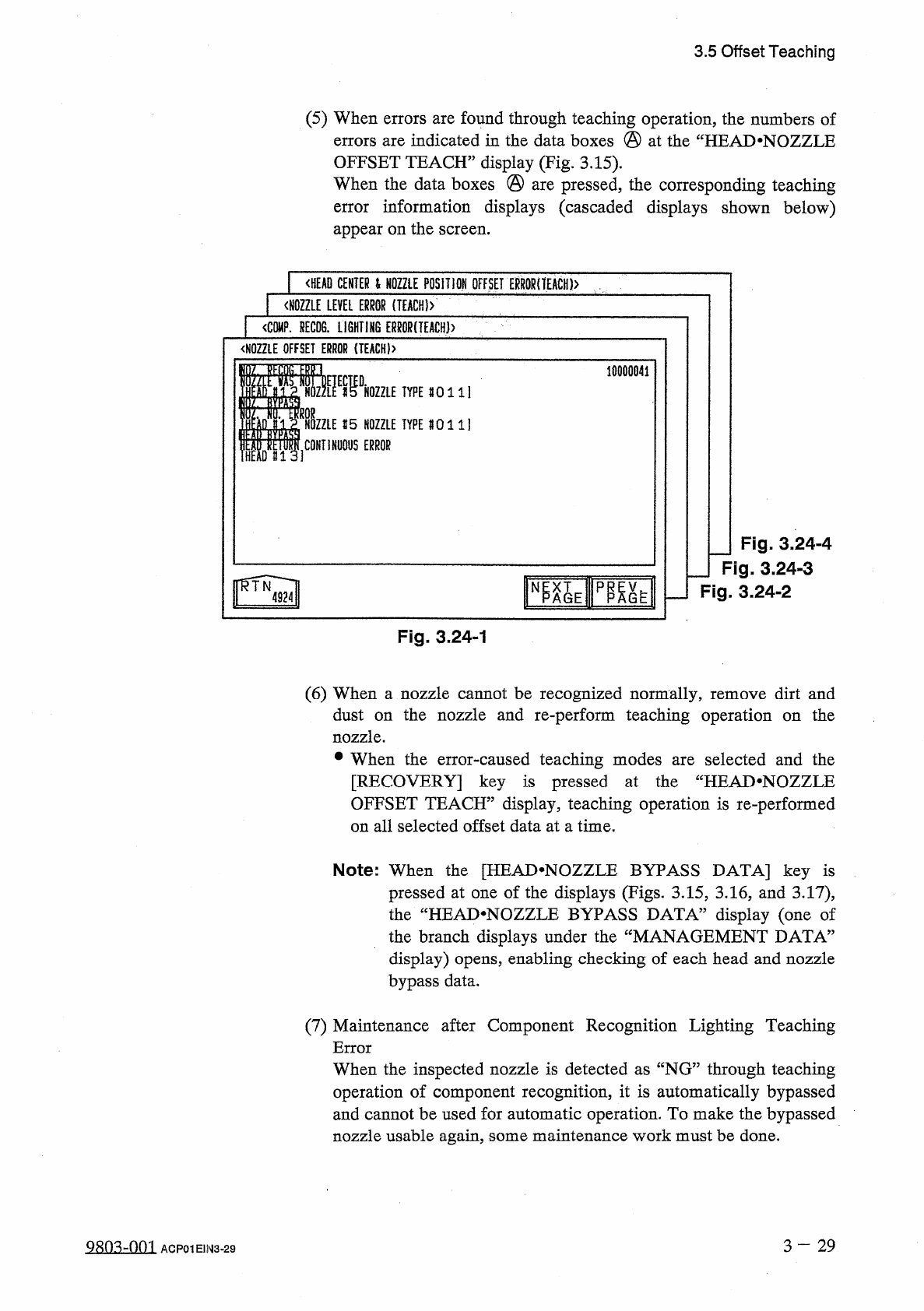
3.5
Offset
Teaching
(
5
)
When
errors
are
found
through
teaching
operation
,
the
numbers
of
errors
are
indicated
in
the
data
boxes
@
at
the
“
HEAD
.
NOZZLE
OFFSET
TEACH
”
display
(
Fig
.
3.15
)
.
When
the
data
boxes
@
are
pressed
,
the
corresponding
teaching
error
information
displays
(
cascaded
displays
shown
below
)
appear
on
the
screen
.
<
HEAD
CENTER
l
NOZZLE
POSITION
OFFSET
ERR
0
RnEACH
)
>
〈
NOZZLE
LEVEL
ERROR
(
IEACH
)
>
1
<
C
隱
.
HECDS
.
LiGHTI
肪
ERMR
(
TEACH
)
>
<
N
0
ZZLE
OFFSET
ERROR
{
TEACH
)
>
10000841
m
.
«
DHOZZLE
1
TYPE
80111
CONTINUOUS
ERROR
I
15
NOZZLE
TYPE
8011
]
I
1
HEM
#
13
]
J
Fig
.
3.24
-
4
_
Fig
.
3.24
-
3
Fig
.
3.24
-
2
N
Fig
.
3.24
-
1
(
6
)
When
a
nozzle
cannot
be
recognized
normally
,
remove
dirt
and
dust
on
the
nozzle
and
re
-
perform
teaching
operation
on
the
nozzle
.
•
When
the
error
-
caused
teaching
modes
are
selected
and
the
[
RECOVERY
]
key
is
pressed
at
the
“
HEAD
.
NOZZLE
OFFSET
TEACH
”
display
,
teaching
operation
is
re
-
performed
on
all
selected
offset
data
at
a
time
.
Note
:
When
the
[
HEAD
^
NOZZLE
BYPASS
DATA
]
key
is
pressed
at
one
of
the
displays
(
Figs
.
3.15
,
3.16
,
and
3.17
)
,
the
“
HEAD
.
NOZZLE
BYPASS
DATA
”
display
(
one
of
the
branch
displays
under
the
display
)
opens
,
enabling
checking
of
each
head
and
nozzle
bypass
data
.
MANAGEMENT
DATA
5
(
7
)
Maintenance
after
Component
Recognition
Lighting
Teaching
Error
When
the
inspected
nozzle
is
detected
as
“
NG
”
through
teaching
operation
of
component
recognition
,
it
is
automatically
bypassed
and
cannot
be
used
for
automatic
operation
.
To
make
the
bypassed
nozzle
usable
again
,
some
maintenance
work
must
be
done
.
3
-
29
S
8
Q
3
dQQl
ACP
01
E
1
N
3
-
29
3.5
Offset
Teaching
•
The
following
explains
about
causes
and
remedies
(
troubleshooting
)
in
order
of
frequency
.
①
Stained
Nozzle
Distinction
:
Lighting
check
results
in
“
NG
”
on
a
specific
nozzle
.
An
NG
factor
may
be
found
visually
in
the
nozzle
image
on
the
recognition
monitor
.
Remedy
:
Wipe
the
nozzle
end
and
the
tapered
area
with
a
soft
cloth
.
②
Stained
Glass
Surface
of
Ring
Lighting
Distinction
:
Lighting
check
results
in
“
NG
”
on
almost
all
heads
and
nozzles
.
Remedy
:
Remove
any
foreign
residues
from
the
glass
surface
and
wipe
the
surface
with
a
soft
dry
cloth
.
③
Stained
Diffusion
Plate
Distinction
:
Lighting
check
results
in
“
NG
”
on
specific
heads
and
nozzles
.
Remedy
:
Wipe
the
diffusion
plate
(
red
acrylic
plate
on
the
lower
surface
of
placement
head
)
with
a
soft
cloth
.
④
Deterioration
of
Lighting
Distinction
:
When
the
level
of
deterioration
is
small
,
light
checking
results
in
“
NG
”
on
a
specific
nozzle
.
When
there
is
considerable
deterioration
,
“
NG
”
is
caused
on
almost
all
heads
and
nozzles
.
Remedy
:
Consult
our
service
personnel
for
re
-
adjustment
of
the
light
source
unit
.
Replace
the
lamp
of
the
light
source
unit
.
Adjust
the
image
input
parameters
.
■
Time
for
Lamp
Replacement
The
lighting
deterioration
rate
of
the
halogen
lamp
which
appears
after
longterm
use
is
10
%
when
power
is
supplied
for
5
,
000
-
6
,
000
hours
(
=
Approx
.
7
8
months
)
.
While
the
lighting
deterioration
rate
is
10
%
-
20
%
(
Approx
.
1
-
year
use
under
normal
condition
)
,
the
lamp
must
be
replaced
with
a
new
one
.
■
Reproducibility
of
Component
Recognition
Lighting
Teaching
Result
The
halogen
lamp
used
for
component
recognition
lighting
normally
shows
the
deterioration
of
lighting
after
longterm
use
.
In
addition
,
some
changes
in
the
light
intensity
are
caused
due
to
ambient
temperature
and
the
time
of
power
supply
.
Therefore
,
a
result
of
lighting
check
sometimes
shows
“
OK
”
or
“
NG
”
depending
upon
the
time
frame
and
/
or
the
room
temperature
when
component
recognition
lighting
teaching
operation
was
performed
and
the
lighting
condition
is
very
similar
to
the
detection
criteria
.
When
maintenance
work
is
done
but
component
recognition
lighting
teaching
operation
still
results
in
“
NG
”
,
there
might
be
a
sizeable
difference
between
the
pre
-
adjustment
at
shipment
and
the
actual
environmental
condition
.
In
this
case
,
consult
our
service
personnel
for
detailed
information
.
9
sn
^
-
nm
ACP
01
EIN
3
-
30
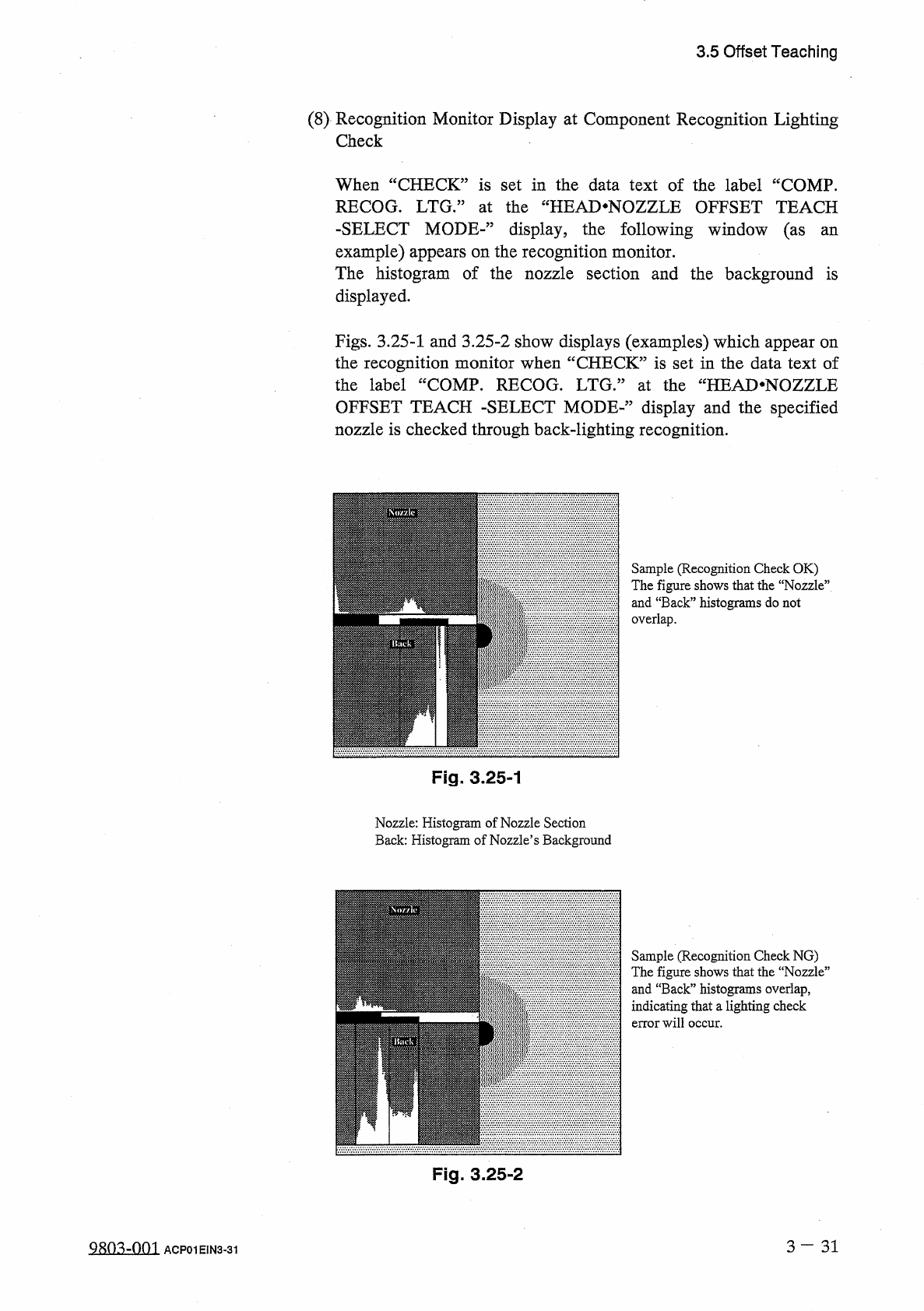
3.5
Offset
Teaching
(
8
)
Recognition
Monitor
Display
at
Component
Recognition
Lighting
Check
When
“
CHECK
”
is
set
in
the
data
text
of
the
label
“
COMP
.
RECOG
.
LTG
•
”
at
the
“
HEAD
.
NOZZLE
OFFSET
TEACH
-
SELECT
MODE
-
”
display
,
the
following
window
(
as
an
example
)
appears
on
the
recognition
monitor
.
The
histogram
of
the
nozzle
section
and
the
background
is
displayed
.
Figs
.
3.25
-
1
and
3.25
-
2
show
displays
(
examples
)
which
appear
on
the
recognition
monitor
when
“
CHECK
”
is
set
in
the
data
text
of
the
label
“
COMP
.
RECOG
.
LTG
/
5
at
the
“
HEAD
*
NOZZLE
OFFSET
TEACH
-
SELECT
MODE
-
’
,
display
and
the
specified
nozzle
is
checked
through
back
-
lighting
recognition
.
Sample
(
Recognition
Check
OK
)
The
figure
shows
that
the
“
Nozzle
”
and
“
Back
”
histograms
do
not
overlap
.
Fig
.
3.25
-
1
Nozzle
:
Histogram
of
Nozzle
Section
Back
:
Histogram
of
Nozzle
’
s
Background
Sample
(
Recognition
Check
NG
)
The
figure
shows
that
the
“
Nozzie
”
and
“
Back
”
histograms
overlap
,
indicating
that
a
lighting
check
error
will
occur
.
Fig
.
3.25
-
2
3
—
3 1
QRO
^
-
Om
ACP
01
EIN
3
-
31