3MAINTENANCE__O.pdf - 第198页
4.7 Setting of Screen Mode [ SCREEN SAVER MODE ] When the touch screen or a pushbutton switch is inactive for the specified period of time , the “ SCREEN SAVER ” display appears on the screen to save screen life of ( CRT…
4.7
Setting
of
Screen
Mode
4.7
Setting
of
Screen
Mode
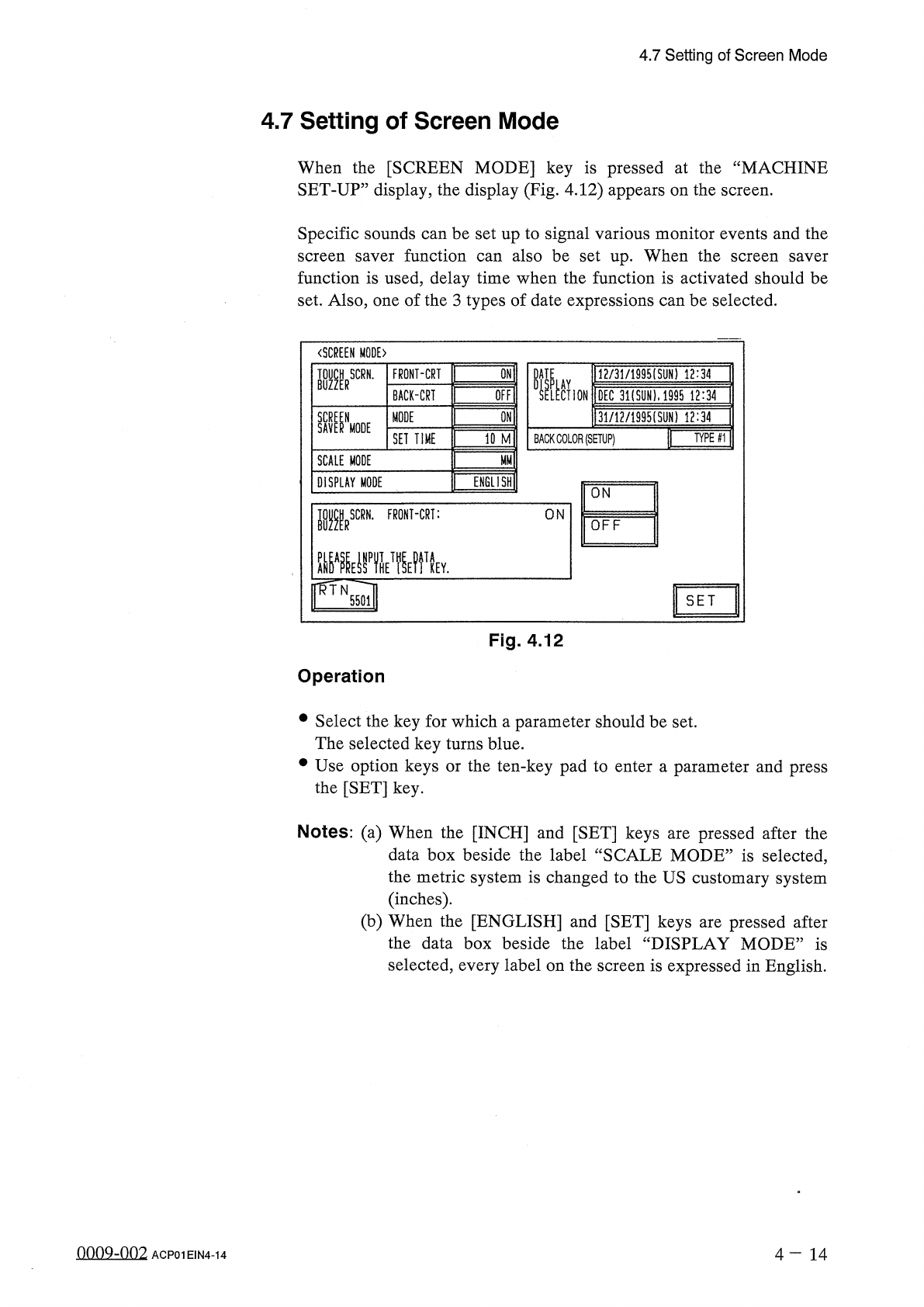
When
the
[
SCREEN
MODE
]
key
is
pressed
at
the
“
MACHINE
SET
-
UP
”
display
,
the
display
(
Fig
.
4.12
)
appears
on
the
screen
.
Specific
sounds
can
be
set
up
to
signal
various
monitor
events
and
the
screen
saver
function
can
also
be
set
up
.
When
the
function
is
used
,
delay
time
when
the
function
is
activated
should
be
set
.
Also
,
one
of
the
3
types
of
date
expressions
can
be
selected
.
screen
saver
〈
SCREEN
MODE
)
W
_
IAV
.
M
2
/
31
/
1995
ISUN
)
12
:
34
SELECTION
IDEC
3
i
(
syN
)
.
i
99
rT
?
il
4
|
3
lJl
2
/
1995
(
SUN
)
12
^
7
DATE
BUZZERSCRN
'
FRONT
-
CRT
QFFI
BACK
-
CRI
W
MODE
SAV
^
NMODE
WMI
TYPE
#
1
SET
TIME
BACK
COLOR
(
SETUP
)
SCALE
MODE
ENGLISH
!
DISPLAY
MODE
ON
■
RSCRN
.
FRONT
-
CRT
:
ON
OFF
^
A
^
ynTHETfyi
IWN
TA
KEY
.
SET
5501
Fig
.
4.12
Operation
•
Select
the
key
for
which
a
parameter
should
be
set
.
The
selected
key
turns
blue
.
•
Use
option
keys
or
the
ten
-
key
pad
to
enter
a
parameter
and
press
the
[
SET
]
key
.
Notes
:
(
a
)
When
the
[
INCH
]
and
[
SET
]
keys
are
pressed
after
the
data
box
beside
the
label
“
SCALE
MODE
”
is
selected
,
the
metric
system
is
changed
to
the
US
customary
system
(
inches
)
.
(
b
)
When
the
[
ENGLISH
]
and
[
SET
]
keys
are
pressed
after
the
data
box
beside
the
label
“
DISPLAY
MODE
”
is
selected
,
every
label
on
the
screen
is
expressed
in
English
.
onnQ
-
nn
2
4
-
14
ACP
01
EIN
4
-
14
4.7
Setting
of
Screen
Mode
[
SCREEN
SAVER
MODE
]
When
the
touch
screen
or
a
pushbutton
switch
is
inactive
for
the
specified
period
of
time
,
the
“
SCREEN
SAVER
”
display
appears
on
the
screen
to
save
screen
life
of
(
CRT
and
LCD
)
.
Note
:
While
the
“
ERROR
”
display
is
active
or
a
message
is
issued
in
the
text
box
of
the
label
“
MGT
.
INFO
.
”
at
a
display
,
the
screen
saver
function
does
not
work
.
•
Time
(
a
period
of
time
before
the
monitor
saver
function
starts
working
)
can
be
set
in
the
range
of
1
~
60
minutes
in
the
increments
of
1
minute
.
•
When
“
OFF
”
is
set
in
the
text
box
of
the
label
“
MODE
”
,
the
screen
saver
function
is
not
activated
.
[
Requirements
for
Cancellation
of
Screen
Saver
Mode
]
The
screen
saver
mode
is
canceled
when
,
•
the
touch
panel
is
touched
.
•
a
push
button
other
than
the
[
POWER
OFF
]
button
is
pressed
.
Note
:
While
the
screen
saver
function
is
activated
,
no
effect
is
given
to
any
operation
of
the
machine
.
However
,
when
the
[
STOP
]
,
[
PAUSE
]
,
or
[
INTLK
BYPASS
]
button
is
pressed
,
the
screen
saver
function
is
canceled
and
the
button
function
is
implemented
.
•
an
error
occurs
.
•
a
message
is
issued
in
the
text
box
of
the
label
“
MGT
.
INFO
.
”
.
4
—
15
■
mm
ACP
01
EIN
4
-
15
4.7
Setting
of
Screen
Mode
[
Details
of
"
SCREEN
SAVER
,
,
Display
]
(
1
)
Front
Operation
Panel
SCREEN
SAVER
After
1
second
SCREEN
SAVER
Fig
.
4.13
•
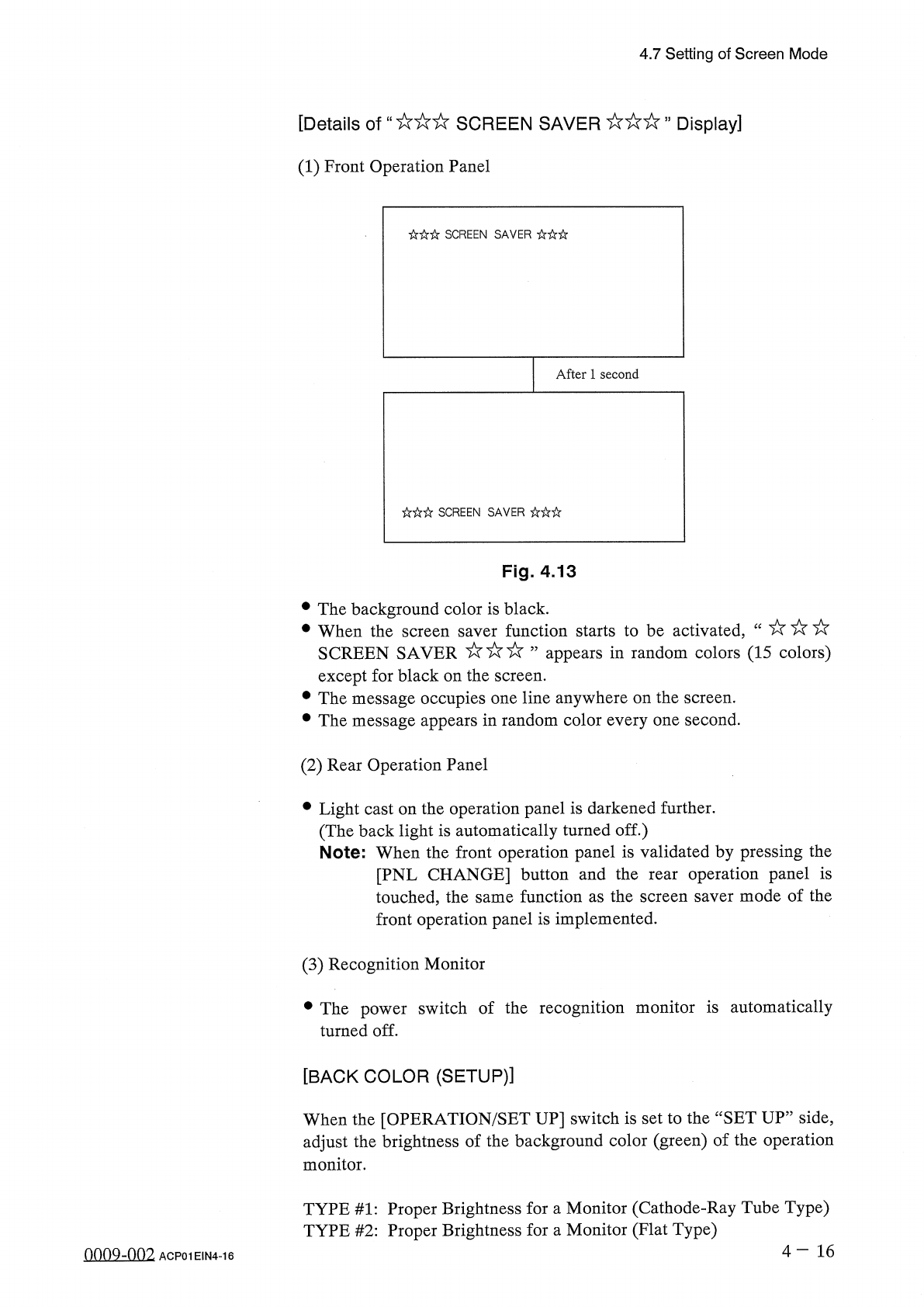
The
background
color
is
black
.
•
When
the
screen
saver
function
starts
to
be
activated
,
SCREEN
SAVER
’
’
appears
in
random
colors
(
15
colors
)
except
for
black
on
the
screen
.
•
The
message
occupies
one
line
anywhere
on
the
screen
.
•
The
message
appears
in
random
color
every
one
second
.
(
2
)
Rear
Operation
Panel
•
Light
cast
on
the
operation
panel
is
darkened
further
.
(
The
back
light
is
automatically
turned
off
.
)
Note
:
When
the
front
operation
panel
is
validated
by
pressing
the
[
PNL
CHANGE
]
button
and
the
rear
operation
panel
is
touched
,
the
same
function
as
the
screen
saver
mode
of
the
front
operation
panel
is
implemented
.
(
3
)
Recognition
Monitor
•
The
power
switch
of
the
recognition
monitor
is
automatically
turned
off
.
[
BACK
COLOR
(
SETUP
)
]
When
the
[
OPERATION
/
SET
UP
]
switch
is
set
to
the
“
SET
UP
”
side
,
adjust
the
brightness
of
the
background
color
(
green
)
of
the
operation
monitor
.
TYPE
#
1
:
Proper
Brightness
for
a
Monitor
(
Cathode
-
Ray
Tube
Type
)
TYPE
#
2
:
Proper
Brightness
for
a
Monitor
(
Flat
Type
)
4
-
16
oonQ
-
nn
2
ACP
01
EIN
4
-
16