444CEMM1.pdf - 第83页
Page 1-21 REGULAR MAINTENANCE 1 Check Every 24 Hours (Routine) 1-3-2 Cleaning the Cover Glass for the Line Camera (before Operation) NOTICE This maintenance is current-carrying operation. When you open the safety cover ,…
Page 1-20
1-3 Check Every 24 Hours (Routine)
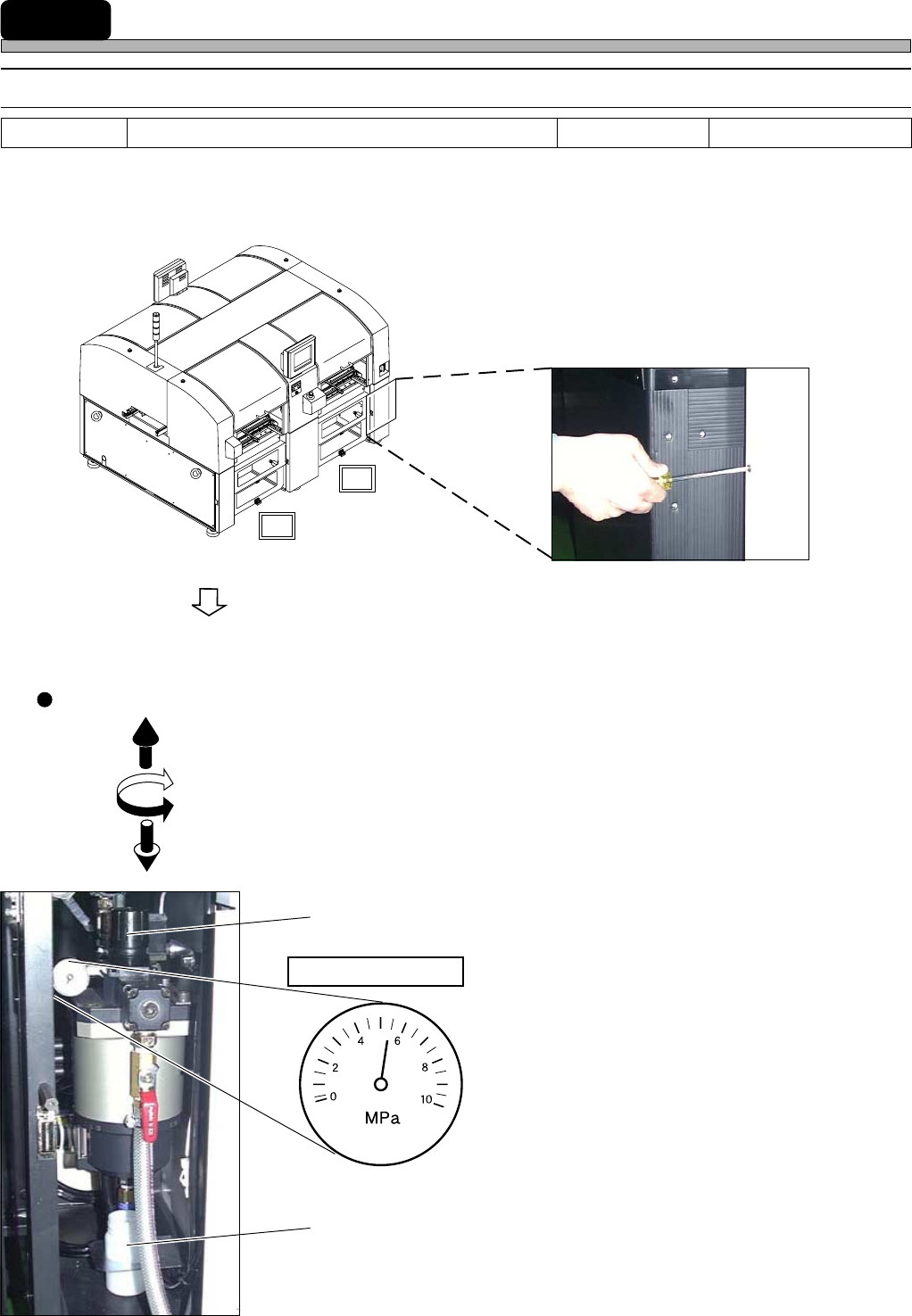
1-3-1 Checking the MR Unit (before Operation)
Check the air pressure of MR unit and clean the water receiver.
∗ The MR unit is put at lower right of the machine rear side. This operation is for AR only.
1. Open the cover at lower right of the
machine rear side.
∗ Remove the screw by using a Philips driver.
2. Check the air pressure.
Valve operation
∗ Supply air pressure standard
0.49 MPa to 0.79 MPa
∗ Ensure that it is within the standard.
When the air pressure is out of the standard,
adjust it with the valve.
3. Check the water receiver.
∗ Empty the water.
4. Close the cover at lower right of the
machine rear side.
∗ Tighten the screw by using the Philips screw.
4U4C-AB00
Tools
Philips driver
Required time 1 minute
AR
BR
444C-401P
Air pressure gauge
1. Unlock
2. Adjust
3. Lock
Valve
444C-402P
Water receiver
444C-E-MMA01-A03-05
∗∗
∗∗
∗ This picture shows the one for CM202-DH.
∗∗
∗∗
∗ This illustration shows the one for CM202-DH.
Page 1-21
REGULAR
MAINTENANCE
1
Check Every 24 Hours (Routine)
1-3-2
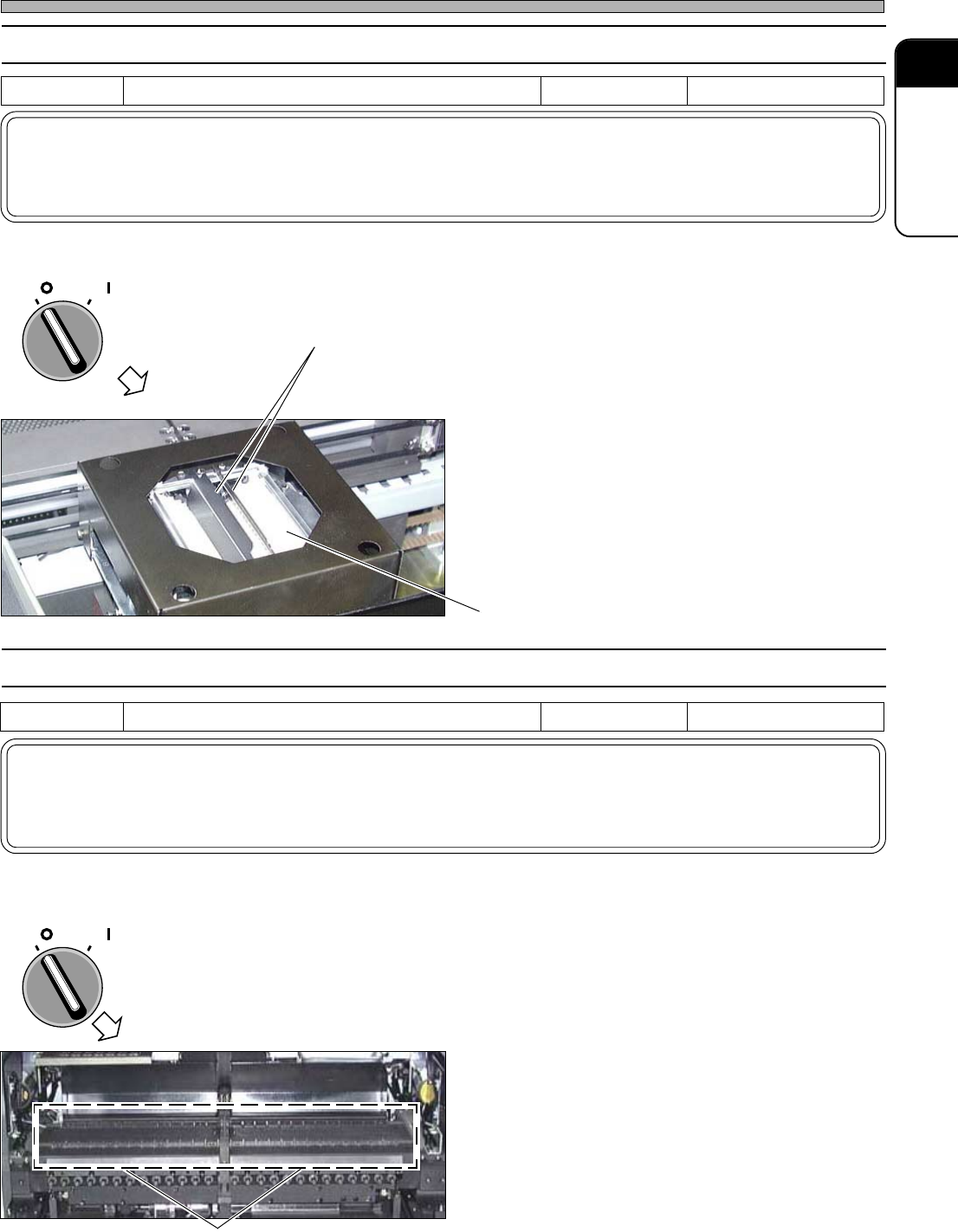
Cleaning the Cover Glass for the Line Camera (before Operation)
NOTICE
This maintenance is current-carrying operation. When you open the safety cover,
the power of XY motor is cut. So be sure to open the safety cover to operate.
Clean the cover glass for the line camera. Dust on the cover glass will cause wrong recognition.
1. Turn OFF the servo switch.
2. Open the safety cover.
3. Clean dust on the cover glass for the
upper face of the line camera illumi-
nation.
∗ Be careful not to damage to the shielding plate.
Damage to the shielding plate will cause wrong
recognition.
1-3-3 Cleaning the Tape Feeder Setting Face (before Operation)
NOTICE
This maintenance is current-carrying operation. When you open the safety cover,
the power of XY motor is cut. So be sure to open the safety cover to operate.
Before setting the tape feeder to the table of it, clean the setting face. Foreign body on the setting
face will cause wrong pickup.
1. Turn OFF the servo switch.
2. Open the safety cover.
3. Clean the setting face with the
vacuum cleaner or cleaning brush.
∗ If chip components have dropped on the tape
feeder tables, the tape feeder ski will be
damaged and the pick-up position may be
dislocated. And, what’s worse, pick-up errors
can be increased. Before changing production
models or the tape feeder parts, be sure to
clean there.
Tools Cloth Required time 1 minute
OFF ( )
ON ( )
SERVO
Cover glass for the upper face
of the line camera
Tools
Vacuum cleaner , cleaning brush
Required time 1 minute
OFF ( )
ON ( )
SERVO
Setting face
444C-E-MMA01-A03-03
444C-404P
Shielding plate
444C-403P
∗∗
∗∗
∗ This picture shows the one for CM202-DH.
Page 1-22
Check Every 24 Hours (Routine)
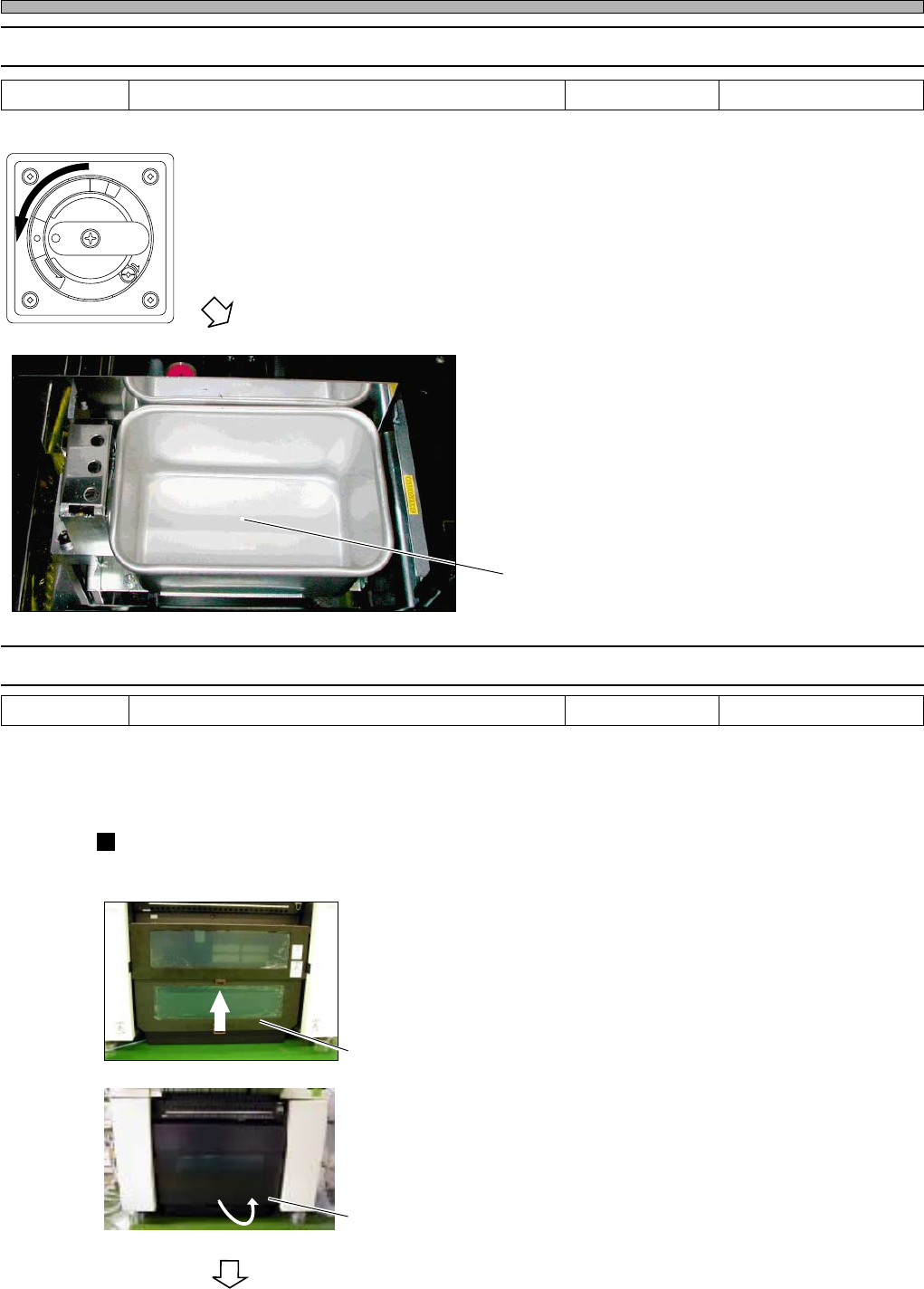
1-3-4 Cleaning the NG Chip Discharge Box (after Operation)
After the production, clean the NG chip discharge box.
1. Turn OFF the power.
2. Open the safety cover.
3. Empty chips in the NG chip discharge
box.
∗ This picture shows the one for CM201/202-DS.
1-3-5 Cleaning the Used Tape Box (after Operation)
After the production, clean the used tape box.
∗ The used tape box is optional.
∗ Clean the used tape box during the production as well as after the operation.
CM201-DH, CM202-DH/DHU/DK, CM201-DS, CM202-DS
1. The cutting unit is set
1. Open the cutting unit cover.
Tools Required time 1 minute
NG chip discharge box
444C-522P
R
E
L
E
A
S
E
T
R
I
P
O
F
F
O
N
R
E
S
E
T
Cutting unit cover
444C-E-MMA01-A03-06
4H4C-502P
To the next page
∗ While the cutting unit cover is open, the cutter
will not work for safety. After cleaning, be sure
to close it.
Tools Scissors Required time 3 minutes
E24C-401P
CM201-DH,
CM202-DH/DHU/DK
Cutting unit cover
CM201-DS, CM202-DS