00198045-01_OM_BulkFeeder_X_EN.pdf - 第14页
SIPLACE BulkFeede r X / Operating Ma nual 05/2017 Edition 14 Figure 3-3: Fiducials for SIP LACE Vision The plate shutt er can be opened and cl osed via the corres ponding butt ons on the feeder or u nder Manual Operation…
SIPLACE BulkFeeder X / Operating Manual 05/2017 Edition
13
3.2 Cartridge
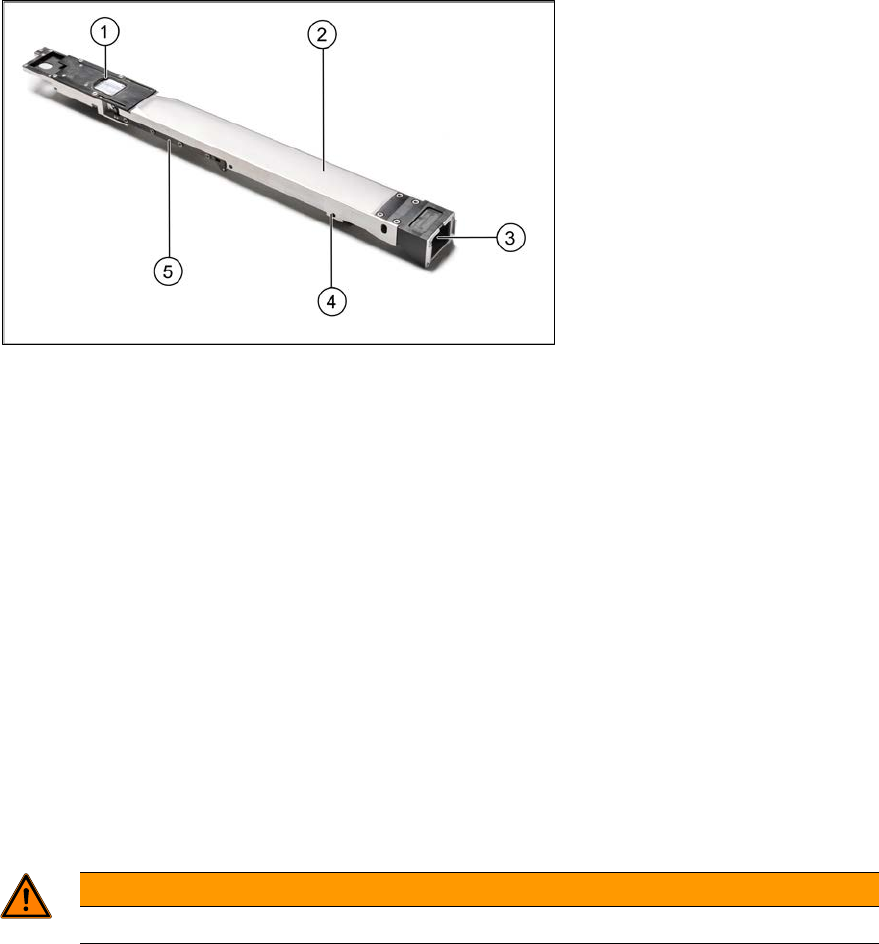
Figure 3-2: Cartridge
1. Pickup plate (glass plate) with plate shutter
2. Component container with container shutter (filled with components)
3. Refill connector
4. Clamping mechanism
5. RFID
The Cartridge SIPLACE BulkFeeder X consists of the pickup plate with pickup area and plate
shutter, the component container with container shutter and the filling funnel.
The Cartridge gets inserted on the Base Unit via a guide rail and can be easily replaced while the
feeder stays on the table. The Cartridge has a separate locking system and can be removed by
pressing the yellow button on the feeder for at least 1 second or under Manual Operations on the
station software GUI.
The components are picked up contactlessly from the glass plate. The surface of the glass plate is
structured to avoid that the components adhere.
WARNING
Do not touch the glass plate. ►
Each Cartridge has a unique ID that is stored at the bottom side of the Cartridge. Additionally, the
same ID is printed as barcode on the Cartridge. Thus, the Cartridge can be uniquely identified
either via the RFID or the barcode by ASM Setup Center.
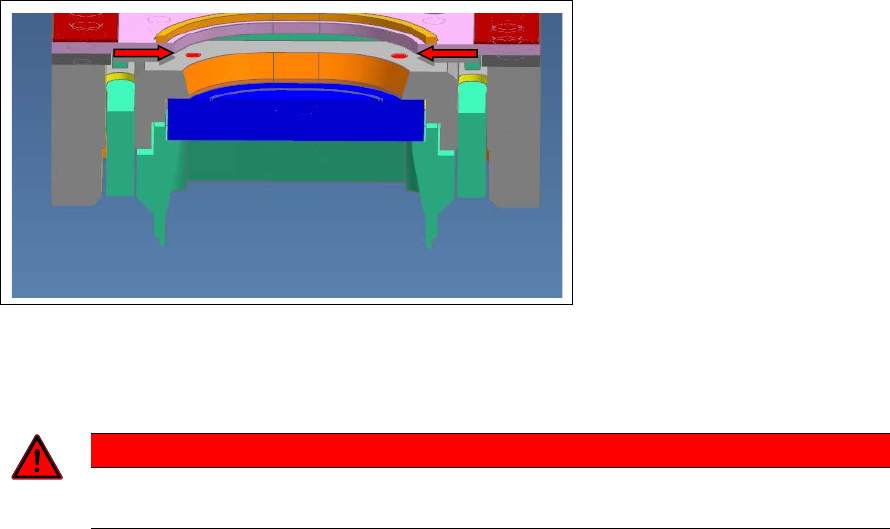
Within the field of view of the feeder camera there are two through-holes with a diameter of 1 mm
as fiducials for SIPLACE Vision in the Cartridge.
SIPLACE BulkFeeder X / Operating Manual 05/2017 Edition
14
Figure 3-3: Fiducials for SIPLACE Vision
The plate shutter can be opened and closed via the corresponding buttons on the feeder or under
Manual Operations on the station software GUI.
DANGER
Do not open the plate shutter manually! This may cause malfunction of the shutter ►
mechanism.
The container shutter is a shaft with a groove that runs in a sliding sleeve. The function of the
container shutter is to block the glass plate from being filled by slipping components when the
Cartridge is removed. For this, the components are vibrated behind the shutter and the shutter gets
closed before the Cartridge is removed.
The container shutter can be opened and closed via the corresponding buttons on the feeder or
under Manual Operations on the station software GUI.
3.3 Feeding principle
A vibration and shutter mechanism pours loose components onto a glass pickup plate. An
integrated camera takes a picture of the components from underneath the glass plate. The station
computer analyzes the image, identifies the components that are suitable for pickup and
determines their position and alignment.
SIPLACE BulkFeeder X / Operating Manual 05/2017 Edition
15
3.4 Controls and Displays of the Base Unit
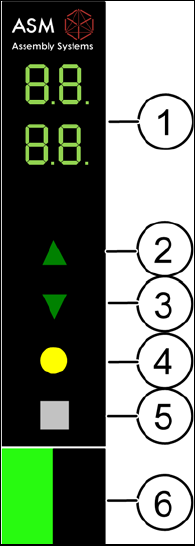
The control panel is a 7-segment display.
The SIPLACE BulkFeeder X has a main menu and submenus. After switch-on, the main menu is
automatically displayed.
1. 7-segment display
2. Forwards button
3. Backwards button
4. Remove cartridge button
5. Set button
6. Status display (green after login)
Figure 3-4: Control and display panel
Press the Set and Remove cartridge buttons shortly at the same time (< 2 seconds) to switch ►
over to the submenu.
Press the Set button > 2 seconds to switch over from a standard submenu to an advanced ►
submenu within the menu mode.
The decimal points in the display at the top indicate that the submenu mode is activated.
The submenu mode is automatically terminated if no button has been pressed within 15 seconds.
In this case, a possibly changed value will not be saved.