4OM-1064-001.pdf - 第152页
Tg0249-PM-MM 9910-001 3-106 6. TEACH OFFSET Display [ALL BM. HD. ZERO] Key Both Beams A and B are zeroed. When this key is selected and the [MOVE] button is pressed, the zeroing operation starts. [ECCENTRIC PT .] Key Whe…
Tg0249-PM-MM
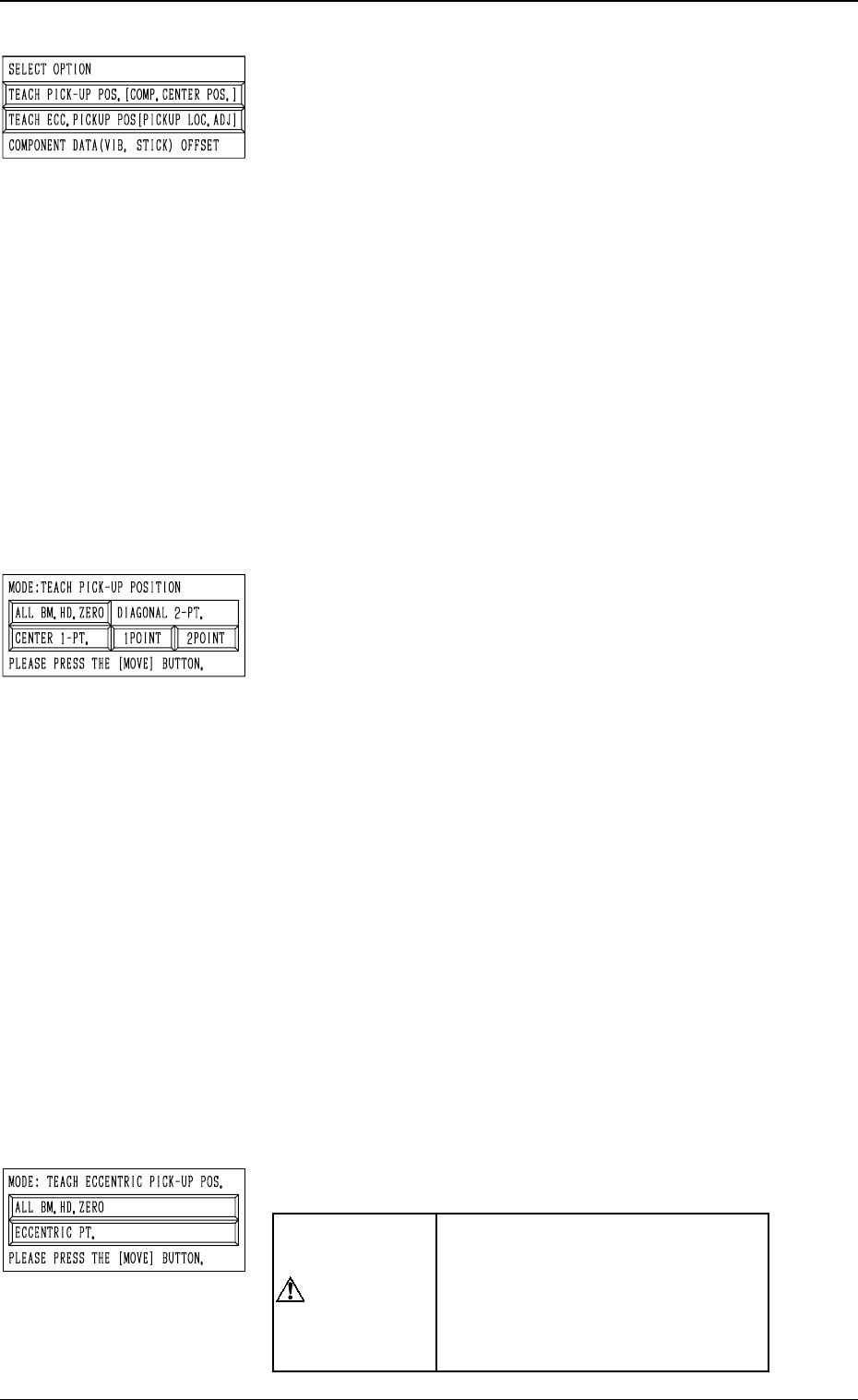
*3 “SELECT OPTION”
[TEACH PICK-UP POS. [COMP. CENTER POS.]] Key
When this key is pressed, the display (Fig. 3.66-1) ap-
pears on the screen.
To teach the center position of the component, use this
function for the “FEEDER (B) OFFSET” teaching.
[TEACH ECC. PICKUP POS [PICKUP LOC. ADJ]] Key
When this key is pressed, the display (Fig. 3.66-2) ap-
pears on the screen.
When a component has a groove, a protrusion, etc., and
cannot be picked up at the center without any hindrance,
use this function for the “PICK-UP LOCATION AD-
JUSTMENT X, Y” teaching.
[COMPONENT DATA (VIB. STICK) OFFSET] Key
When this key is pressed, the display (Fig. 3.75) ap-
pears on the screen.
Use this function to teach “OFFSET X, Y”.
This key can be selected only when the feeder No. se-
lected in *1 is allocated to a vibratory stick feeder.
*4 “MODE: TEACH PICK-UP POSITION”
This is used to additionally modify “FEEDER (B) OFF-
SET X, Y”.
[ALL BM. HD. ZERO] Key
Both Beams A and B are zeroed.
When this key is selected and the [MOVE] button is
pressed, the zeroing operation starts.
[CENTER 1-PT.] Key
When this key is selected and the [MOVE] button is
pressed, the P.E.C. recognition camera moves to the com-
ponent center position (Position of “Design Position +
Feeder (A) Offset + Feeder (B) Offset”) of the pertinent
feeder, making it possible to capture the image. Under
this condition, shift to the trackball operation and per-
form the manual alignment operation.
“DIAGONAL 2-PT.” [1POINT] and [2POINT] Keys
These keys are used to align the component with two
diagonally-located points.
Use this function when the maximum outside dimen-
sions of the component exceed “10 × 10 mm” (when
the whole image of the component cannot be captured
on the recognition monitor).
*5 “MODE: TEACH ECCENTRIC PICK-UP POS.”
“PICK-UP LOCATION ADJUST-
MENT X, Y” in the component li-
brary data is modified additionally.
Incorrect teaching operation will
cause the pick-up rate to deterio-
rate.
6. TEACH OFFSET Display
9910-001 3-105
CAUTION
Tg0249-PM-MM
9910-001 3-106
6. TEACH OFFSET Display
[ALL BM. HD. ZERO] Key
Both Beams A and B are zeroed.
When this key is selected and the [MOVE] button is
pressed, the zeroing operation starts.
[ECCENTRIC PT.] Key
When this key is selected and the [MOVE] button is
pressed, the P.E.C. recognition camera moves to the des-
ignated pick-up location correction position based on
the component center position (Position of “Design Po-
sition + Feeder (A) Offset + Feeder (B) Offset”) of the
pertinent feeder, making it possible to capture the im-
age. Under this condition, shift to the trackball opera-
tion and perform the manual alignment operation.
Note: It is necessary to correctly teach the component
center position before the eccentric position is
adjusted.
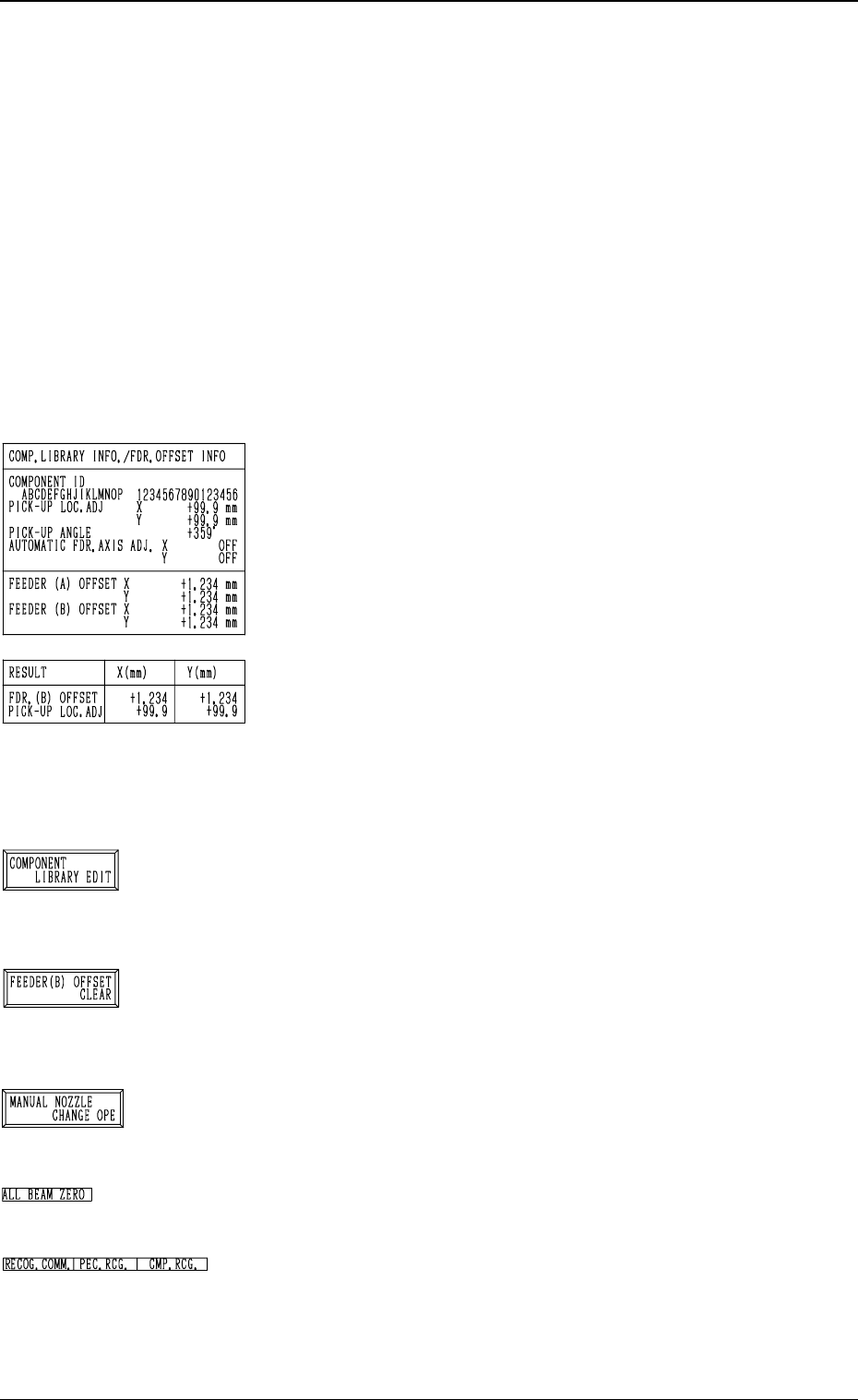
*6 “COMP. LIBRARY INFO./FDR. OFFSET INFO”
Displayed are the component library data and the feeder
offset of the feeder No. set up in *1.
*7 “RESULT X (mm), Y (mm)”
When the manual alignment operation (using the trackball)
is completed, the results of the teaching operation are dis-
played.
Selection of [TEACH PICK-UP POS. [COMP. CENTER
POS.]] Key: FEEDER (B) OFFSET
Selection of [TEACH ECC. PICKUP POS [PICKUP LOC.
ADJ]] Key: PICK-UP LOCATION ADJUSTMENT
*8 [COMPONENT LIBRARY EDIT] Key
When this key is pressed, the “COMPONENT LIBRARY
EDIT” display appears on the screen, enabling the opera-
tor to edit the data related to the feeder No. which was se-
lected in *1.
*9 [FEEDER (B) OFFSET CLEAR] Key
When this key is pressed, the “FEEDER (B) OFFSET
CLEAR” display appears on the screen, enabling the op-
erator to clear the feeder (B) offset related to the feeder
No. which was selected in *1.
*10 [MANUAL NOZZLE CHANGE OPE] Key
When this key is pressed, the “MANUAL NOZZLE
CHANGE OPERATION” display appears on the screen,
enabling the operator to attach or store the nozzles.
*11 “ALL BEAM ZERO”
When all beams are zeroed completely, the back ground
turns green. Otherwise, the background has no color.
*12 “RECOG. COMM.”
When “DISABLE” is set in the “P.E.C.” and “COMPO
NENT RECOGNITION” data boxes at the “TEST
MODE” display, the background color of “P.E.C. RECOG.”
and “COMP. RECOG.” becomes light red. (No background
color in normal cases)
Tg0249-PM-MM
Operation Procedure
Basically, a component must be picked up when the nozzle is located at the
center of the component.
Therefore, “AUTOMATIC FEEDER AXIS ADJUSTMENT MODE” is pre-
pared to feed back and correct the positional deviation between the compo-
nent and nozzle center positions (the deviation calculated through compo-
nent recognition processing), using the statistical processing. However, there
may be some components which have a groove, a protrusion, etc., at their
centers, causing some hindrance to the component picks at the centers. To
cope with such components, the “PICK-UP LOCATION ADJUSTMENT”
function is prepared in the component library and can be selected to shift
the pick-up position intentionally from the component center.
The menus for pick-up location teaching are prepared to cope with each
case described before.
• Teaching Operation for Alignment of Component Center with Nozzle
Center
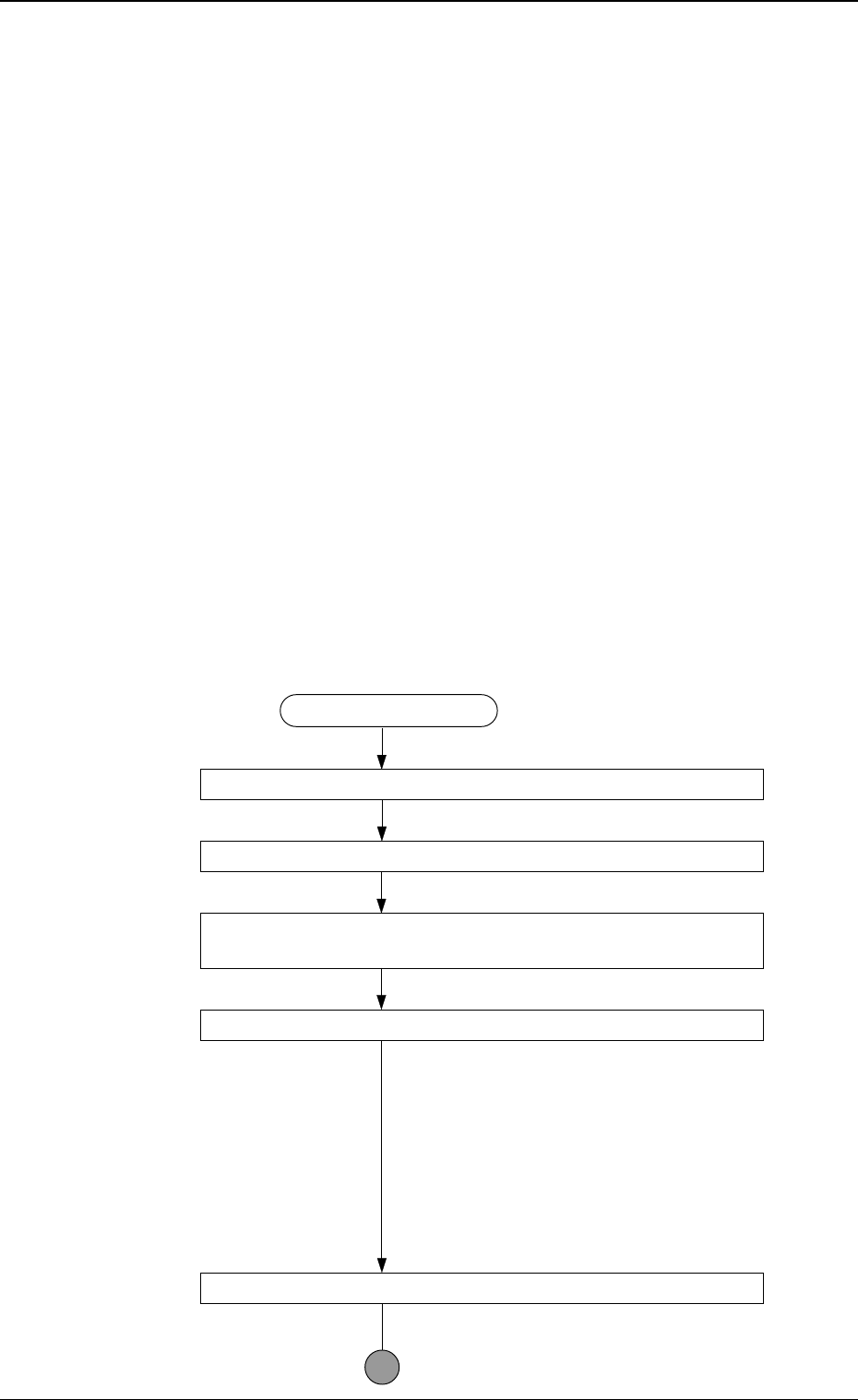
(1) Follow the teaching flow in Fig. 3.68 and perform the teaching operation
on the component center position.
When no regulation is given to the shape of components and positioning
should be made simply to the component center, use the [TEACH PICK-
UP POS. [COMP. CENTER POS.]] key.
Note: The teaching operation must be performed while “ALL BEAM
ZERO” is displayed.
Teaching Procedure
Designate the objective feeder No. for teaching.
Select the [TEACH PICK-UP POS. [COMP. CENTER POS.]] key.
Select the [CENTER 1-PT.] key or perform the “DIAGONAL
2-PT” operation.
Press the [MOVE] button.
The placement head moves to the objective
feeder position for teaching and the image of
the pick-up location is captured by the P.E.C.
recognition camera.
When the [CENTER 1-PT.] key is selected,
the registration of the designated nozzle is
made together for graphic teaching to facili-
tate the manual alignment operation with the
trackball.
Positioning Operation with Trackball
Refer to “Trackball Operation” (described
later) for details.
9910-001 3-107
6. TEACH OFFSET Display
Fig. 3.68