4OM-1064-001.pdf - 第172页
Tg0249-PM-MM 6.14 Camera Head Offset • The following teaching operations can be performed at the same time. Component Recog Camera Offset (Step-3) Head Center Of fset Head Of fset Head Offset (Get Both Image) When the [C…
Tg0249-PM-MM
6.13 Nozzle Setup
• This function automatically mounts the nozzles to be used in teaching op-
erations on each head.
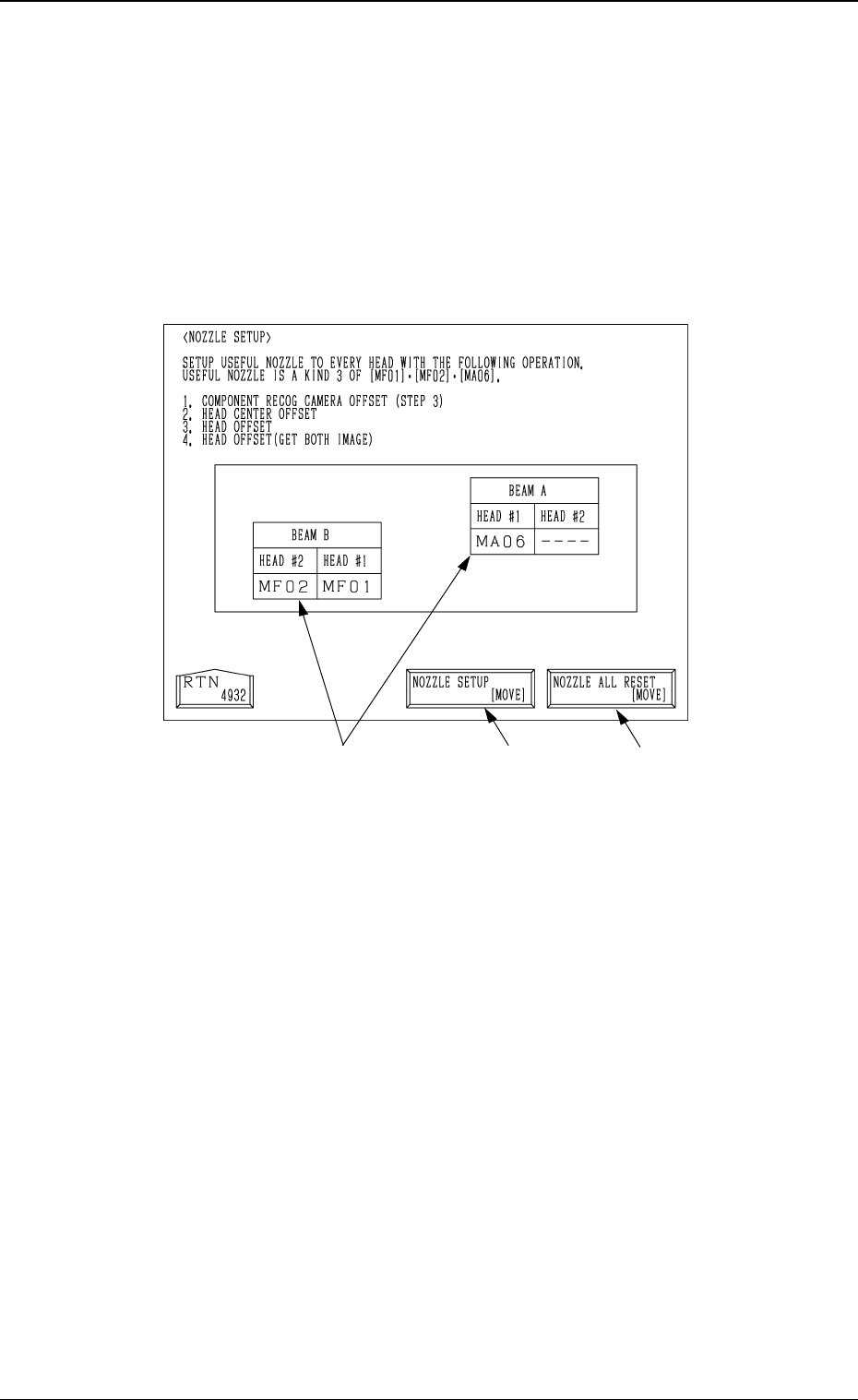
When the [NOZZLE SETUP] key is pressed at the “TEACH OFFSET” dis-
play, the following display appears on the screen.
*1
Fig. 3.82
9910-001 3-125
6. TEACH OFFSET Display
*2
*1 [NOZZLE SETUP [MOVE]]
When the [MOVE] button is pressed after selecting this key, all the
nozzles mounted on heads are housed in the nozzle stockers, and then the
nozzles [MF01], [MF02] and [MA06] are mounted on each head.
*2 [NOZZLE ALL RESET (MOVE)]
When the [MOVE] button is pressed after selecting this key, all the nozzles
mounted on heads are housed in the nozzle stockers.
*3 Nozzle Mounting Condition
The nozzle mounting condition on each head is displayed.
Operation Procedure
(1) Set the nozzles [MF01], [MF02] and [MF06] in the nozzle stockers.
(2) Select the [NOZZLE SETUP (MOVE)] key and then press the [MOVE]
button.
*3
Tg0249-PM-MM
6.14 Camera Head Offset
• The following teaching operations can be performed at the same time.
Component Recog Camera Offset (Step-3)
Head Center Offset
Head Offset
Head Offset (Get Both Image)
When the [CAMERA
•
HEAD OFFSET] key is pressed at the “TEACH OFF-
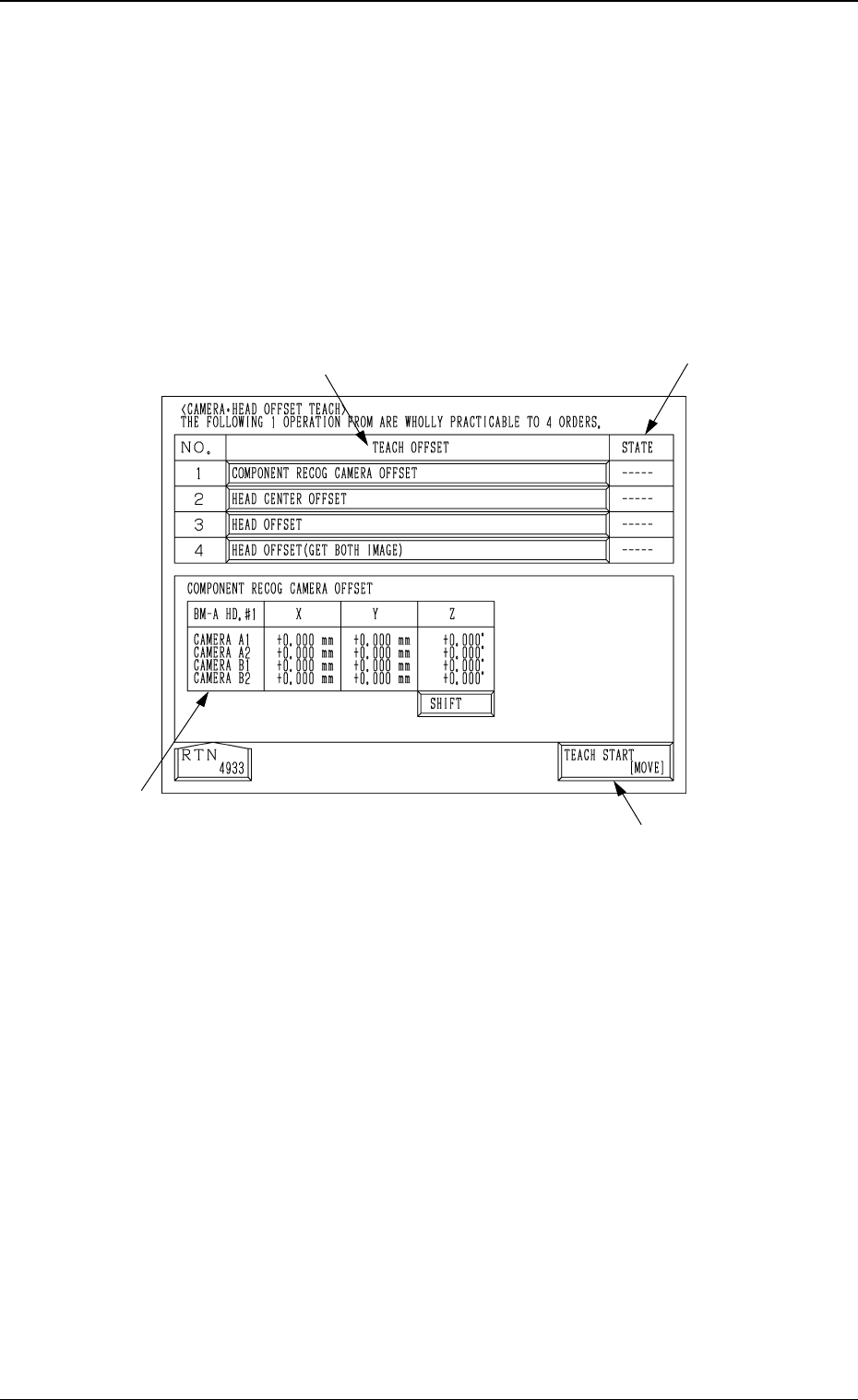
SET” display, the following display appears on the screen.
6. TEACH OFFSET Display
Fig. 3.83
9910-001 3-126
*1
*3
*2
*4
*1 [TEACH START [MOVE]]
When the [MOVE] button is pressed after selecting this key, the follow-
ing teaching operations are performed one after another.
Component Recog Camera Offset (Step-3)
Head Center Offset
Head Offset
Head Offset (Get Both Image)
*2 “TEACH OFFSET”
The progress status of each teaching operation is indicated.
*3 “STATE”
The nozzle mounting condition on each head is displayed.
“---” : The progress status is indicated before the teaching
operation is performed.
“RUN” : The progress status is indicated during the teaching
operation.
“COMPLETE” : It is indicated when the teaching operation is com-
pleted.

Tg0249-PM-MM
*4 Date Indication
When the [TEACH OFFSET] key is pressed, each offset data is indicated.
In the case of “COMPONENT RECOG. CAMERA OFFSET”, pressing
the [SHIFT] key indicates the data for each head in turn.
Operation Procedure
(1) Select the [CAMERA
•
HEAD OFFSET] key and press the [MOVE]
button. The offsets of Nos. 1 to 4 are automatically taught in turn.
Note: In the following cases, the “CAMERA
•
HEAD OFFSET” teaching
can’t be performed.
• If any one of the component recognition cameras is set to “Camera
Skip”.
• If any one of the heads is set to “Head Skip”.
9910-001 3-127
6. TEACH OFFSET Display