YSM10_Mainte_E.pdf - 第139页
6-7 6 How to replace consumable parts 4. Conveyor 4.1 Replacing the conveyor belt If significant looseness, contamination, or scuffing is found in the convey or belt when performing the work steps in "5.2.1 Inspecti…
6-6
6
How to replace consumable parts
5
Disconnect the connector.
Disconnect the connector of the valve you
want to replace.
6
Replace the valve.
Remove the mounting screws (2 pcs.) of the
valve you want to replace with a precision
Phillips screwdriver, and then replace the
valve.
53608-KMG-00
c
CAUTION
The packing is attached to the back of the valve.
Replace the valve with a new one while carefully
checking the packing for dropping or catching.
7
Return the components to their
original positions.
1. Return the connector, head plate, and
baffle plate to their original positions.
2. Remove the square cloth under the head
unit.
8
Check the valve operation.
Turn on the supply air and main power, and
then check the operation of each valve on
the [Unit] - [Head] screen or [I/O] screen.
c
CAUTION
When checking the operation of the shaft blow valve
on the [I/O] screen, be sure to remove the nozzles from
all heads.
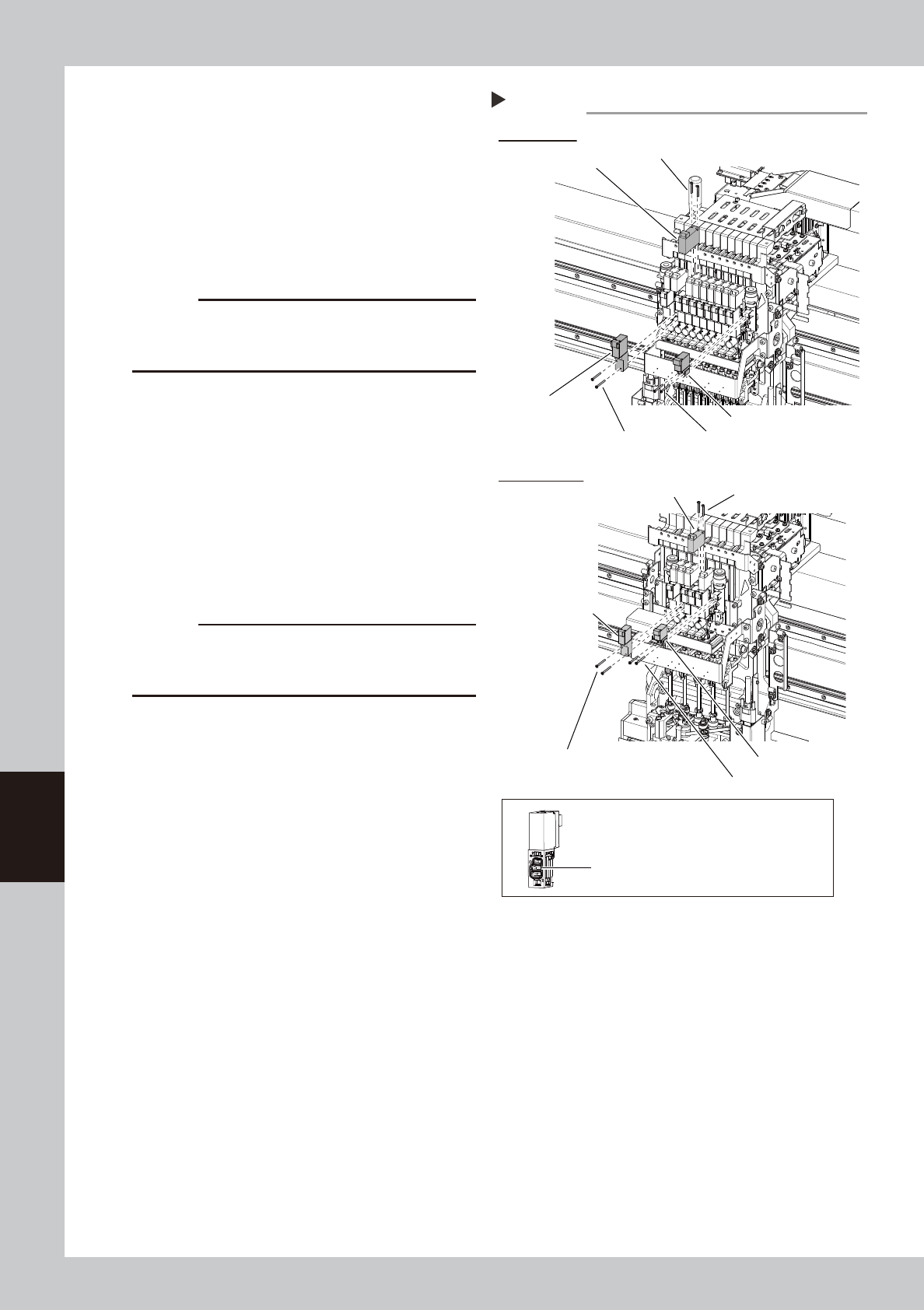
Step5
HM head unit
HM5 head unit
Blow valve
Blow valve
Mounting screw (2 locations)
Replacing the head valve
Shaft blow valve
Shaft blow valve
Mounting screw (2 locations)
Mounting screw (2 locations)
Mounting screw (2 locations)
Mounting screw (2 locations)
Operation valve
Operation valve
Mounting screw (2 locations)
The packing is attached to the back of the valve.
Be careful not to drop this packing.
6-7
6
How to replace consumable parts
4. Conveyor
4.1 Replacing the conveyor belt
If significant looseness, contamination, or scuffing is found in the conveyor belt when performing the work
steps in "5.2.1 Inspecting conveyor belt and cleaning guides and pulleys" of Chapter 3, the conveyor belt
needs to be replaced.
1
Change the conveyor width to a
convenient width for maintenance
work.
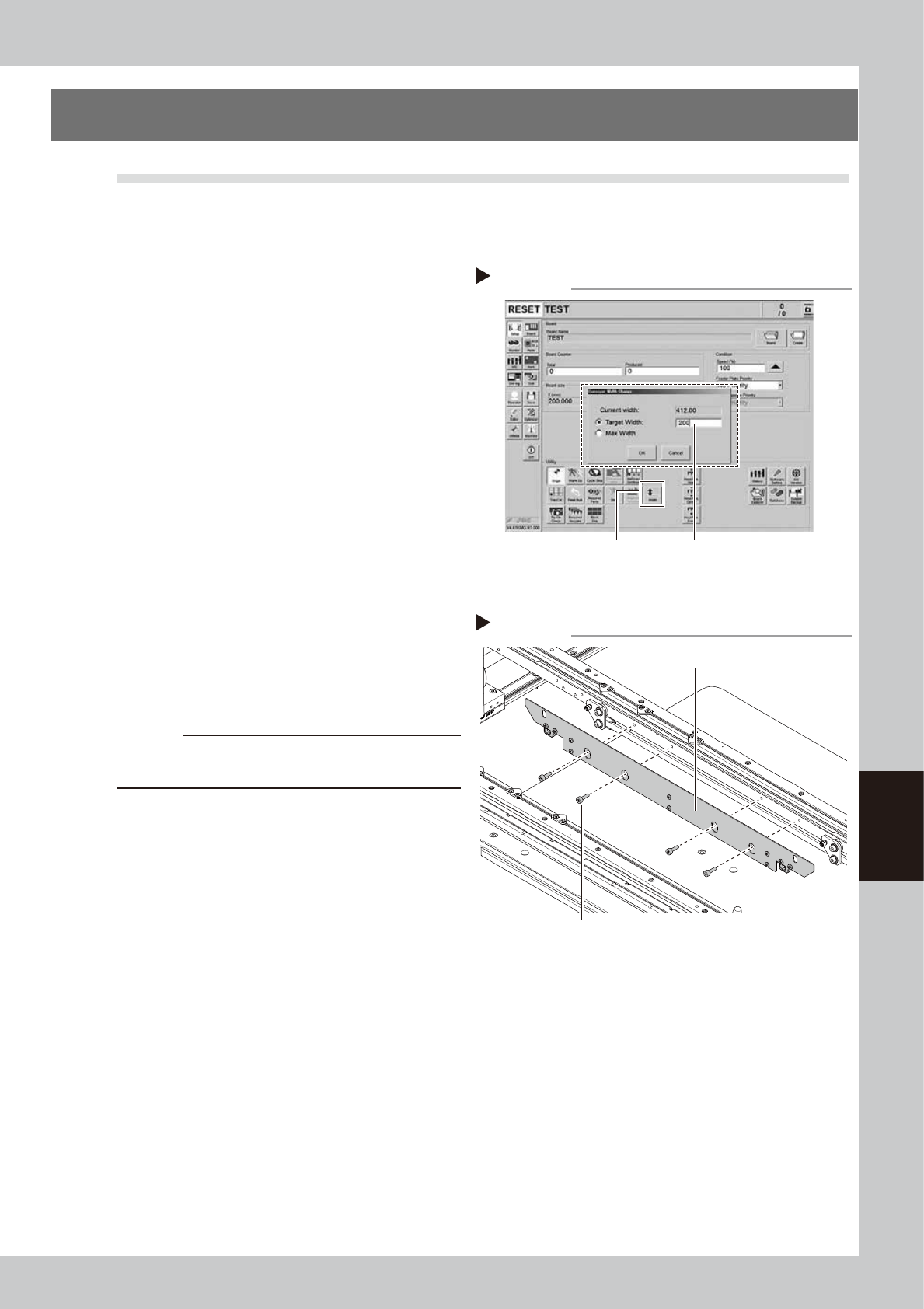
1. Press the [Width] button to display the
"Conveyor Width" screen.
2. In the "Target Width" box, enter a width
large enough for maintenance work
(about 200mm) and press the [OK]
button. The conveyor is changed to the
specified width.
54600-KMG-00
2
Make the preparation for cleaning.
e
1. Press the emergency stop button to open
the machine safety cover.
2. Place a square cloth on the push-up
plate.
3
Remove the board clamp plates.
Use a hexagon wrench (3) to remove the 4
board clamp bolts, then remove the board
clamp plate.
53609-KMG-00
c
CAUTION
Do not remove any bolts other than the 4 bolts shown in
the figure on the right.
Step 1
[Width] button
Enter conveyor width.
Changing the conveyor width
Step 3
Removing the board clamp plate
Board clamp plate
Board clamp plate mounting bolts
6-8
6
How to replace consumable parts
4
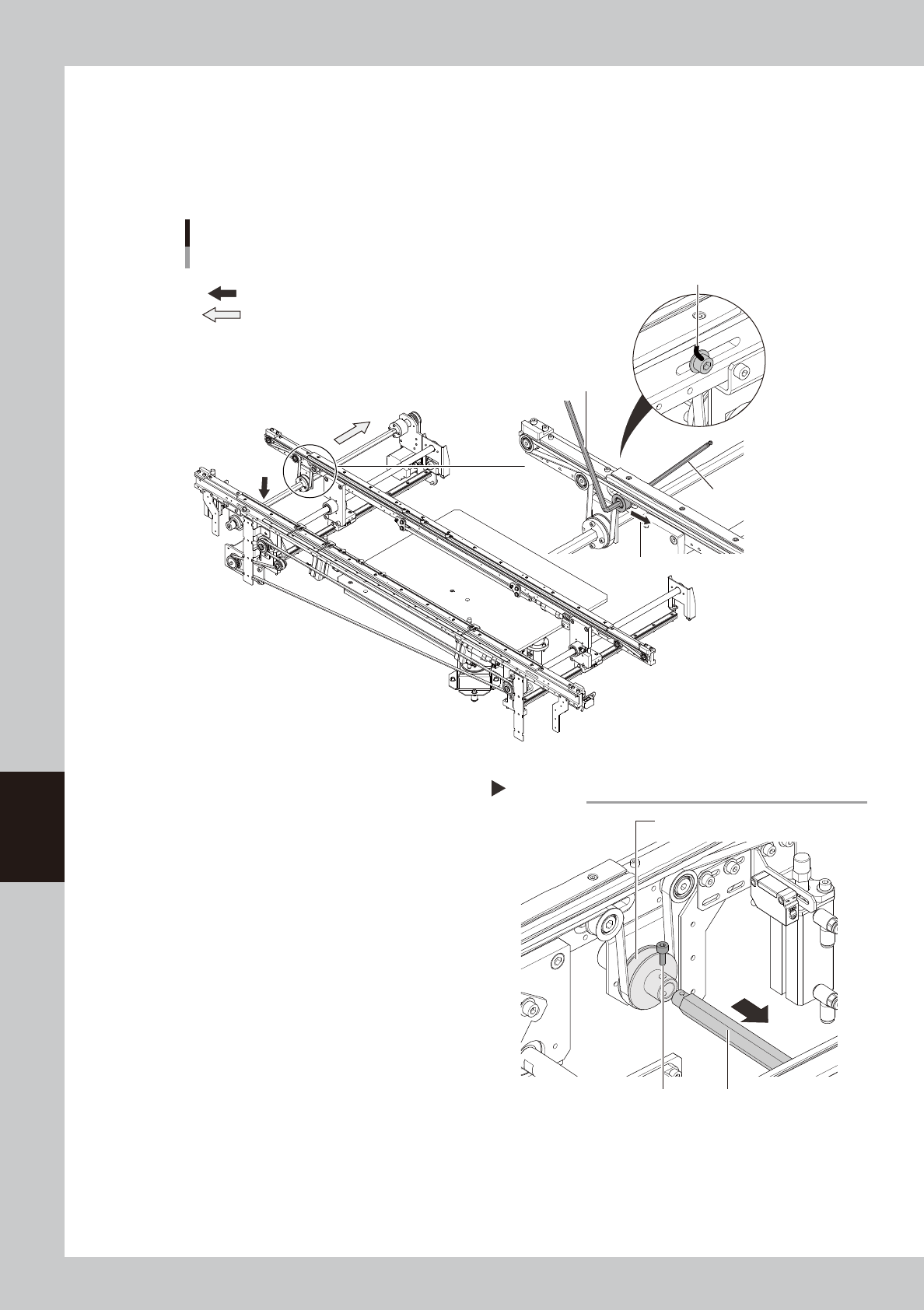
Loosen the belt.
1. Before loosening the conveyor belt, mark at the current position of pulley with a permanent marker.
2. Loosen the pulley mounting screws applying the tension with a hex wrenches (5 and 4) referring to
the figure below.
3. Move the pulley to the direction that the belt is loosened.
: Position to separate spline shaft
: Direction to pull spline shaft
Hex wrench (4)
Hex wrench (5)
Mark pulley position.
Direction that belt is loosened
Replacing the conveyor belt
53610-KMG-00
5
Separate the spline shaft from the
drive pulley.
Remove the mounting bolt from the belt
drive pulley with a hex wrench (3). (See the
figure shown in Step 4 for the pulley
position.) Pull out the spline shaft to make a
clearance.
53611-KMG-00
Separating spline shaft
Step 5
Mounting bolt
Drive pulley
Spline shaft