YSM10_Mainte_E.pdf - 第79页
3-12 3 Periodic maintenance items 2.1.2 Cleaning and lubricating the X-axis guide 1 Pr epare for the cleaning and greasing. e 1. Press the emergency stop button to open the machine safety cover . 2. Grasp the carrying ha…
3-11
3
Periodic maintenance items
4
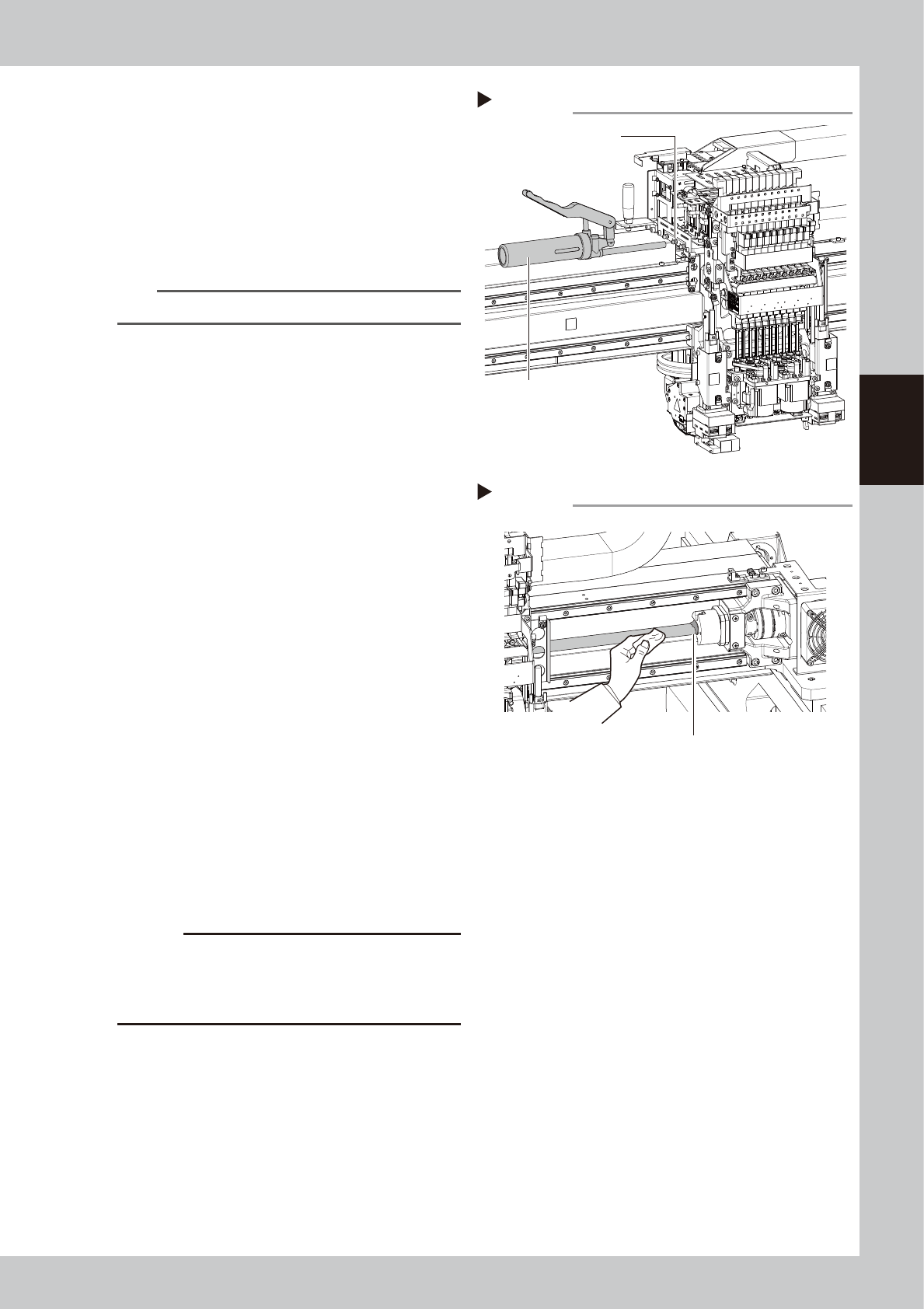
Inject the grease.
1. As shown in the figure on the right, move
the head unit to the right to see the
grease nipple.
2. The grease nipple at the center of those
aligned at 3 locations is the ball screw
nipple. Use a grease gun (standard type)
to inject the prescribed grease at the
grease nipple.
n
NOTE
Inject until the grease begins to seep out from the gap.
5
Wipe off the excess grease.
1. Grasp the carrying handle and move the
head unit to the left.
2. Wipe all excess grease from the ball
screw and the ball screw end faces.
3. Move the head unit to the opposite end
and wipe all excess grease from the
opposite-end ball screw and the ball
screw end faces.
53315-KMG-00
6
Perform a warm-up.
1. Remove the square cloth.
2. Reattach the anti grease splatter cover.
3. Close the machine safety cover and
cancel the emergency stop.
4. Press the [Warm Up] button on the
"Setup" screen to open the "Warm Up"
screen. Perform the warm-up operation
for approx. 8 minutes.
e
7
Check the grease condition.
1. After stopping the warm-up, press the
emergency stop button to open the
machine safety cover.
2. Remove the anti grease splatter cover
and wipe off grease which has collected
on the ball screw and the ball screw end
faces.
c
CAUTION
Repeat Steps 6 and 7 until grease accumulations no
longer occur. Beginning production with grease
accumulations present could cause the grease to
spatter.
8
Attach the anti grease splatter
cover.
Step 4
Grease nipple (center)
Grease gun (standard type)
Applying grease
Step 5
Wiping off the excess grease
Excess grease
3-12
3
Periodic maintenance items
2.1.2 Cleaning and lubricating the X-axis guide
1
Prepare for the cleaning and greasing.
e
1. Press the emergency stop button to open the machine safety cover.
2. Grasp the carrying handle to move the head unit forward.
3.
Place a square cloth under the head unit
.
2
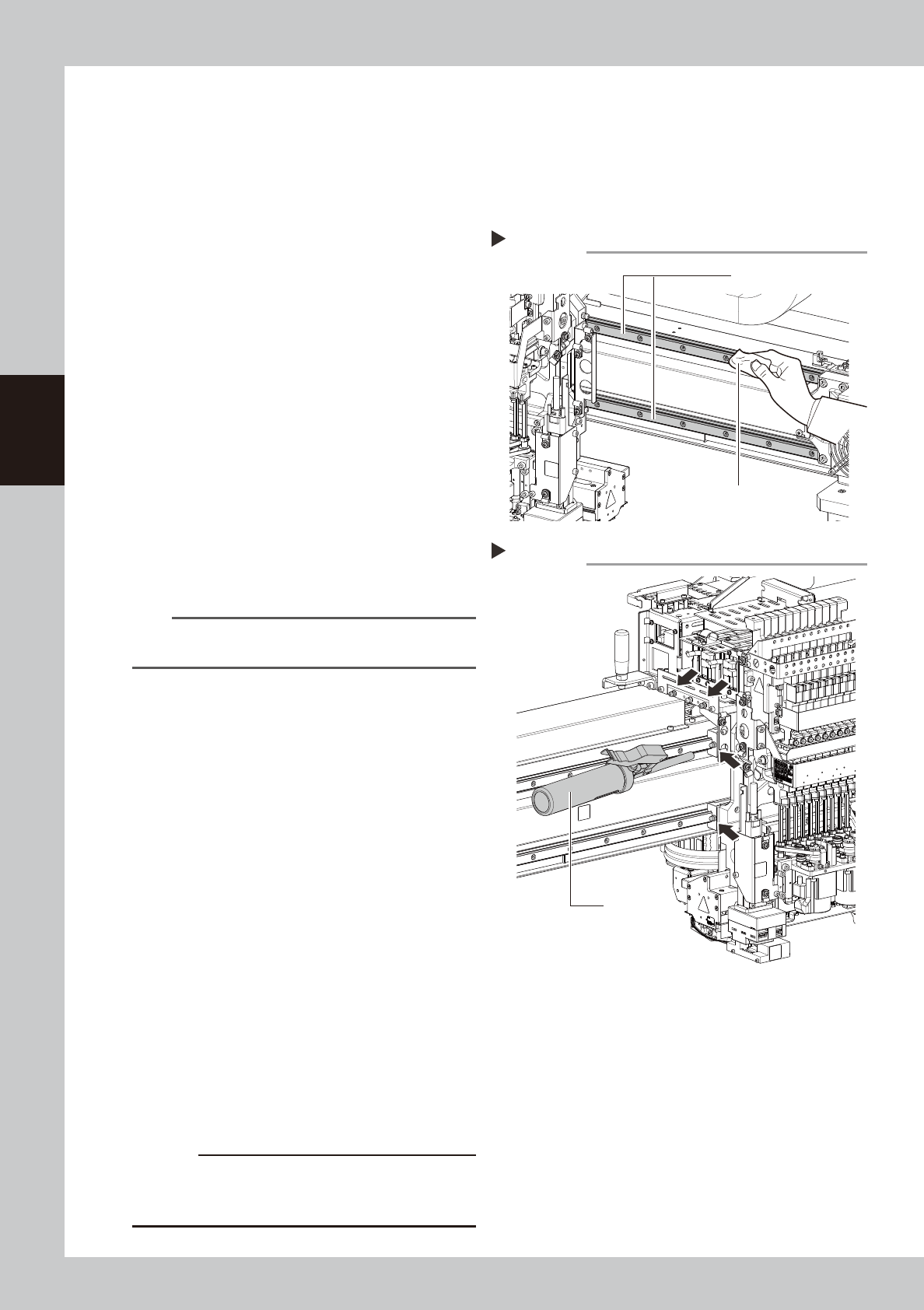
Clean the guide.
1. Grasp the movement handle and move
the head unit to one end.
2. Using a paper cloth (clean room type)
which produces no lint, wipe the old
grease and soiling from the entire guide.
3. Move the head unit to the opposite side,
then clean the opposite-side guide.
53316-KMG-00
3
Inject the grease.
Using a grease gun (standard type), inject
the prescribed grease (NSL) at the X-axis
guide's grease nipples (4 nipples).
53317-KMG-00
4
Spread the grease.
Move the head unit left and right several
times manually to spread the grease.
n
NOTE
The grease you have injected through the nipple oozes
to the guide when moving the axis.
5
Wipe off the excess grease.
Wipe off the excess grease from both ends
of the guide.
6
Inject the grease again.
Repeat Steps 3 to 5 twice again.
After that, visually check that the grease is
applied to the entire guide.
7
Perform a warm-up.
1. Remove the square cloth.
2. Close the machine safety cover and
cancel the emergency stop.
3. Press the [Warm Up] button on the
"Setup" screen to open the "Warm Up"
screen. Perform the warm-up operation
for approx. 8 minutes.
e
8
Check the grease condition.
1. After stopping the warm-up, press the
emergency stop button to open the
machine safety cover.
2. Wipe off grease which has collected on
the guide end faces.
c
CAUTION
Repeat Steps 7 and 8 until grease accumulations no
longer occur. Beginning production with grease
accumulations present could cause the grease to spatter.
Step 2
Cleaning the guide
Cloth
Guide
Step 3
Injecting the grease
Grease gun
(standard type)
3-13
3
Periodic maintenance items
2.2 Y-axis
This section explains the Y-axis inspection, cleaning, and lubricating procedures. For details regarding
lubrication points and the lubrication condition, see "Chapter 5 Lubrication points and schedule". The user
must provide the grease gun (standard nozzle and bent nozzle) and the prescribed grease (NSL).
2.2.1 Cleaning and lubricating the Y-axis ball screw
1
Prepare for the cleaning and greasing.
e
1. Press the emergency stop button to open the machine safety cover.
2. Place a square cloth near the Y-axis.
2
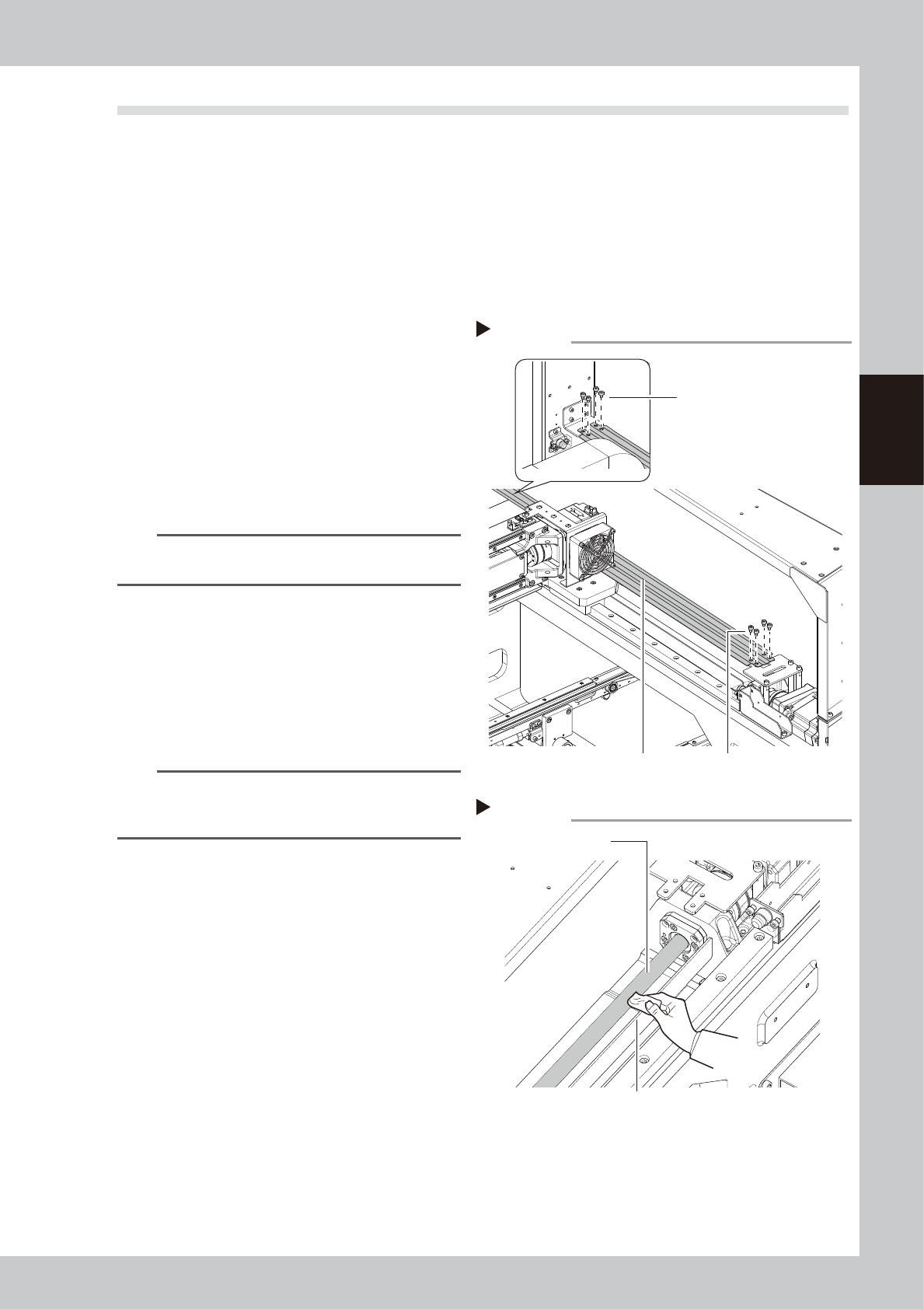
Detach the anti grease splatter
cover.
1. Grasp the carrying handle to move the
head unit backward.
2. Remove the 8 cover mounting screws on
the front and rear of the anti grease
splatter cover with a hex wrench (4).
3. Pull the anti grease splatter cover
forward to detach it.
53318-KMG-00
TIP
Reattaching the Y-axis anti grease splatter cover by
reversing the above removal procedure.
3
Clean the ball screws.
1. Move the head unit backward.
2. Wipe away the old grease and dirt from
the ball screw with a lint-free cloth or
paper towel (for clean room use).
3. Move the head unit forward and wipe
the opposite-side ball screw.
n
NOTE
When cleaning the ball screw, carefully clean its
groove area as well. Be sure that the cloth, etc., being
used to clean the ball screw does not produce lint, etc.
53319-KMG-00
Step 2
Detaching anti grease splatter cover
Anti grease splatter cover
Cover mounting screws
Cover mounting screws
Step 3
Cleaning the ball screw
Cloth
Ball screw