YS12调整.pdf - 第39页
Service Engineer Service I nformati on SI080 4004 E-000 = YS12 , YG12: Procedure for adjustmen t after installa tion of the mach ine 39/60 Double click on the graph to display the details. 6.2. Check the “VgChart” 1. Cli…
Service Engineer
Service Information
SI0804004E-000 = YS12, YG12: Procedure for adjustment after installation of the machine
38/60
6. If “AMF index” falls below 1.0.when performing accuracy
check by ACP
If the measured results of “AMF index 1” and “AMF index 2” fall below 1.0, analyze the measured
data by “VgChart” and check the mounting state. If the mounting is unstable, the AMF index
cannot be improved no matter how many times the adjustment by ACP is performed.
Please check the cause of the problem referring to the analysis result, and perform adjustment
again.
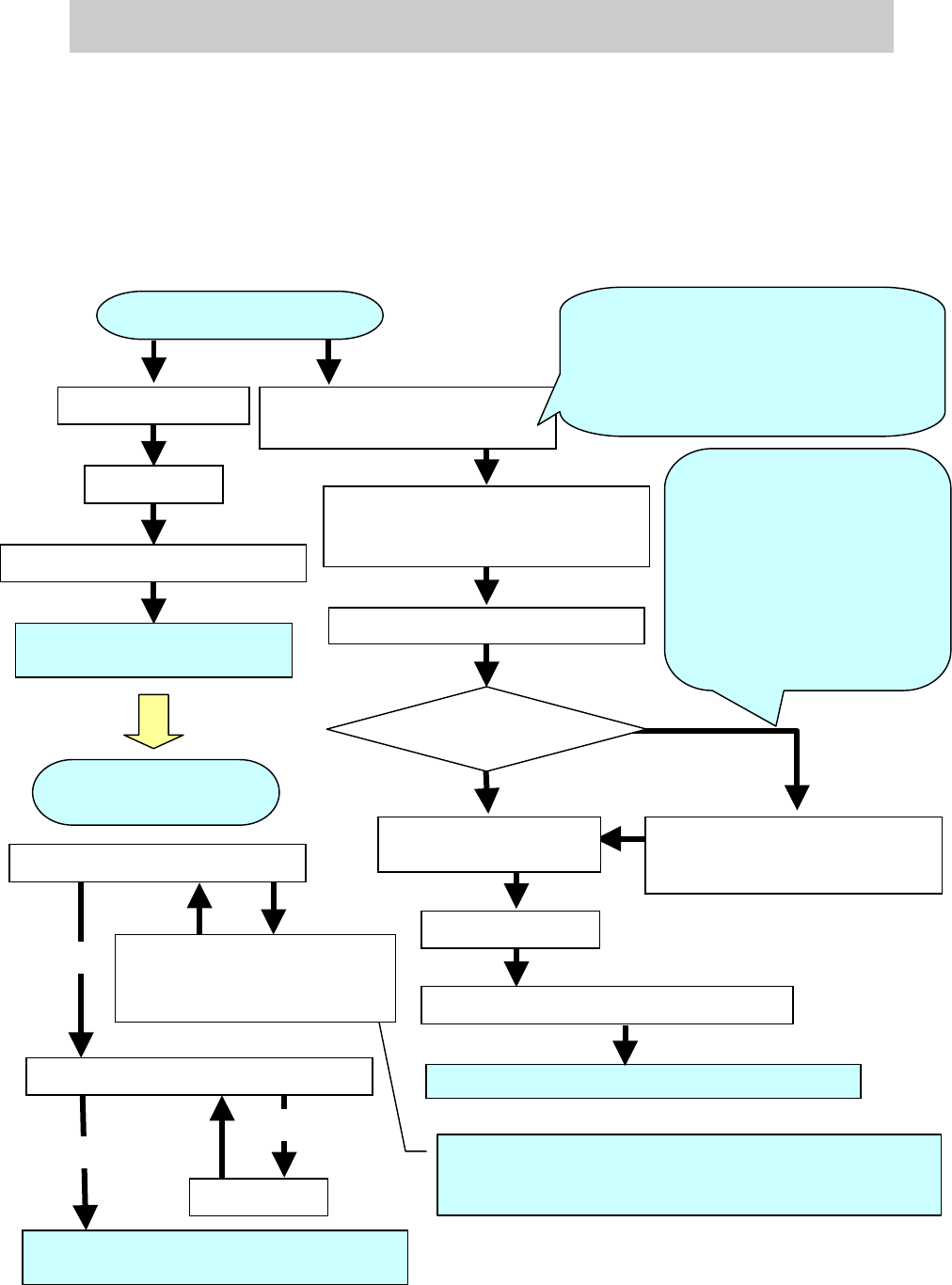
6.1. The workflow when “AMF Index” falls below 1.000
Figure 52
Check the “VgChart”
ACP adjustment of the Scan camera
X
Y
offset deviation
OK
If the mounting results data
spreads in the X and Y directions
Save the result of mounting
accuracy after adjustment
Feedback
-
Scale adjustment of the fiducial camer
a
- Scale adjustment of the scan camera
- Positioning of the scan camera
Feedback
- Scale adjustment of the multi
camera
- Positioning of the multi camera
Save the result of mounting accuracy after adjustment
ACP adjustment of the multi
camera
FAMF adjustment of the multi camera
When performing the head
offset adjustment in the
mounting adjustment of the
main scan camera, please
make sure to perform scale
adjustment and positioning of
the multi camera. Please
perform scale adjustment and
positioning of the multi camera
after performing Head offset
adjustment of the scan camera.
Adjustment of the multi
camera (Option)
NG
Feedback
When the AMF Index value falls below 1.0, the initial
adjustments of the items adjusted for the main camera (Fiducial
camera scale, Head offset) are not basically performed.
The value of “Index 2” varies depends on
the patterns of the mounting results data. If
the value is 1.0 or above, please perform
feedback for the correction value instead of
performing adjustments such as scale
adjustment.
Multi camera
(Option) Equipped?
ACP adjustment of the
Scan camera
Accuracy check of the Scan camera by ACP
- Scale adjustment of the multi
camera
- Positioning of the multi camera
NG
OK
Save the result of mounting accuracy after
adjustment
Adjustment of Head offset XY
YES
NO
Service Engineer
Service Information
SI0804004E-000 = YS12, YG12: Procedure for adjustment after installation of the machine
39/60
Double click on the graph to
display the details.
6.2. Check the “VgChart”
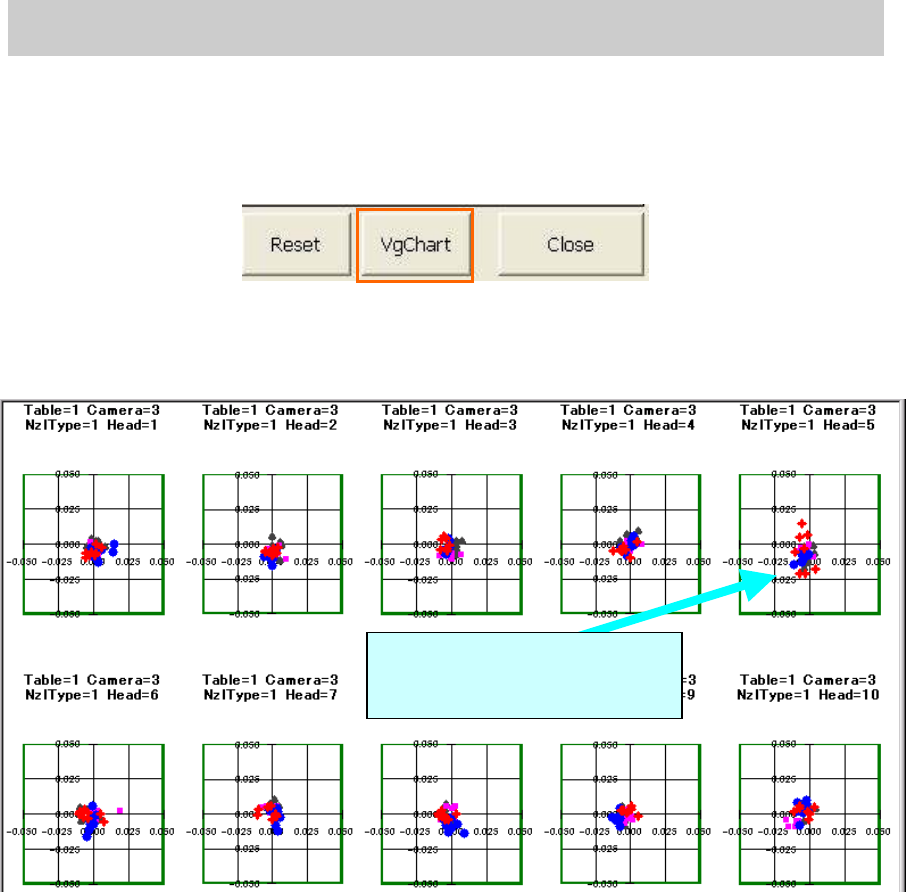
1. Click on the [VgChart] button.
The chart screen is automatically created based on the measured data by clicking on the
[VgChart] button.
Figure 53
2. Check the Chart screen
Check the Chart screen to determine which head is the causal factor that the “AMF Index 1”
does not meet the specified value.
Figure 54
Analyze the chart and perform further adjustment if needed.
Service Engineer
Service Information
SI0804004E-000 = YS12, YG12: Procedure for adjustment after installation of the machine
40/60
6.3 How to analyze the “VgChart”
Please refer to the following for the typical chart of the adjustment result and how to take
measures.
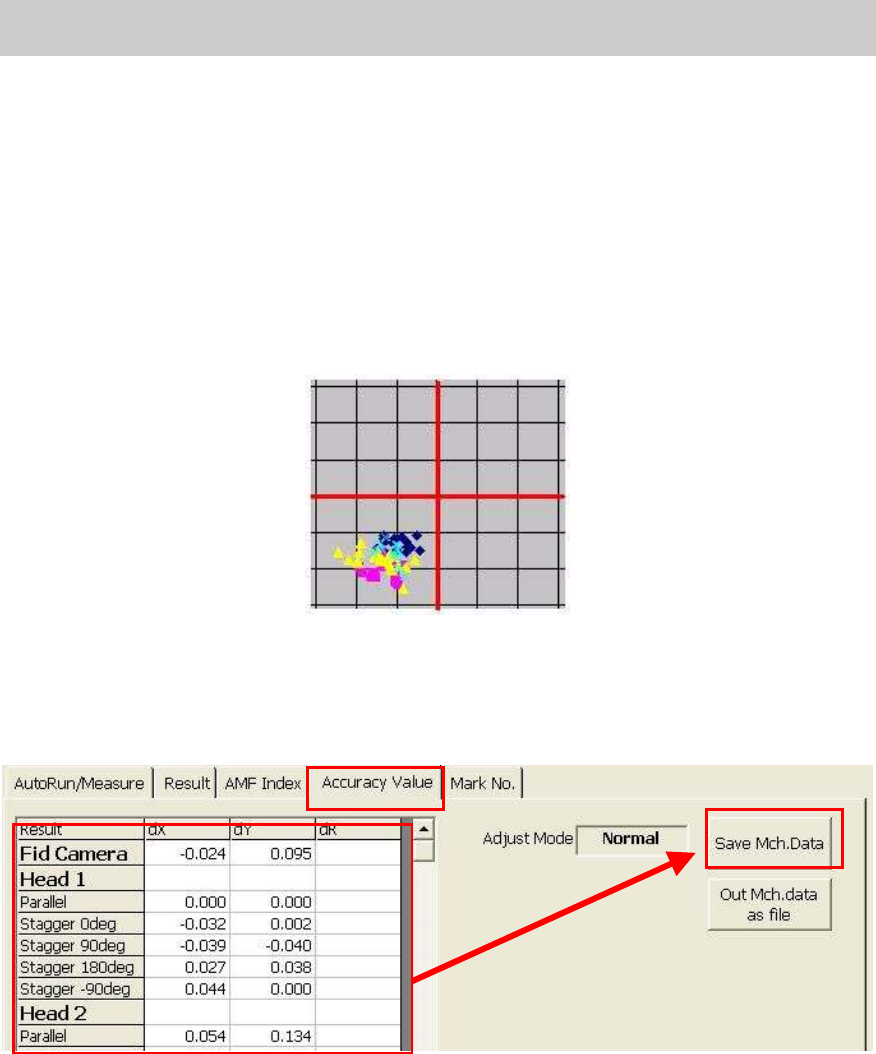
A. If the XY offset shift is found in the data of mounting result
What is “XY offset shift”?
When the deviation is found in the positions where all the components are mounted, in the same
direction and in all the angles as can be seen in Figure 55
.
If the analysis result by the Vg Chart indicates that there is “XY offset shift”, perform feedback for
the compensation value of the measured result.
Figure 55
1. Check and save the corrected value
1) Select the “Accuracy Value” tab.
Click on the “Accuracy value” tab to display the screen shown in Figure 56.
Figure 56
2) Check the values to be corrected.
Check if there is no problem with the values to be corrected, then click on the [Save
Mch.Data] button.
2. After saving the corrected value in the machine data, perform ACP accuracy check again.
If the measured result meets the specified value:
- Bring back the machine data and the data of the mounting result.
- If the machine is equipped with the multi camera Move on to “0.7. Accuracy adjustment
of the multi camera (Option).”
If the machine is not equipped with the multi camera Move on to “8. Items to be adjusted
relating to the mounting accuracy of the machine”.