YS12调整.pdf - 第45页
Service Engineer Service I nformati on SI080 4004 E-000 = YS12 , YG12: Procedure for adjustmen t after installa tion of the mach ine 45/60 2. Air piping Disconnect the hose of the air valve at the far side on the left si…
Service Engineer
Service Information
SI0804004E-000 = YS12, YG12: Procedure for adjustment after installation of the machine
44/60
7.3. FAMF adjustment of the multi camera (Glass QFP 68 pin)
After completing the ACP adjustment of the multi camera with the 1005 ceramic chip, please
perform mounting adjustment by picking up the Glass QFP68 pin by 304A (315A) nozzle on the
FAMF station.
7.3.1. Tools required for adjustment
1. FAMF station
Part No. Part Name
FAMF Station(240*170)
KGA-M88F0-A0X FAMF STATION ASSY
Board data: FAMF_QFP68_ST_H48.ygx
2. The mounted component for adjustment
Part No. Part Name
Glass QFP68 pin KW8-M880A-10X GLASS QFP 68P
3. Nozzle for adjustment
Part No. Part Name
Type 304A(315A) nozzle
(For QFP)
KHY-M7750-A0X NOZZLE 304A/315A AS
Table 23
7.3.2. Initial setup for the FAMF station
Perform air piping and the wiring in order to use the FAMF station.
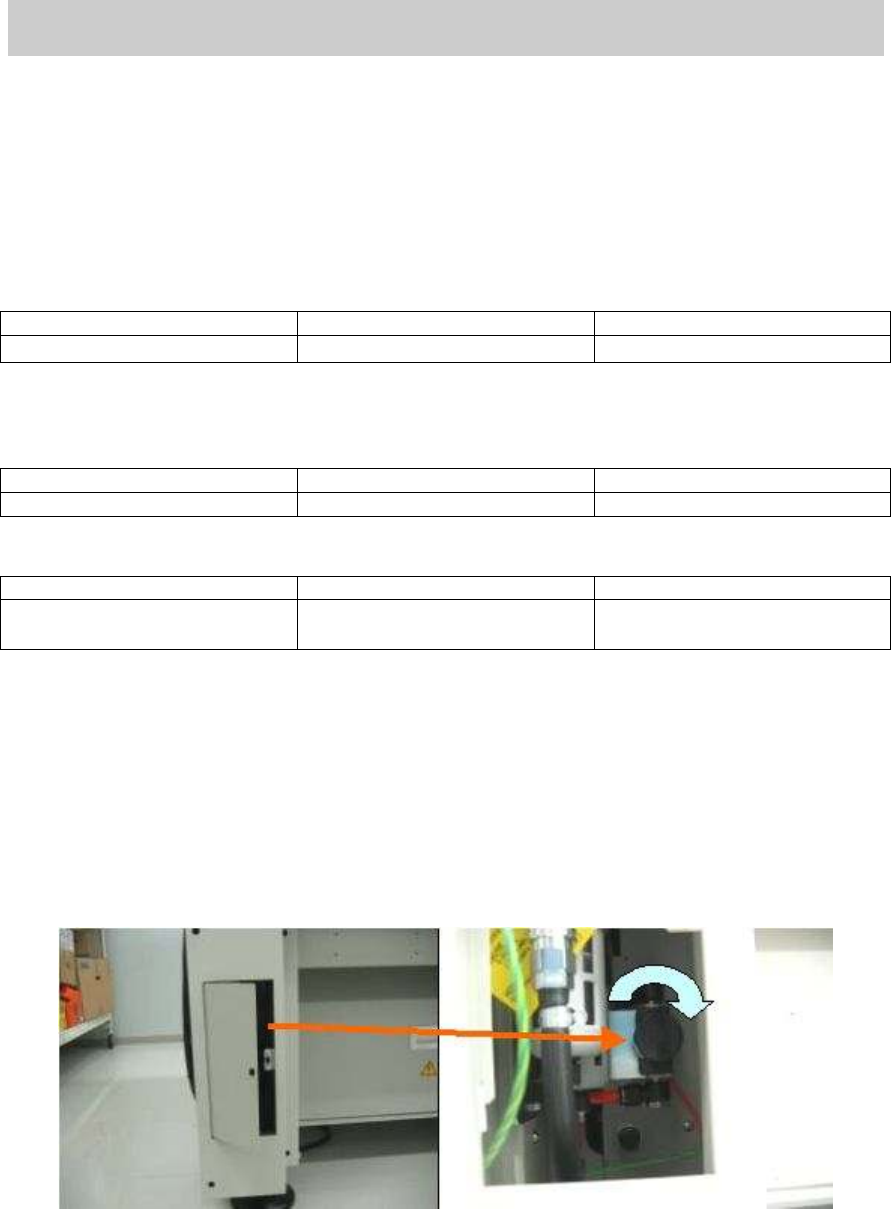
1. Stop the main air supply.
Turn the “Air pressure supply / shutoff” switch inside the cover at the left bottom of the
machine to the right in order to shut off the air supply.
Figure 59
Service Engineer
Service Information
SI0804004E-000 = YS12, YG12: Procedure for adjustment after installation of the machine
45/60
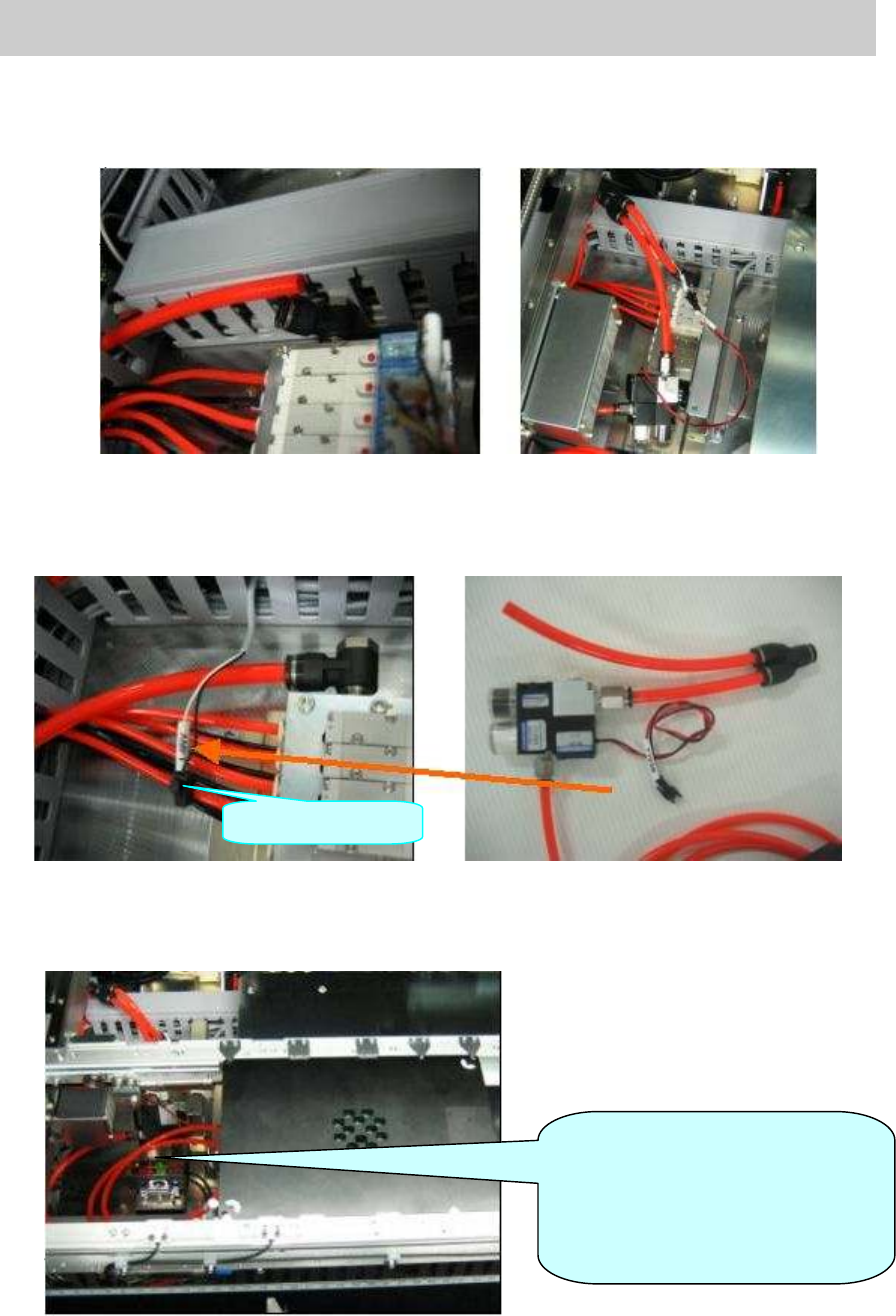
2. Air piping
Disconnect the hose of the air valve at the far side on the left side of the pushup plate, and
connect the ejector to where the hose of the air valve was connected.
Figure 60
3. Connect the ejector
Take out the harness “AMF1” used for generating the ejector from the duct at the far left at
the pushup plate, and connect the connector of the station to the AMF 1 connector.
Figure 61
4. Clamp the station board
Connect the Φ 6mm air hose of the ejector to the air joint on the back of the station.
Change the conveyor width to 170.0mm, set the station and secure it by board clamp.
Figure 62
AMF1Connector
[Warning]
Please connect the air hose to
lower than the conveyor height so
that it does not interfere with the
head.
Service Engineer
Service Information
SI0804004E-000 = YS12, YG12: Procedure for adjustment after installation of the machine
46/60
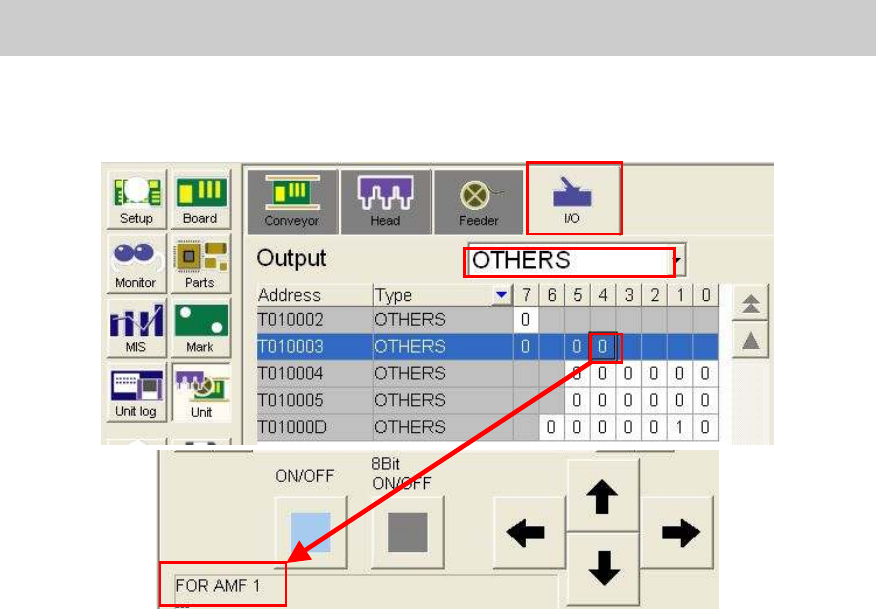
5. Check the operation of the ejector on the I/O screen
Open the “Unit” screen and select “Others” from the dropdown list on the “Output” side on the
“I/O” tab.
Figure 63
When the ejector is connected to “AMF 1” connector, please select [T0100034].
6. Check the operation of the ejector.
Check the operation of the ejector by selecting “T0100034” and clicking on the [ON/OFF]
button.
7.3.3. Read the FAMF board data
Read the board data for FAMF adjustment.
Board data: FAMF_QFP68_ST_H48.ygx
The FAMF adjustment for the multi camera is performed by mounting the Glass QFP68 pin with
the 304A (315A) nozzle.
The nozzle does not come with the machine as standard equipment; please prepare it before
adjustment if the customer does not have it.
The heads to be used are “Head 4” and “Head 8”.
7.3.4. Recognition of the mark and the component
In FAMF adjustment, Glass QFP68 pin is picked up from the station, recognized and mounted on
the station. Then after the camera recognizes the mounting state of the component, the
component is picked up again for recognition repeatedly.
Please make sure to perform recognition check in advance so that no error occurs during the
sequence of the operation.
1. Recognize the fiducial marks on the FAMF station.
TheΦ1.0mm holes at the lower left and at the upper right on the station board are recognized
as the marks.
Mark No.: No.2 Hall_1.0_Circle
Move the camera to the fiducial coordinate and perform recognition check on the “Mark
adjust” screen.