SIPLACE Vision Customer_en.pdf - 第39页
Component Shapes Structure of Component Shape Data S tudent Guide SIPLACE Vision (Customer) Edition 12/2008 EN Component Shapes 39 5 Component Shapes The component shapes and their fea tures need to be described complete…

User Interface
Component Shape Wizard Quality-Influencing Decisions
Student Guide SIPLACE Vision (Customer)
User Interface Edition 12/2008 EN
38

Component Shapes
Structure of Component Shape Data
Student Guide SIPLACE Vision (Customer)
Edition 12/2008 EN Component Shapes
39
5 Component Shapes
The component shapes and their features need to be described completely (and independently of the
camera type) for the image processing system. This description is to be made in the SIPLACE Pro
Component Shape Editor.
The following applies for the SIPLACE Vision image processing system:
A correct description of the component shapes, with geometrically traceable values is essential! Use
the component shape data sheet as the basis for this description.
Note: In the case of ICOS systems, there are often no descriptions or the tolerance values may be
set very high.
The component shape interpreted from the ICOS dataset is not necessarily the optimal shape for
SIPLACE Vision!
Inaccurate descriptions of CS geometries may work for older ICOS systems, although they could
lead to errors or placement offsets in the SIPLACE Vision system, which tests more accurately.
The simplest description of an object, which needs to be taught/programed with the camera before
application, is typically a Fiducial or an Inkspot.
The CS description, in contrast, must contain at least a group description.
NOTE: The image request at the camera is only triggered if the minimum requirements for component
shape data have been fulfilled (e.g. when all lead rows are described). Since SR/MC 603, the SIPLACE
Vision component shape type and the programming information for component shapes is
INADEQUATE.
Component shape types also contain other shapes, all in all a total of 17. This arrangement allows
you to find the optimum algorithms and illumination parameters for each class, which significantly
reduces the teaching required.
5.1 Structure of Component Shape Data
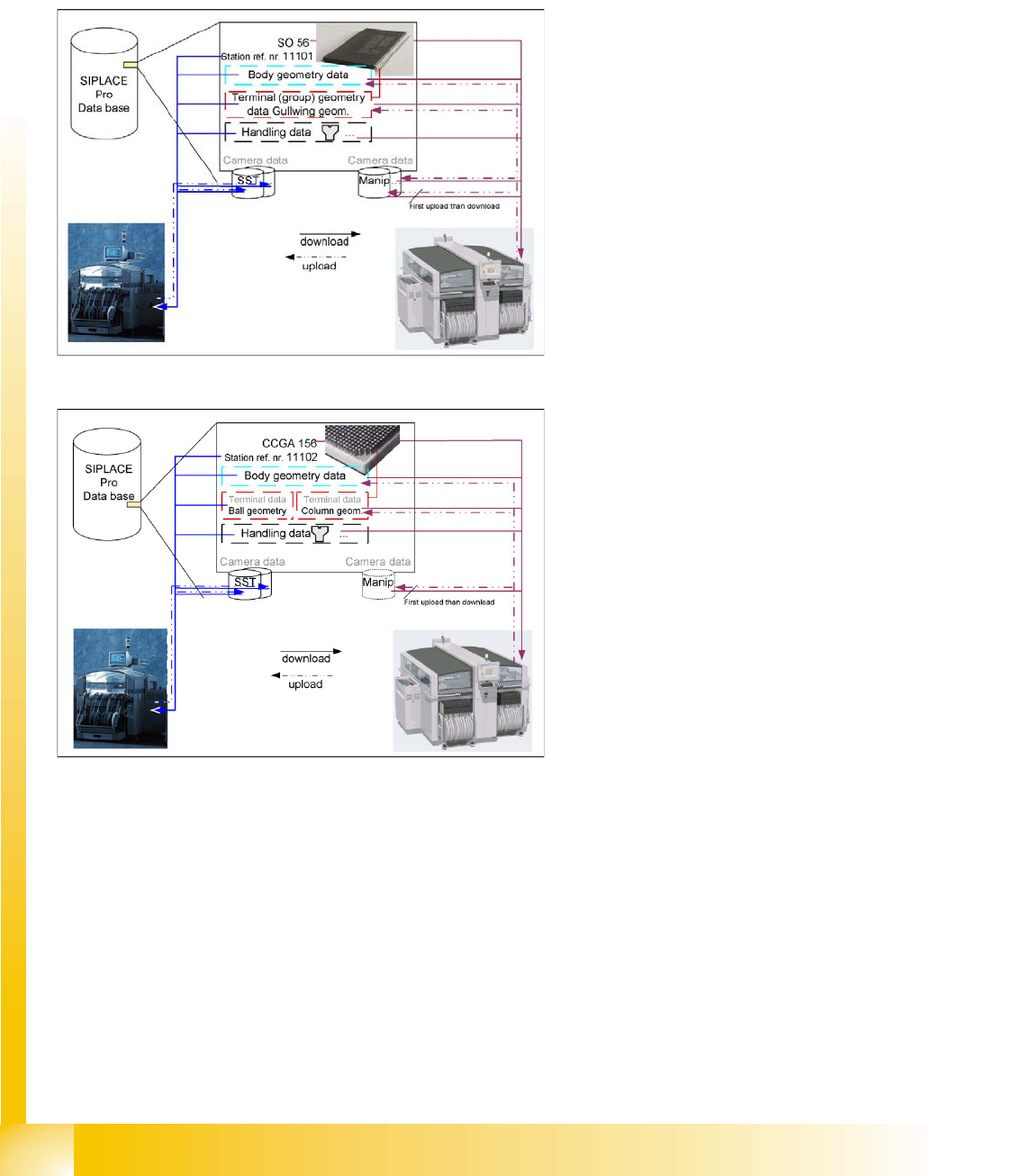
The CS data in SIPLACE Pro consist of the following data and settings:
Vision geometric data for the component shape; an assigned camera type; the nozzles to be used
and the inspection mode setting.
These settings can be edited in the CS Editor.
Sensor-specific default settings.
The parameters for the individual cameras are not accessible and contain the default illumination
setting and the algorithms for the respective shape.
Manipulation data.
These are created during CS teaching and are sensor-specific. They contain alterations to the
illumination value settings etc.
This dataset is currently not accessible for deleting, although it can be reset to default values.
CO handling data (such as nozzles, vacuum checks, special procedures...).
These settings are made in SIPLACE Pro and can not be edited on the station interface or SIPLACE
Vision.
Component Shapes
Structure of Component Shape Data Component Centering with Combined Usage of SIPLACE Vision and ICOS
Student Guide SIPLACE Vision (Customer)
Component Shapes Edition 12/2008 EN
40
5.1.1 Component Centering with Combined Usage of SIPLACE Vision and ICOS
When using both Vision systems (ICOS and SIPLACE Vision) for component centering, you can select
either a common or a separate dataset for each CS number, in SIPLACE Pro. Separate datasets also
require separate maintenance. Only use this option, if you expect that geometric data which have been
taught for SIPLACE Vision will have a negative effect on the optical recognition in the ICOS system of
older machines.
Data management is as follows:
SIPLACE Vision processes the exact component shape dimension descriptions and can then alter these
through teaching. However, this may lead to recognition problems for some CS descriptions, when used
in ICOS Vision systems.
In these cases, it is advisable to keep the group data and lead data descriptions separately in SIPLACE
Pro.
This alternative option - separate data management - must be selected before you download to
SIPLACE Vision!
In rare exceptions, it may become necessary to create a completely new CS dataset for SIPLACE Vision,
if the SIPLACE Vision and ICOS descriptions are incompatible.
This could occur with various Moulded CSs (which have identical dimensions for ICOS), due to the
colored body and with various CSs, which have identical X/Y dimensions but different Z CO heights for
the CO sensor (in SIPLACE Vision).
The older ICOS image processing system
saves all teaching data in the SST file of the
relevant sensor type. The CS download data
consists of general data, group and lead
descriptions and the teaching data from the sensor
system type data area.
The SIPLACE Vision image processing system
saves the teaching data in a general data area; in
the group and lead descriptions and in the
manipulation data.
The CS download data consists of general data,
group and lead descriptions and the teaching data
from the manipulation data area.
Enabling the component shape default values,
resets the data to its default values (manipulation
data).